-
-
Slide Deck Title Slide
-
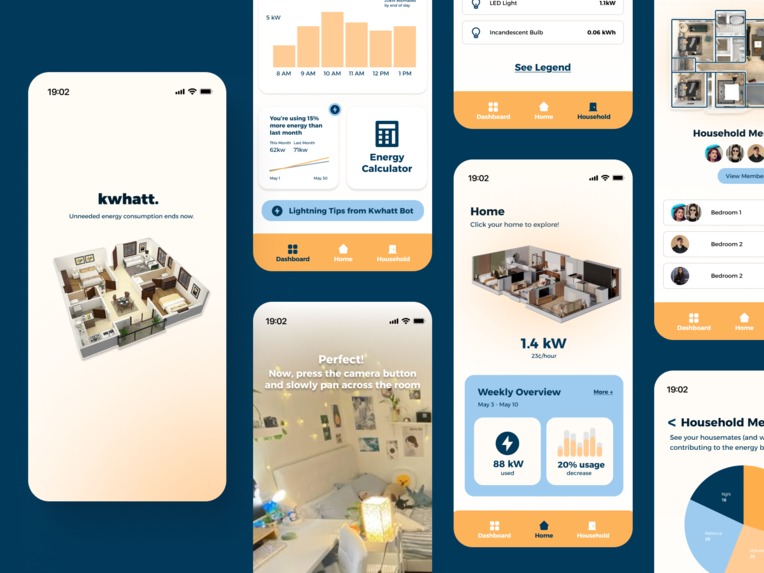
iPhone Mockups
Inspiration
- Busy college students and young adults who are first-time renters often overlook and lack an understanding of their daily energy usage and how it translates into environmental and financial impact. This makes it difficult to make informed decisions that align with individual ecological responsibility and build financial literacy.
- What users need → a way to visualize and quantify the amount of energy (understanding ecological responsibility as an individual) they are using & how that equates to monetary costs.
- How we resolve this issue → create a home management app that oversees energy usage through integration to smart home & regular devices that provides recaps on: energy saved (and relevant monetary counterpart if applicable) and energy usage throughout the day (peak & nonpeak hours)
What it does
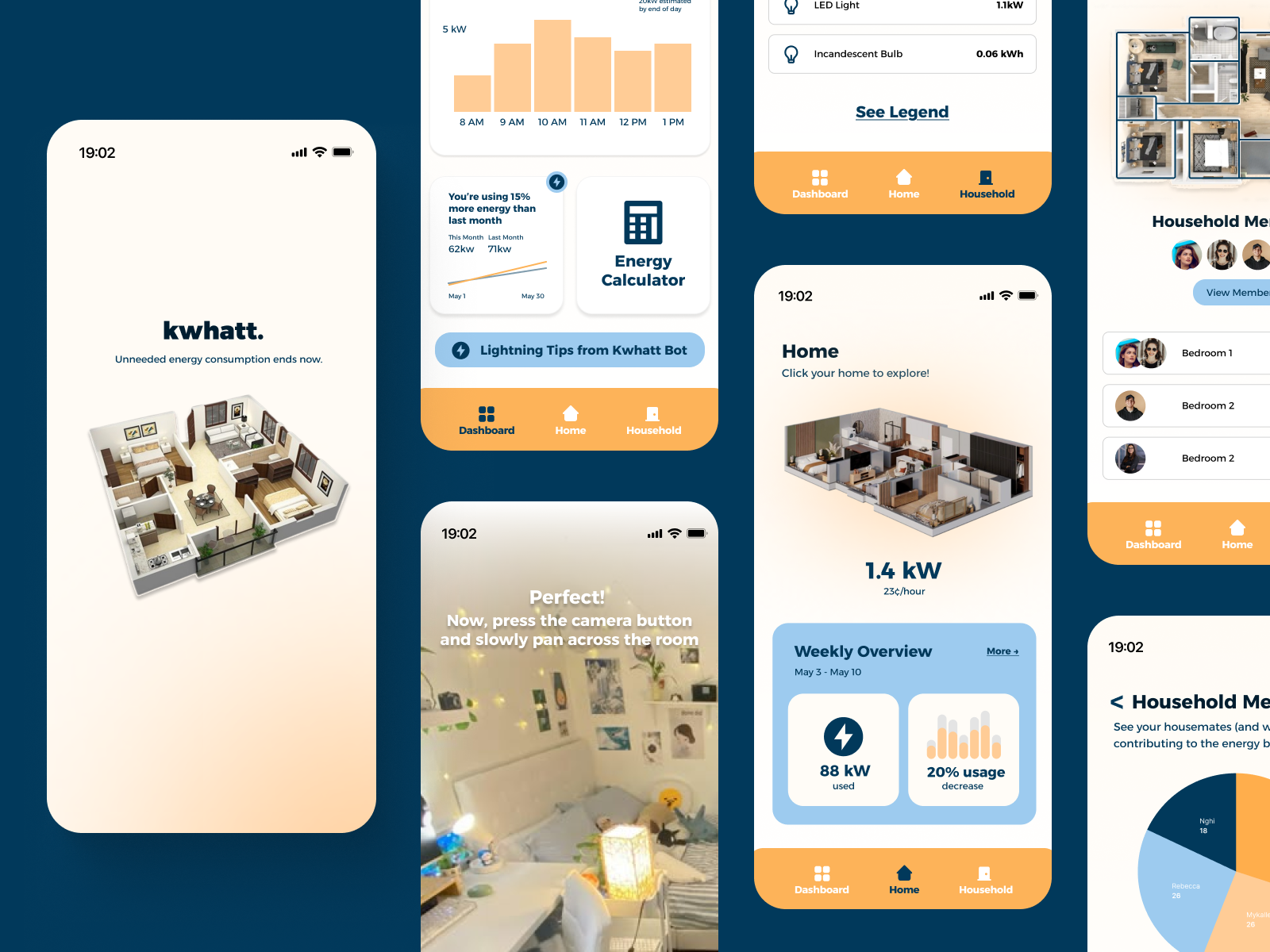
- Home Page: where users can see the layout of their living space and see a weekly overview of their energy usage.
- Dashboard Page: reflecting stats of energy usage throughout each day of the week.
- Household Overview Page: See the levels of energy usage in different rooms/areas of the living space.
- Onboard Calibration Page: Opens the camera to capture the area of living space and identify energy usage.
- Onboarding Pages: Three pages that transition to explain the functions of the application.
- Live Appliances Page: See your appliances that are currently live/in use, along with their energy usage (kW/week) and cost (cents/hour).
How we built it
- Conducted research into the issue, along with conducting surveys (24 responses) and interviews (3 interviews) to get feedback from individuals about energy consumption in their living spaces to refine our product approach.
- Affinity analysis & competitive mapping
- Figma
Challenges
- Drafting an idea that fostered creativity while addressing an in-depth problem that impacts the community
- Composing a design with ideal design principles that met user feedback/needs and blended aesthetics well (colors, style, layout, light mode/dark mode, etc.)
- Deciding what features to prioritize, including in our design, as we wanted to set realistic expectations of what we could complete and showcase within the time frame.
Accomplishments
- Creating an effective survey and interview layout to receive optimal responses and feedback from individuals.
- Using the research collected from our surveys/interviews to narrow our idea and application focus.
- Finding color schemes, layouts, and fonts that complement the design.
- Creating a Figma design with pages that represent the main functions of the application: home page, dashboard page, household overview page, onboard calibration page, onboarding pages, live applications page, etc.
What We Learned
- From our surveys and interviews, we learned about the various backgrounds students and young adults have with understanding energy usage.
- Learned about the in-depth processes of UI/UX: user research, affinity analysis, competitive mapping, and more!
Next Steps For kwhatt.
- Develop a prototype for launching our mobile app.
- Add additional features, such as a login/sign-up page, profile page for users to edit their account and living space, resources page for users to explore more resources about energy usage, and look over FAQ’s, etc.
- Change the language of the app to highlight and emphasize energy savings in kwhatt dashboard to motivate and build financial habits
- Create re-usable components and a small design library for consistency
- Hierarchy: emphasize info most relevant to the user
Built With
- figma
- ui
- ux

Log in or sign up for Devpost to join the conversation.