-
-
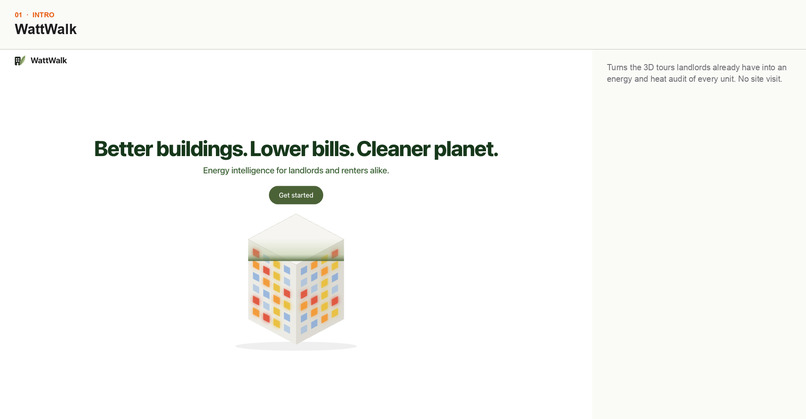
WattWalk turns the 3D tours landlords already have into an energy and heat audit of every unit. No site visit.
-
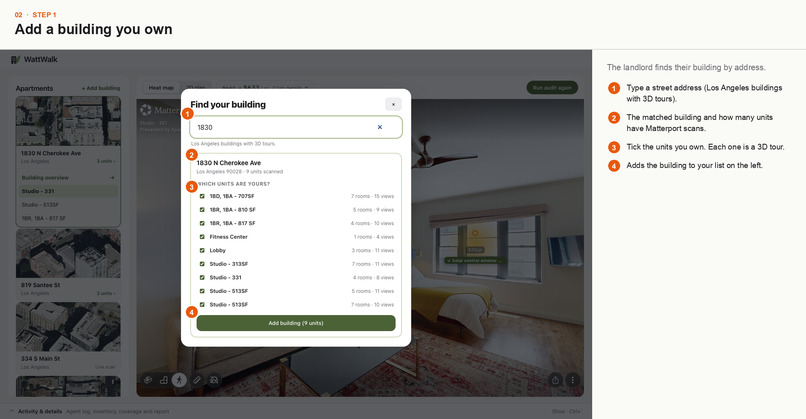
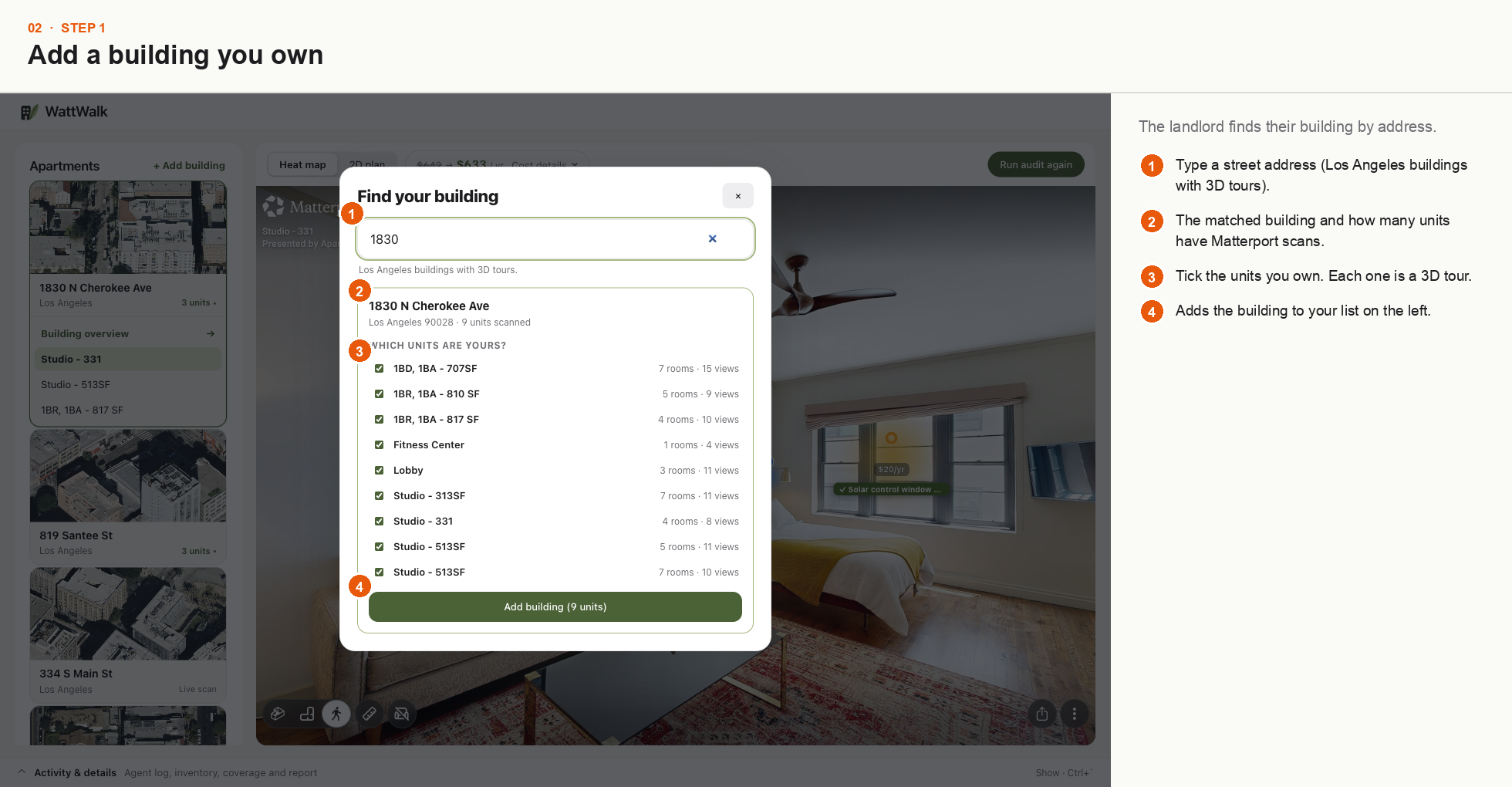
Search an LA address. WattWalk matches it to CoStar data and Matterport 3D tours; tick the units you own.
-
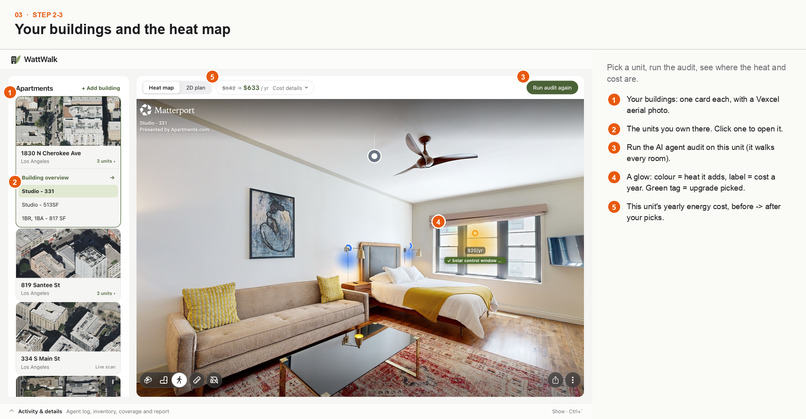
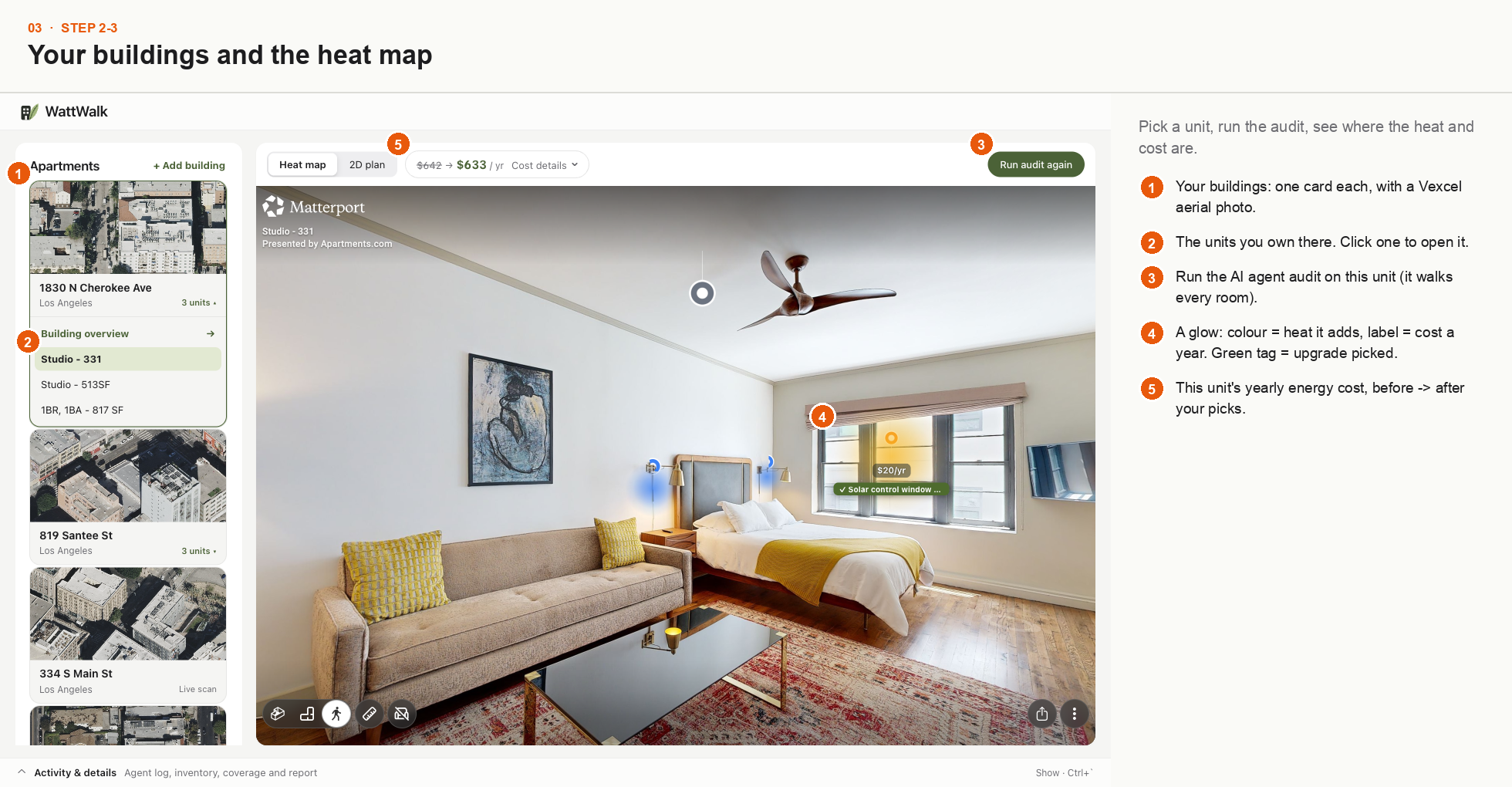
Each item glows in the 3D tour: colour = heat, label = yearly cost. Buildings show Vexcel aerial photos.
-
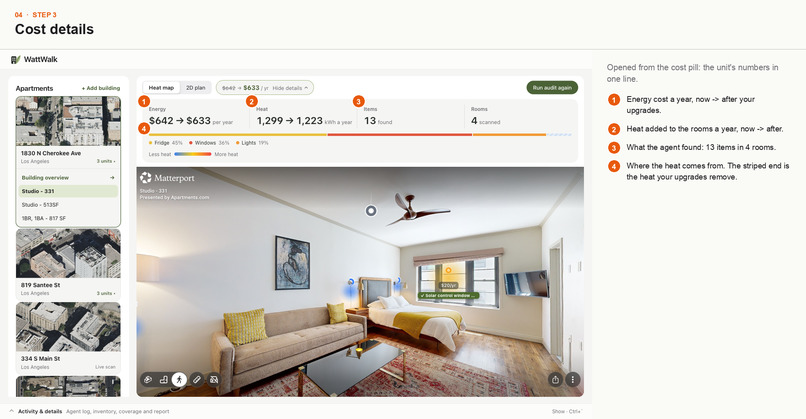
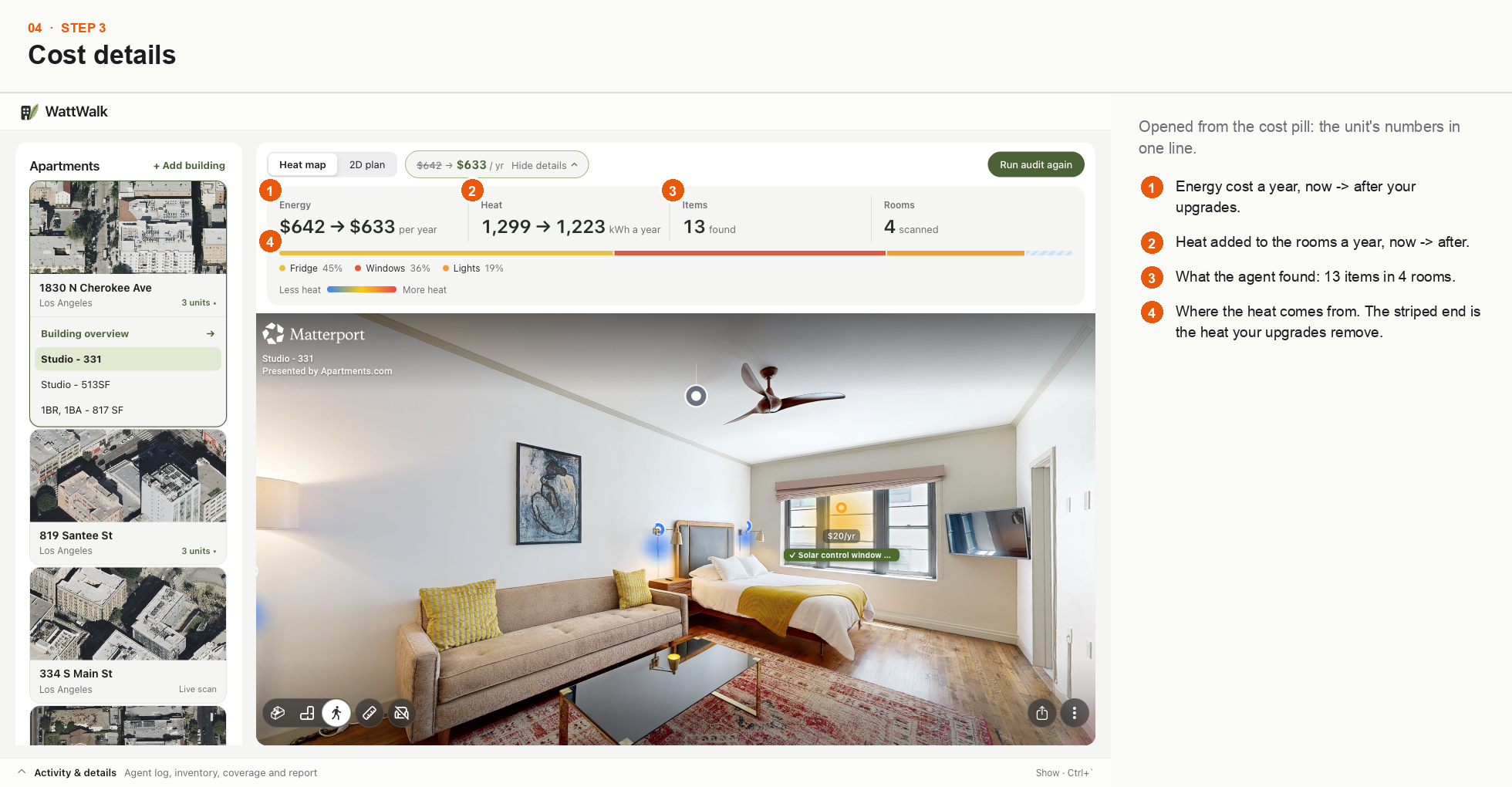
Yearly energy cost and heat, before and after your upgrades, plus where the heat comes from.
-
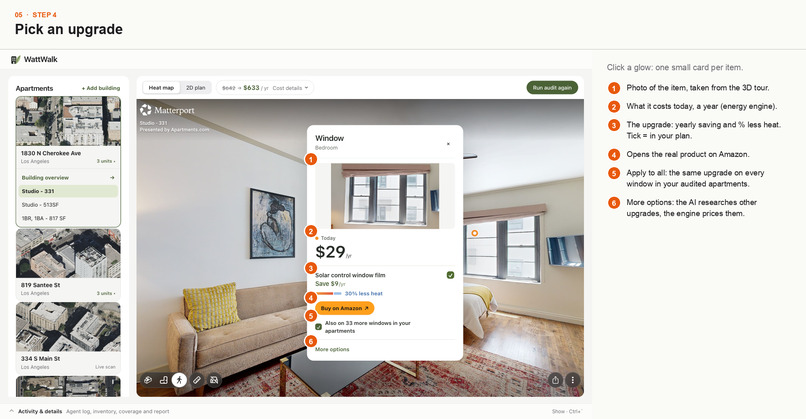
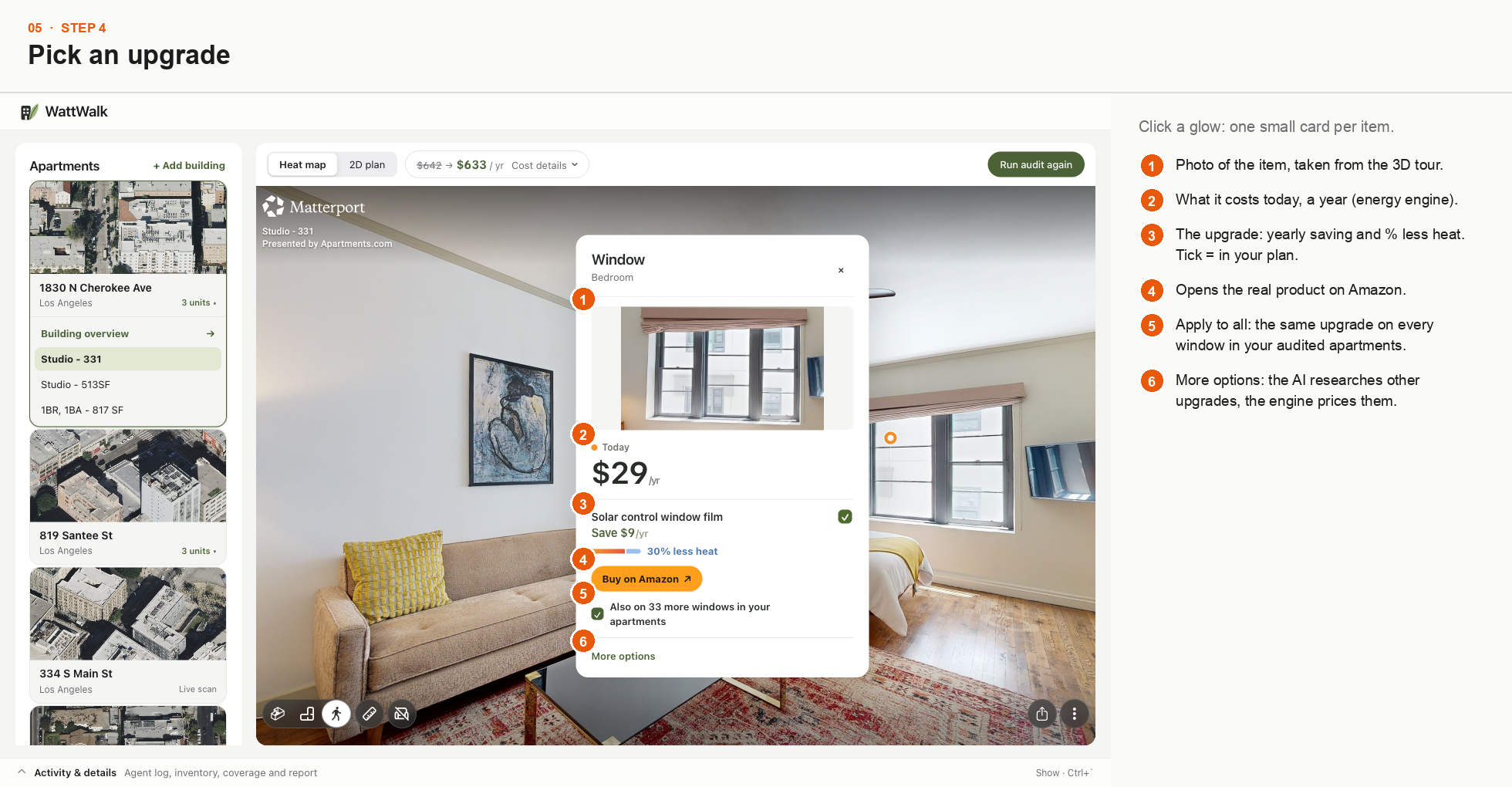
Click a glow: see the item, its yearly cost, and an upgrade's saving and heat cut. Buy on Amazon or apply to all your units.
-
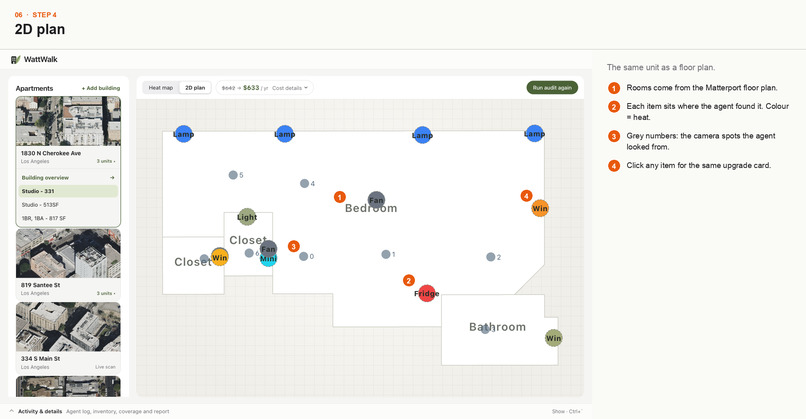
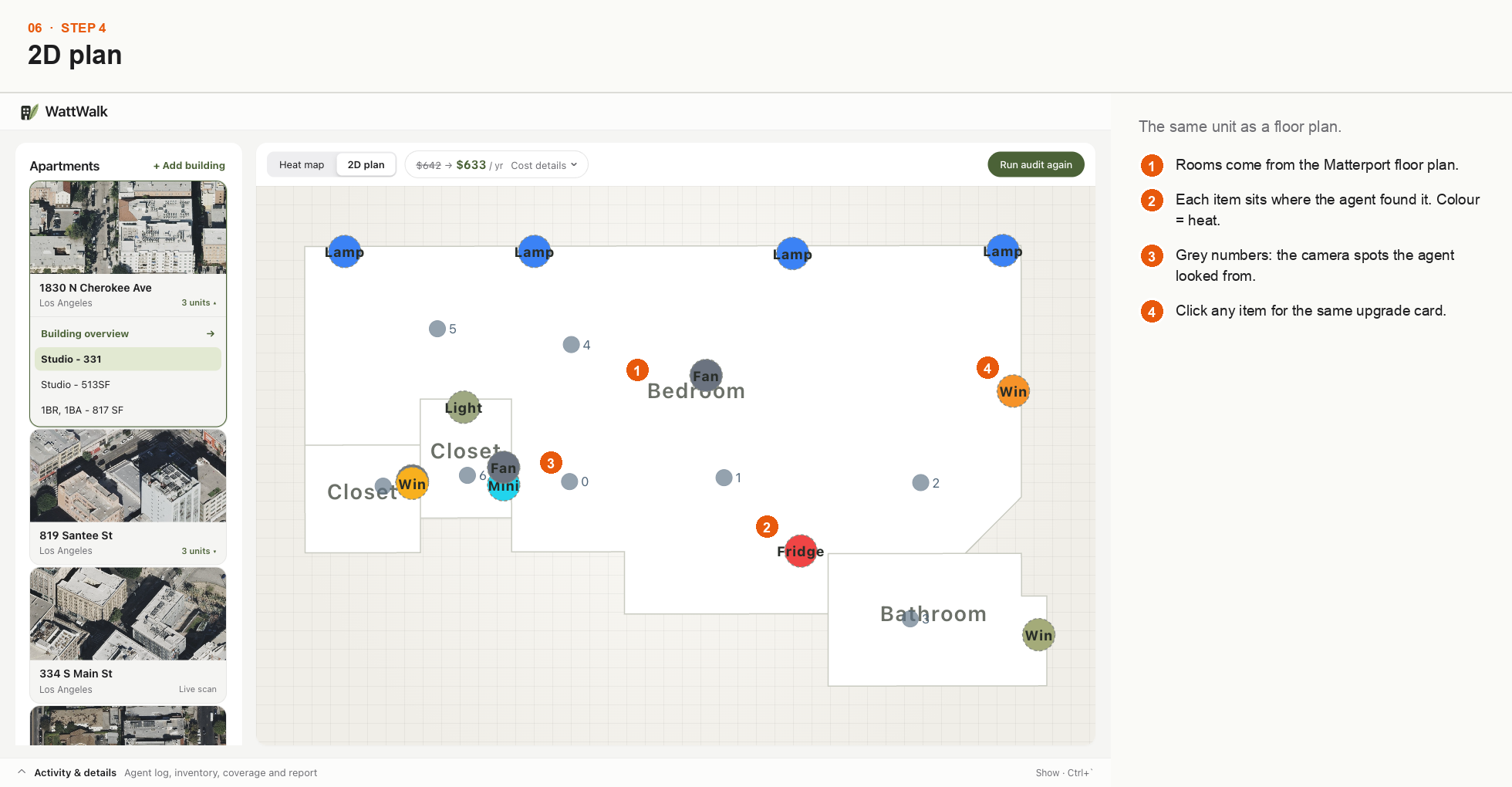
The same unit as a floor plan, with every item placed where the AI agent found it.
-
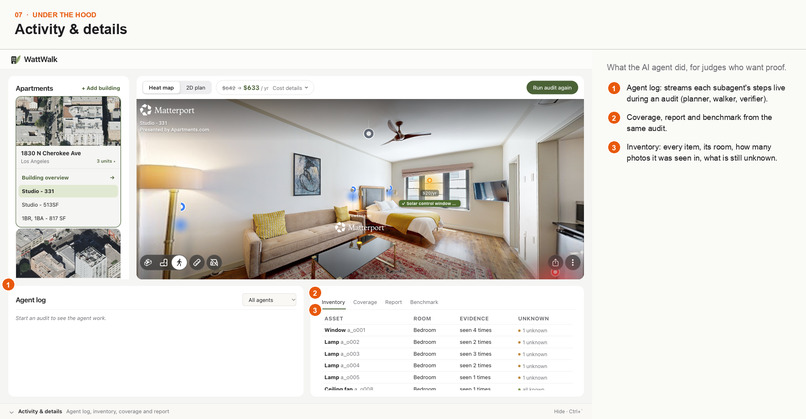
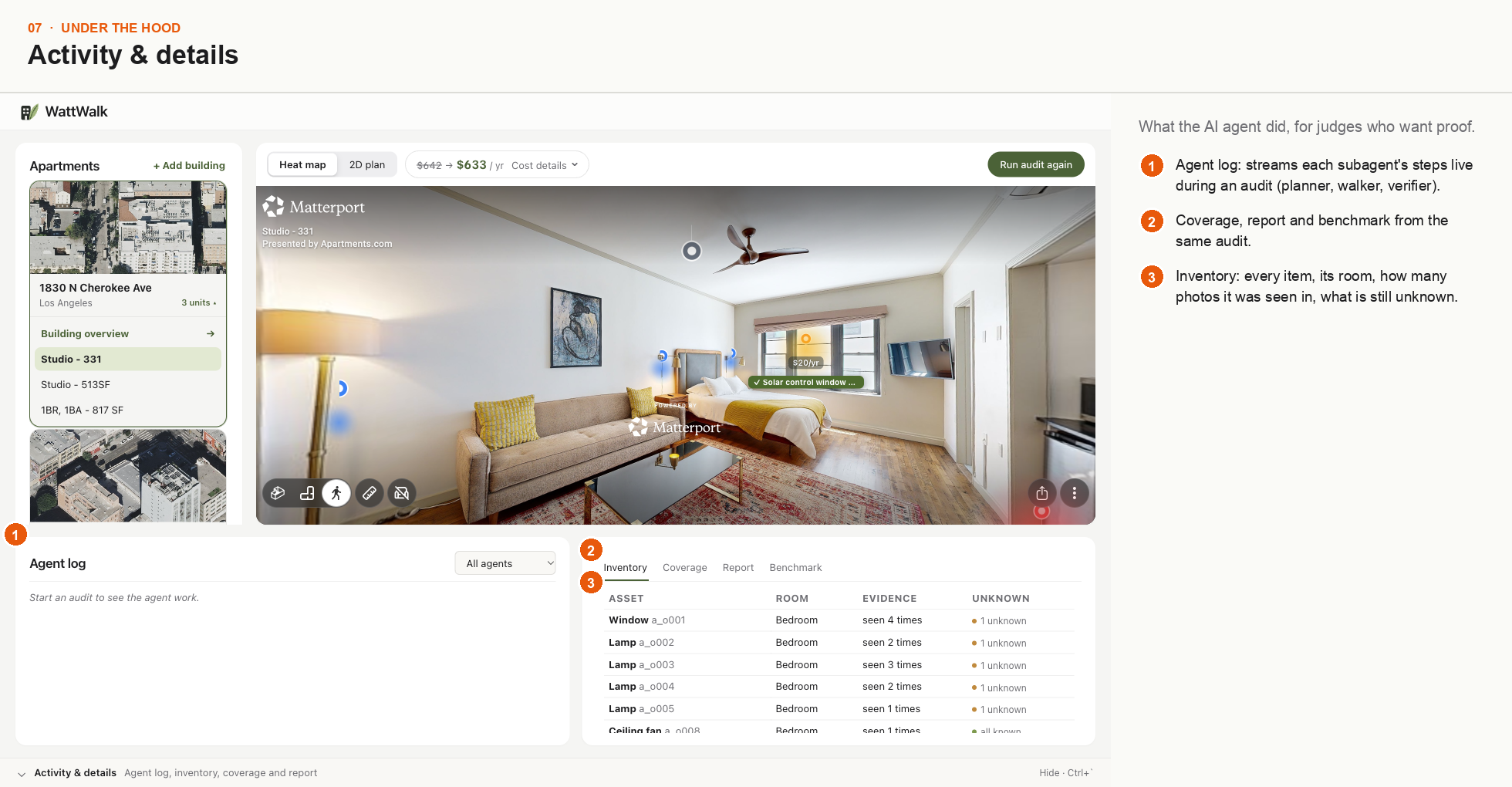
A Deep Agents planner sends subagents to load building data, walk each room, plan upgrades and check the results.
-
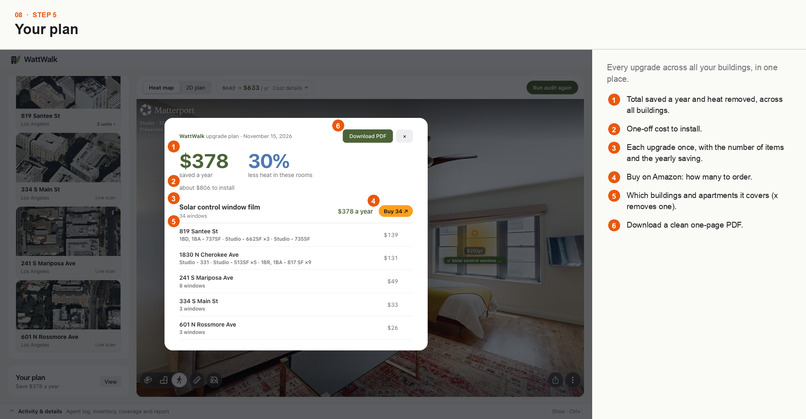
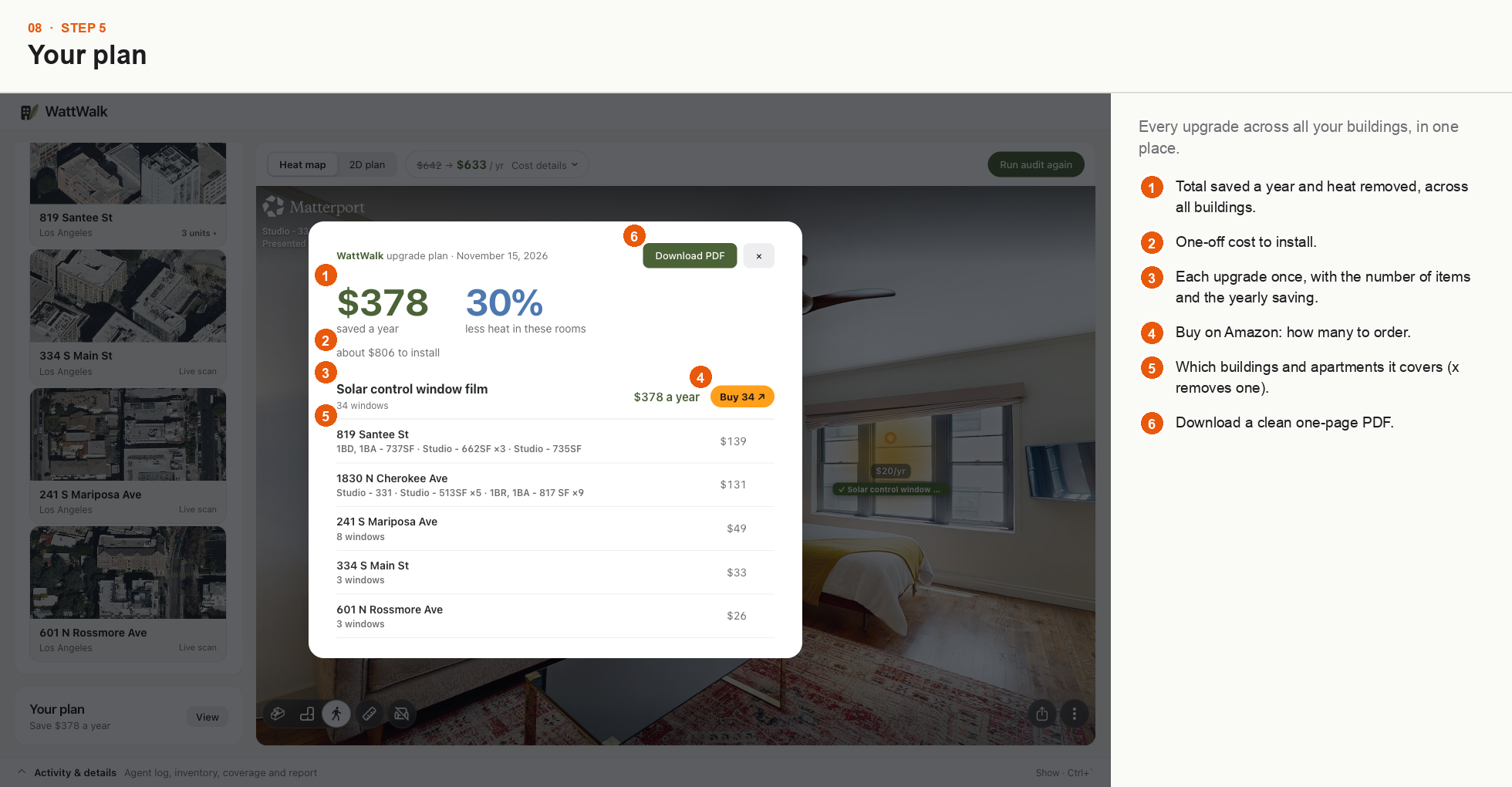
Every upgrade across your buildings: yearly savings, % less heat, how many to buy. Download as a one-page PDF.
-
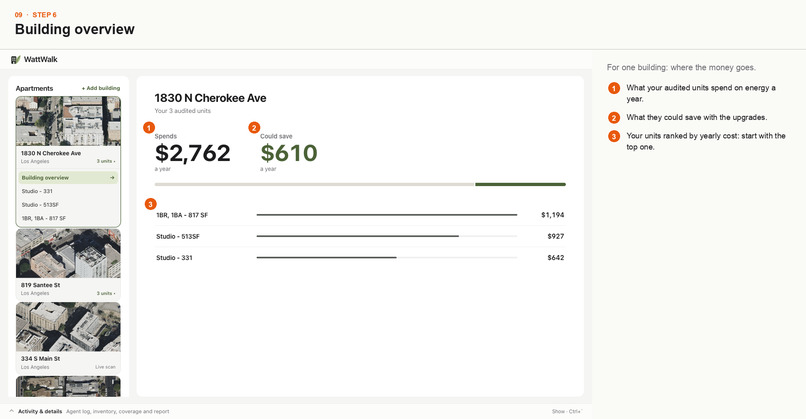
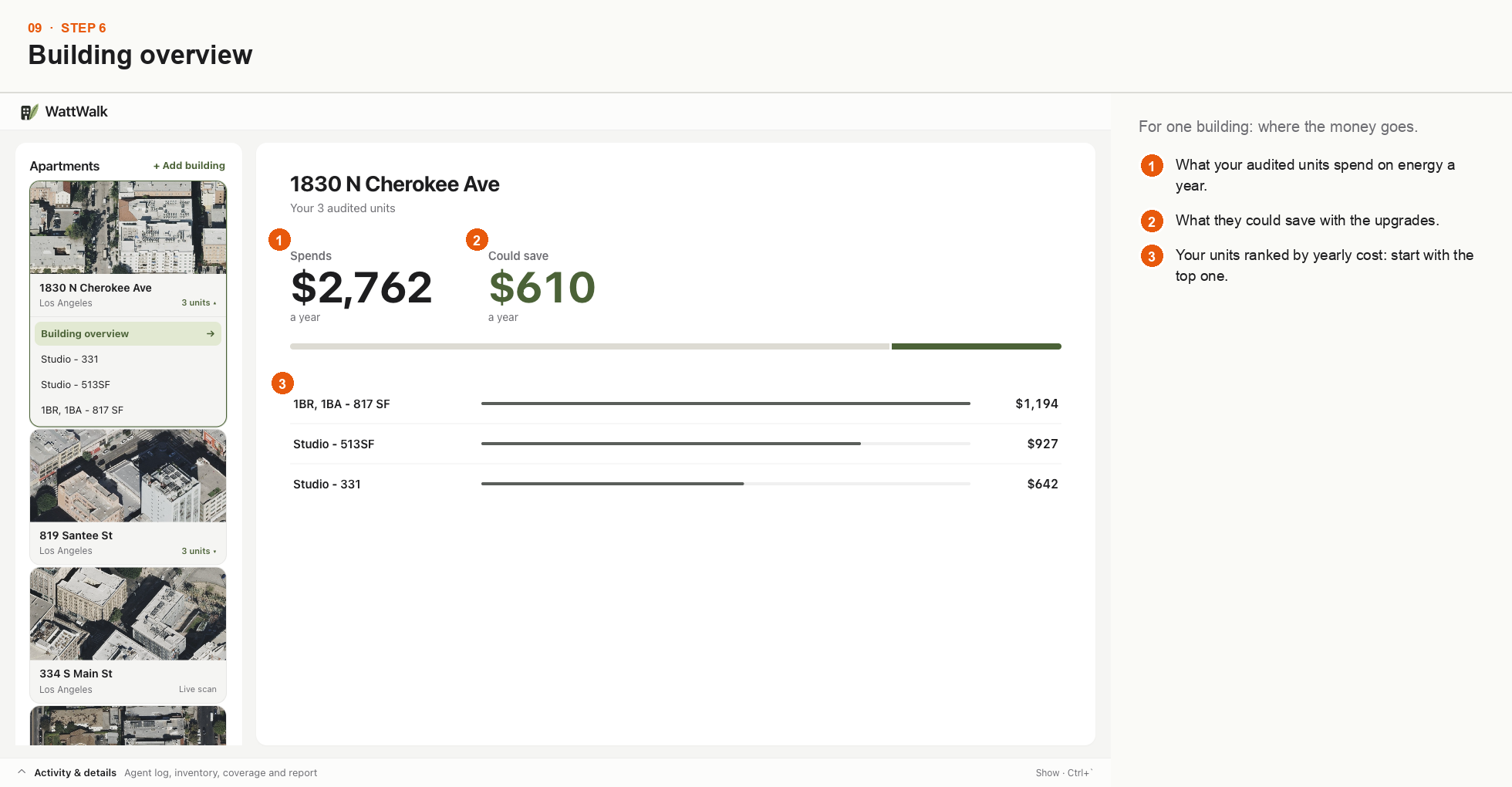
What your audited units spend a year, what they could save, and which unit to fix first.
Inspiration
Anyone who has rented or owned an apartment knows the feeling: a shocking summer electric bill, and no idea what caused it. Is it the drafty single-pane window? The window AC humming in the corner? The old fridge gasping for air?
Professional energy audits answer that, but they cost hundreds of dollars per visit and need an auditor on site with thermal cameras and a clipboard. For a landlord with dozens of units, that adds up fast, so it rarely happens.
Meanwhile, millions of apartments already have high-resolution 3D scans sitting on listing sites. So we asked: what if an AI agent could walk through a 3D tour that already exists, inspect every appliance, window and light, and hand back an evidence-backed energy audit, with no site visit?
That question became WattWalk.
What it does
WattWalk turns the 3D tours landlords already have into an interactive energy audit for every unit.
- Autonomous virtual walkthrough: an AI agent explores the 3D scan room by room and identifies energy-relevant items: windows, AC units, fridges, ranges, lights and fans.
- Heat map in 3D and 2D: every item glows on the 3D tour and on the floor plan by how much heat and money it wastes, so problem spots stand out at a glance.
- Evidence-backed numbers: each item links to the photo it was found in. Yearly cost combines the item's power draw, typical hours of use and local electricity rates:
Yearly cost = Σ (power × hours of use × $/kWh)
We combine this with CoStar building data and Los Angeles EBEWE energy benchmarking records.
- AI upgrade ideas: click any item to see fixes with yearly savings, the cut in heat and payback time. For anything outside our catalog, the AI researches new options, clearly labeled as estimates.
- One click to buy: every fix links to a real product, so a plan turns straight into a shopping list.
- Portfolio view: browse buildings and units, with live aerial imagery of each building.
- Your plan: pick the fixes you want and watch the yearly bill drop live. You get one plan per unit, biggest savings first, ready to download as a PDF.
How we built it
- Vision and reasoning: DeepSeek-V4.1-Flash, a multimodal model, finds and classifies items in tour frames, and a Deep Agents planner decides where to look next.
- Spatial engine: Python and FastAPI, with custom 3D-to-2D projection, camera calibration and raycasting that place each detected item at its real position in the Matterport coordinate system.
- Data fusion: Matterport scan geometry, the CoStar building data kit, Los Angeles EBEWE benchmarking records and Vexcel aerial imagery, so the numbers reflect the real building rather than guesses.
- Frontend: React, TypeScript and Vite with the Matterport Showcase SDK, SVG floor plans and a custom
HeatGlowoverlay that anchors glows to 3D positions. - Design: a calm, Apple-inspired interface (soft neutrals, forest green, clear type) that makes building science feel simple instead of like an engineering spreadsheet.
Challenges we ran into
- Getting 3D positions right: Matterport panoramas are 360° spherical images. Turning a box drawn on a flat frame into an exact point in the room was hard. Early pins floated out of windows or sank into walls until we wrote dedicated camera-transform and raycasting math that snaps them to real surfaces.
- The split-incentive problem: in rentals, landlords pay for upgrades while tenants often pay the bills. We designed the plan to show both sides: what a fix costs, what it saves and how fast it pays back.
- Making the math approachable: heat-loss formulas, efficiency ratings and kWh rates made our first UI look like a cockpit. We stripped it back until anyone could click a glowing item and get the point in seconds.
Accomplishments that we're proud of
- The "aha" moment: clicking a glowing spot in a virtual room and watching it open into a card with real savings numbers.
- Reliability: a strict testing culture throughout the build, with [] backend tests and [] frontend tests passing.
- Grounded in real data: every dollar figure ties back to an item's photo, its power draw and real building records, not generic tips.
What we learned
- Context makes vision AI work: a bare crop of a machine gets hit-or-miss guesses. Adding the room, viewing angle and building era makes identification far more accurate.
- Seeing waste drives action: people tune out numbers on a bill, but a red glow over an old AC unit makes them want to fix it.
What's next for WattWalk
- Rebate matching: show the price after local and utility rebates.
- Phone scans: let owners capture a unit in about a minute with an iPhone LiDAR app.
- Contractor quotes: connect owners with local contractors to turn a saved plan into finished work.
- Portfolio reports: roll every unit's plan into one building-level capital plan.
Built With
- amazon-bedrock
- costar
- css
- deep-agents
- deepseek
- fastapi
- google-gemini
- html
- javascript
- langchain
- matterport
- matterport-showcase-sdk
- numpy
- opencv
- pandas
- pillow
- pydantic
- pytest
- python
- react
- shapely
- typescript
- uvicorn
- vexcel
- vite
