-
-
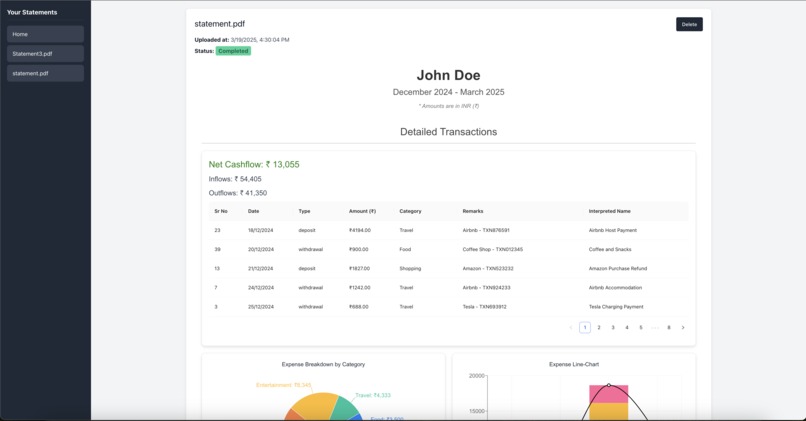
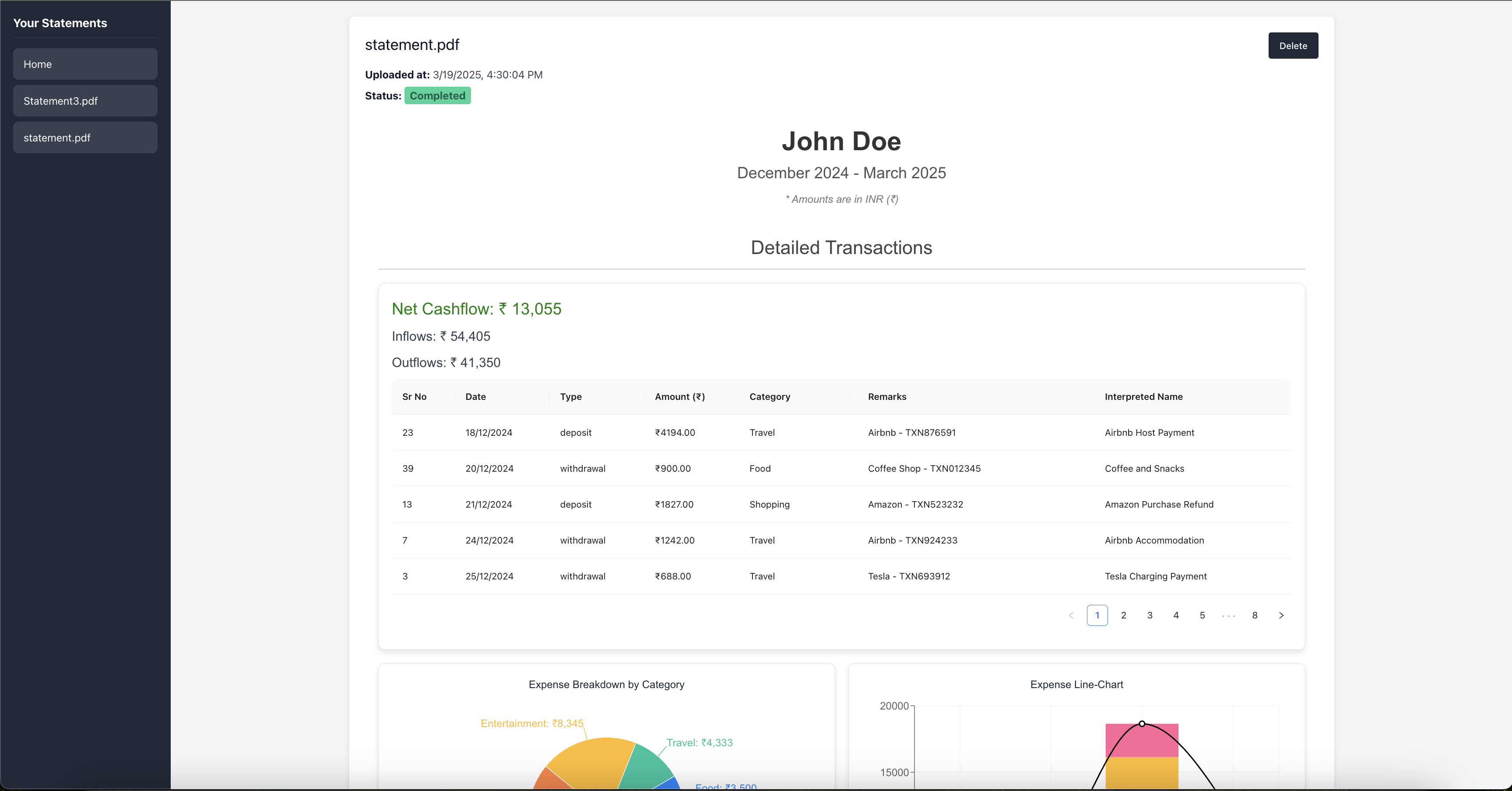
UI Transaction Table
-
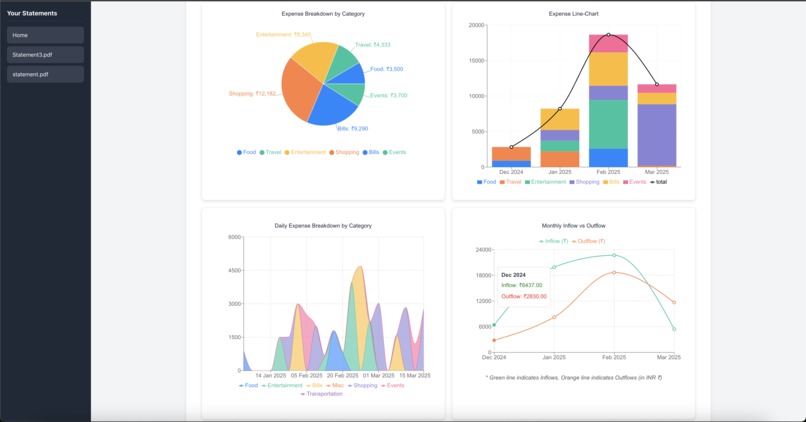
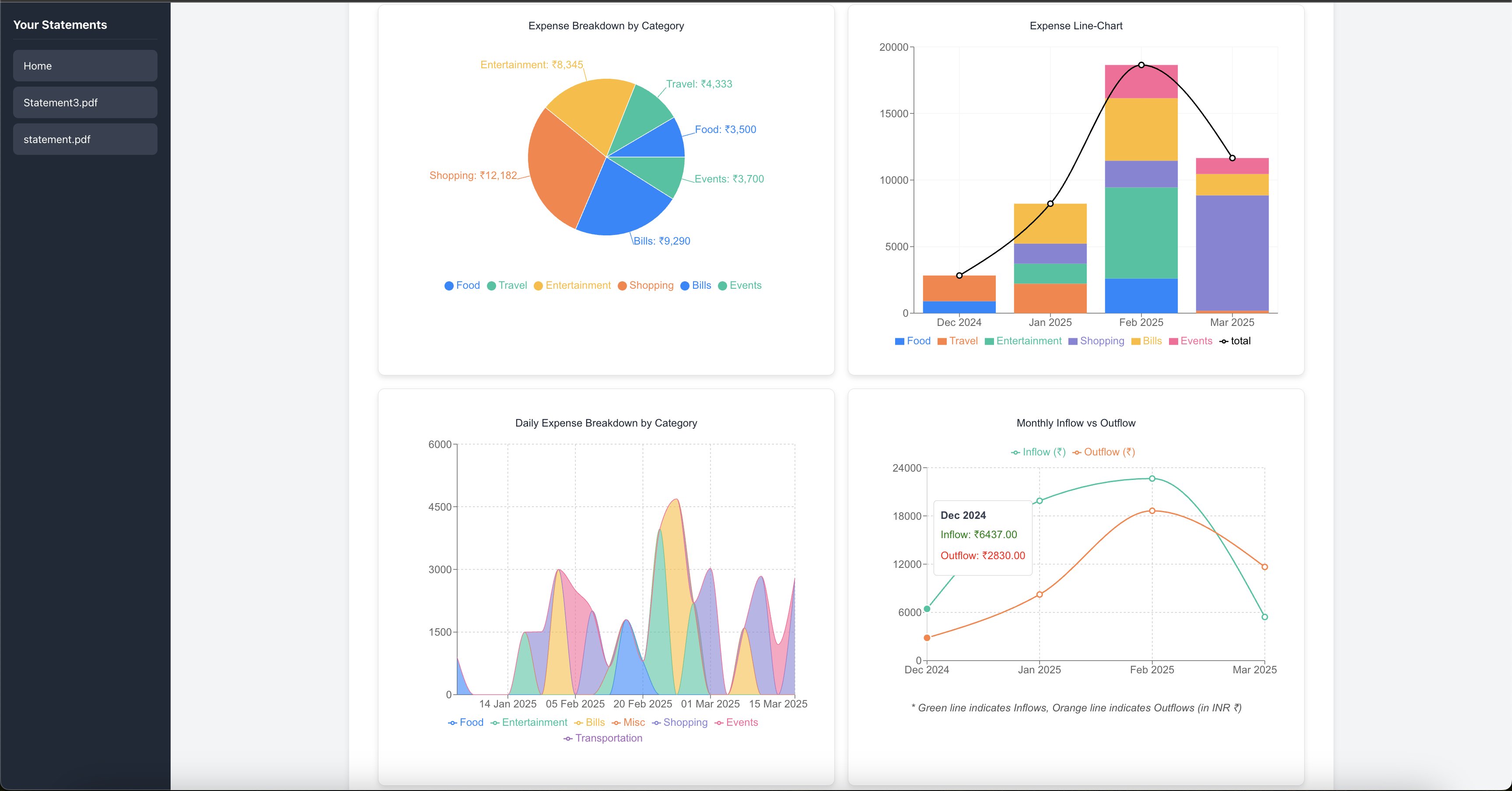
UI Dashboard
-
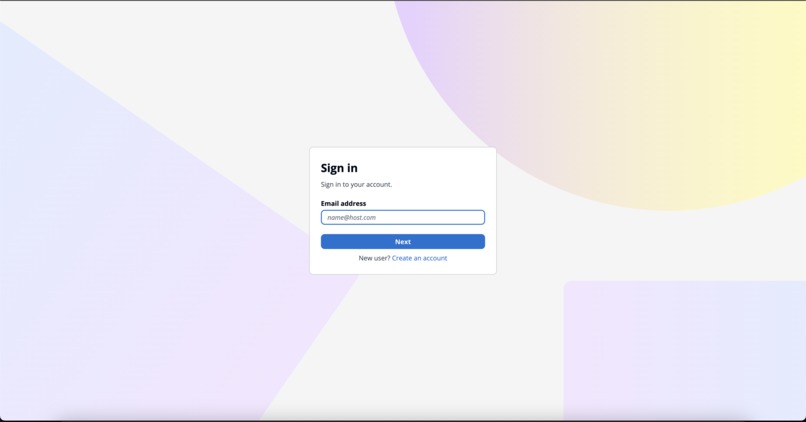
AWS Cognito UI
-
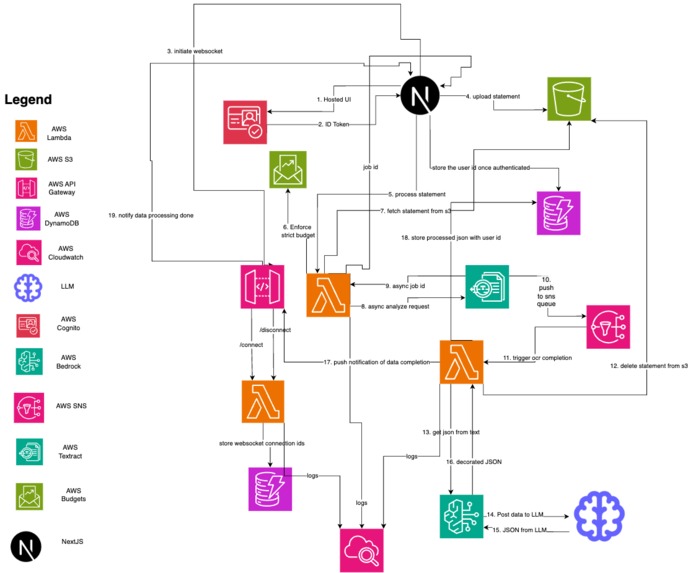
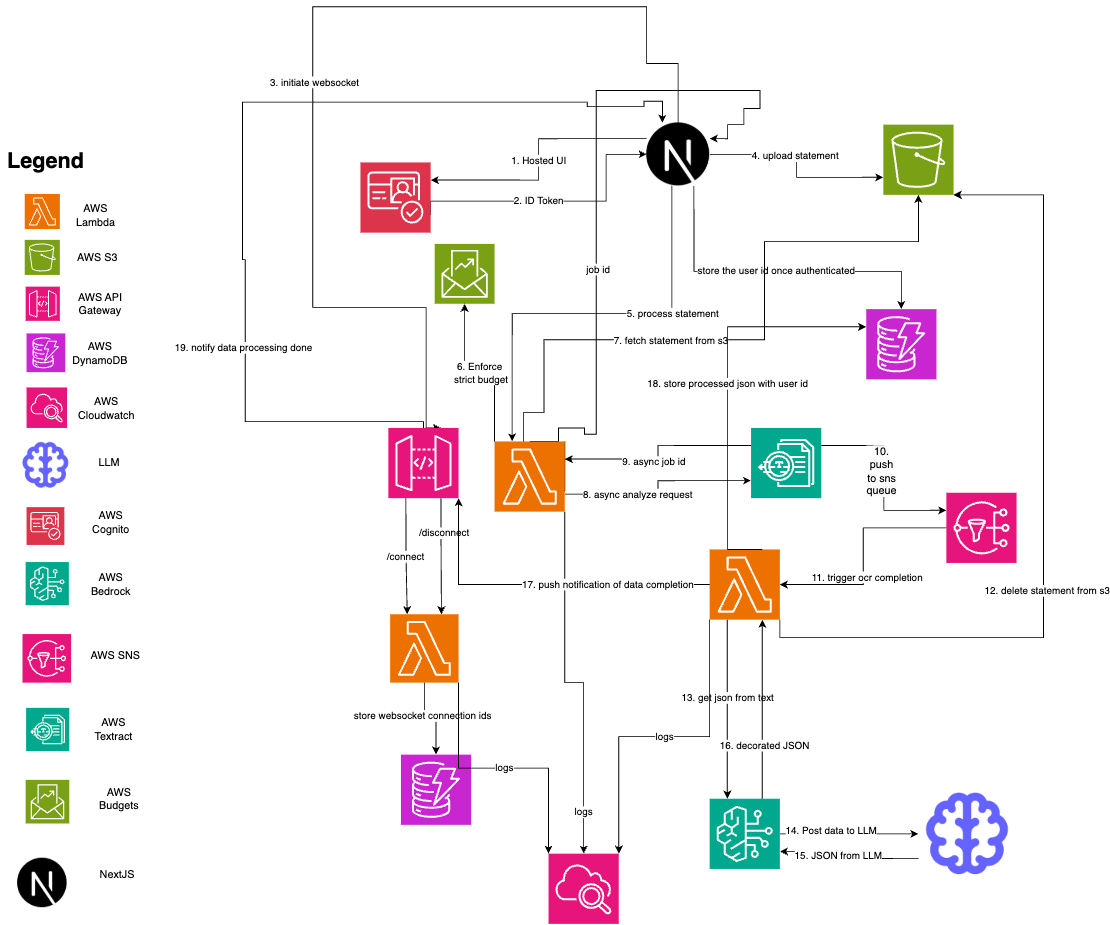
Architecture Diagram


Watch-Your-Spend
Submission for AWS Blogathon, by Chirag Rao
Inspiration
Recently moving to Bangalore, and shifting over to a new apartment after getting a new job, was quite a rollercoaster. From setting up the essentials, or handling daily chores, everything was a new experience. But in all this, you tend to lose track of your finances for a while, and when you finally sit to analyze your statements, it's a mess, especially if you have multiple bank accounts, with multiple credit cards. This is where the idea of Watch-Your-Spend came to my mind. I wanted to build an app, that can analyze your bank statements PDF file, irrespective of which bank or financial institution, and provide observability towards your spending habits, and everything in a dashboard style, single glass pane view. Furthermore, having not used AWS services before, I wanted to get acquainted with the AWS ecosystem.
What it does
Watch-Your-Spend is a purely bank-agnostic cloud-native, serverless application, that uses AI conversational agents to analyze your bank statements. The USP of this application is that it analyzes your financial history, without you having to enter details of each and every transaction manually. It automates workflows of using OCR to scan your bank statement, feeding the parsed table transaction data to an AI agent, which then processes the data, and provides analytics on your spending habits, based on a few global system prompts, and fallback mechanisms to ensure consistency across all generated text.
It also processes transactions real-time, so it sends push notifications through websockets once processing is complete.
The Large Language Model that I am using is Claude Sonet 3.5 v2, developed by Anthropic, which is a cross-inference model, and is capable of handling multiple tasks at once, and is a great fit for text summarization and data extraction. It has a context length of 200,000 tokens, and a token limit of 4096 tokens (which can be expanded to 8192 tokens using the beta-header flag).
How I built it
The application is built using a variety of AWS services, and NextJS for the front-end. The front-end is a mix of server-side rendered components as well as client based components, which uses edge processing to render the page, and then fetches data from the serverless functions to optimize SEO and boost performance by offloading a few build processes to the edge. Hereby I have outlined the tech stack used to build the application:
- AWS Lambda: The serverless functions are written in Python, and use AWS Lambda, with Lambda layers for custom dependencies.
- AWS S3: The application uses AWS S3 to store the PDF file, and then deletes it once processing is complete for compliance, as we are dealing with sensitive data.
- AWS Bedrock: The AI interface is built using AWS Bedrock, and the data is stored in DynamoDB, using Claude Sonet 3.5 v2 as the cross-inference LLM model.
- AWS API Gateway: The application uses AWS API Gateway to initiate a websocket two-way realtime connection to and from the lambda function and the front-end, alerting the user when processing is complete.
- AWS Cloudwatch: The application uses AWS Cloudwatch to monitor the lambda function and display logs.
- AWS Textract: The application uses AWS Textract to extract the data from the PDF file asynchronously, and AWS SNS to send a notification to the lambda function that handles further processing of the extracted data into a structured format.
- AWS Cognito: The application uses AWS Cognito to authenticate the user by generating a user pool and using the authentication JWTs to authorize the user.
- AWS DynamoDB: The application uses AWS DynamoDB to store the bank statement extracted data from the AI Agent, and the data is stored in a structured format for easy querying and analysis. AWS DynamoDB also stores the websocket connections for each user, and manages it based on the user's session state.
- AWS SNS: The application uses AWS SNS to send notifications to the lambda function once the data is extracted from the PDF file.
- AWS Budgets: The application uses AWS Budgets to set a strict budget for the AWS account to prevent abuse, and monitor the usage of the services.
- Front-End: The front-end is built using Next.js, and uses Recharts for data visualization and Chakra UI for styling, along with various other popular well-maintained libraries.
- Deployment: The application is deployed on Vercel, which provides a serverless platform for hosting the front-end application, and also provides edge processing capabilities for server-side rendering.
I have attached the high-level architecture diagram for the application below.
Technical Details.
The user starts off with visiting the landing page, and creating an account, using AWS Cognito for authentication via JWT's. When the user logs in, it instantiates a web-socket connection, which is managed by AWS API Gateway and its respective lambda functions which run when the connect/disconnect events are triggered. Then they are redirected to the dashboard, where they can upload their bank statement PDF file. This file is sent via a POST request to a lambda function, which then stores the file in S3, and triggers a Textract job to extract the data from the PDF file asynchronously using Amazon Simple Notification Service notifying another lambda function once processing is complete.
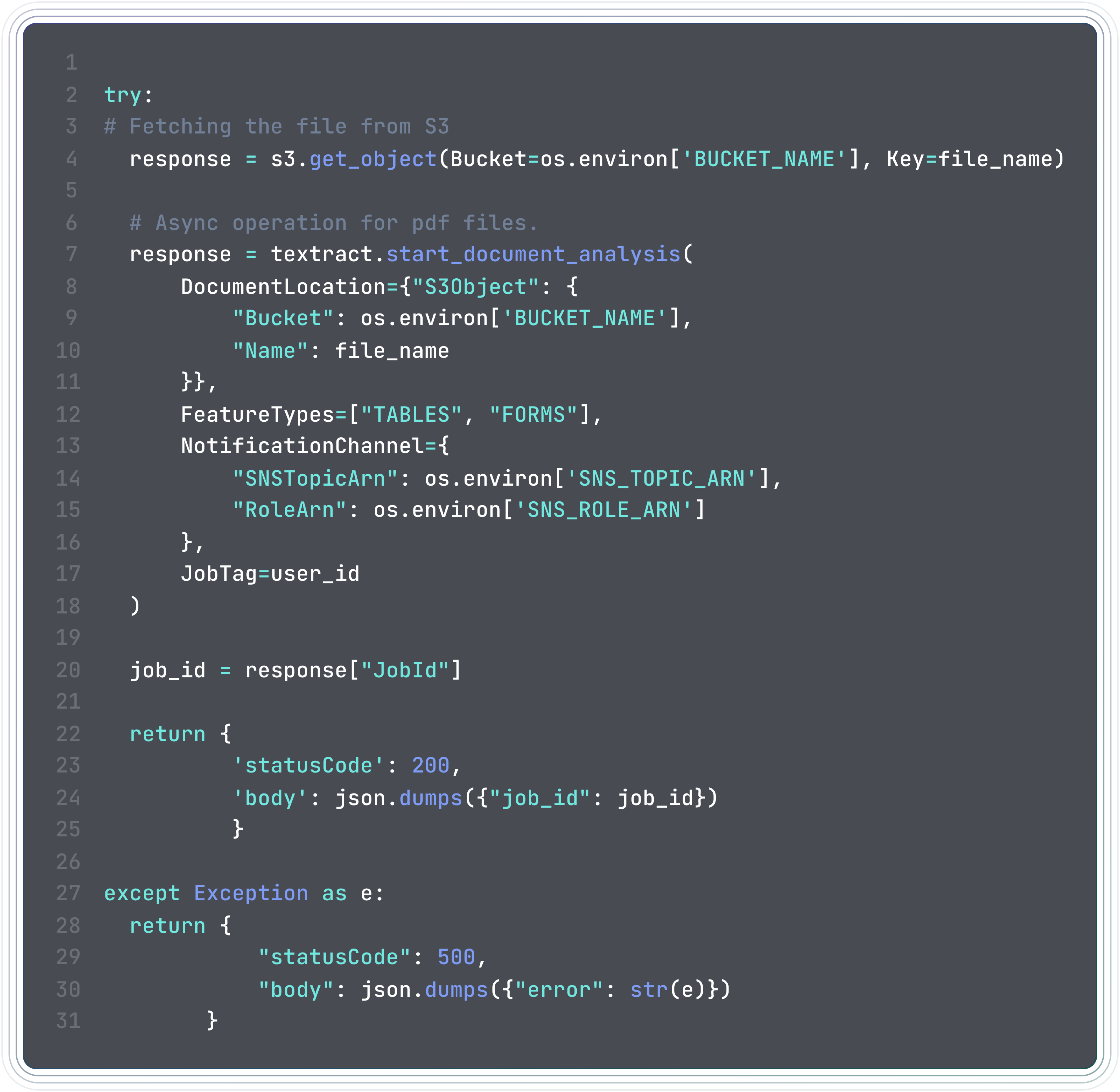
Data extraction in AWS Textract is in a heirarchical abstract block format, and I have used a custom lambda layer to install a custom package to parse this block data. (textract-caller).
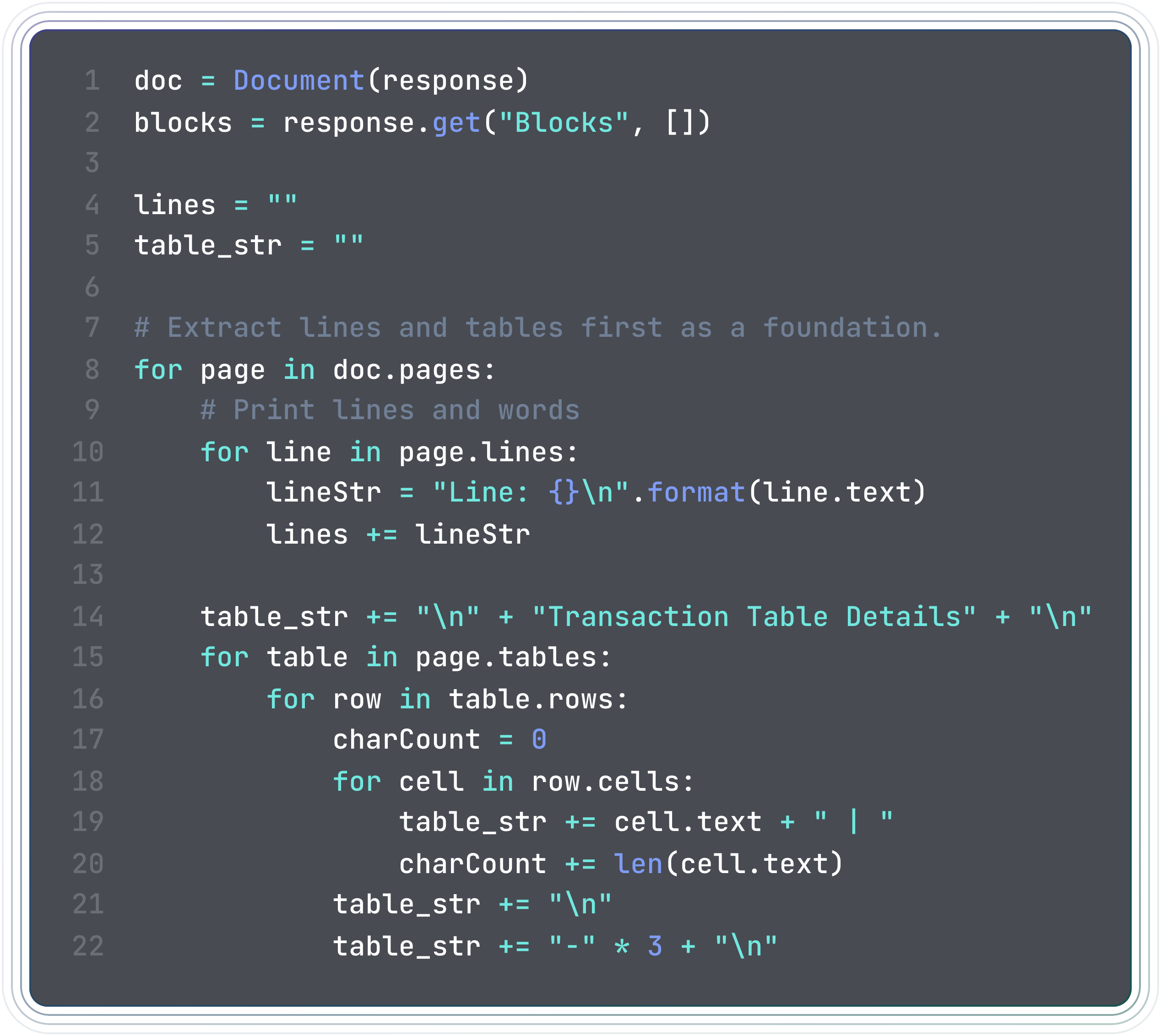
Then once the data is extracted, AWS SNS handles notifying another lambda function for further processing. This lambda function then uses the AWS Bedrock Converse API to communicate withe the model in a conversation type format, with user and assistant alternating messages, streamed via chunks in real-time for better handling of output tokens and to avoid throttling. Once we have the AI model output, we use that to generate custom graphs and provide observability.
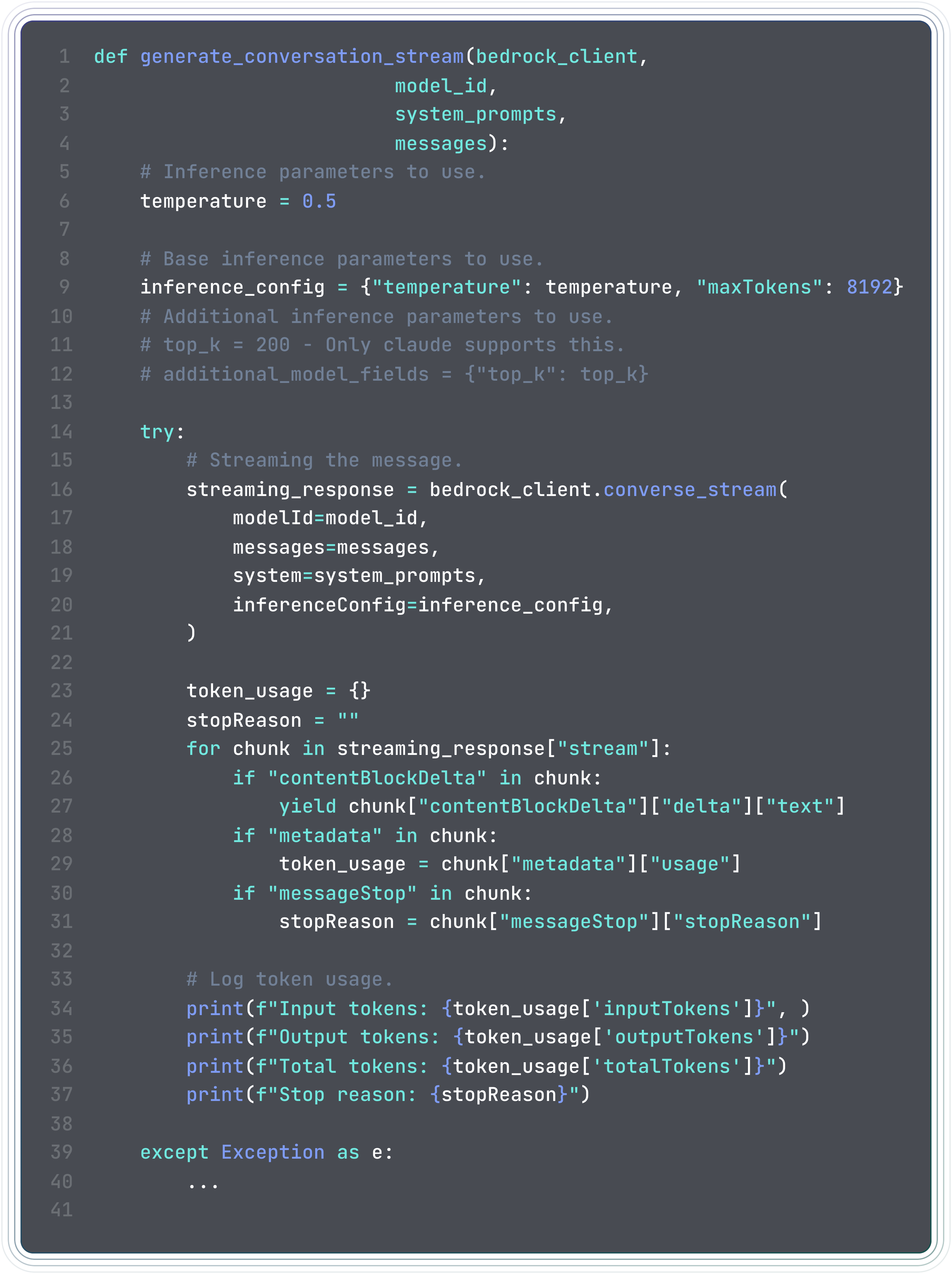
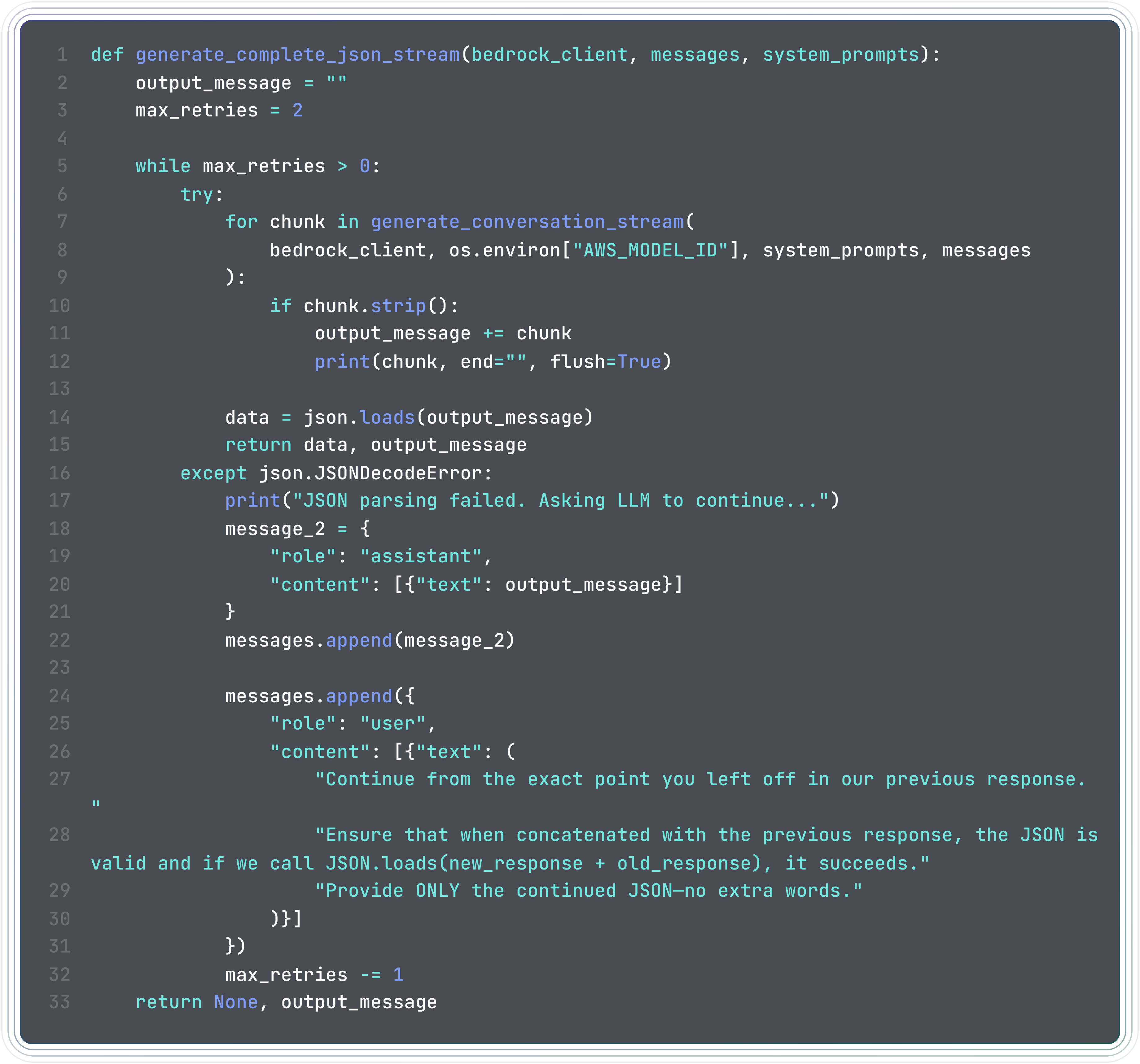
Once the second lambda function is done processing the data, it sends a notification to the front-end via real-time, 2-way websockets connection, using the AWS API Gateway. I could also have used HTTP v2, however I believe websockets are a great alternative. The front-end handles the notification, and displays a toast when the processing is complete.
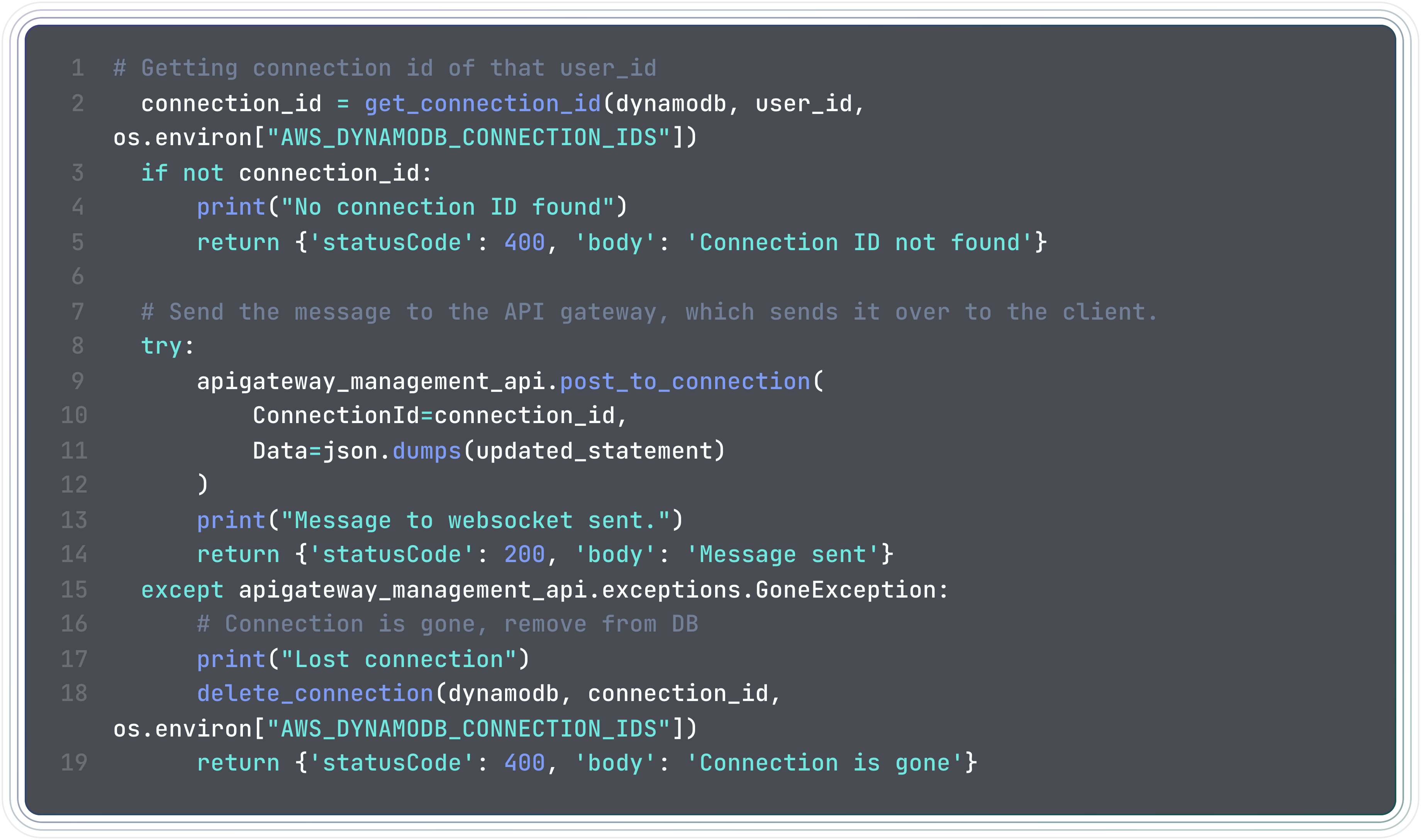
The end-user is then displayed comprehensive and lucid graphs and plots, using Recharts, and the data is stored in DynamoDB for further analysis, such as AI insights, spending habits tracking, guide to optimize spends etc, which can be added in the future.
The web-socket instance is terminated when the user logs out, deleting the connection id from the DynamoDB table, once the associated cookie of the user is also deleted.
Challenges I ran into
- One of the first hurdles I faced while building the project was authentication. Security tends to be really complicated at times, and I built the authentication process post receiving the Cognito auth-code from scratch, which was a bad idea. It is better to use prebuilt libraries like NextAuth or Auth0.
- The second hurdle I faced was in the prompt engineering process. I spent a lot of time, carefully selecting and engineering global system prompts, to make the AI response, just like I wanted it to be, for effective parsing.
- Handling token limits was also a challenge, as an LLM cannot process very large input tokens. So in the end, I resorted to streaming the response, and enforcing a limit on the number of pages in the pdf file. The global system prompt also prevents the model from generating very large responses and failing.
- And of course, as this pipeline involves multiple AWS services, the integration of all the services was a bit tricky, and took a lot of time to get it working just about right. Maybe using the AWS CDK or some IaaS tool like Terraform would have made it easier, as I had to do a lot of manual work to set up the services, a lot of clicking around the AWS console.
Accomplishments that I am proud of
This project took me around 2 weeks to complete end-to-end, and I am really proud of the end-result, even though there needs to be a plethora of changes to get this production ready. I was able to learn how AWS services interact with each other as well as build a fully functional serverless and AI-native application to analyze bank statements, and provide observability on spending habits. I was able to build an app with a beautiful and minimal front-end, using Next.js, Chakra UI and Recharts.
Something that I must mention before I conclude, is that I cannot understate how much AI has helped me in the development process, and even though it couldn't solve all my problems by a long-shot, it did give me a lot of ideas and suggestions on how to approach a problem, and I am grateful for that. It has sped up my development process by a lot, and I am really excited to see how it evolves in the future, and how software engineers can make the best use of it.
Limitations and Future Work.
- PDF Files Only: The application is currently limited to processing only PDF files, and does not support other file formats like CSV or Excel. This is a limitation that can be addressed in the future by adding support for other file formats like csv or xlsx.
- Token Limit Issues: Handling token limits for the AI agent is a challenge, and the application's current implementation does not handle it very well. Suppose a checkings account, with hundreds of transactions per day, my app cannot handle the sheer volume yet. A better approach would be to chunk the data into smaller pieces and process them in parallel, and then merge the results. A custom token management and cost optimization microservice or module needs to be built.
- Enforce Strict Schema: Use some schema validator tool like Zod, so that LLM doesn't hallucinate and output a JSON which is invalid.
- Observability Only: Currently, Watch-Your-Spend provides only observability on the spending habits, and does not provide any recommendations or suggestions on how to save money or optimize spending. Which is a feature that necessarily doesn't need to be added, as people have different spending habits which work for them.
- Standardization and Internalization: This needs to be handled, different date formats, different languages, different currencies, and different financial institutions across the world/india.
- ISO Regulations and Compliance: The application needs to be compliant with ISO regulations and standards, and needs to be audited for security and compliance, as the app is processing sensitive data.
- Overall Page: Adding a overall page, which gives the user a consolidated view of their spending habits across all their accounts and credit cards.
- Responsiveness improvements: Improved experience across all screen sizes, not just Desktop.
- Better Error Handling: The application needs to have seperate errors for development and production, a fully-fledged error factory must be built.
- Handling Scale: We can have multiple users concurrently using the application, and multiple async jobs. Requests need to be rate-limited better, introducing message brokers and load balancers to handle scale.
Gallery
Here are some screenshots of the application.
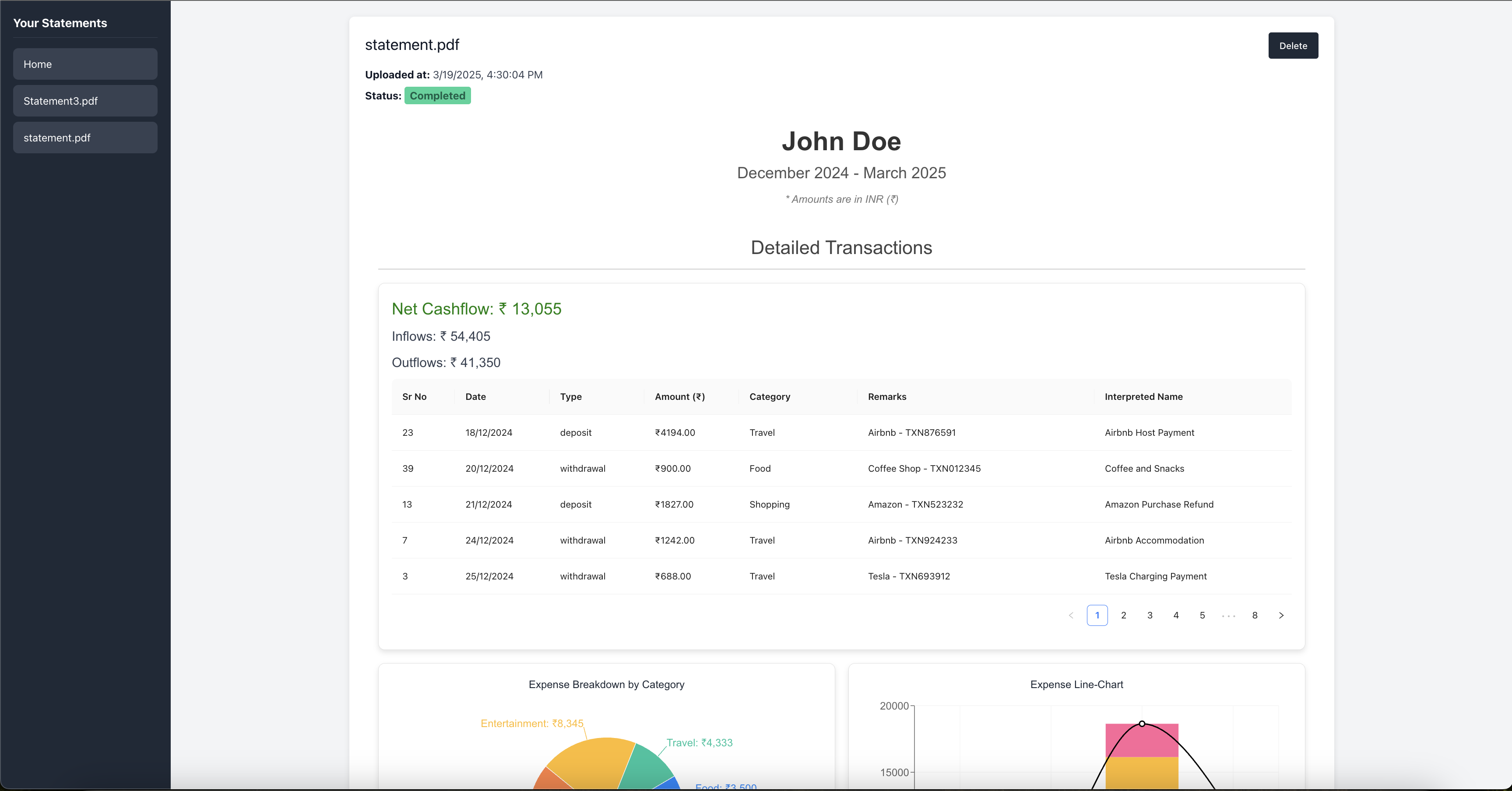
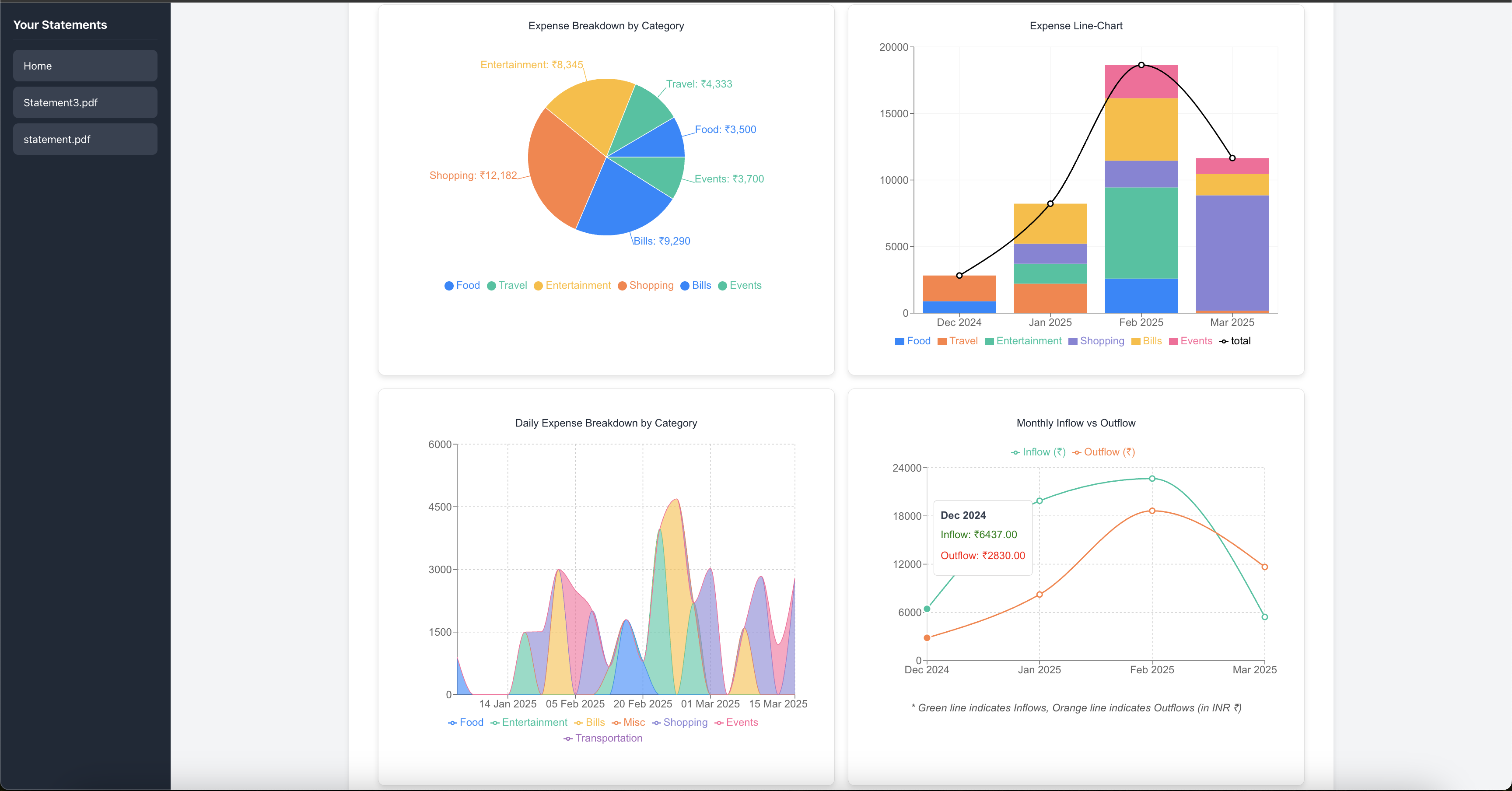
Deployment
I have deployed this application on Vercel, and I am sharing the public URL as well as the github repo link below. The github repo also includes some crucial lambda functions. Please feel free to give it a try, and let me know your feedback.
Public Link: Watch-Your-Spend-Public-URL
Github Repo: Watch-Your-Spend-Github-Repo
To prevent abuse, I have enforced a strict budget on the AWS account, and all API requests after crossing that budget will fail until the limit restores the next month.
Thank you for reading!
Cheers,
Chirag
Built With
- amazon-sns
- amazon-web-services
- api-gateway
- bedrock
- cloudwatch
- cognito
- dynamodb
- javascript
- lambda
- node.js
- python
- s3
- textract
- vercel

Log in or sign up for Devpost to join the conversation.