-
-
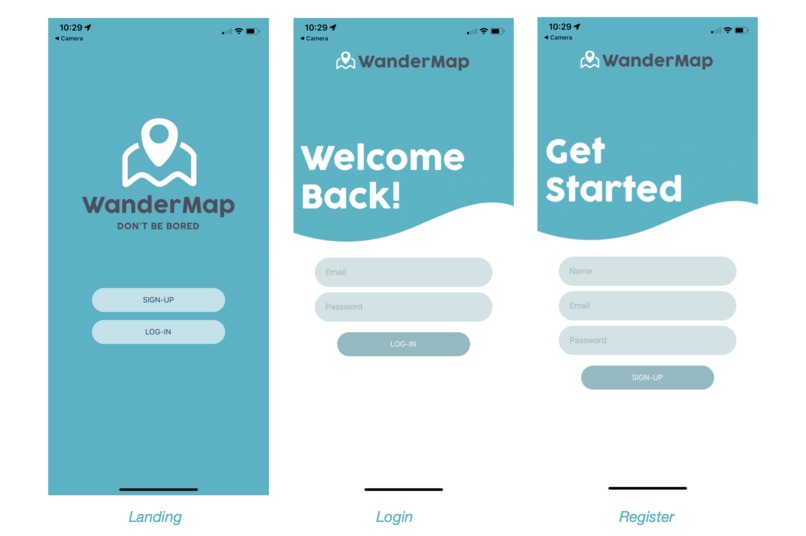
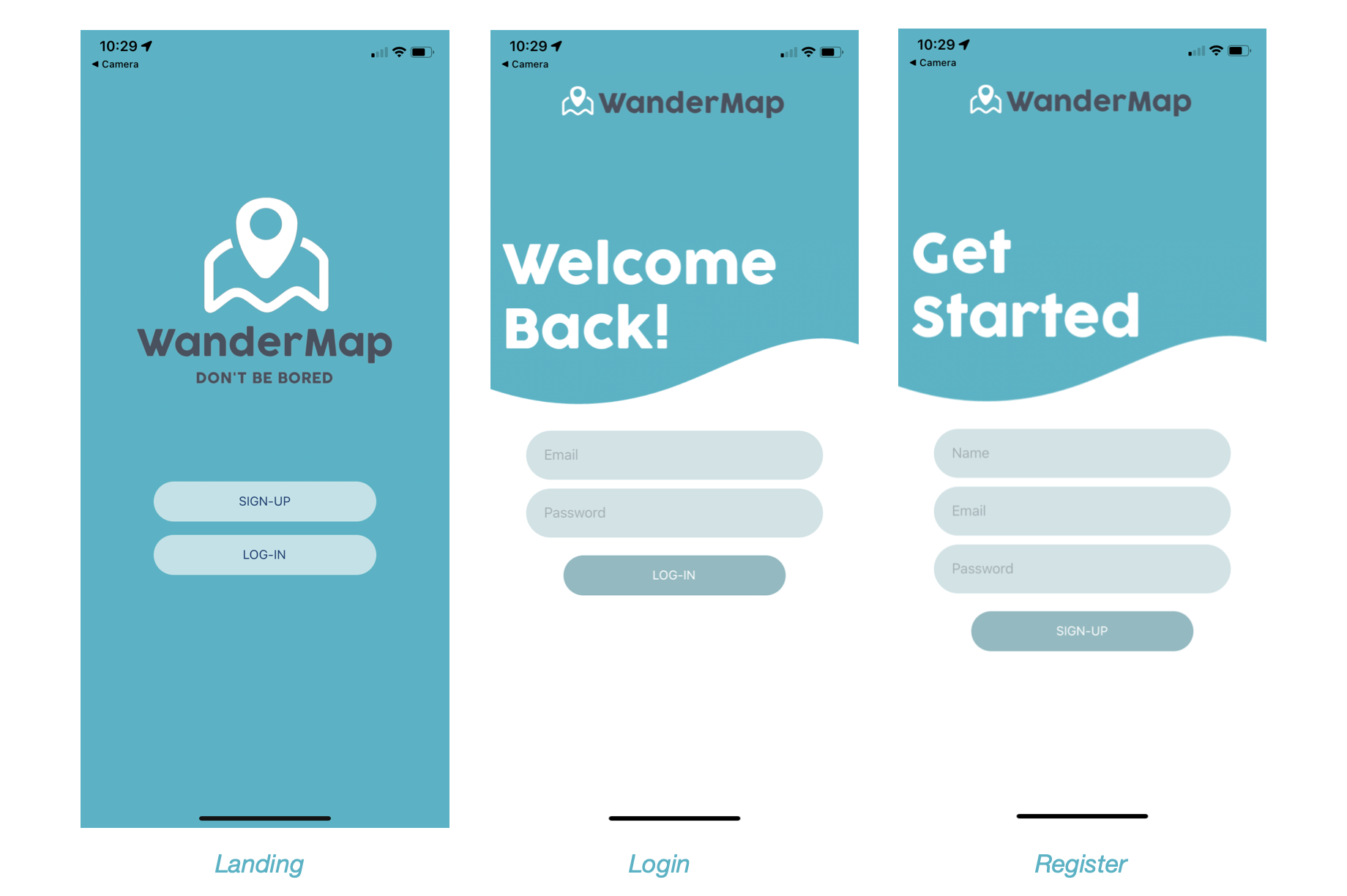
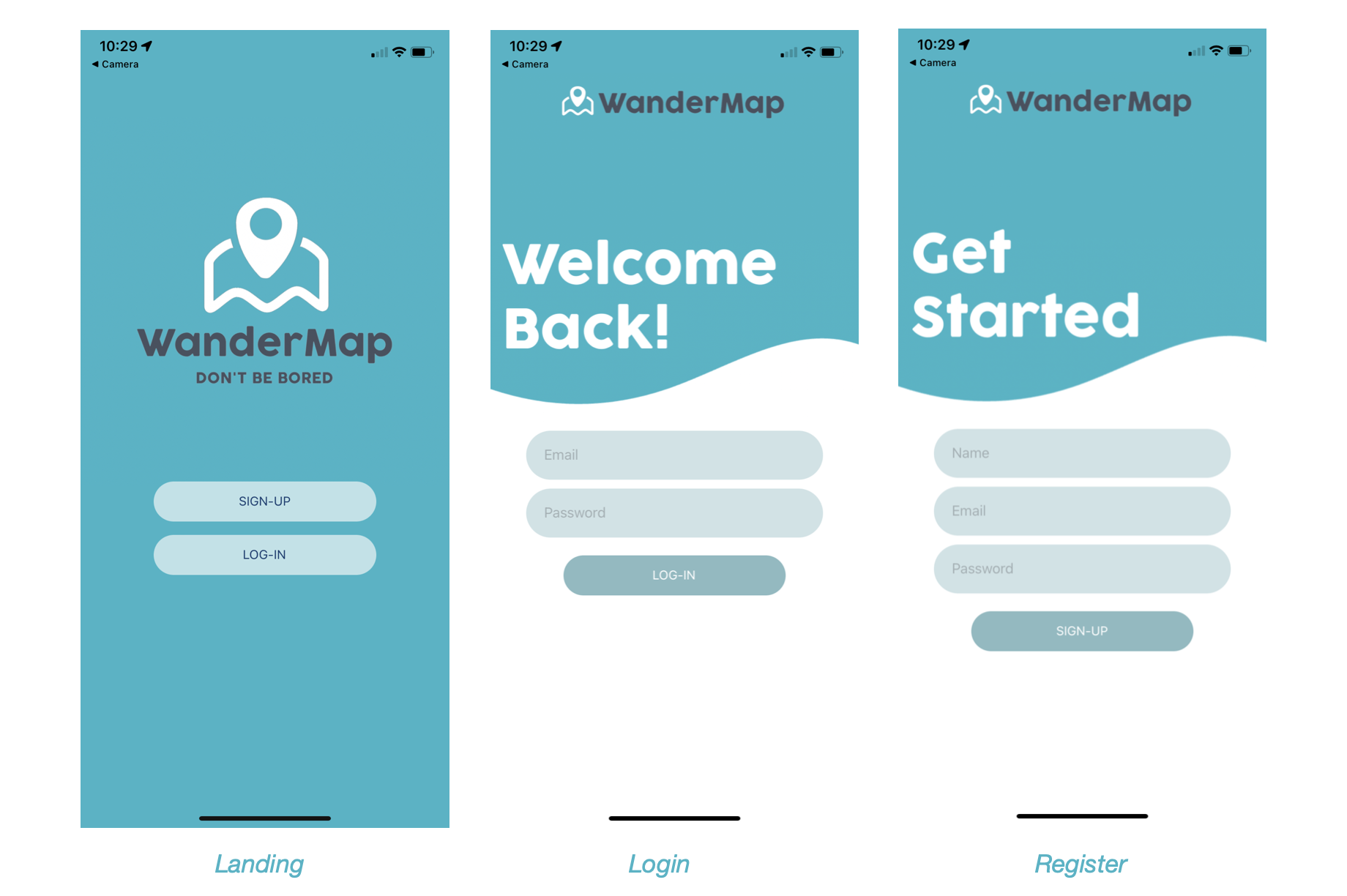
Landing, login, and register screen
-
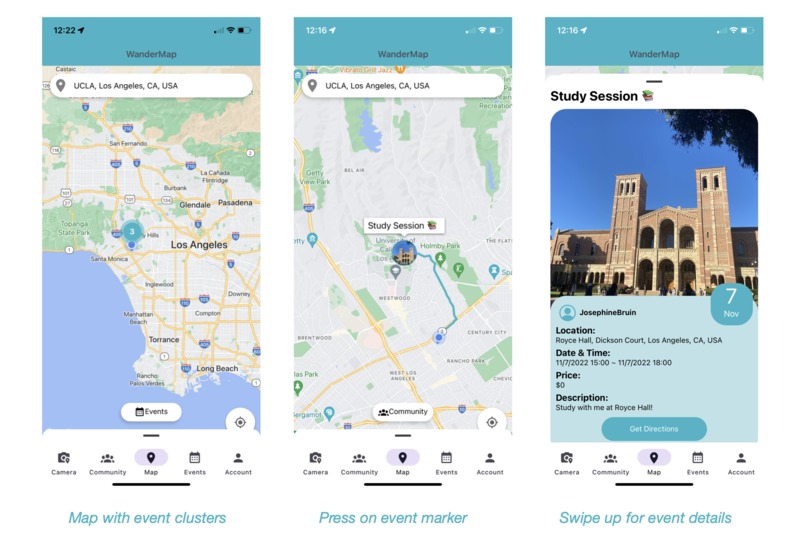
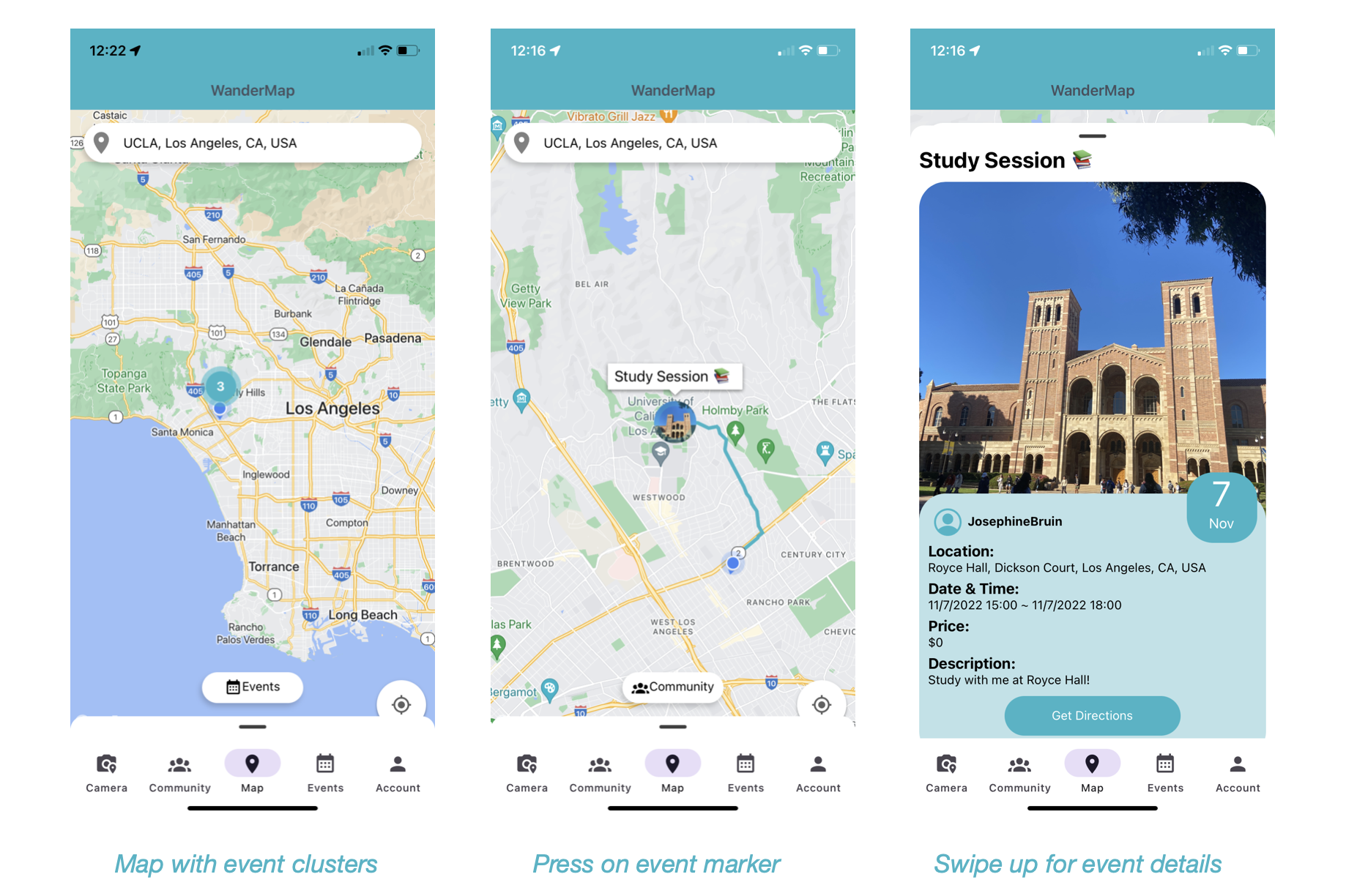
Map screen and its features
-
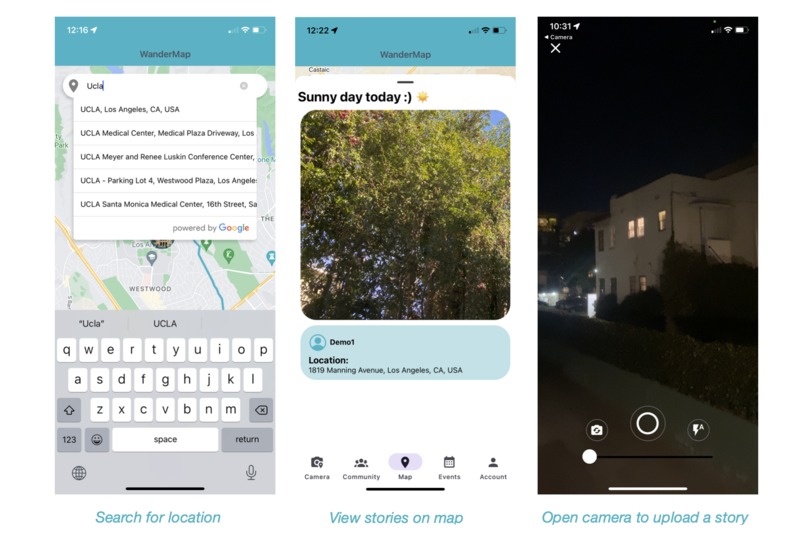
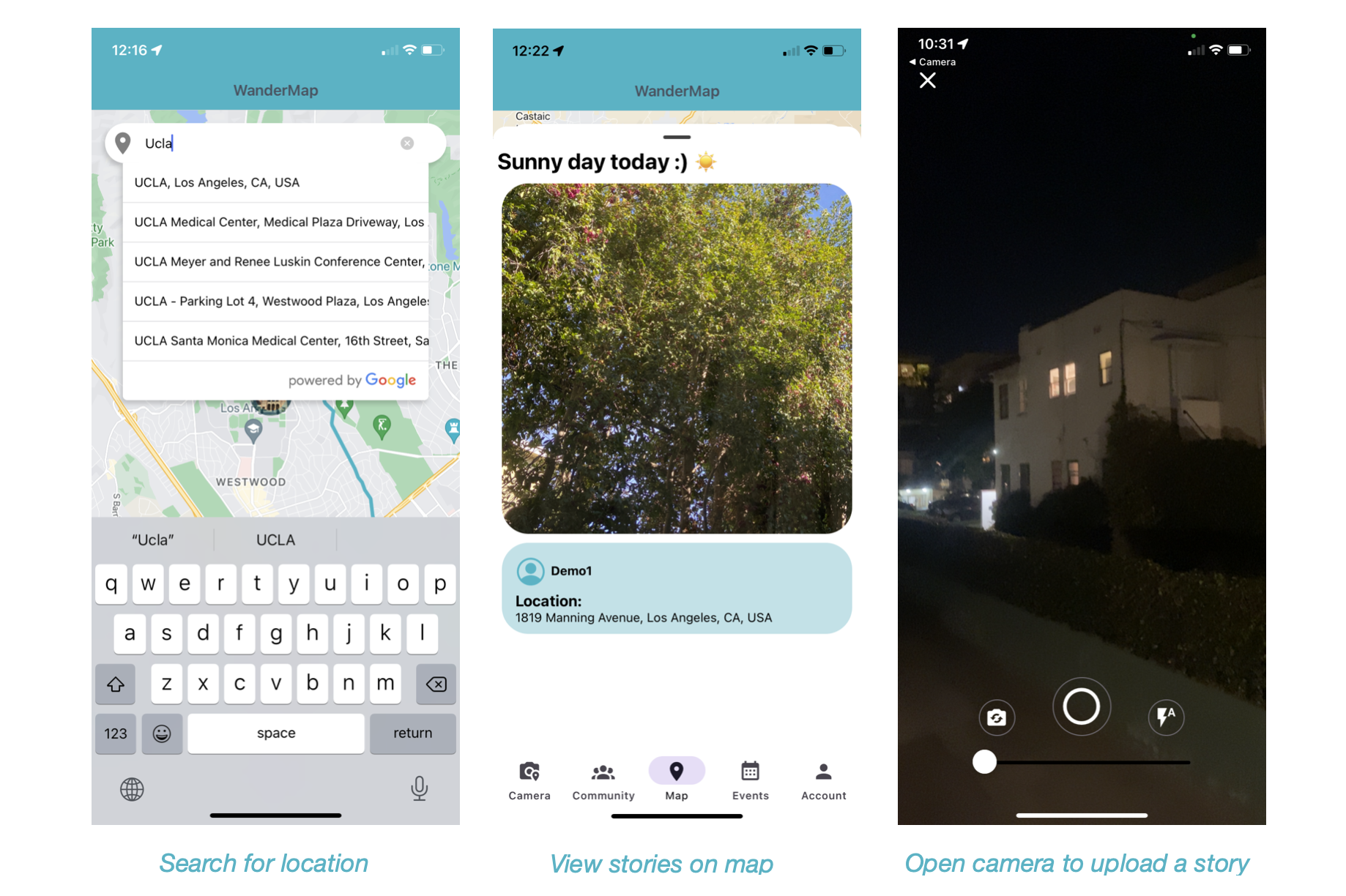
Location search, view stories on map, upload a story
-
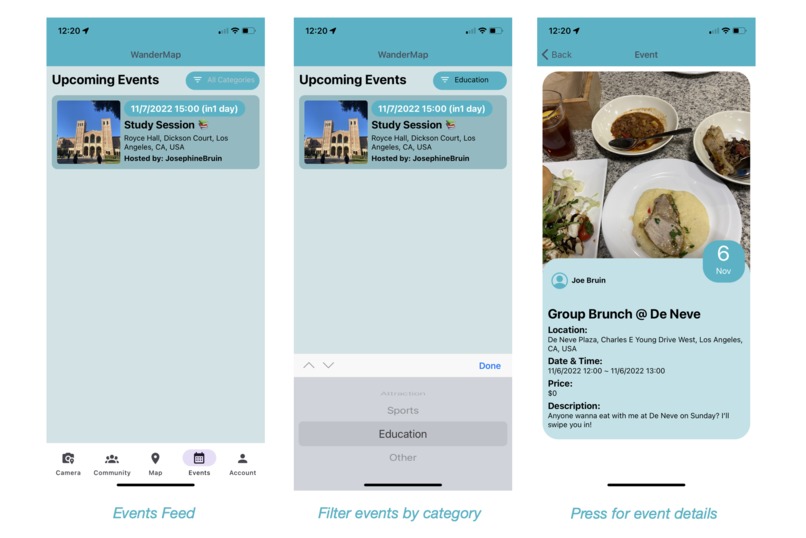
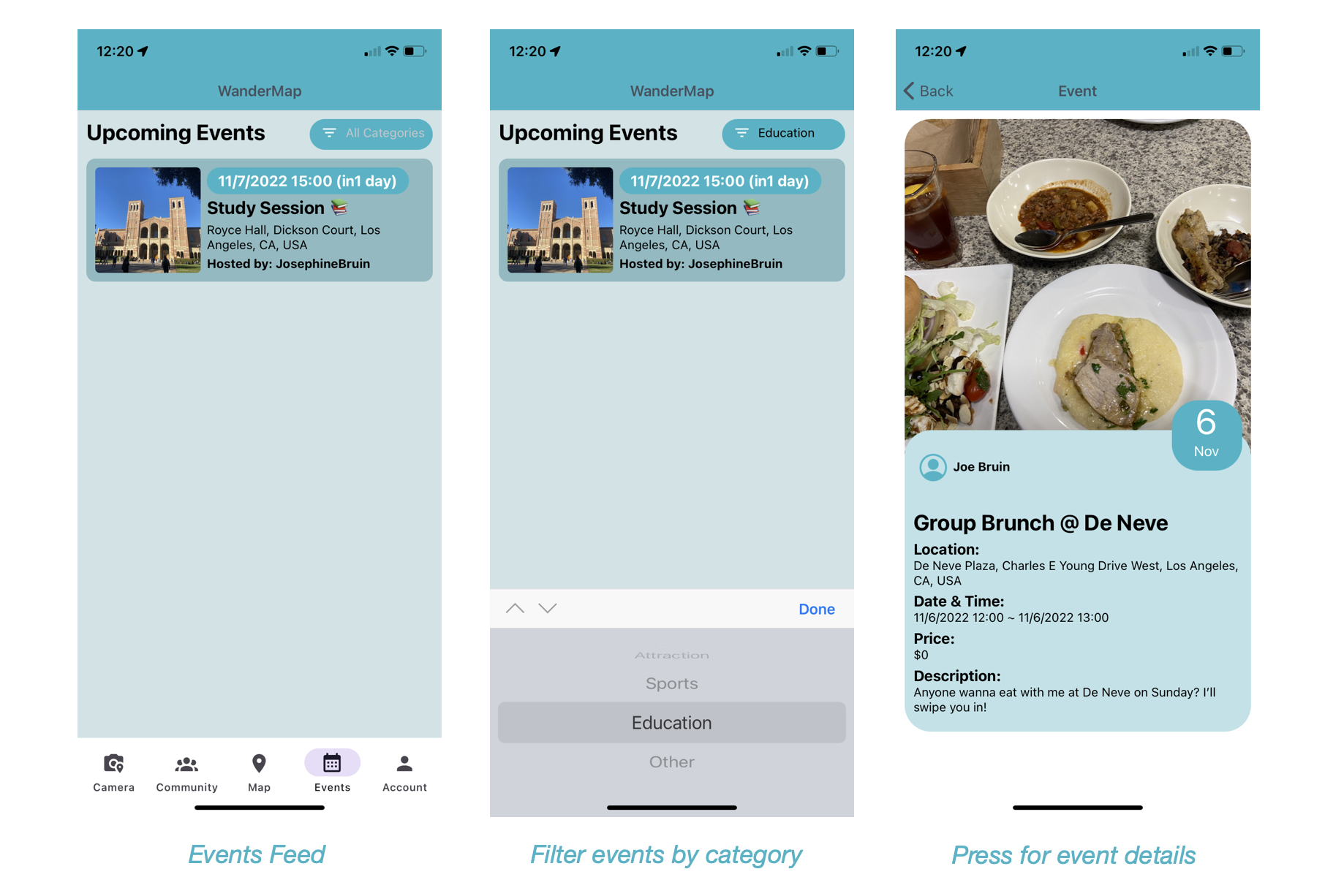
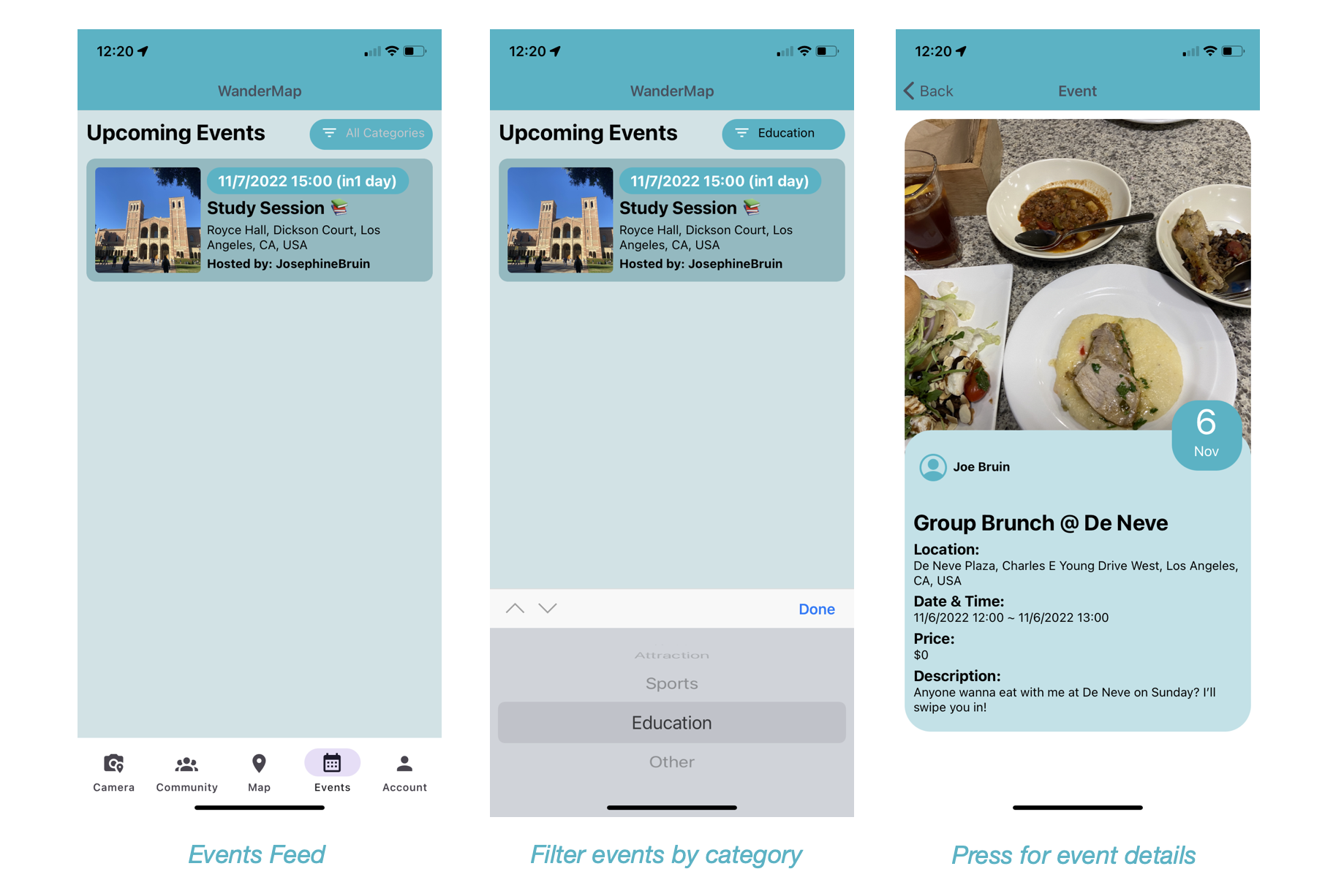
View events posted by following users
-
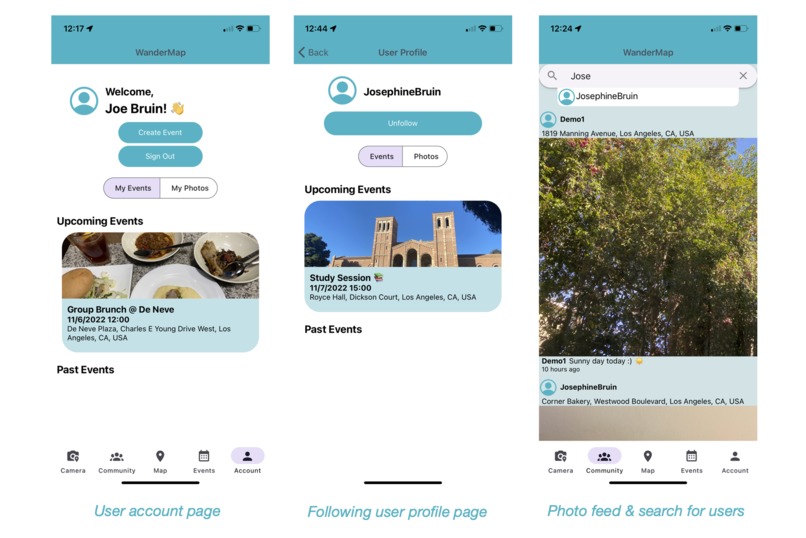
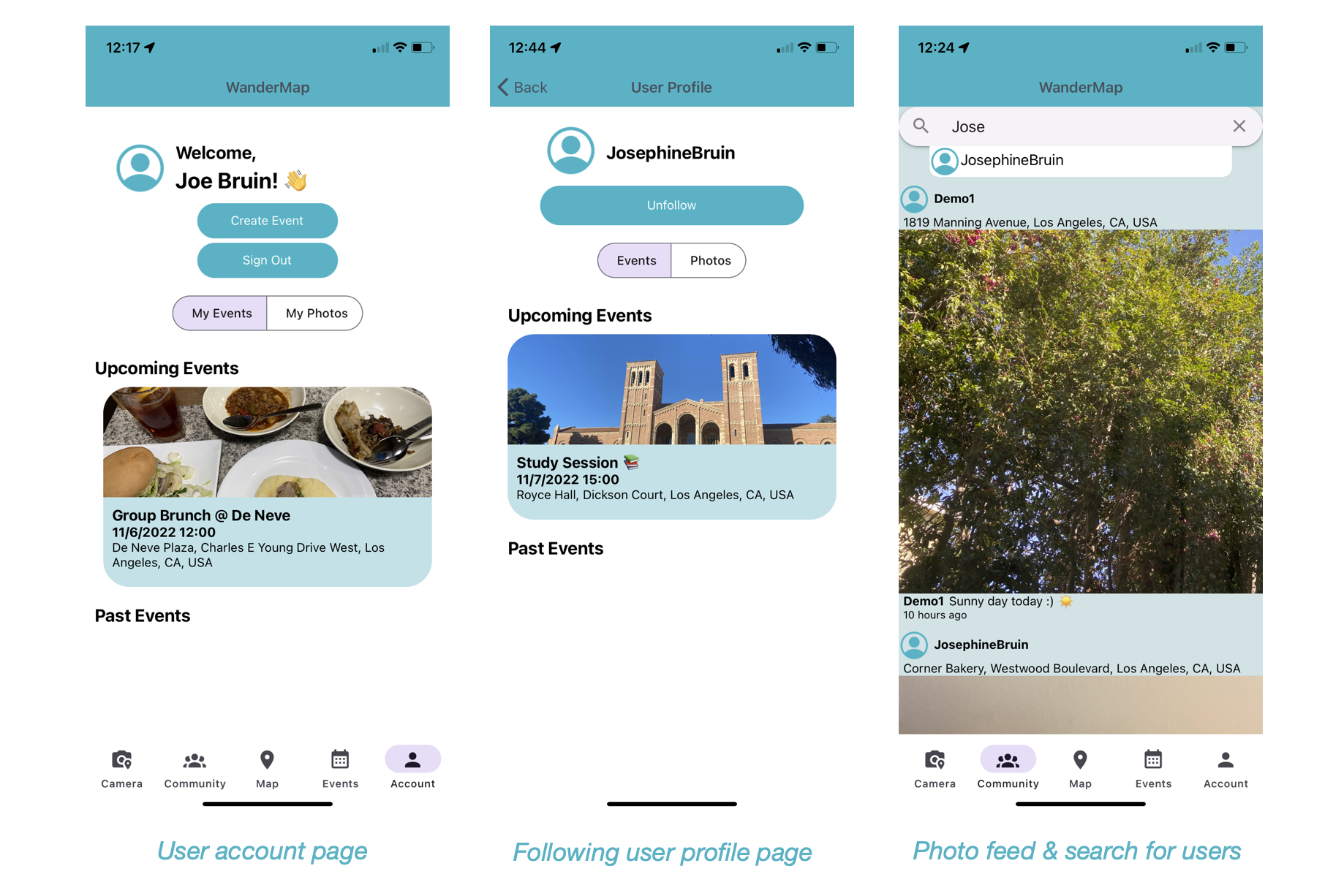
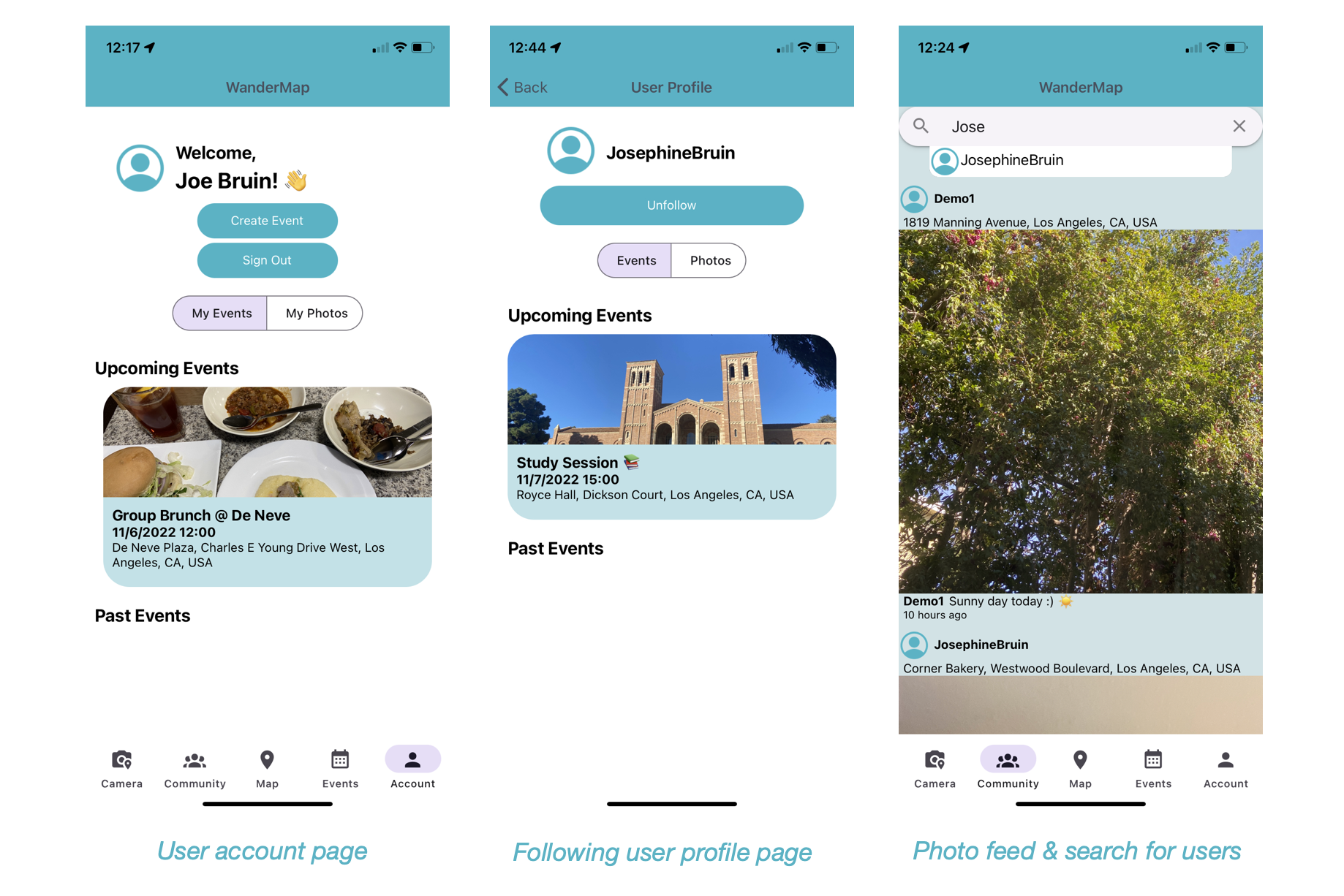
View profile page and search for users
Links 🔗
- Live link (Try it out on Expo)
- Demo video
- Github Repo

Overview ⭐️
“Don’t be bored” – this is our slogan in reference to Google’s previous slogan “Don’t be evil.” WanderMap is a social networking app that allows users to share events within their own communities and view events within close proximity on a map. Currently, there are event apps such as “Eventbrite” which are geared towards professional use and “Meetup.com” which is a little bit more casual but is not really oriented towards interacting with friends. There are social media apps which can be a bit easier when it comes to sharing events. For example, with “Snapchat” users can share photos in a discreet format and view real-time friend locations. “Instagram” allows users to share photos/videos to their followers in a more public setting. However, they’re more geared towards social interactions and are not the best when it comes to sharing events on a map. WanderMap was created in hope to make it easier for users to discover events, especially when they are spending their days with no particular plans.
This could be a beneficial addition to Alphabet as Google does not currently have a major social media app as one of their products. Having WanderMap could encourage users to upload photos at different locations and if the user chooses to make the image available as a review on Google Maps, that would increase the amount of image data available for their Places API. If WanderMap implemented “likes” as one of the features for user photos and events, Google can also collect a large amount of data to predict user habits and build a better recommendation system across multiple platforms. This would also be a great addition because users can currently Google search for events to see a list of event data scraped from third party websites but they do not have an official platform. If they use WanderMap as a prototype for “Google Events”, it would encourage even more users to use their products. With “Instagram” using Apple Maps and “Snapchat” using Mapbox to display their maps, it would be further beneficial for Google to attempt to compete in a social media app using Google Maps Platform as they have a large database and a wide variety of APIs.
Another motivation behind this project was also to create a platform where users can share what they are up to whilst being more “down to earth”, avoiding the adversarial effects of social media. Currently, most of the major social media platforms involve users becoming in a sense “addicted to” manipulating their online social presence, which could possibly lead to deterioration in one’s mental health. WanderMap attempts to resolve this problem by motivating users to meet up in real life and by having minimal features that could likely cause them to bear negative thoughts. For example, users can share photos from an event they are currently attending to attract their followers to join them. However, they can neither edit photos nor can they upload photos from their own camera roll. Users are also not able to view a list or even the number of followers they have to prevent them from thinking about their online popularity. Instead, they can share events which encourage users to physically meet up and have real life interactions. Also an FYI - the colors used in this app are "teal" and "purple" to sort of target the 90's feelings (like Dixie cups) and remind users of the days where there were no smartphones and social interactions occurred more in real-life.
Inspiration 💙
Being an underground DJ, I wanted an app where I could share my DJ events with only a selected group of guests. My friends and I often advertise our events by posting a photo and story on Instagram but that always felt like it wasn’t enough because posts are buried in the feed after a couple of days pass by and stories tend to be viewed lightly. Furthermore, when I see a DJ event hosted within my community but am contemplating whether or not I should go because there are multiple events hosted at the same time or the event doesn’t seem interesting enough, I decide by viewing my other friends’ stories. However, instead of going through everyone’s stories to find a story posted by a friend who is currently at the event, it’d be much easier to be able to find stories by clicking on the location of the event. It would also be easier to see markers of events on a map to see what events are going on than to scroll through an Instagram feed or searching usernames for their event posts. Although we usually have guests who are friends or friends of friend, we’d also love to make new friends with someone who is just as much into music and to filter those people. I think it’d be easy to do so if there was a social network with maps. This inspired me to build WanderMap, where users can view events by following other users. This would also be useful for just anyone trying to host an event such as a casual hangout or a study session.
What it does 🌎
User can register or login to the app.
User is then directed to a map screen where it fetches their current location and displays events posted by users they are following.
- They can click on each of these markers to view details of the event.
- This would also trigger a direction route to be drawn on the map so that if the user decides to go, they can follow along this route.
- To get more detailed real-time navigation, user can click on “Get Directions” to be navigated to Google Maps.
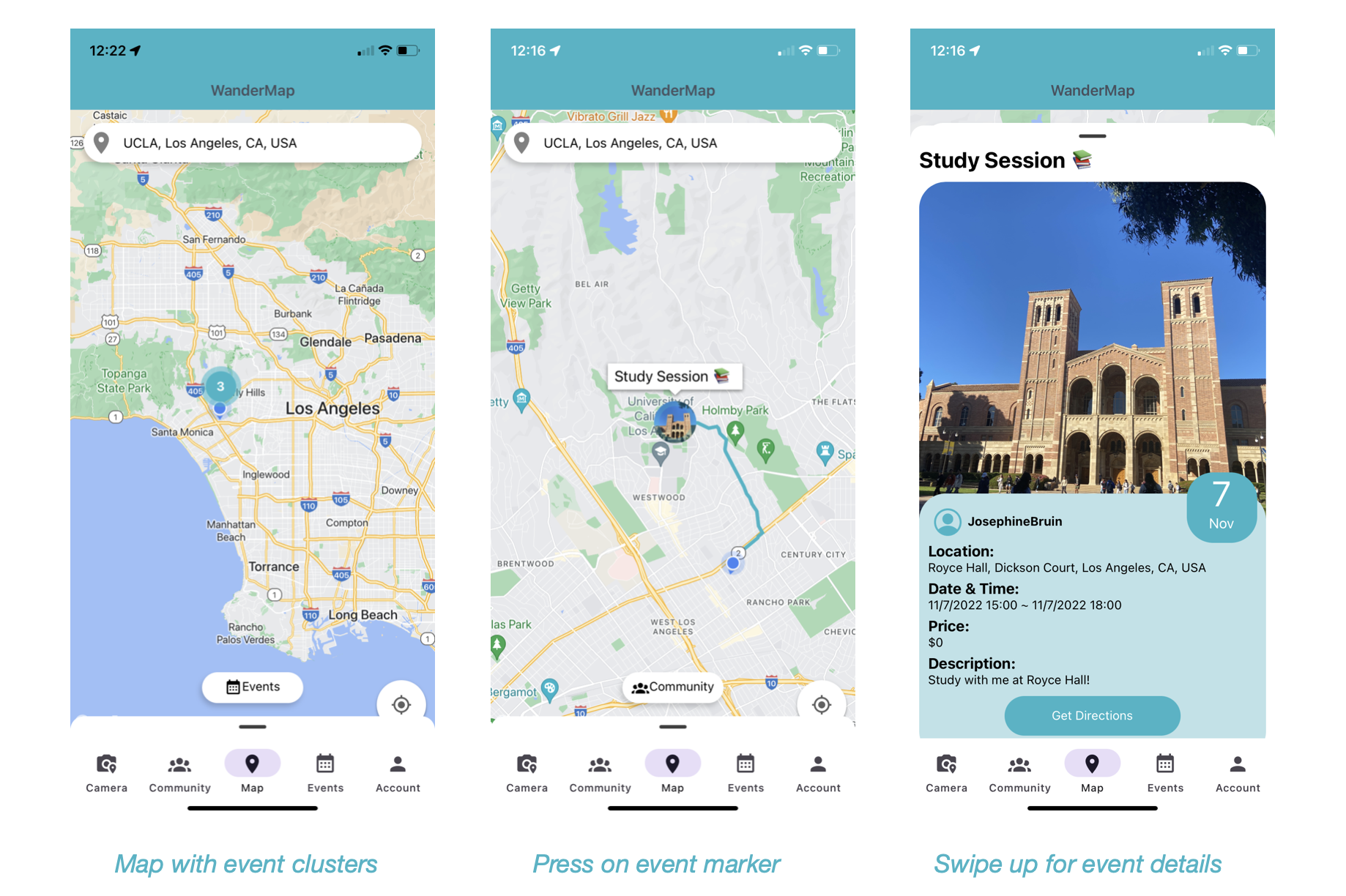
- If the user is interested in a different location other than their current location, they can type the name of location in search bar and will animate to the new location.
- User can also press on the “Community” button to switch the markers from events to stories posted by friends.
- User can navigate to camera to post stories on the map.
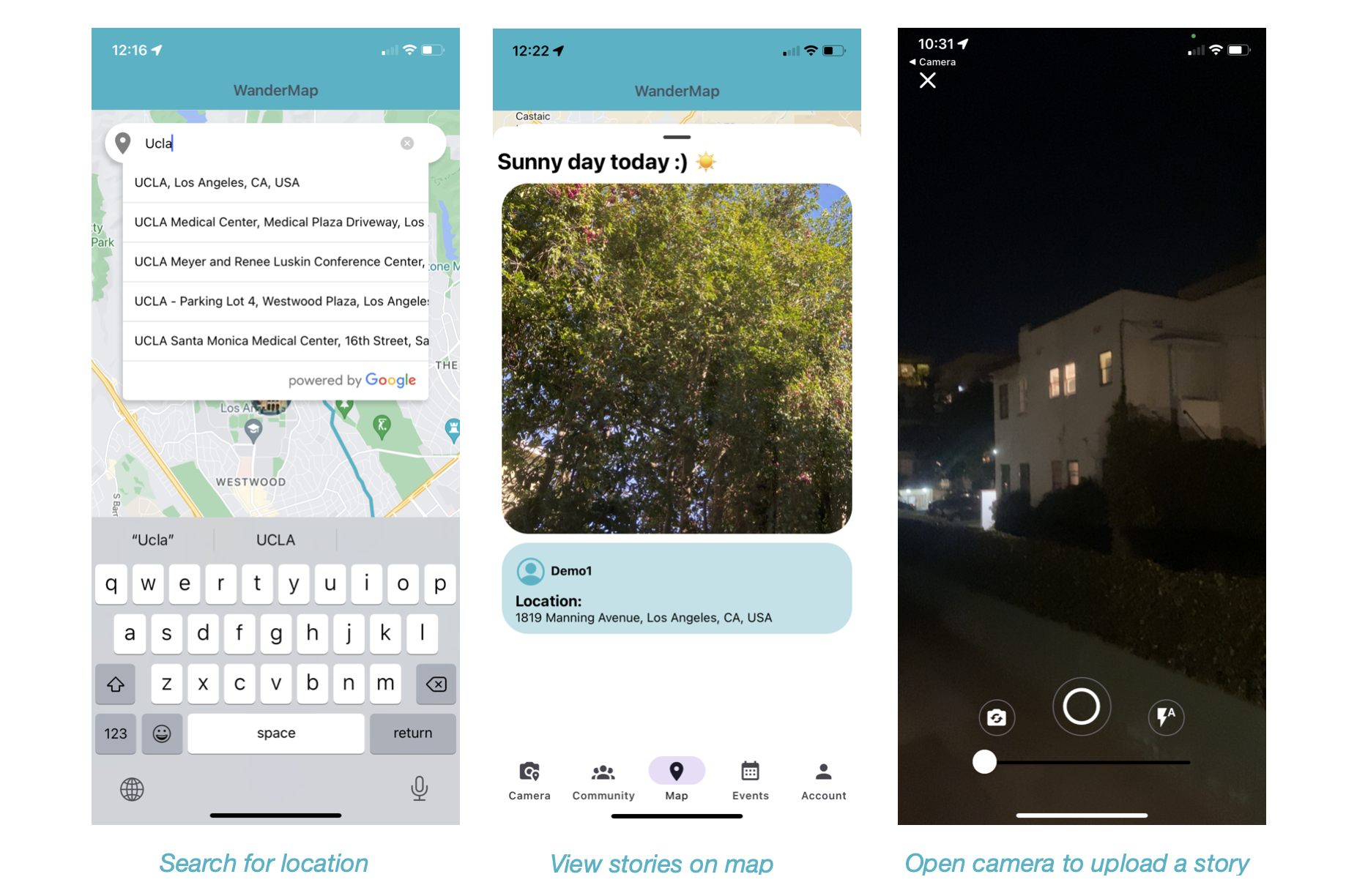
- They can click on each of these markers to view details of the event.
User can navigate to events feed to view a list and also filter events by categories. Pressing each event will direct them to a screen with more details.
- User can also navigate to the "Community" tab to view all photos posted by following users and also search for other users to view their profiles and follow them.
- User can navigate to their account tab to view their own profile and to create an event or log out.
What I learned 📚
- I did a lot of prior research with similar apps and UI mockups to figure out the most straightforward and natural UI/UX
- How to code in React Native using React Hooks and Expo workflow
- How to use Firebase for user authentication and Firestore as my database for storing user information
- Using React-Redux to build the backend of a CRUD application
- Using npm community libraries to implement Google Maps APIs
- Navigating between screens and tabs using React-navigation
- Subtle UIs such as dismissing keyboard when user touches area outside keyboard, using scroll views for enabling scrolling in a long page that doesn’t fit to screen, more FlexBox, and adopting a grid system to implement user photos archive in profiles to mimic that of Instagram’s.
How I built it 🛠
- Front-end: React Native with Expo workflow
- State Management: Redux (built reducers to fetch user information from Firestore and used redux-thunk as middleware)
- Database: Firestore
- Authentication: Firebase (email & password verification)
- Google Maps Platform APIs:
- Maps Javascript API (to display a mapview)
- Directions API (to get route from current location to target location)
- Places API (autocomplete to get location search by name)
- Hosting: Expo
- UI Frameworks:
- React Navigation (to navigate user between pages)
- React Native Paper (Material UI style components)
- Expo Camera (to build camera for taking photos)
- Expo Location (to fetch user’s geolocation)
- UI Inspiration:
I viewed hundreds of mock-up designs on Dribbble to get inspiration for how my App should look. The following are the designs that inspired my App the most:- "CariEpent - Event Mobile App" by Asal Dsign
- "Event App" by Radovan Tucek
- "Circle - Social Networking App" by Happy Tri Milliarta
- "CariEpent - Event Mobile App" by Asal Dsign
Challenged faced 💪
- Limited number of community libraries to implement Google Maps API to React Native
- Real-time navigation is prohibited and user must be directed to Google Maps app
- Since a lot of the actions were asynchronous (such as fetching user’s current location) implementing React hooks and coming up with logic to show users data after asynchronous fetching was difficult
- Thinking about how to structure my database was difficult, especially Firestore not being the most optimal database for a social media application
- Easily used up my Firebase daily bandwidth limits, which made it difficult to conduct testing
- Brainstorming HCI and coming up with a UI/UX that allows the most natural user interaction was difficult (especially brainstorming my bottom tabs, having subtle UI components such as dismissing keyboard on touch or enabling scroll view, and positioning different components within MapView was difficult because there’s a lot of information to display to the user.)
- Implementing the zoom feature on the camera was difficult - I had to do a lot of testing to zoom in with a decay function to make the slider behavior more natural.
- Setting up my reducers and actions were difficult as I wasn’t sure how to structure my backend in general
- Setting up map and geolocation to work correctly
Proud Accomplishments✨
- Was able to built the app in a month considering it is my first time doing mobile dev and my first time using React Native
- Wrote a thorough documentation on Github
- Being able to create a working app just in general, but particularly proud with the following features:
- The map screen (bottom sheet to mimic the UI of Google Maps App, makers to show events, clusters to display large number of markers, rendering directions when event is clicked)
- Filter events by categories in events feed
- Camera (added features such as auto-flash, flip camera, zoom and styled their UI)
- Follow/unfollow feature for other users and viewing their profiles
- And many more!
Categories submitted to 🗂
- "Mobile App": because WanderMap is a iOS & Android App that uses Google Maps Platform mobile SDKs.
- "User Experience": because I think this is a new type of social media app like no other where user interaction mainly relies on a map and it also encourages users to meet up in real life to avoid the negative consequences of social media addiction.
What's next 💻
There are still many tasks to be completed before officially releasing the app on Google Play Store and App Store. Such include:
- Show event posts in Google search, upload user photos to Google Maps reviews
- Display events in close proximity even if the user is not following the host of the event
- Add usernames to each user so that users with the same name do not show in search
- Add visibility feature (private, public, block, report) to user posts and accounts
- Account CRUD - enable editing on user profiles, deleting accounts, forgot password
- Add “groups” feature - make users able to group their friends using lists
- Event tags - add hashtags to events and posts to make a more functional search bar
- Share feature - enabling sharing photos to other apps, enable .ics file (calendar) exports
- More camera features -more natural camera zoom-in, use TensorFlow to identify objects in photo and predict captions
- Messaging feature - enable users to send DMs each other
- “Going/Interested” & “like” feature - enable users to interact with user events and photos
- Build recommendation system to predict user’s favorite events/photos and show them in feed in that order
- Notifications - enable push notifications when an event marked as “going” is approaching
- Ticketing system - create an original ticketing system so that users don’t have to deal with third party apps.
- Increased log-in options - add major services such as Google and Facebook
- Implement more security features - 2fac authorization, email verification, find better ways to store API keys
- Optimize performance
- Fetching user location with Expo geolocation takes time, consider switching to Google Maps Geolocation API, which also allows fetching location without depending on GPS.
- A lot of bandwidth is required to render contents in the app, especially rendering user uploaded images. Consider using low resolutions.
- Optimize database: Firestore might not be the most suitable database for this app
- Better positioning of myLocation button in MapView
- Increase in variety of languages offered
- Create a web version of the app
- Fix the positioning bug of the autocomplete search bar


Log in or sign up for Devpost to join the conversation.