-
-
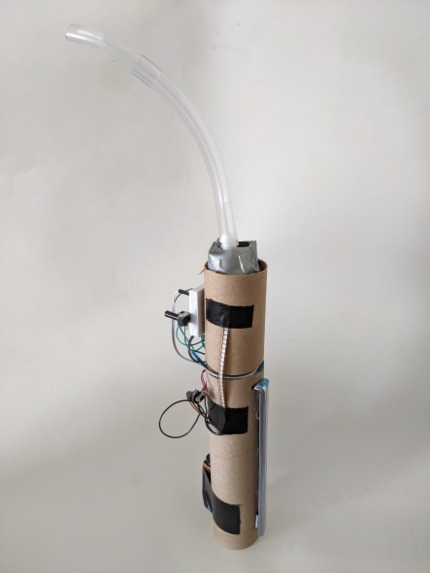
THE walking talkbox
-
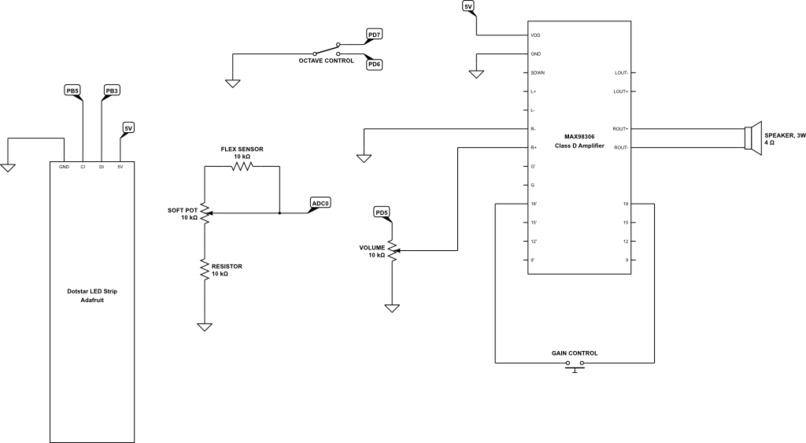
circuit diagram
Inspiration
Talk boxes normally need an additional instrument - what if the talk box was the instrument?
Abstract
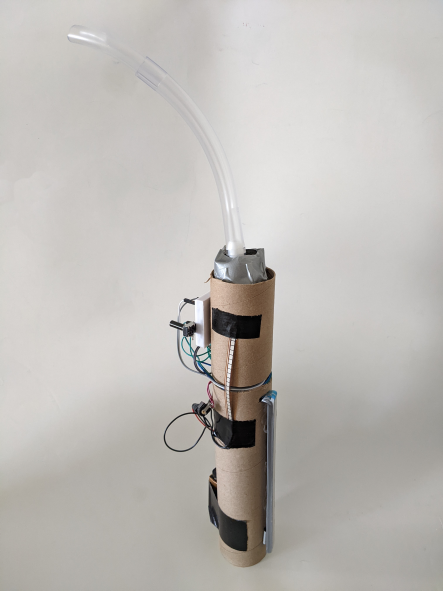
The Walking Talk Box is a self-contained instrument and effects unit designed to take the effects of a standard talk box pedal on the go. It features a slide bar for note control, a knob for volume control, a button for temporary gain boost, a switch for octave control, and a flex sensor to act as a whammy bar. Additionally, the Walking Talk Box is battery powered by a single 9 V battery. It is lightweight and completely portable which is a great success. Its current form in cardboard and duct tape is less than ideal but it functions just as it should. There is room for improvement in terms of waveforms and range, but otherwise it is a very fun instrument to play.
Motivation
A talk box is typically used as a peripheral device in conjunction with another instrument (keyboard, electric guitar, etc.). This requires you to own two devices in order to create sounds and music with the talk box. I want to create an instrument that uses talk box technology but does not require an input from a separate instrument. Rather, the talk box will be incorporated into a handheld instrument. The slide bar is also a way to make the talk box more accessible as it is a simple way to understand note selection.
Goals
Milestone 1
A (mostly) completed “works-like” model. Input to the ribbon controller will result in corresponding notes. The volume and gain knobs will adjust volume and gain when turned. The octave control button will double or halve the frequency accordingly. At this point I anticipate still using a wall plug as the energy source. A mock-up of the physical design will be completed and early prototypes created.
Final Demo
Solving the power management and switching to battery power. All the components will be organized to fit within the body/casing that will be finished. The speaker will be attached to the tube and sealed in to create the talk box effect. Any stretch goals (whammy bar, discrete mode, downloadable sounds, and charging stand) will be attempted once these previous goals have been met.
Methodology
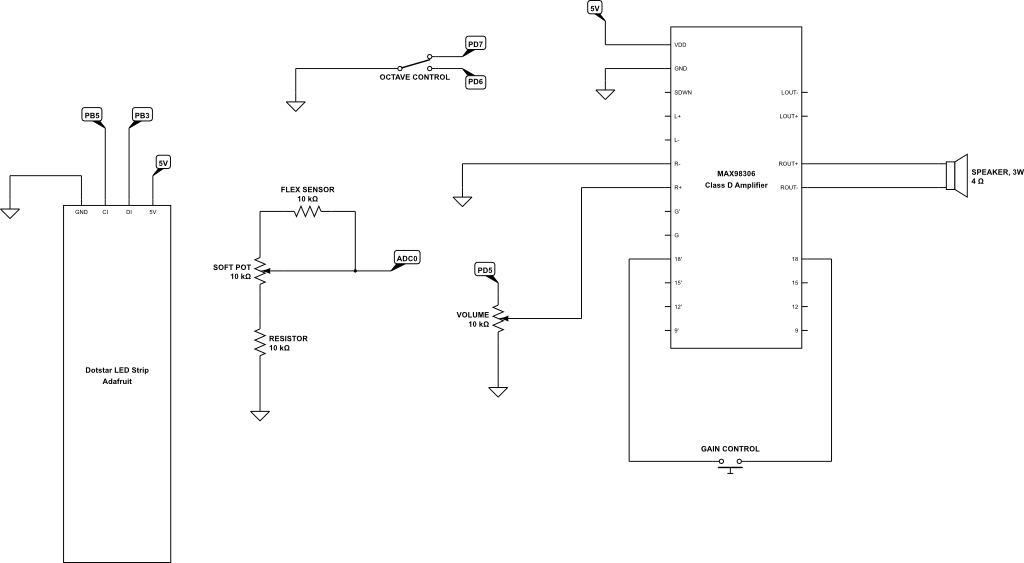
I began by taking the analog input from the soft potentiometer and determining a range for possible notes. Once the range was determined I connected the speaker and fine tuned the range to frequencies that sounded more pleasant. I then tried to incorporate another analog input for volume control. I achieved this by toggling between ADC pins on the Arduino to constantly check each pin. This resulted in a very clunky output so I switched to using a potentiometer as a hardware volume knob. This reduced the load on the microcontroller and made the volume control much smoother. I attached a two-state switch to toggle between octaves. This was done by polling the pins attached to the switch at the start of each loop and changing the clock select bits accordingly. The next challenge was to make it so notes would only play when the soft potentiometer was touched. I first tried using a button that would trigger an interrupt to turn the speaker on when pressed. This worked but proved very inconvenient. I next tried using a force sensor and even a makeshift capacitive touch sensor, but nothing worked quite how I wanted. I then found that by enabling the internal pull-up resistor on the analog pin I was using and rearranging the wiring of the soft potentiometer, the ADC would always read high unless it received an input. I also wanted to include a method to adjust the gain. The amplifier that I chose to use for my speaker used jumpers to switch between discrete gain values. I noticed that the biggest difference was between the lowest gain and the highest gain, so I determined it was enough to add one button to act as a jumper that would activate the highest gain when pressed. After that the challenge was using the LED strip. I wanted the soft potentiometer to appear to light up where you touched it so I used an LED strip with a very dense distribution of LEDs. I wrote my own library that used bit-banging to turn on and off specific LEDs. Finally it was time to add the whammy bar. I used a flex-sensor for this feature. I was not interested in trying multiple analog inputs again so I decided to set it up in a similar fashion to the volume knob. I attached the flex sensor between two of the soft potentiometer pins and found that the sitting resistance threw off the analog input by quite a lot. So to the other pin of the soft potentiometer I attached a resistor that matched the resistance of the flex sensor. The addition of battery power was simply as everything was functioning just fine powered from the Arduino’s 5V pin. I connected a 9V battery via barrel jack to the input voltage and it worked smoothly. With everything wired correctly I made the bold decision to solder it all to a protoboard as well as switch to an Arduino Nano. Since the Nano also uses an ATmega328P the transition was very smooth. I decided to switch so I could fit everything into a smaller housing. However, the space I had been using to fabricate the housing was closed early due to rising COVID rates and so I resorted to using cardboard and other materials I could get my hands on quickly. Then a positive COVID test for me interrupted the soldering and I was left with even fewer resources. I was able to create something that is mostly contained and captures the general vision I was going for.
Results
In the end I had an instrument that makes music. It is controlled by a slide bar that lights up where you press it. Volume and gain can both be adjusted. You can switch between two octaves. You can even bend the instrument to create a whammy bar effect. And of course, the speaker is well insulated and attached to a tube which successfully creates the talk box effect. It’s even battery powered and completely portable. And to top it all off it is very, very fun to play.
Conclusion
I learned a lot about analog inputs from this project. Specifically I learned how difficult it is to have simultaneous analog inputs with only one ADC on the ATmega328P. From this I learned how analog devices can instead be wired directly into the hardware to change inputs and outputs. This made the programming much simpler and the output was just as good, if not better. I also learned a lot about SPI and different forms of serial communication. In the end I did decide to just bit-bang the LED strip because it required simpler code. Additionally, I learned that sometimes the most elegant solution is the simplest. For example, instead of attaching several analog inputs, having them each run through each other reduced the amount of code and improved the quality of the output. I am very happy that I met all of my base goals. I even met one stretch goal. I am most proud of making an instrument that is fun to play. I was essentially able to achieve my vision (at least function-wise) that I had at the beginning of this project. The LED strip was a surprise challenge and I was that close to giving up on it and just attaching LEDs to all of the remaining pins. But with a little extra research and some elbow grease I was able to learn about bit-banging and successfully write my own library. I could have managed my time better as far as the physical appearance of the project goes. I had all of the basic functions ready to go at or shortly after the midterm demonstration. I kept putting off the physical design of it until I had all the perfect functionality, but that led me to making it out of a cardboard tube and duct tape. An obvious next step would be to create a better housing. It would need to be semi flexible to retain the whammy bar effect. Another next step could be to better refine all of the inputs and outputs. It works really well as is, but it needs some serious fine tuning before it can feel like a real instrument.
References
Arduino source code for shiftOut function used as a basis for part of my LED strip library.
Built With
- atmega328p
- c


Log in or sign up for Devpost to join the conversation.