
wakuwaku
Inspiration
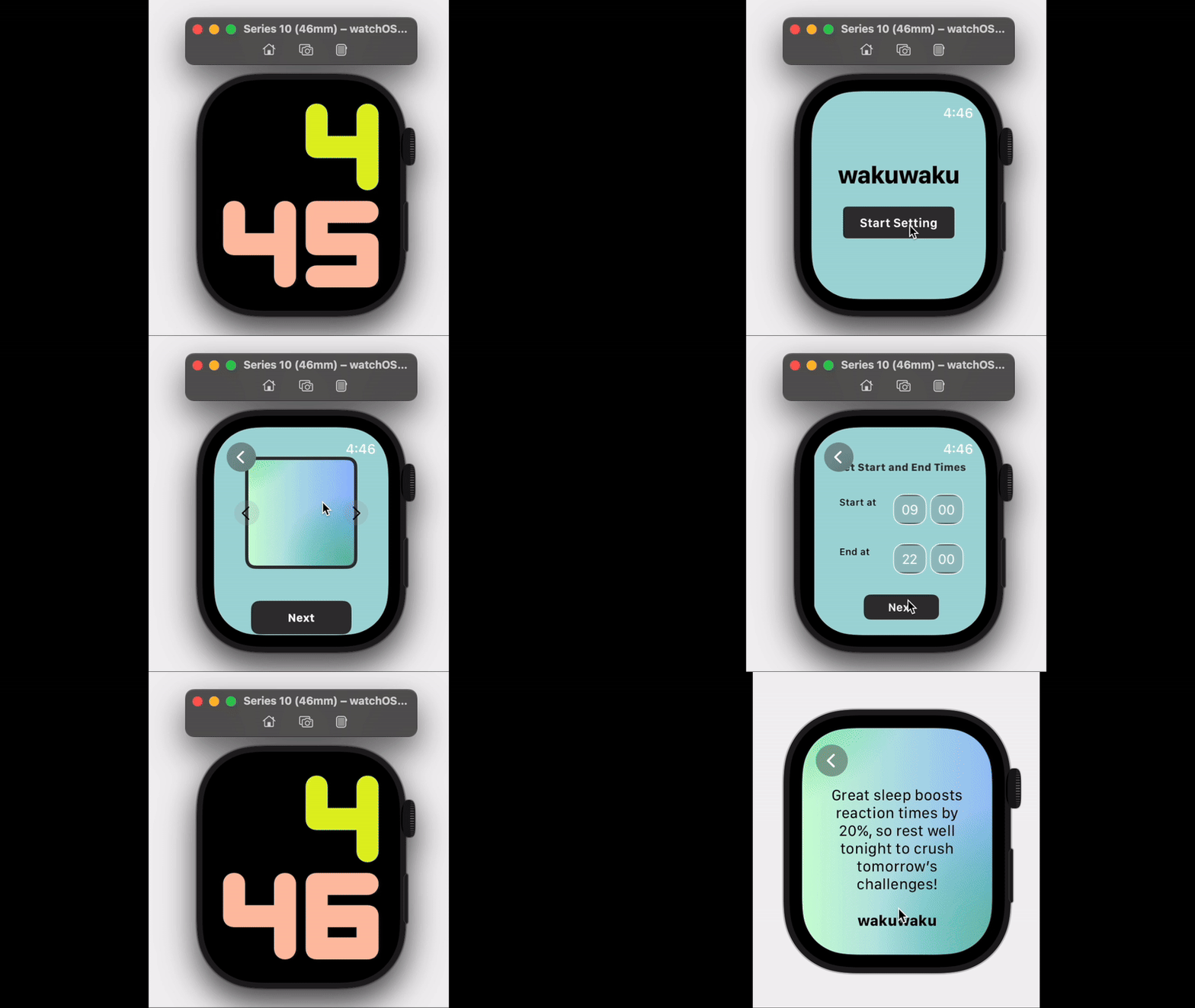
Earlier this year, my mom excitedly bought a health calendar with daily wellness tips from her favorite influencer. While she loved it, she often forgot to check it. I realized her Apple Watch, which she uses daily to track her health, could be the perfect platform to deliver those tips—timely, personalized, and convenient. This sparked the idea for wakuwaku, a fun and simple app to make wellness tips easily accessible through notifications on your wrist.
What it does
wakuwaku delivers bite-sized, actionable health tips directly to your Apple Watch. Users can:
- Choose from categories like Stress & Anxiety, Sports & Sleep, or Nutrition.
- Customize their app’s appearance with a personalized wallpaper.
- Set the frequency and timing of notifications based on their schedule.
The app ensures users receive timely, personalized wellness tips tailored to their needs.
How we built it
Tech Stack:
- Programming Language: Swift
Frameworks:
- SwiftUI: For building the user interface.
- WatchKit: For managing the application lifecycle and interactions with the watchOS environment.
Environment:
- Xcode: The primary IDE used for development.
- Apple Watch Simulator: For testing and previewing watchOS applications.
We started by designing the user flow, from category selection to personalized notifications. Using randomized health tips stored in an array, we implemented dynamic notifications and a customizable user interface.
Challenges we ran into
- Designing a compact yet engaging user experience for the small Apple Watch screen.
- Ensuring efficient notification scheduling to deliver tips at the right time.
- Balancing personalization while maintaining simplicity in the app setup process.
The biggest challenge was being completely new to Swift and the Apple development ecosystem. We had to start from scratch, learning how to use Xcode, SwiftUI, and WatchKit. While we were familiar with coding websites, this hackathon became an opportunity to challenge ourselves by learning a new language and building for a platform we had never worked with before.
Accomplishments that we're proud of
We are proud of:
- Building a functional Apple Watch app from scratch in a language we had never used before.
- Creating a clean, user-friendly interface that works seamlessly on the small Apple Watch screen.
- Successfully implementing personalized health tips and dynamic notifications.
What we learned
- How to use Swift and Xcode to build apps for watchOS.
- The basics of SwiftUI and WatchKit, including handling notifications and app lifecycle management.
- The importance of designing intuitive and efficient user experiences for small screens.
What's next for wakuwaku
In the future, we plan to:
- Leverage Machine Learning: Use models such as Core ML or TensorFlow Lite to analyze user preferences and health data for tailored tips.
- Expand Content: Increase the tip database to include more categories and add multilingual support.
- Gamification: Add features like streaks or badges to encourage consistent use.
- Develop an iPhone Companion App:
- Allow for enhanced customization and analytics.
- Include a "Save" functionality in the watchOS app to let users save valuable tips. These saved items can later be accessed on the iPhone app, which will provide extended content such as detailed articles and videos for a more comprehensive experience.
- Allow for enhanced customization and analytics.
- Cloud Integration: Use services like Firebase or AWS to store user preferences and ensure a seamless experience across devices.
- HealthKit Integration: Sync and analyze user activity, sleep, and fitness data to provide dynamic, data-driven wellness tips.
wakuwaku is just getting started, and we’re excited to see how we can make wellness accessible, personalized, and engaging for everyone!
Built With
- swift
- swiftui
- watchkit

Log in or sign up for Devpost to join the conversation.