-
-
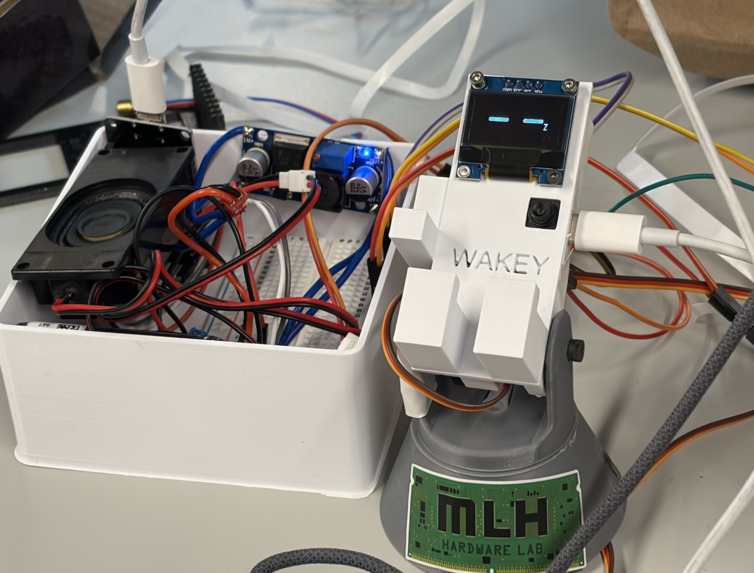
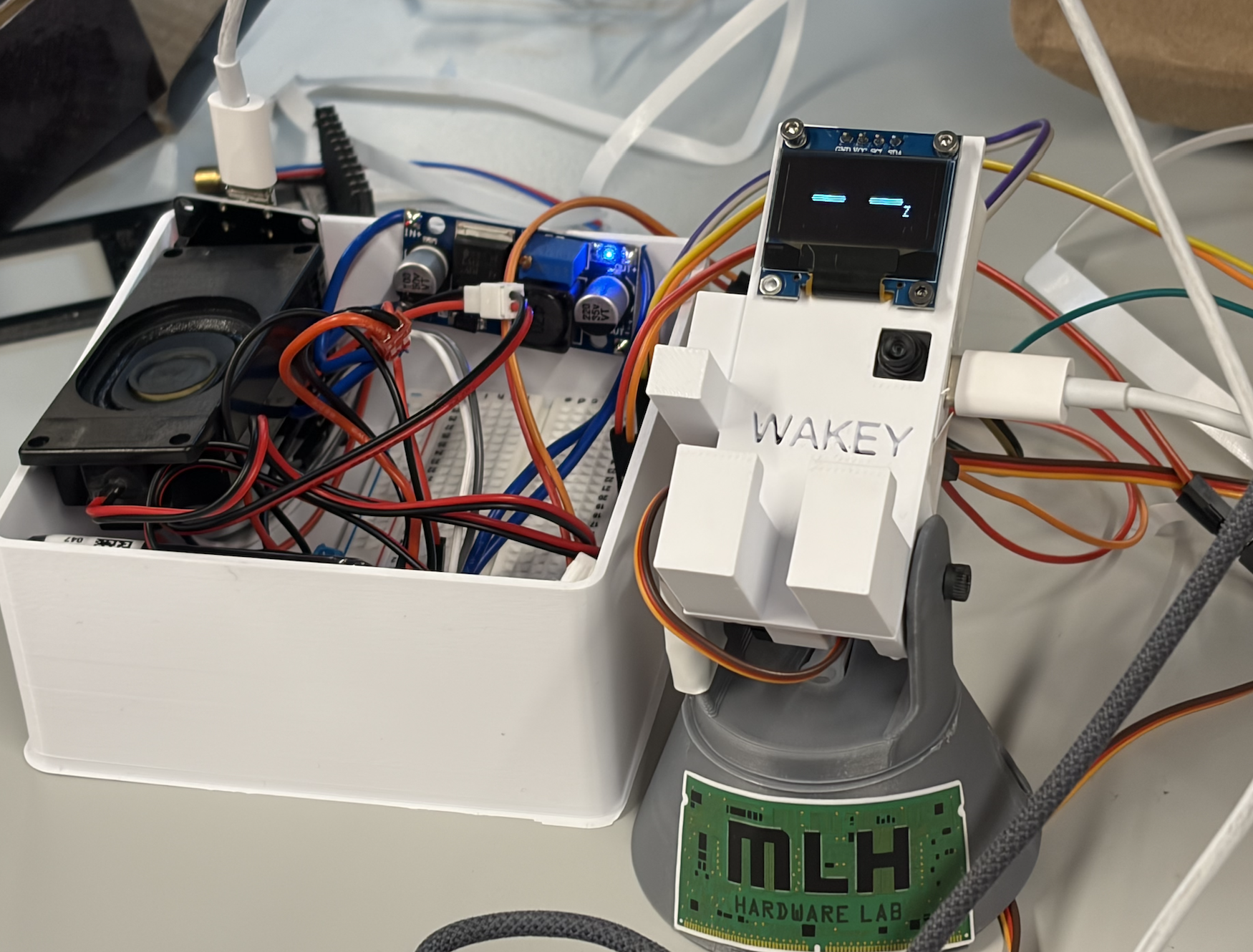
WAKEY (desk-robot)
-
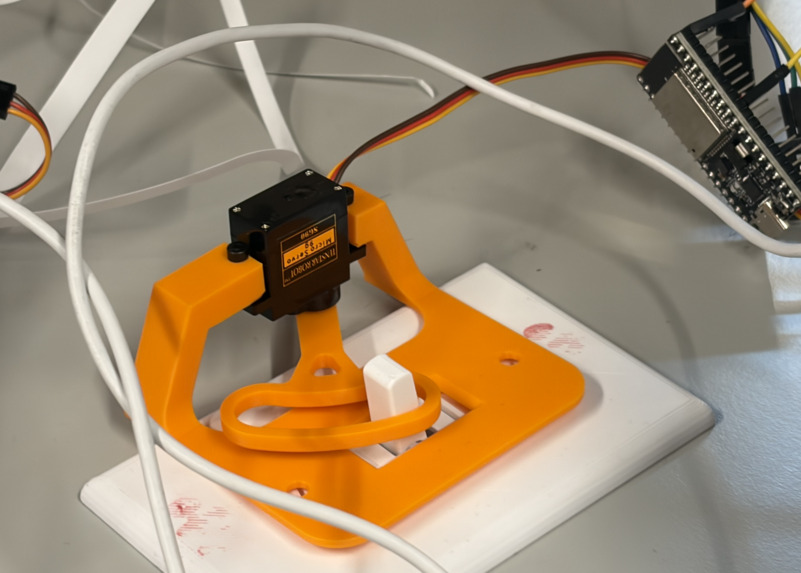
The Smart Light Controller & Key Hanger
-
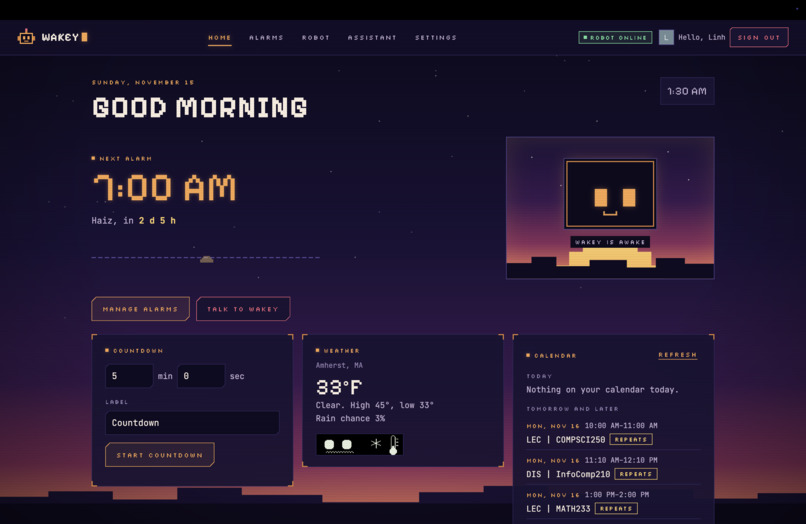
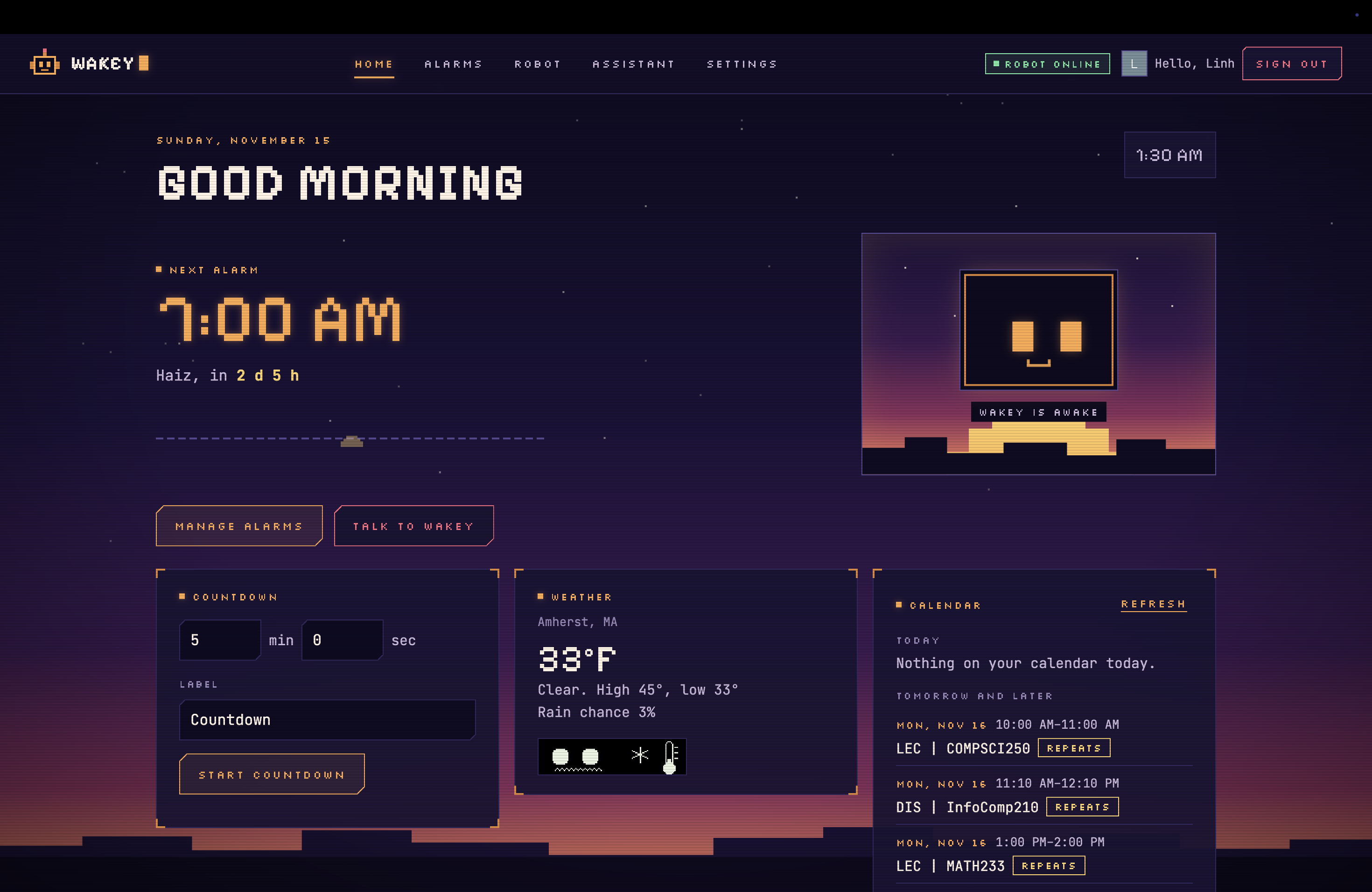
Web dashboard
Inspiration
We've all been there. It's 8:30 AM, class has already started, and we're still in bed because hitting the snooze button was just too easy.
As college students who constantly struggle to wake up for early classes, we wanted to build an alarm that we couldn't simply turn off and go back to sleep. That's how WAKEY was born!
Instead of letting you silence the alarm with a single tap, WAKEY challenges you to get out of bed, find a randomly selected object, and show it to the robot's camera. And to make sure you're really awake, it turns on your room lights too!
But we didn't want WAKEY to be just another alarm clock. We wanted it to be a cute little desk companion that could help us throughout the day, whether that's reminding us about upcoming classes, answering questions, playing music, or keeping us company during late-night study sessions.
We also wanted to solve another problem almost every dorm student knows: leaving your room without your keys.
Our goal was simple: make waking up less miserable, prevent those annoying everyday mistakes, and make student life a little more fun!
What it does
WAKEY is a smart dorm companion consisting of two connected components: a desk robot and a wall-mounted smart light controller with an integrated key hanger.
1. The Desk Robot
The main robot sits on your desk and combines an interactive alarm, personal assistant, and mini AI study buddy.
- Object Recognition Alarm: Instead of pressing snooze, you must find and show WAKEY a randomly selected object. The alarm won't stop until the object is recognized, encouraging you to actually get out of bed.
- Pan-Tilt Head Movement: WAKEY features a two-axis pan-tilt mechanism powered by two servo motors. Its head can rotate horizontally and tilt vertically, giving it a wider viewing range and more expressive movements.
- Smart Light Control: The moment the alarm goes off, WAKEY wirelessly activates a servo mounted near your light switch to turn on the room lights. This also solves a hardware limitation: our ESP32 camera struggles to recognize objects in low-light conditions.
- Personalized Morning Briefing: After you complete the alarm challenge, WAKEY uses the Google Calendar API to check your upcoming events and help you prepare for the day.
- AI Chatbot & Study Buddy: You can talk to WAKEY, ask questions, and use it as a little companion while studying.
- Audio Interaction: WAKEY uses a speaker and digital audio amplifier for alarm sounds and spoken responses.
- Customizable Desk Decoration: Its cute design, OLED display, expressive movements, and interchangeable accessories make WAKEY something you'd actually want to keep on your desk.
2. The Smart Light Controller & Key Hanger
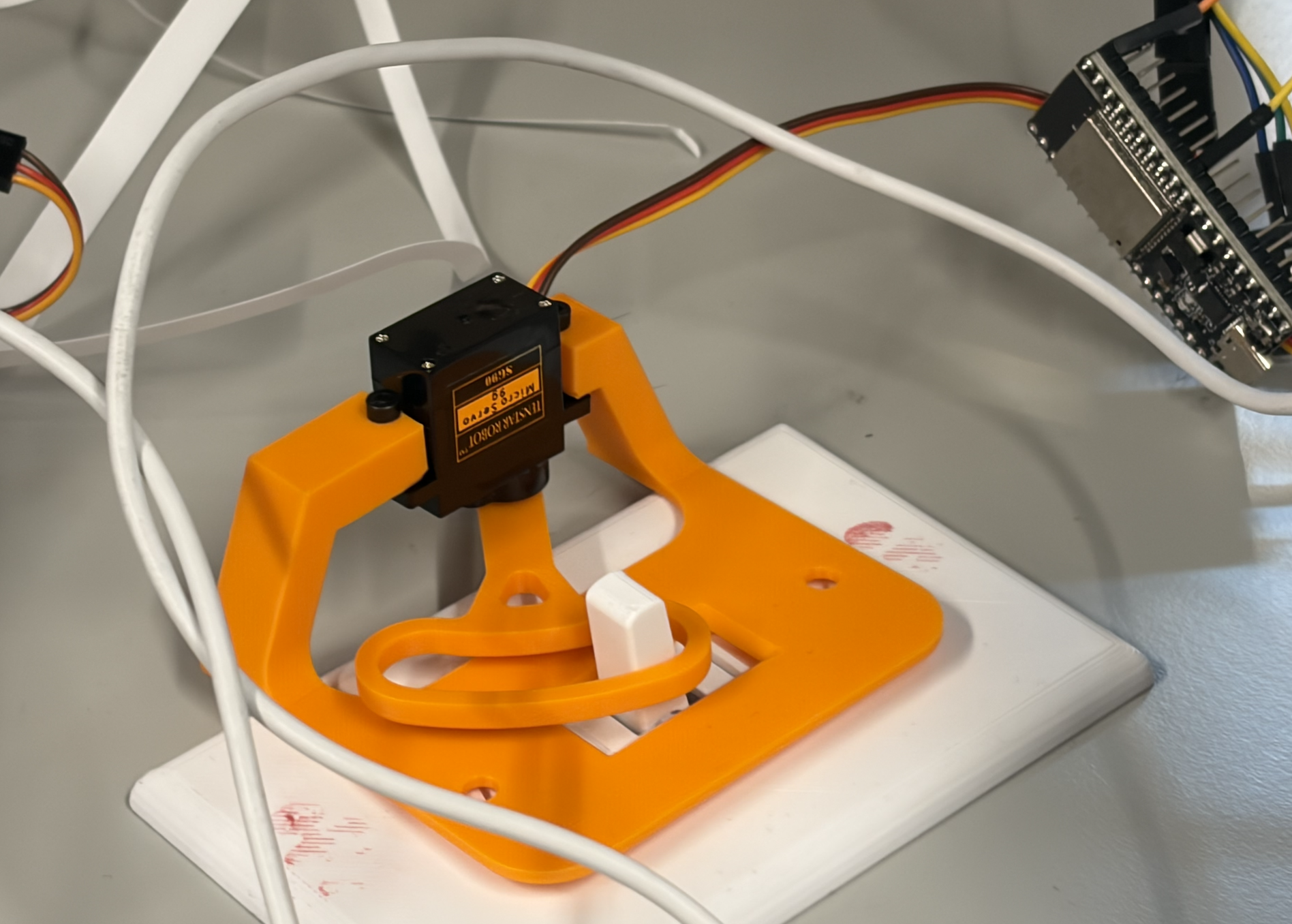
The second part of WAKEY originally started as a simple servo mechanism that could physically flip a dorm room light switch.
But we realized we could make it even more useful by turning it into a smart key hanger.
Our system combines a Hall effect sensor, magnetic keychain, and laser-based sensor.
- Key Detection: The Hall effect sensor detects whether the magnetic keychain is on its designated hanger.
- Departure Detection: The laser-based sensor detects when someone is about to leave the room.
- Forgotten Key Reminder: If WAKEY detects that you're leaving while your keys are still on the hanger, it reminds you to grab them.
- Automatic Light Control: When you take your keys to leave, WAKEY can automatically turn off the room lights.
This turns two everyday actions, remembering your keys and turning off the lights, into one simple routine.
And because the system physically operates the existing light switch, it doesn't require modifying the dorm's electrical wiring.
How we built it
WAKEY combines embedded hardware, computer vision, wireless communication, 3D printing, AI, and web development.
Hardware
Main Robot
The main robot is built around a Seeed Studio XIAO ESP32-S3 Sense, a compact microcontroller with a camera for capturing images used in object recognition.
We implemented a two-degree-of-freedom pan-tilt mechanism using two servo motors. One controls horizontal rotation, while the other controls vertical tilt, allowing WAKEY to move its head and adjust the camera's viewing direction.
We also integrated:
- OLED Display (I2C): Displays the clock and robot expressions.
- MAX98357A I2S Class-D Audio Amplifier: Converts digital audio from the ESP32 into amplified speaker output.
- 4Ω 3W Speaker: Plays alarm sounds and spoken responses.
- Adjustable DC-DC Buck Converter: Steps down our 7V power supply to approximately 5V for the servo motors.
- 3D-Printed Enclosure: Designed in Autodesk Fusion 360 and fabricated to house the electronics while giving WAKEY its personality.
Smart Light Controller & Key Hanger
The wall-mounted module uses a separate ESP32 connected to a servo motor that physically operates the dorm room light switch.
The main ESP32-S3 communicates with this secondary ESP32 using ESP-NOW, a lightweight wireless communication protocol that allows ESP32 devices to exchange messages directly without relying on a Wi-Fi router.
The key hanger integrates:
- KY-003 Hall Effect Sensor: Detects the magnetic field from a magnet attached to the keychain.
- Magnetic Keychain: Provides a detectable signal when the keys are on the hanger.
- Laser-Based Sensor: Detects departure-related activity.
- Servo Motor: Physically turns the light switch on or off.
Software
We built a web application that allows users to manage alarms, connect their Google Calendar, and interact with WAKEY.
For the alarm system, the ESP32-S3 camera captures images that are processed by our computer vision pipeline to identify the requested object.
We integrated the Google Calendar API to retrieve upcoming events and provide personalized morning briefings.
We also implemented AI chatbot capabilities so WAKEY can answer questions and act as a mini study buddy.
For communication between the desk robot and wall-mounted controller, we use ESP-NOW to send light-control commands wirelessly.
Our goal was to make all these components work together as one connected system rather than a collection of separate features.
Challenges we ran into
This was our first time working with hardware components, and we definitely underestimated how difficult it would be!
1. The camera that almost ruined our weekend
We originally ordered an ESP32 camera from Amazon, but it couldn't be delivered in time for the hackathon.
With no time to wait, we borrowed an older board from a friend. Unfortunately, it was extremely unreliable. Almost every time we flashed new firmware, the board would stop responding, and we'd have to figure out how to bring it back to life.
It was especially stressful because the camera was one of the most important parts of our project.
2. We had 7V, but our servos needed 5V
Another unexpected challenge was our power supply.
We had a 7V power source available, but our servo motors required approximately 5V.
Connecting them directly could damage the hardware, so we learned how to use an adjustable buck converter to step down the voltage.
Getting the power system working reliably was a huge milestone for our team.
3. Our camera couldn't see in the dark
Our ESP32 camera struggled with object recognition in low-light conditions.
Since WAKEY is designed to wake people up in the morning, when their rooms might still be dark, this was a serious problem.
Instead of trying to solve everything through software, we came up with a hardware solution: automatically turn on the room lights when the alarm starts ringing!
We added a second ESP32 and a servo motor to physically flip the light switch.
What started as a hardware limitation became one of WAKEY's most useful features.
4. Making the pan-tilt mechanism work
Building a robot that can move its head sounds simple until you actually try it.
We had to design a mechanism that could support the camera and electronics while allowing smooth horizontal and vertical movement.
We also had to consider servo positioning, power requirements, mechanical clearance, and how to fit everything inside our 3D-printed enclosure.
This taught us that designing a working robot involves much more than simply connecting motors to a microcontroller.
5. Making everything work together
Getting one servo to move or one camera to capture an image was one thing.
Getting the camera, pan-tilt mechanism, OLED display, audio system, ESP-NOW communication, Hall effect sensor, laser sensor, and web application to work together was an entirely different challenge.
We spent a lot of time debugging wiring, firmware, communication issues, and unexpected hardware behavior.
But seeing all these components finally work together made the effort worth it.
Accomplishments that we're proud of
Our biggest accomplishment is that we built a working robotics prototype despite having almost no prior experience with embedded systems!
We're especially proud of:
- Building WAKEY from scratch: Going from a simple idea about missing morning classes to designing, 3D-printing, assembling, and programming our own robot.
- Designing a functional pan-tilt system: Giving WAKEY two-axis head movement and a more expressive personality.
- Wireless light control: Getting two ESP32 boards to communicate through ESP-NOW and physically operate a dorm light switch without modifying the electrical wiring.
- Building a smart key hanger: Combining magnetic key detection and departure sensing to help students avoid forgetting their keys.
- Solving real hardware problems: Learning to use a buck converter, troubleshoot unreliable camera hardware, and work around limited components.
- Combining hardware and software: Integrating camera input, servo movement, an OLED display, audio output, wireless communication, sensors, and a web application.
- Designing something with personality: Making WAKEY a cute, customizable desk companion rather than just a box full of electronics.
What makes us most proud isn't just the technology. It's that we started the weekend barely knowing how to work with these components and ended up building something we could actually interact with.
What we learned
Before this hackathon, most of our experience was in software development. WAKEY pushed us completely outside our comfort zone.
We learned how to work with ESP32 microcontrollers, camera modules, servo motors, I2S audio amplifiers, power converters, sensors, and wireless communication protocols like ESP-NOW.
We also gained hands-on experience with 3D modeling, mechanical design, prototyping, and integrating embedded hardware with a web application.
One of our biggest lessons was that hardware problems can't always be solved by writing more code.
Sometimes you need to rethink the physical design, change the wiring, find a better power solution, or turn a limitation into a new feature.
We also learned how important it is to be resourceful. Whether it was borrowing an old camera at the last minute or figuring out how to power our servos, we constantly had to adapt our plans to the components we actually had.
Most importantly, we learned that building something from scratch is messy, unpredictable, and sometimes frustrating, but incredibly rewarding when it finally works.
What's next for WAKEY WAKEY
We have plenty of ideas for making WAKEY even better!
First, we want to improve the reliability and accuracy of our object recognition system, especially under challenging lighting conditions.
We also want to expand WAKEY's AI chatbot and study buddy capabilities, making conversations more natural and allowing it to provide more personalized assistance throughout the day.
We'd love to integrate Spotify more deeply into the morning routine, allowing WAKEY to play personalized playlists when you wake up.
On the hardware side, we want to improve the pan-tilt mechanism, add more expressive movements, and create interchangeable accessories so users can customize their own WAKEY.
We also want to refine our smart key hanger and light-control system to make it easier to install in different dorm rooms.
Eventually, we hope to make WAKEY an affordable, customizable desk companion that helps students stay organized, build better routines, and actually make it to their 8:30 AM classes.
Because if we can't stop ourselves from hitting snooze, maybe a cute little robot can. 🤖❤️
Built With
- api
- camera
- esp
- gemini
- sensor


