-
-
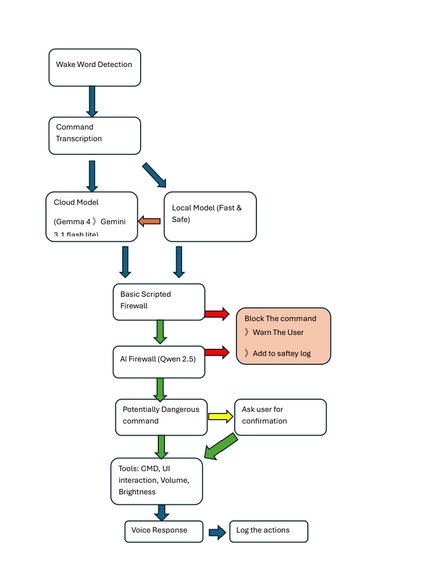
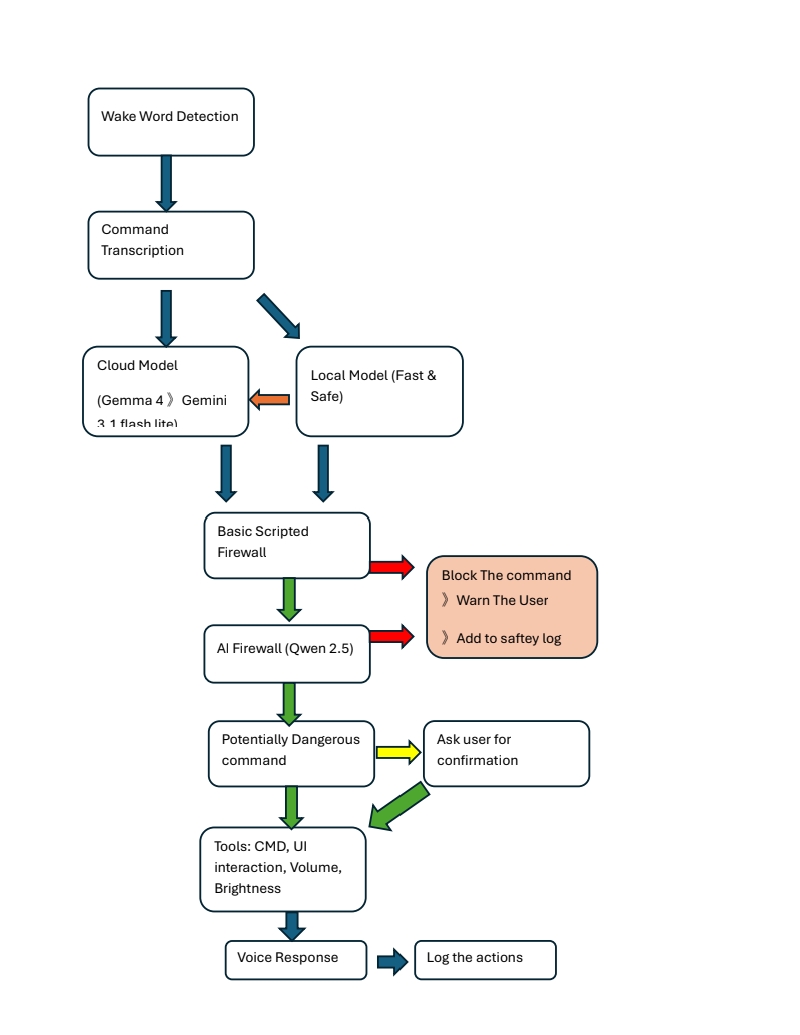
Flowchart
-

UI

Inspiration
Wakey began with a simple observation from everyday life. My grandmother, like many older adults, often struggles with modern digital systems even when essential services depend on them. Tasks such as booking appointments, understanding notices, completing forms, or navigating websites can become frustrating and exhausting.
That made us ask a broader question: what if technology adapted to people instead of expecting people to adapt to technology?
We wanted to create a system where users could simply speak naturally in their preferred language and receive guided, accessible help interacting with digital systems. That idea became Wakey.
What it does
Wakey is an accessibility-first AI operating layer that helps individuals with physical disabilities, cognitive issues, severe digital illiteracy or extreme stress ,understand information, navigate complex digital services, and act independently through safe, human-controlled interaction.
Wakey combines multimodal understanding, accessibility adaptation, and local execution to reduce digital friction.
Core capabilities include:
- Understanding information displayed on screen
- Breaking down complex content into clear steps and checklists
- Navigating websites and digital services
- Filling non-sensitive form fields through guided interaction
- Creating actionable task lists
- Supporting multilingual interaction
- Adapting behavior through accessibility personas
- Enforcing confirmation before sensitive actions
Rather than replacing human decision-making, Wakey assists users in moving from confusion to understanding and action.
How we built it
We started from user experience rather than implementation.
Instead of beginning with technical architecture, we first imagined how a user would naturally interact with the system and designed workflows around accessibility, simplicity, and independence.
Development progressed through multiple stages:
Phase 1 — Core Interaction
Basic voice interaction and local command execution.
Phase 2 — Safety & Guardrails
Implementation of execution restrictions, monitoring, confirmation controls, and auditing.
Phase 3 — Interface Interaction
Allowing Wakey to understand and interact with on-screen components through structured UI understanding.
Phase 4 — Accessibility & Language
Adding multilingual support and accessibility-focused behavioral adaptation.
From there, the project expanded through iterative refinement into multiple advanced phases (up to 8 advanced versions) focused on reliability, responsiveness, and user autonomy.
Challenges we ran into
One major challenge was reliability.
Cloud models behaved inconsistently and occasionally encountered server failures or changing behavior. To improve resilience, we introduced failover strategies and routing logic to maintain continuity.
Latency was another challenge. Cloud-based reasoning introduced delays that reduced usability. We addressed this by routing lightweight interactions locally and reserving larger models for more complex reasoning tasks.
Testing safety systems also became unexpectedly difficult. As modern AI models became increasingly resistant to unsafe requests, triggering our own security layers consistently became challenging. This pushed us toward layered safety rather than relying on a single control mechanism.
Another challenge was maintaining accessibility while preserving user control. We wanted to avoid creating systems that either automate too aggressively or interrupt users constantly with confirmations.
Accomplishments that we're proud of
We are proud that Wakey evolved from a small prototype into a complete accessibility-focused system through multiple iterations.
Some accomplishments include:
- Building a multimodal interaction pipeline
- Creating a layered safety model with human confirmation
- Designing accessibility personas
- Supporting multilingual interaction
- Enabling guided website navigation
- Creating resilient failover behavior across AI systems
- Maintaining local responsiveness for everyday interactions
- Recording audit logs while preserving user privacy controls
Most importantly, we built a system that attempts to increase independence rather than replace users.
What we learned
This project taught us that good AI systems are not only about stronger models.
We learned how model routing, tool specialization, and execution boundaries can significantly improve responsiveness and reliability.
We also learned that accessibility is not a feature added at the end—it must shape architecture decisions from the beginning.
Another major lesson was that safety and usability often need to be balanced together rather than optimized independently.
What's next for Wakey
Our next goal is to continue improving precision, accessibility, and portability.
Future plans include:
- Wakey Base 2: a hybrid architecture using lightweight on-device understanding combined with cloud reasoning
- Improved UI understanding and action validation
- Expanded cross-platform support across Windows, macOS, and Linux
- Automated detection of language and accessibility modes
- Developer SDKs to make accessibility features easier to integrate into external applications
Our long-term vision is to help make digital systems easier to access, understand, and use for everyone.


Log in or sign up for Devpost to join the conversation.