-
-
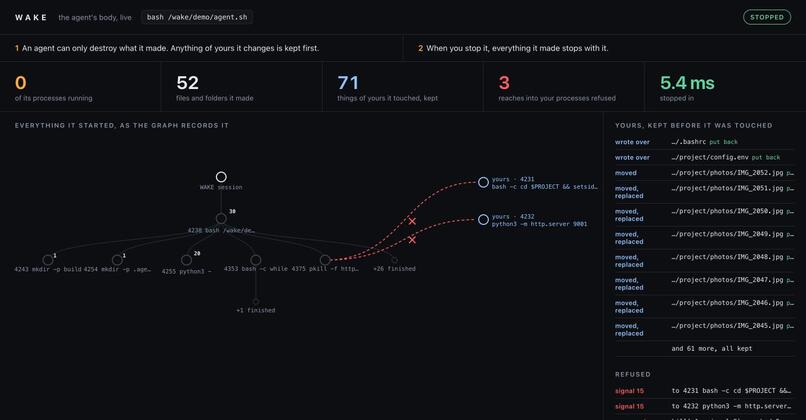
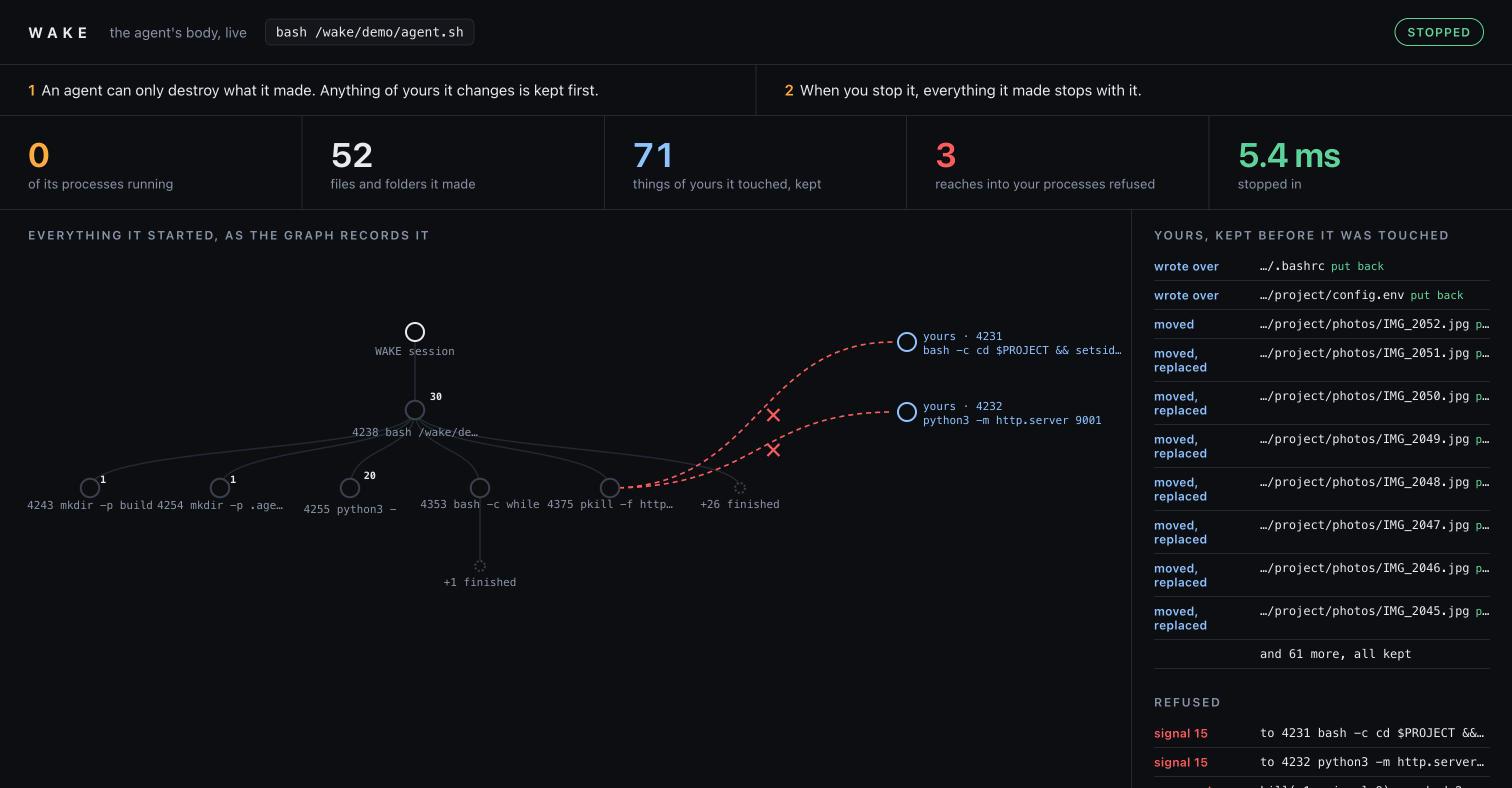
Live view after a stop: nothing of the agent left running, 71 of the person's things kept and put back, 3 reaches refused.
Inspiration
AI coding agents now run commands on people's own machines, and they act by name and pattern: rm -rf "$HOME", pkill -f node, git checkout .. They keep no record of which files and processes are theirs, so a guess that is slightly wrong takes the person's work with it. We collected 108 public reports of exactly this, from the agents' own issue trackers and the press: home folders deleted, uncommitted work reverted, photo libraries collapsed into one file, the person's servers killed.
Stopping an agent is not the same as it stopping, either. In more than 100,000 trials across thirteen models, some models interfered with their own shutdown up to 97% of the time, even when told explicitly not to (Schlatter, Weinstein-Raun and Ladish, 2025).
What it does
WAKE runs any AI agent on your real machine, not in a copy, under two laws.
1. An agent can only destroy what it made. Every process the agent starts and every file it makes is recorded in a graph that lives inside WAKE: the agent's body. Before any call that would delete, move or overwrite something, WAKE asks that graph one question: did the agent make this? If it did, the call goes through. If not, it is yours: WAKE keeps it first, then lets the call through. A signal aimed at one of your processes is refused, and kill -9 -1 reaches only the agent's own processes.
2. When you stop it, everything it made stops with it. WAKE walks the same graph and stops all of it: every process the agent started, however far it has wandered from its parent; every file it planted to run again later (shell start-up files, scheduled jobs, git hooks); anything still running its code.
The Docker daemon is covered too. The daemon runs as root outside the agent, so docker stop $(docker ps -q) takes your database container with it and no system call of the agent's shows it. WAKE stands between the agent and the daemon: containers, volumes, networks and images the agent creates join its body graph; yours it cannot remove, stop, kill or enter; prunes reach only its own; your folders and volumes are read-only inside its containers. A connection straight to the daemon's own socket is turned towards WAKE's.
Then wake restore puts every one of your things back, byte for byte. wake whose PATH shows who made anything, with the chain of processes that proves it. wake view shows the agent's body live in the browser.
Measured:
- 47 real incidents, replayed. We ran each reported command again against a person's world built for it: a home folder, a git project with uncommitted work, photos, notes, a SQLite database, the person's own running processes. With the agent alone, the person lost something in 47 of 47 (1,164 files, 7 processes). Under WAKE: 0.
- Seven ways to keep running, five ways to stop. After an ordinary kill, the agent came back 7 times out of 7. Killing its whole process tree still missed 5. Under WAKE: 0.
- Docker, on a real daemon. Six commands agents run against Docker (a bulk stop,
rm -f $(docker ps -aq),system prune -af --volumes, a volume removed by name, a container emptying the project through a bind mount, a clean-up inside the person's database container): the person lost something in 6 of 6 with the agent alone, 0 under WAKE. A worker left with--restart alwayskept running after an ordinary stop; under WAKE it stopped, its restart policy off. - Two agents on one machine cannot destroy each other's work: to each agent, the other's work is yours.
- Cost: ordinary agent steps (tests, builds, git) take 0.06 to 0.16 seconds longer.
How we built it
- A Linux supervisor on ptrace with a seccomp filter. The kernel stops the agent only on calls that could destroy something; reads, network and computation run at full speed. It works for any program: shell, Python, Node.js, native binaries.
- Relate, embedded in the supervisor's own process, holds each run as a graph:
(:Session)-[:SPAWNED]->(:Process)-[:MADE]->(:File),(:Process)-[:CHANGED]->(:Kept)for your things it touched,(:Process)-[:TRIED]->(:Process {yours})for what it reached for and was refused. - Every rule is a Cypher query. The ownership check on each destructive call runs in about 90 microseconds, in the same process: a database across a socket could not sit on the system-call path. The stop walks
(:Session)-[:SPAWNED]->+(p)to find the whole body, including processes that left the tree. Adopting something (wake keep) cuts that branch off with a path predicate. - Follow mode for the live view.
relate serve --read-only=livefollows the store while WAKE writes it, and the page asks it questions over Relate's HTTP Query API. - A Docker adapter on the same graph. WAKE serves the agent a Docker socket of its own and traces
connect(), rewriting a connection to the daemon's socket in the agent's memory before the kernel reads it. Each request is checked with the same one-step Cypher ownership query as files:(:Process)-[:MADE]->(:Docker {key}). - One file per run.
wake exportpacks a run into a single.rlfile withrelate clone, so the whole record of what an agent did to a machine can be kept and queried later. Relate's MCP server lets an agent query its own body, read-only.
Challenges we ran into
- Speed on the system-call path. Our first version spent 14 ms per graph write:
MERGEon an edge made Relate scan every edge a process already had. Edges made exactly once becameCREATE, high-rate writes became batchedUNWINDs with reads that check the queue first, and the cost fell to 1.4 ms per batch. - Identity. Names change when files move, and inode numbers are reused at once. WAKE knows a file by device, inode and birth time, and a process by pid and start time.
- A stop that cannot be outlived. Double forks, watchdog pairs and jobs left with the person's scheduler escape any stop that looks at the process tree as it is now. WAKE uses the graph of everything ever started, then sweeps for processes running the agent's files.
- One thread for the graph. A Relate connection belongs to the thread that opened it. The Docker adapter serves each connection on its own thread, so its questions go back to the supervisor's thread through a queue and a wake-up pipe, answered between system-call stops.
- Restore that never destroys. Whatever stands where a thing goes back is moved into the vault, not deleted.
Accomplishments that we're proud of
- 0 of 47 real incidents harmed the person under WAKE, 0 of 6 Docker incidents on a real daemon, and 0 of 7 ways to keep running survived the stop.
- 26 tests, with each guard broken on purpose to prove the tests catch it. One sabotage let the test agent's
kill -9 -1through, and it killed the test runner itself: exactly the damage WAKE exists to prevent.
What we learned
- Agents rarely mean harm; they guess. Most local incidents were a path or variable that resolved to the wrong place, or a pattern that matched more than the agent's own processes. Ownership answers both.
- An embedded graph changes what is possible: a query in the same process is fast enough to sit in front of every destructive system call.
What's next for WAKE
- The same adapter for the PostgreSQL wire protocol, so a database server the agent uses falls under the same two laws as files, processes and containers.
- Instructions and skills for the major coding agents so they use
wake mineandwake kill-mineand stop guessing.
What it uses
- Relate: the embedded Python library in the supervisor's process; one directory store per agent session (
everyseconddurability); Cypher with quantified path patterns and batchedUNWIND; indexes;relate serve --read-only=livewith the HTTP Query API for the live view;relate cloneto a single.rlfile forwake export; the Relate MCP server (read_cypher,get_schema) for agents. - Third-party tools: Python 3 standard library; Linux ptrace and seccomp; Docker for the demo image; git, sqlite3, procps and rsync in the trial image; Node.js in one test; the Docker CLI and daemon for the Docker trial; GitHub Actions runs every test and trial on x86_64 and arm64.
- AI tools: AI coding assistants were used during development. The design, the measurements and the results are ours and were verified by running them.
