-
-
Logo
-
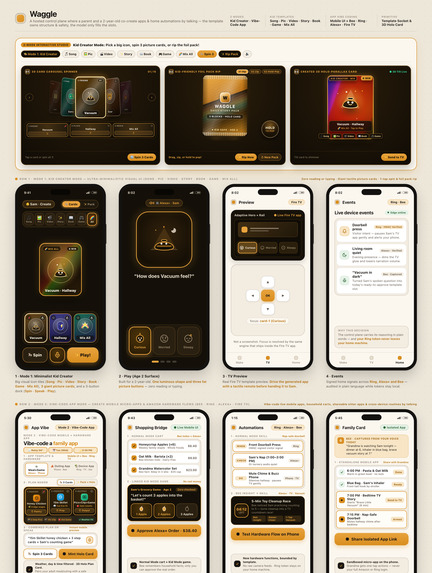
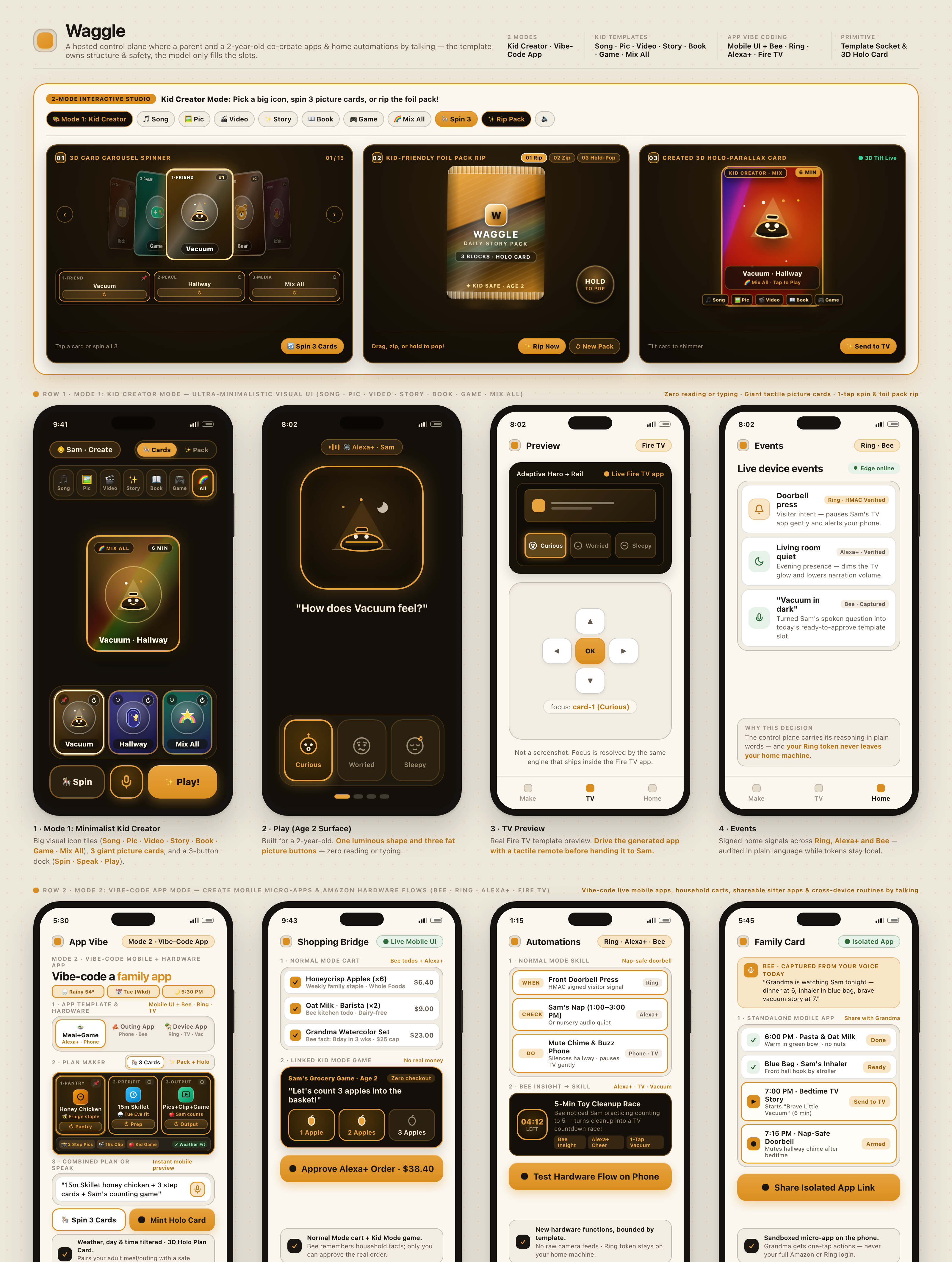
UX/ UI mockup of both modes
Inspiration
I was excited by Amazon's new Bee and wanted non-developers to be able to extend it and build apps for it. I have a young son, so using Alexa as the interface to vibe code those apps felt natural.
Then I asked, why stop at Bee? Waggle builds for the whole Amazon ecosystem: Alexa, Fire TV and Ring, with Bee feeding ideas in. You can make standalone apps, or ones tightly integrated with the hardware.
The most fun part came next. My son is too young to read or write, but he's fine with short commands and pressing buttons. So I added a mode designed for young children, to encourage their talking and creativity.

* An asterisk marks anything simulated, proposed or not built today. The list is at the end.
What it does
Waggle has two modes on one control plane. In both, nothing reaches a screen or a device until a parent approves it. To see both from the user's side, walk through the user-experience demo.
App Mode (vibe code)
You say what you want your home to do, and Waggle builds it for Alexa+*, Ring* and Fire TV*.
What it makes today (two templates):
- Routine (WHEN → CHECK → DO): "when the doorbell rings and nobody's home, announce it on Alexa and pin it to the Fire TV."
- Family / Sitter Card: a shareable card with the schedule, house rules and emergency contacts, for a sitter, a guest or a carer.
Developers also get a real Fire TV app project (React Native for TV).
How it works:
- You say it out loud* or type it.
- Waggle picks a template and fills its slots.
- A checker validates the draft.
- You approve it.
Guardrails:
- Each template fixes its permissions and budget cap.
- Routines can only use a closed list of triggers, checks and actions.
- Nothing with an outside effect happens until you approve it.
- Your Ring token never leaves your own machine.

Kids Mode
You and a child make a story or learning game, and it plays on the TV*.
What it makes: a narrated, interactive story from one of six templates, such as counting, letter hunt and feelings. It's for ages 2 and up, with pictures and voice.
How it works:
- You say the idea and pick a learning goal.
- You preview it on your phone and approve it.
- The child plays it with the remote on Fire TV*. An Echo Show with a remote (the 15 and 21) should work too*.
Want to play one yourself? Open the live app.

How we built it
How the pieces fit, step by step, is in the technical demo. The code is public: github.com/diydan/waggle.
- One Cloudflare Worker for everything. A single Hono Worker serves the MCP server, the phone studio, the TV page, the Ring webhook receiver and the Alexa+ bridge*. State lives in D1 with
tenant_idon every table. A Durable Object per household owns the connection to its edge runner. Private R2 holds media, and a Queue runs media generation in the background. - Templates own the structure, and models only fill the slots. The same flow serves both modes:
- Plan: a template is picked from the goal and age.
- Fill: the slots come from fixed word lists. An optional model pipeline (Claude Sonnet 5.5 plans and reviews, MiniMax writes) is built but off in the public demo*.
- Check: our own code validates the result.
- Approve: a person approves before anything happens.
- App Mode runs on a closed vocabulary. A routine can only use the triggers, checks and actions that exist. A draft that names anything else is rejected before a person ever sees it.
- Ring, the careful way. Webhooks are verified with HMAC-SHA256 over the raw bytes, with a constant-time compare, idempotency on
request_id, and an acknowledgement inside Ring's five-second window. The Ring token never reaches our database: a customer-side edge runner dials out to us and holds it. The Ring events themselves are simulated*. - Bee, read on your machine. The edge runner reads your own
beeCLI, read-only, and suggests a story idea or, if you switch it on, a draft Family card. No model reads Bee data. It has been tested against a stub, never a live Bee*. - Kids Mode adds guardrails. Stories come from six reviewed templates. The session ends by itself after a few minutes, and a parent approves every picture and sound before the TV can use it. The child's name is replaced with a placeholder before any model sees it.
- A shared runtime.
@waggle/runtime(MIT) holds the story and routine templates, the safety rules, the Ring verification and the Fire TV D-pad focus model. The phone preview and every generated app run that same code. - Four kinds of media, each from its own model. A parent asks for each piece, and each is made in the background and reviewed before the TV can use it.
- Pictures: Google Nano Banana 2.1, through Cloudflare Workers AI. Prompts come from fixed art direction plus a few story slots, never from the parent's free text or the child's name. Every picture after the first is drawn using the first as a reference, so the character stays the same. A model checks each picture for safety, then a parent accepts it.
- Narration: MiniMax
speech-2.8-turbo, calm and slightly slow, about 3 seconds for a 106-character line. The spoken version leaves out the child's name. - Music: Mureka
mureka-9.5, called directly. - Opening clip: MiniMax
MiniMax-H3animates the story's first picture into a six-second clip. It's the slowest piece, at two to three minutes.
Accomplishments that we're proud of
- Kids Mode. I love the UX and UI, building the companion app was fun, and my son loves it.
- Safe by design. A closed vocabulary, a parent's approval before anything happens, and a Ring token that never leaves your machine.
- One idea, end to end. A spoken sentence becomes a reviewed, approved story or routine, with narration, pictures, music and video made along the way.
What we learned
- Waggle is a great educational tool. It helps my son express his ideas.
- Connecting on-screen experiences to real-world hardware makes them far more engaging.
- Letting templates and a closed vocabulary define the structure, with models only filling the slots, keeps AI output safe and predictable.
What's next for Waggle
- Run on a real Fire TV and a live Bee account.
- A live Alexa+ connection when the tooling opens up.
- AR in the companion app, to turn ideas into 3D worlds.
Try it now
- Live app: make a story or a routine yourself.
- User-experience demo: the house, the phone and the remote.
- Technical demo: how the pieces talk to each other.
- Code: public, MIT licence.
* Not real today: Alexa+ is simulated by our own MCP client; no real speaker has called the Alexa skill. Ring events are simulated. The Fire TV page has only run in desktop Chrome, not on a Fire TV. Bee has only been tested against a stub. The model pipeline is off in the public demo. Lights, the robot vacuum and Echo Show commands stop at our edge runner, which has no handler for them yet.

Log in or sign up for Devpost to join the conversation.