GitHub Repositories
This repository is for providing feedback on the GitHub Repositories extension. You can use the repository to report issues or submit feature requests.
The GitHub Repositories extension lets you quickly browse, search, edit, and commit to any remote GitHub repository directly from within Visual Studio Code. Support for Azure Repos (part of Azure DevOps) is in preview, with only readonly operations currently supported.
Why GitHub Repositories?
As developers, we often clone Git repos locally just to browse them or make small edits. We may want to look at the source code of a library we use, experiment with new tools, or just feel the desire to learn something new.
However, cloning repos takes time and maintenance, as your local copy can quickly become out of date if you don't pull changes regularly. Plus, if you don't know the codebase you're cloning, there may be security risks involved too!
The GitHub Repositories extension in VS Code gives you a fast, convenient, and safe way to open, browse, and edit repos quickly.
Here are some great situations in which you may choose to use GitHub Repositories to work on a codebase:
- To browse, learn, or search a codebase or parts of one, either as it exists today or at any point in history, directly in VS Code.
- To create, edit, and review documentation, blog posts, notes, etc., using VS Code's powerful Markdown editor.
- To make changes that don't require building or running tests, although validations can still run in GitHub Actions triggered on commit.
- To quickly review pull requests (PRs), without having to check-out or in any way affect your local setup. ... And many more!
Features
GitHub repositories
This extension provides the following support for GitHub repositories:
- Open any GitHub repository directly from GitHub — no cloning or local repository required.
- Quickly search for a repository or pull request to open — can also copy/paste links directly from GitHub.
- Repositories always open to the latest version on GitHub, unless you have uncommitted changes
- Similar to editing directly on GitHub, changes will go directly to GitHub on commit — no pushing or publishing branches required.
- Working changes are independent to the branch — work on multiple branches simultaneously!
- When you pause work on one branch and switch to another one, you don’t need to stash your changes — they’ll stay on the previous branch, and when you go back, your changes will be there to pick up right where you left off.
- Automatically detects if there are new changes on GitHub — always stay up to date.
- Indicates the number of unpulled commits on the status bar.
- Flags potential merge conflicts if you've modified the same file as someone else.
- Open GitHub Repositories in the Remote Explorer to see all the GitHub repositories you've accessed.
- You can quickly open a GitHub repository to continue working, or view and compare any uncommitted changes you may have. Additionally, you can apply uncommitted changes across branches from the same repository.
- Search files in the repository.
Azure repositories
This extension provides the following readonly support for Azure repositories:
- Open any Azure repository directly from Azure Repos; no cloning or local repository required.
- Copy/paste links directly from Azure Repos to open the repository directly in VS Code.
- Repositories always open to the latest version.
- Switch between branches and tags in the repository using the branch picker in the status bar.
- Search files in the repository.
Support for editing files and creating commits, branches, and pull requests in Azure Repos is coming soon.
Continue Working On...
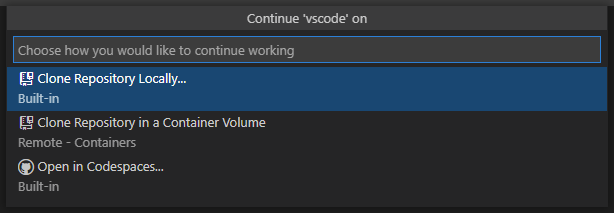
When working with either GitHub or Azure repositories, you have several options to continue working in a more powerful environment.
- When you choose Continue Working On... from the Command Palette or from the remote indicator, you're presented the option to continue your work locally, in a container volume (if you have the Remote - Containers extension), or in GitHub Codespaces.
Releases
While an optional install, this extension releases along with VS Code. The VS Code release notes will include a summary of changes.
You can also install the pre-release version of this extension for early feedback and testing. The pre-release version of this extension works best in VS Code Insiders. You can learn more about VS Code's support for pre-release extensions here.
The pre-release version of this extension replaces the GitHub Repositories (Insiders) extension, which is now deprecated. If you are still using the GitHub Repositories (Insiders) extension and want to migrate to pre-releases,
- Commit any uncommitted changes in your existing GitHub Repositories workspaces to retain access to them after you uninstall the extension.
- Uninstall the GitHub Repositories (Insiders) extension.
- Install the pre-release edition of the GitHub Repositories extension.
Providing Feedback
You can use this repository to:
- Up-vote a feature request or request a new one
- Search for existing issues already reported for potential workarounds
- Report a problem if you don't find what you are looking for
If you have a question, connect with the community using any of these social platforms:


License
By downloading and using the GitHub Repositories extension and its related components, you agree to the product license terms and privacy statement.
License for this repository:
Copyright © Microsoft Corporation All rights reserved. Creative Commons Attribution 4.0 License (International): https://creativecommons.org/licenses/by/4.0/legalcode. For any code or snippets within this repository itself: https://github.com/microsoft/vscode-remote-repositories-github/blob/main/LICENSE-CODE.
Built With
- https://devpost.com/software/vscode-remote-repositories-github/joins/ey86j2xxk3ygbuj20xwj4a

Log in or sign up for Devpost to join the conversation.