-
-

-
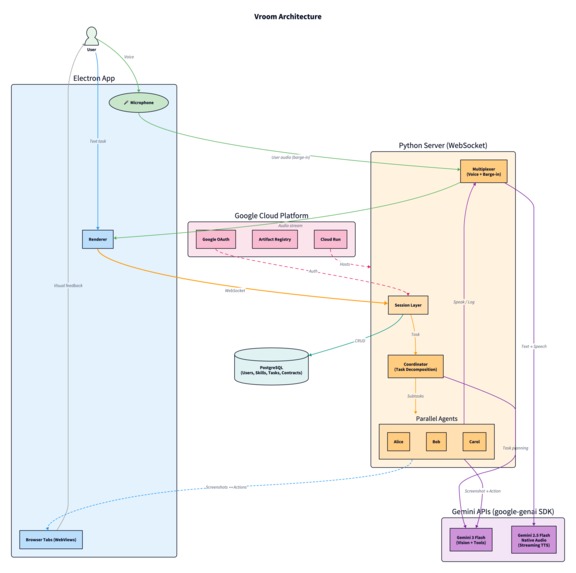
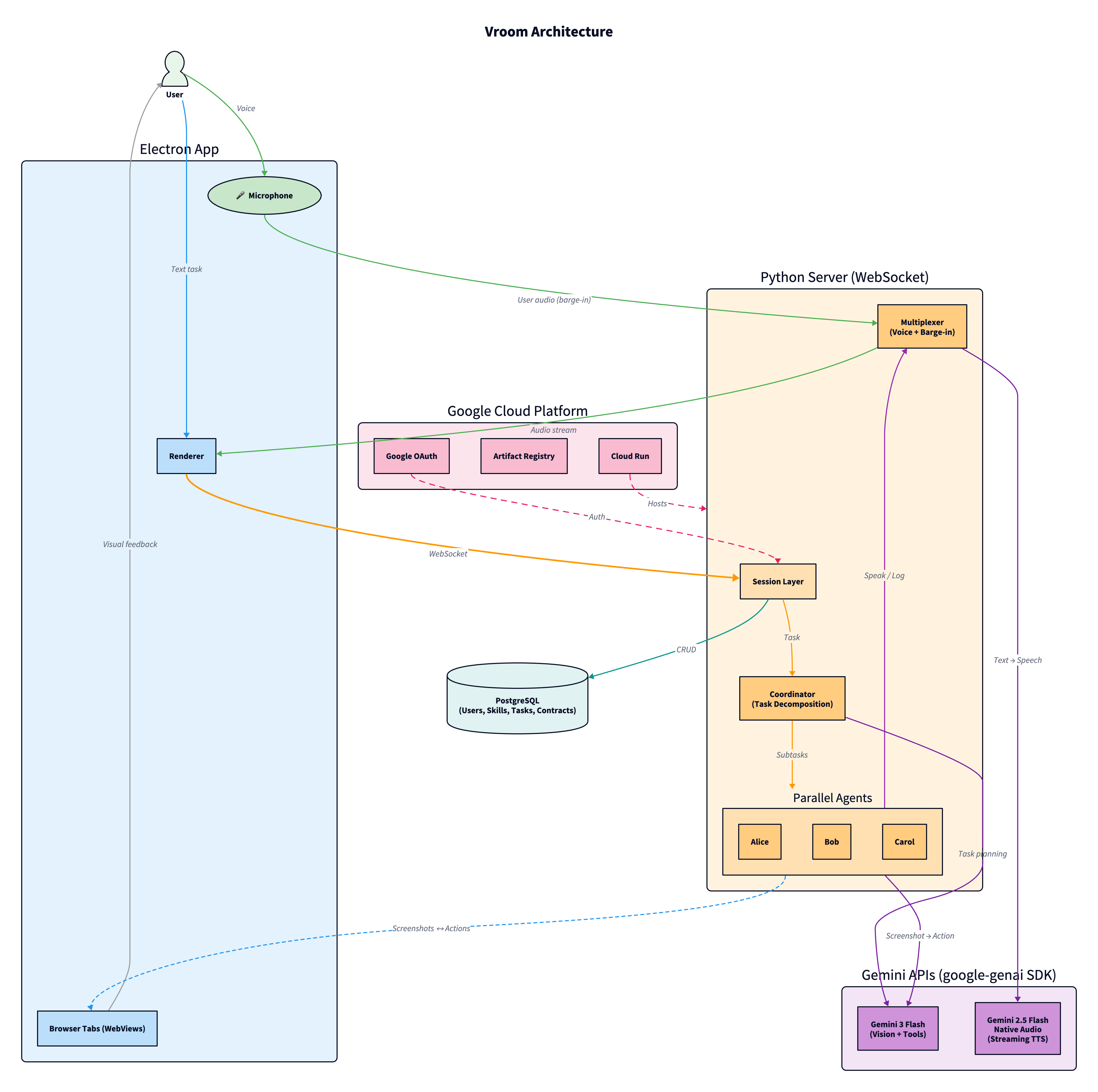
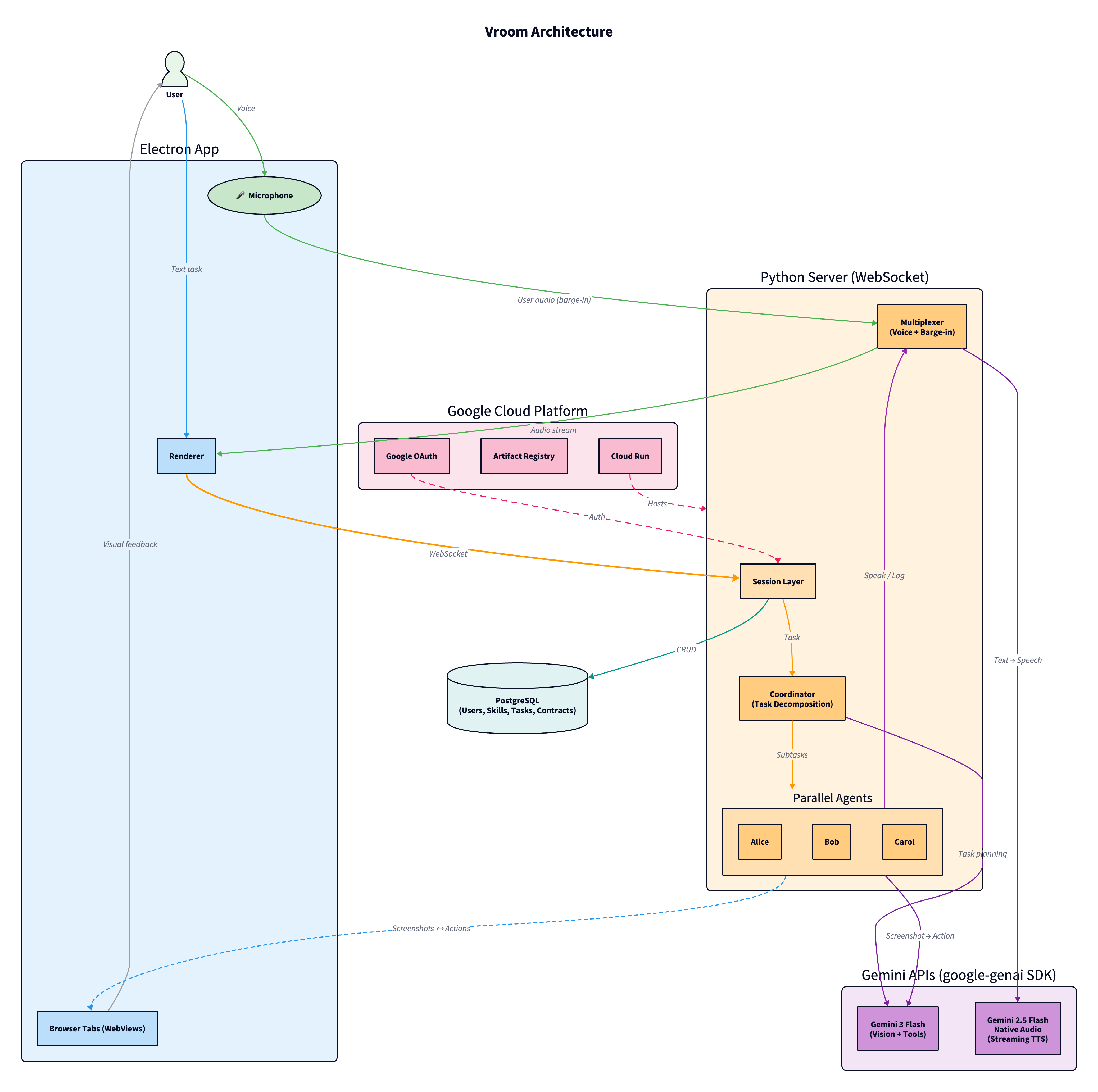
Architectural diagram (https://github.com/kavishsathia/vroom/blob/main/assets/architecture.png)
-
-
-
-

-
-


Quick read
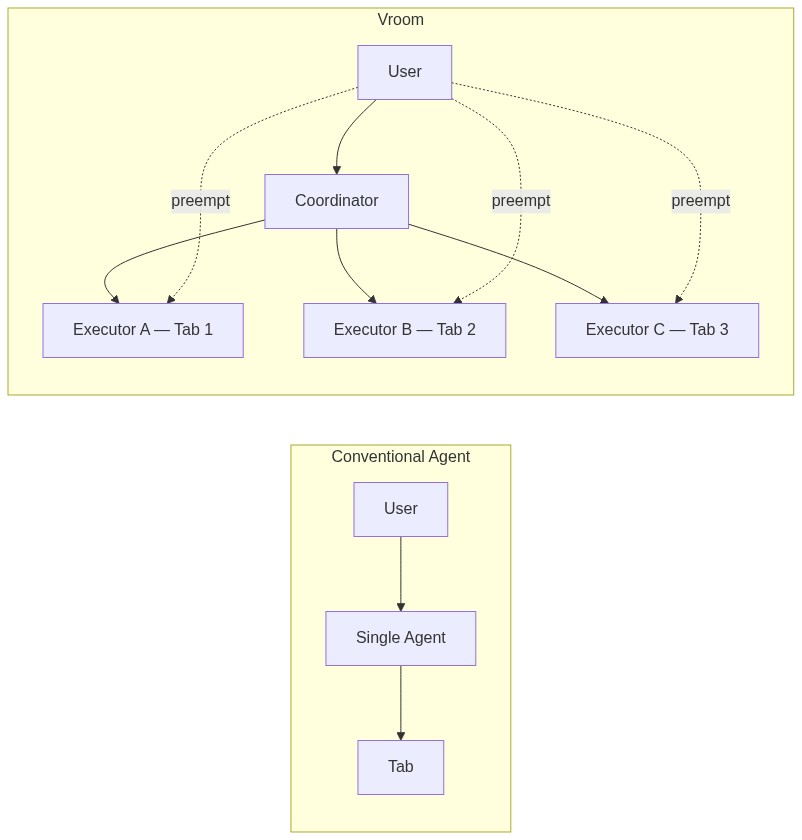
Vroom is a multi-agent browser automation system where a coordinator decomposes your task and spawns parallel executors on separate browser tabs. Agents navigate purely by vision, they screenshot the page and use gemini-3-flash-preview (via the google-genai SDK) to figure out where to click. No DOM access, no page APIs. The agent can only click on what you can see, so you always know what it's doing.
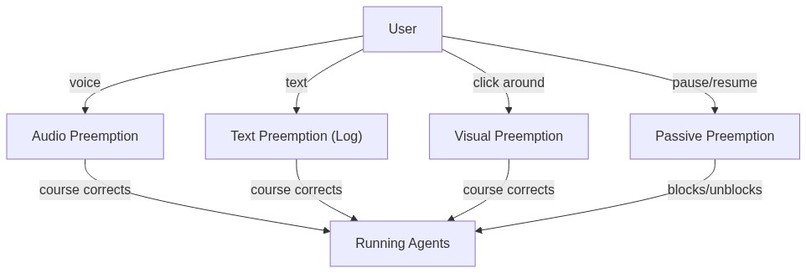
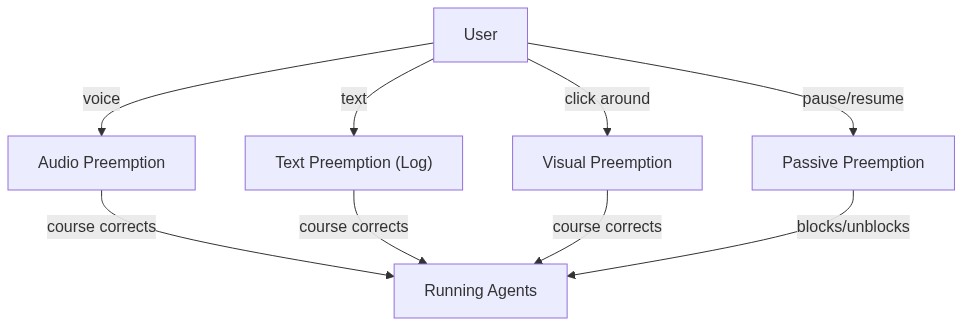
Agents talk to each other and to you through a shared audio channel powered by gemini-2.5-flash-native-audio-preview through the Gemini Live API, each with a distinct voice. A multiplexer enforces one speaker at a time using a pipelined spotlight system. You can barge in at any moment: by voice, text, or by taking manual control of a tab, and agents will course correct without restarting.
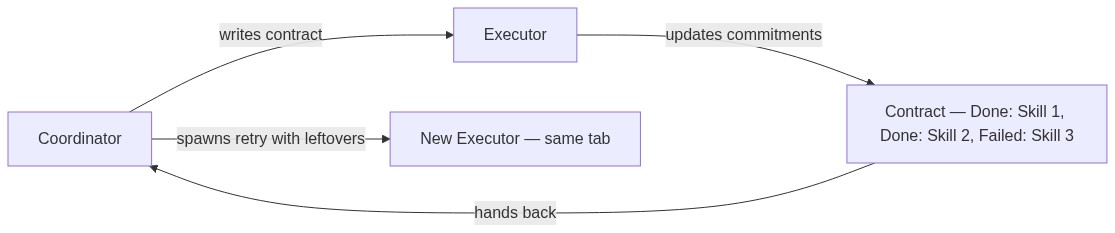
Every executor gets a contract with specific commitments. If it fails, the coordinator knows exactly what was done and what's left, and can retry on the same tab. The whole thing runs on Google Cloud: Cloud Run, Cloud SQL, Artifact Registry, Cloud Build, all are defined in Terraform.
Inspiration
Most of us have probably tried using browser agents in some way, most likely to carry out the mundane, repetitive tasks we'd rather not do ourselves. And it's very likely we weren't too impressed with the results. They're usually slow, and the quality of work drops over time. That's kinda unexpected for a system whose whole thing is being smarter, more efficient, and faster than humans.
The problem surfaced for me when I was trying to add skills to my Linkedin. The task was: here are my list of projects and their READMEs, go to Linkedin and add these 5 projects and 10 unique skills for each project. I assumed I could just leave the agent running and go for a walk.
I did go for a 10-minute walk, and when I came back it had added a total of 15 skills, out of the 50 I asked for, and the skills added on the second project were almost the exact same as the first project (when I literally asked for unique skills). I had to stop the execution, rewrite my instructions to be even clearer, and then started it again. At some point, I just gave up and did it myself.
To be honest though, this isn't an LLM issue, it's an architecture issue. There are 3 big problems with the architecture:
- Even an embarrassingly parallel problem has to be solved sequentially, there are almost no productivity gains (sometimes it's even worse than doing it yourself).
- The agent tends to forget the exact instructions later into execution, falling into a repetitive pattern of what it's been doing.
- Course correction is halting the agent entirely, writing the instruction again and then clicking start. That's inefficient and it's atrocious UX: imagine needing to have a 5-minute meeting with your colleagues just for a minor change in deliverables. It breaks the flow.
The philosophy I'm going for here is this: given a task, the execution should be abstracted away from the user, and the execution should be fast, correct and permeable to input.
What it does
So, that's why I created Vroom (Virtual Room). Here is how it solves the three problems:
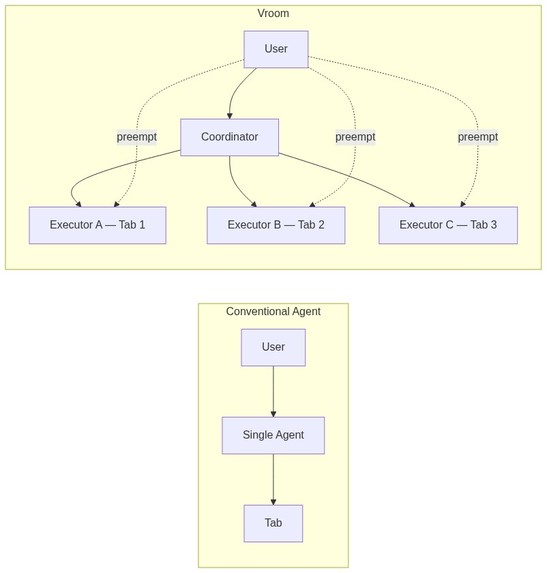
- Separating intent from execution is one of the key contributions of Vroom. We have a coordinator that extracts instructions out of the user's prompt and then spawn and attach executor agents to browser tabs. These executor agents are the ones that do the actual work and they can do it in parallel. This is actually a twofer: having smaller more focused executors would mean that the context window remains lean, so the agents are less likely to forget anything. So the first two problems are solved.
- The second contribution of Vroom is the concept of preemption, or barge-in, in the context of agents. I will explain more below, but this allows you to add on to your instructions without needing to stop the agent mid-execution, and they will course correct automatically. This solves the third problem.
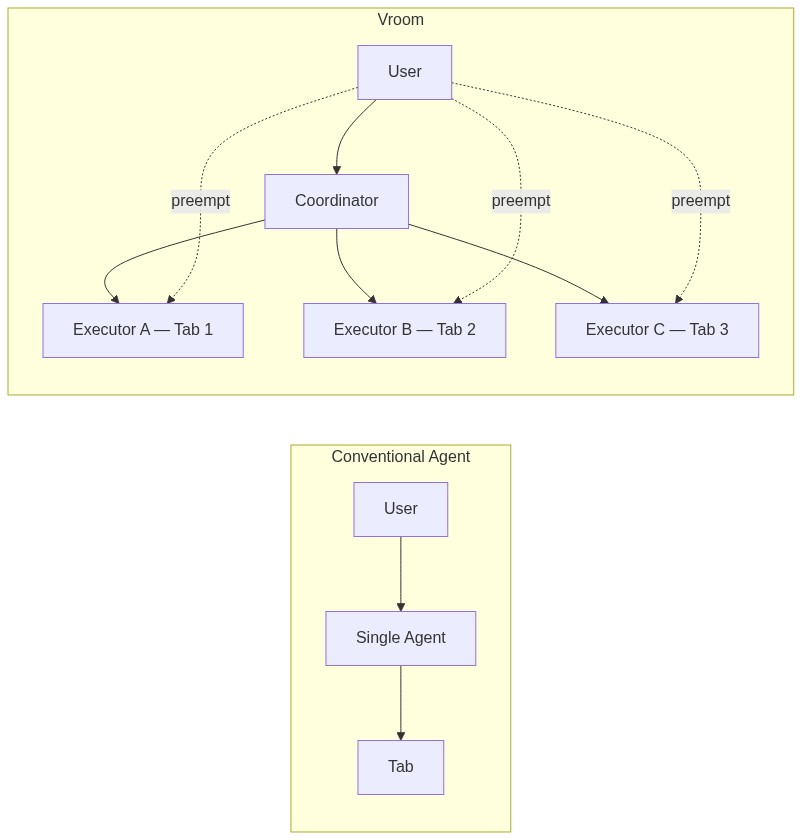
Visually, it feels like this: you and your agents are in a Zoom meeting, all of them are doing their own respective work, and you can chip in at any moment to correct them.
To understand exactly what Vroom does, we can look at its 2 facets: Coordinators and Executors.
Coordinators
You start in an empty meeting room. You think there's no one but there's actually a coordinator waiting for you to say something. You either say your prompt in the chatbox or you voice it out, then the coordinator (powered by gemini-3-flash-preview via the google-genai SDK) will decompose the task into subtasks and spawn executors for each one. Each executor will be attached to a tab and they start executing the subtask on that tab.
Tab lifecycle
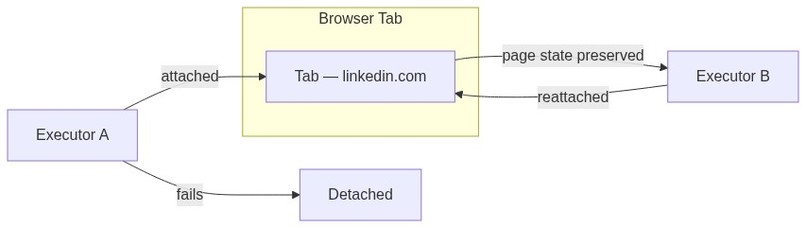
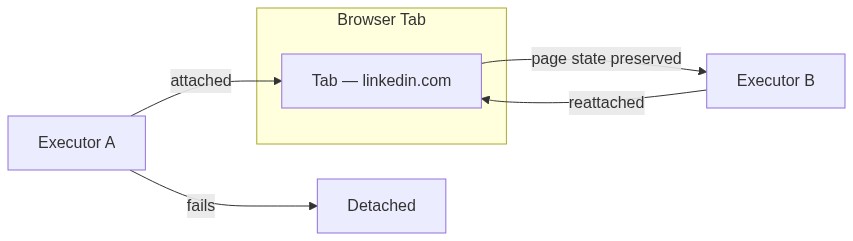
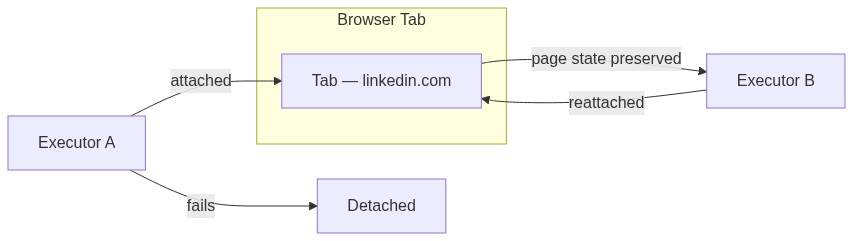
Is the executor and the tab spawned together? They can be, but you can also bring your own tab (BYOT). The lifecycles of the tab and the executors are designed to be separate, a tab can exist without an executor, but an executor must necessarily have a tab. If you have a tab you would like the task to be done on, just drag it into the meeting, and the coordinator will help attach an executor to that tab for you.
Failure, contracts, and error recovery
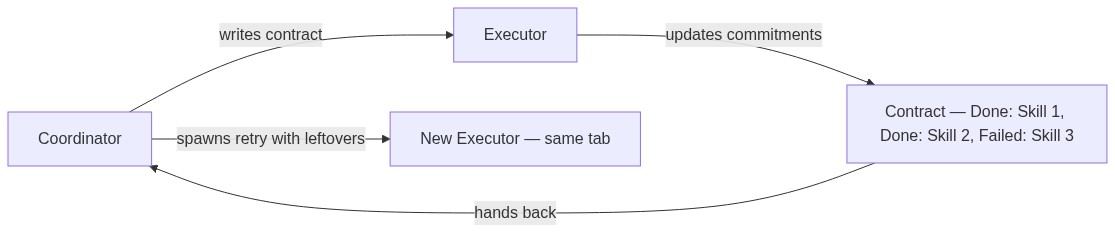
A question that's usually left unanswered is: what if the executor fails? In the conventional paradigm, the burden of knowing what was done and what is yet to be done is offloaded to you, the user! In the Vroom paradigm, since we have one more layer managing intent (the coordinator), it can afford to spawn another agent to retry on your behalf.
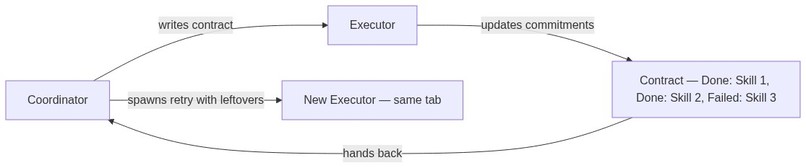
But we have to be careful on what we retry because tasks are usually not idempotent. Adding 10 skills to Linkedin can fail after 5 skills are added but that doesn't mean you should retry adding 10 skills again, you should only add 5 more.
To solve this, I developed the concept of a contract. The coordinator agent initially writes a detailed contract that the executor has to meet, and the executor will update this contract as it completes the commitments. At the end, regardless of outcome, the contract is handed back to the coordinator who now knows exactly what went down. Since the browser tab's lifecycle is detached from that of the agent, the coordinator can now attach another agent to the browser tab with the leftover tasks. This is how Vroom handles error recovery: API timeouts, page loads that fail, or agents that get stuck are all caught by the contract system, and the coordinator can retry with full knowledge of what was already done.
Executor
All the executor knows is the contract and the tab, it is more of a workhorse as compared to the coordinator. It also runs on gemini-3-flash-preview through the google-genai SDK, using its vision capabilities to screenshot the page and figure out where to click. This is a deliberate design choice: the agent never touches the DOM and never calls page APIs. It can only click on what the user can see. This means the user always knows exactly what the agent is doing, and the agent can't do things behind the scenes that the user can't observe. It also keeps the agent grounded in the actual visual state of the page, so there are no hallucinated selectors or stale DOM references.
The executor is an agent that can: get context (this is the crown jewel of this architecture, so I'll explain it in its own deserved section), type, click, scroll, press keys, wait, pause, log, speak, watch and learn.
Notice pause, log, speak, watch and learn. These are the ones that go beyond the conventional paradigm. I'll cover speak first, and the others land naturally.
Interprocess communication
In parallel process in an operating system, there is a need to communicate to each other, this mechanism is known as interprocess communication. When the agents are working together to add unique skills to my Linkedin, they have to communicate with each other so that they don't add the same skills. In a Zoom meeting, it will look like the agents are speaking to each other: you will literally hear them speaking through audio, generated via the gemini-2.5-flash-native-audio-preview model through the Gemini Live API. Each agent gets its own distinct voice from the voice pool (Alice speaks with Kore, Bob with Puck, Carol with Aoede), so you can tell who's talking without looking at the screen.
Synchronization
There's an important invariant here: agents should never talk over each other, and before an agent speaks, it should know what the others have already said. This is handled by the multiplexer, which enforces a single-speaker spotlight: only one agent can speak at a time, and every agent receives the context of what was said before it gets its turn.
Now, let's say each agent is adding 10 skills, should they speak each one out loud? Probably not. There needs to be a more lightweight method of speaking without having to generate audio. And that will just be pure text, for this project, I decided to have it as an append only log. Agents can log their messages, and users can add to this log as well.
Preemption (barge-in)
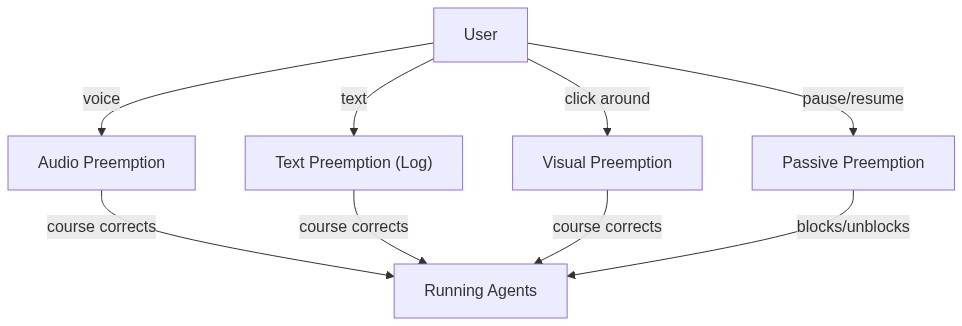
We have seen auditory and textual preemption, that is course correction through audio and text. But really, the best way to preempt is to literally stop the agent and do things yourself, the original way. That is where watch comes in: you can chip in and start doing things on the website and your agent will watch those actions. Then you can ask your agent to continue.
These are all active preemptions, you make the agent do something else by giving multimodal feedback. There is also passive preemption, and this one just involves pausing the agent and resuming it when you want. But it doesn't involve course correcting the agent. Even this is different from the current paradigm because current agents can't pause, they just halt, and you need to type in "continue" and start the agent again.
Skills
We have already strayed far from the current paradigm, and we can go even further. What do we do when we preempt the agent? We are teaching the agent. This means the agent could learn and build a skillset for itself. When the coordinator spawns executors, it can attach specific skills from the global user skillset, the executor can use these skills and even edit it when the user teaches the agent.
How we built it
The shell
The application itself is a browser, built with Electron. Each tab is an embedded webview with full access to the Chrome DevTools Protocol, which is how agents dispatch trusted click, type, and scroll events. This means the agents aren't injecting JavaScript or simulating DOM events, they're using the same mechanism Chrome's own DevTools uses, so every interaction looks identical to a real user.
On the browser, you can define a new task which looks like a new meeting room. Here you can drag in existing tabs, or you could just give an instruction either through text or audio. The information about the tabs and their screenshots will be sent to the coordinator along with your instructions, and the coordinator will use its tools to coordinate the executors.
The coordinator
| Tool | Description |
|---|---|
spawn_executor |
Launch an executor on a new browser tab |
spawn_executor_on_tab |
Launch an executor on an existing tab |
wait_for_results |
Wait for all running executors to finish |
wait_for_one |
Wait for a specific executor to finish |
wait_for_any |
Wait for the next executor to finish (whichever completes first) |
list_tabs |
List all open tabs and their executor assignments |
complete |
Signal that the entire task is done |
Notice how I used OS primitives to do this, the entire thing is actually just inspired by the operating system paradigm, you can wait for processes, you can spawn new ones etc.
As I mentioned above, coordinators hand out contracts to executors. This allows it to know how much of the work was actually completed by the executor so that in the case where the executor fails, the coordinator could adapt based on the results and produce a new contract for a new agent.
The contract itself is composed of multiple commitments, and as we'll see the executor can batch clear commitments, so that it can actually focus on doing its work instead of dealing with the contracts.
The executor
The executor has the following tools and the last few set it apart from current browser agents.
| Tool | Description |
|---|---|
get_context |
Receive unread messages, user audio, and visual preempt data from the multiplexer |
click |
Click an element using normalized bounding box coordinates |
type |
Type text into the focused element |
key_press |
Press a keyboard key, with optional modifiers |
hover |
Hover over an element to reveal tooltips or menus |
navigate |
Go to a specific URL |
scroll |
Scroll the page in any direction |
wait |
Do nothing and wait for messages from other agents |
speak |
Say something to the user via audio |
log |
Write to the shared chat log (visible to all agents and the user) |
update_commitment |
Mark a single commitment as done or failed |
update_commitments |
Batch update multiple commitments at once |
add_memo |
Attach a memo to the contract (blockers, corrections, extra context) |
read_skill |
Read a skill from the global library |
add_skill |
Save a new reusable skill |
replace_text_in_skill |
Update an existing skill |
done |
Signal task completion |
speak and log are synchronization mechanisms, it uses these tools to get heard by other agents. But how do agents hear?
get_context
As I said before, this is the crown jewel. This function allows the agent to see the screen, see what others said, and read user's feedback at the same time. It's the single function that lives at the center and enables all of Vroom's key contributions.
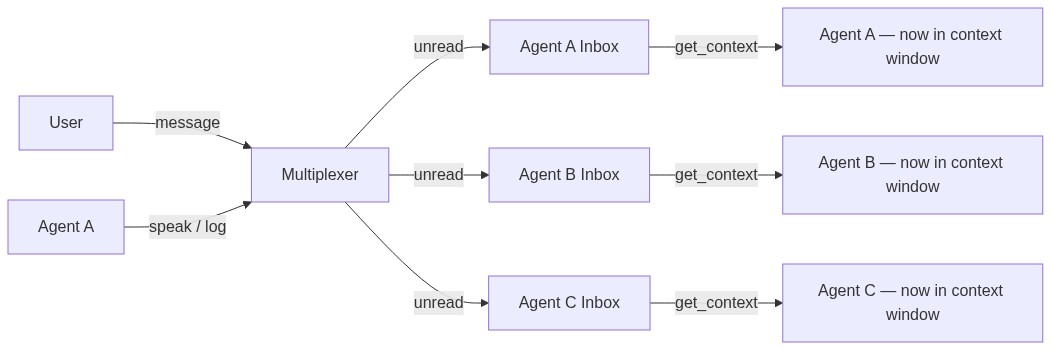
Each agent has an inbox, and there are messages that are read and messages that are not. When a message is read, there is a guarantee that the message is within the agent's context window. So when the agent calls get_context, it will see the messages that it has not seen yet and now it's in its context window.
Since the user is also an agent in this system, the user messaging anyone is treated the same way as any other agent sending a message. What makes this even better is the invariant: when sending a message, the agent has every prior message in its context window.
I enforce that by making sure that when the agent calls a synchronization function, its inbox has no unread messages. And when the agent calls done, I also make sure it has no unread messages, because what if the user preempts after the agent thinks its done, now it's not really done is it?
Skills
When the agent learned something new, it can also choose to remember that by using the replace_text_in_skill and add_skill functions. This ensures that you don't need to preempt the agent for the same stuff for repetitive work. And it also means that you don't have to bring your own skills, it grows as you use it.

The multiplexer
The multiplexer is the instrument that enforces one-at-a-time speaking, and it is quite elegantly designed. It is only used for audio speech because speaking at the same time can lead to UX issues.
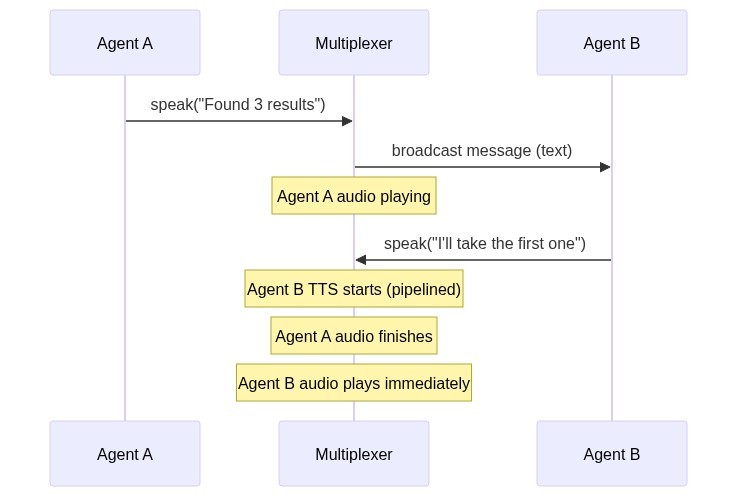
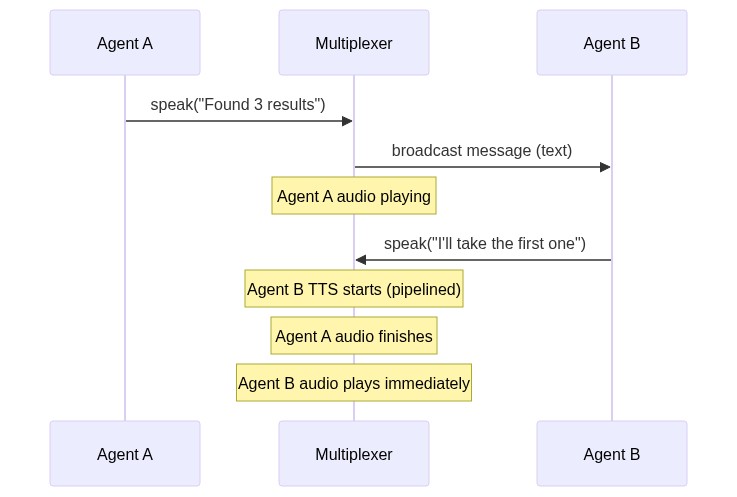
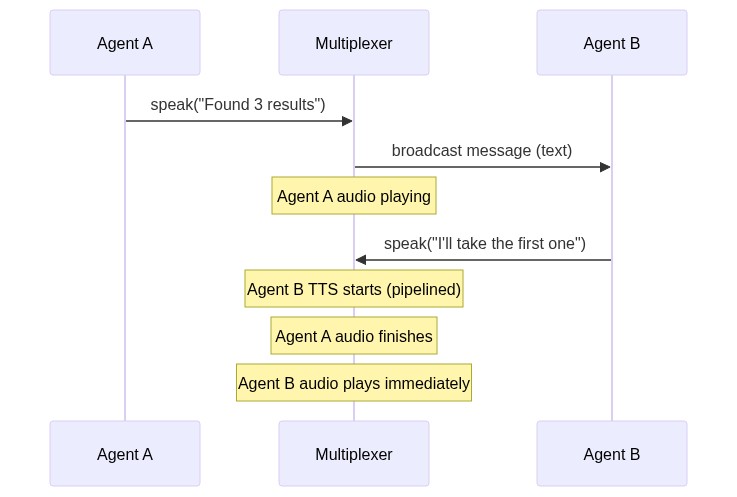
Here is how it works: right after an agent generates a message, and right before it is played out, the message is broadcasted to all the agents. This point in time is called the beginning of a spotlight.
In this system, any agent can just claim a spotlight by being the first to speak. Let's say Agent B decides to reply to the earlier message that was broadcasted. Note that the earlier message is still being played out via audio. Agent B will respond via text and the TTS (streamed through the google-genai SDK's Live API) will start while that audio is still being played out. When the audio finishes playing, agent B's message will immediately start playing because the TTS had already started before. When this new audio starts playing, it is the end of the previous spotlight, and the beginning of a new one.
It is essentially inspired by a CPU pipeline, to increase throughput and reduce latency. And it also makes sure no two agents speak at once.
The infrastructure
The Electron app and the Python server talk to each other over a single WebSocket connection. Every screenshot request, every click, every tab open, it all goes through that one pipe. The server doesn't know or care about the browser internals, it just sends actions and receives screenshots.
The server itself is deployed on Google Cloud Run, which means it scales down to zero when no one is using it and spins up when someone connects. The database is a Cloud SQL Postgres instance sitting in the same region, connected through a Unix socket so there's no public IP exposed.
The whole infra is defined in Terraform, so spinning up a new environment is just a terraform apply. And for CI/CD, pushes to main trigger a Cloud Build pipeline that builds the Docker image, pushes it to Artifact Registry, and deploys it to Cloud Run automatically. On the GitHub side, there's a separate Actions workflow that runs lint and tests on every push and PR, and a release workflow that builds Electron binaries for Mac, Windows, and Linux when you tag a version.
Challenges we ran into
The multiplexer queue was a big problem. Initially, agents would queue their intent to speak, but the ordering was wrong because agents expressed intent too early. An agent meant to speak second would end up first in the queue. The fix was to remove the queue entirely and let agents claim the spotlight on a first-come-first-served basis, just like how people actually talk in a meeting.
Screenshot resolution was a big one. When I first tested on Google Sheets, the agent was clicking on totally wrong cells. B5 became C8. Bumping the resolution helped, but the Chrome DevTools Protocol banner kept shifting the viewport, so coordinates were off. I had to keep the debugger attached throughout the session to stabilize things.
Preemption had a subtle bug: when I course corrected an executor mid-task, the extractor didn't know about it. So the extractor would see the executor's result and think it failed, then spawn another executor to redo the work. I had to piggyback my corrections onto the tool call results going back to the extractor so that it stays in sync.
Accomplishments that we're proud of
The agents actually collaborating. When I asked two agents to add 3 unique skills to Linkedin between them, the second agent decided on its own to add 2 skills instead of 1 so they could hit the target together. No one told it to do that.
The invariant holding up. By design, when an agent speaks, every prior message is already in its context window. This isn't just a nice property, it's what makes the entire synchronization layer work without race conditions.
The multiplexer pipeline. Inspired by CPU pipelining, TTS generation for the next message starts while the current one is still playing. This means there's almost no dead air between agents speaking. It genuinely feels like a conversation.
Building a full browser in Electron. I offloaded the initial work to Claude and had a working proof of concept in 5 minutes.
What we learned
The gap between intent and execution is smaller than expected with Gemini. I originally designed a separate expressor and executor layer, but Gemini's bounding box detection is good enough that a single agent can handle both intent and clicks. I might revisit this separation later but for now it's unnecessary complexity.
OS primitives map naturally to agent orchestration. Spawn, wait, wait_for_any, it's all just process management. The entire coordinator is basically a scheduler.
Queues don't work for agent speech. In real conversations, people don't queue up to talk, they claim the floor. Switching from a queue to a claim-based spotlight made the conversations feel more natural.
What's next for Vroom
Echo cancellation for hands-free preemption. Right now there's an unmute button because I don't want ambient noise interrupting agents. Proper echo cancellation would make the experience truly hands-free.
Revisiting the intent-execution separation. Gemini handles it fine today, but as tasks get more complex, having a pure intent layer that doesn't touch the DOM could make the system more robust. I could perhaps get some inspiration from WebMCP.
Better creative output. The agent can make slides, but the quality is rudimentary. With better prompting and maybe a dedicated creative executor, this could be much more useful.


Log in or sign up for Devpost to join the conversation.