-
-
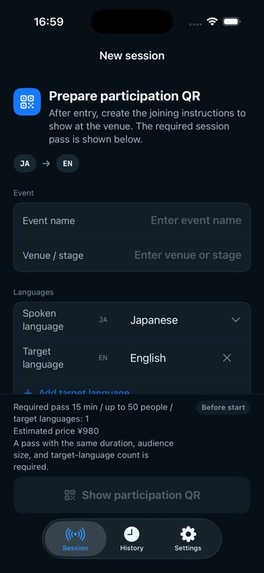
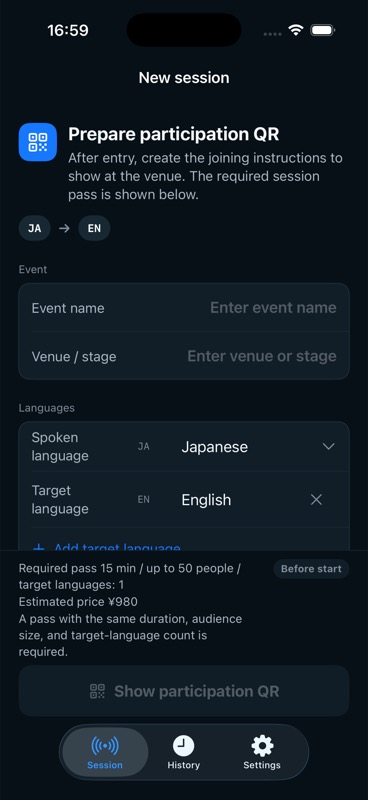
Prepare the room: choose languages and a session pass on the organizer's iPhone.
-
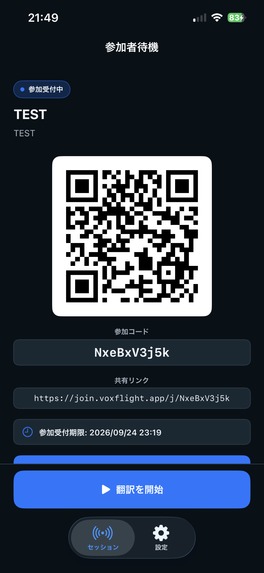
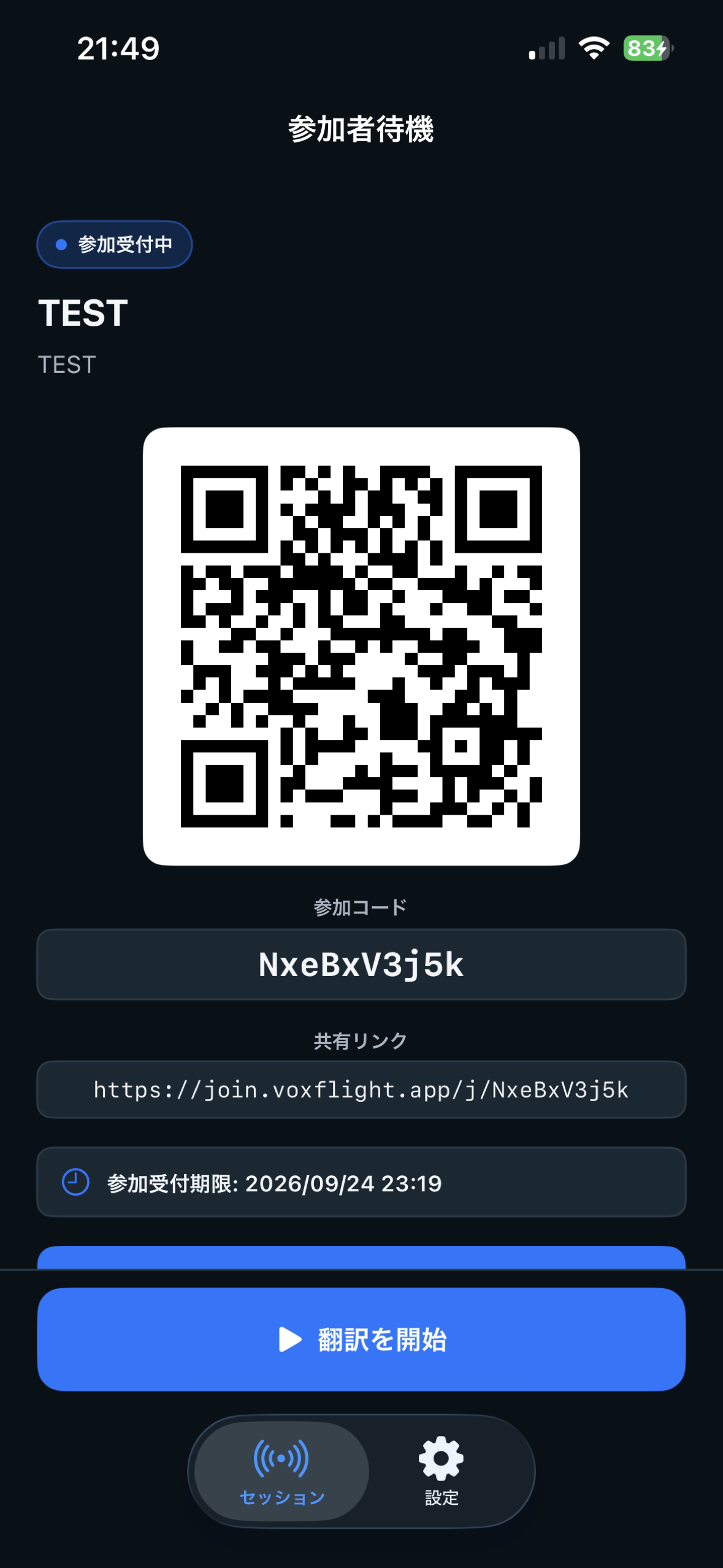
One QR code for the room. Show it or share the link, then start translation. Japanese UI; English guide in the story.
-
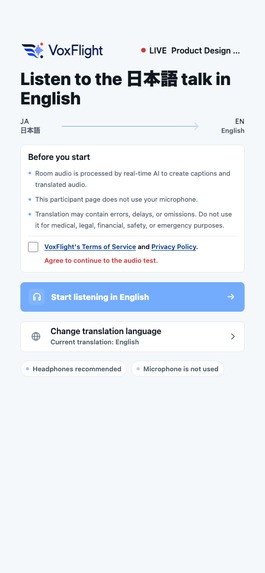
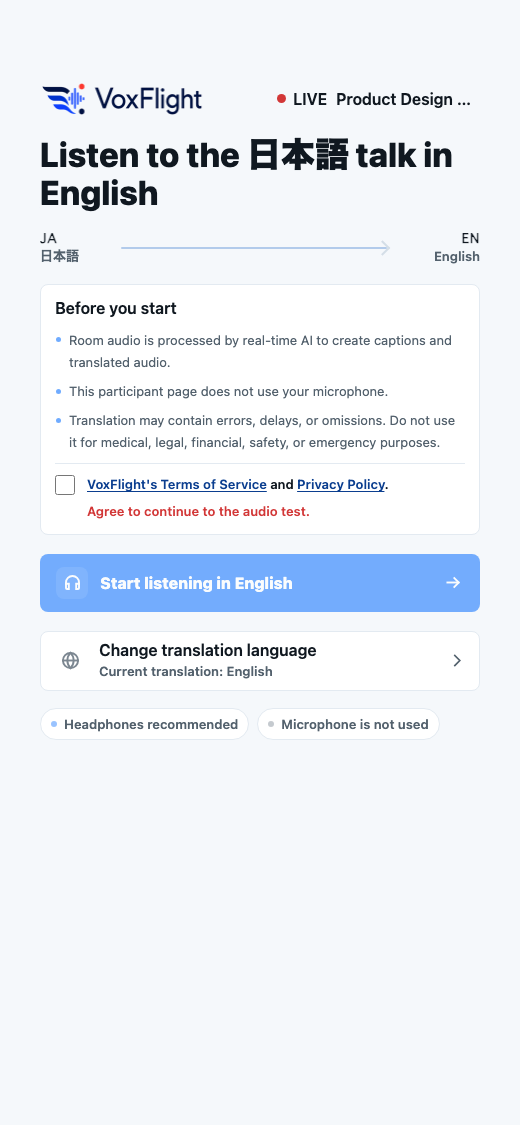
Scan. Pick a language. Listen. Attendees join in their browser, with no app, account, or payment.
-
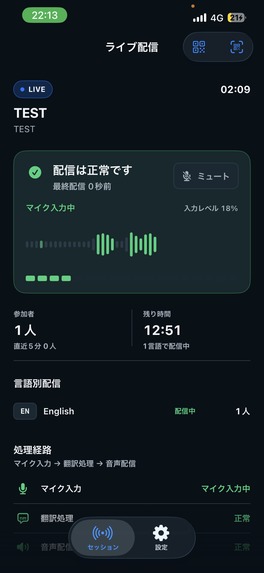
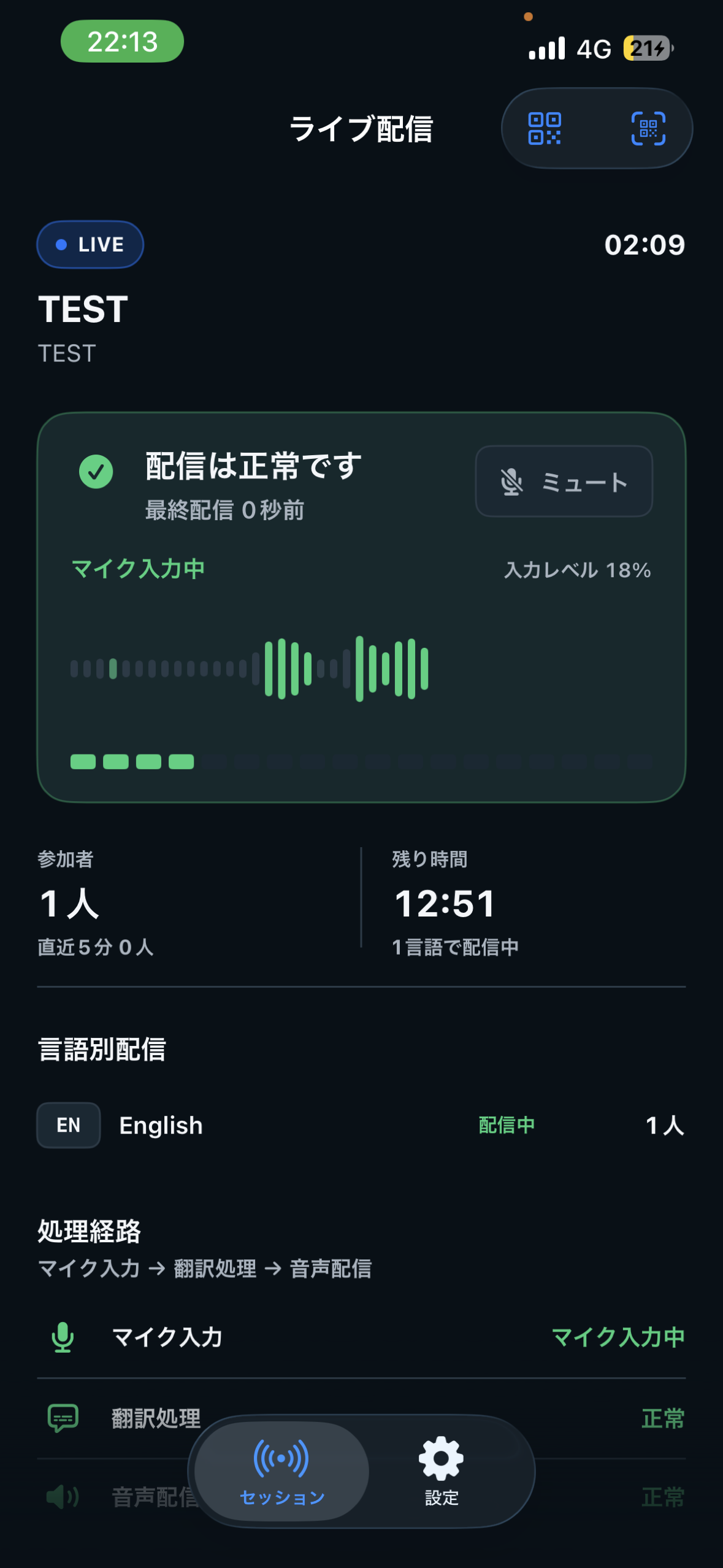
Keep the room connected: live delivery status, microphone activity, listeners and time remaining. Japanese UI; English guide in the story.
-
VoxFlight app icon.
The talk I didn't give
The conference talk never happened. I had an opportunity to speak, but I could not deliver the talk in English. I also could not take classes taught in English. In one room I had something to say; in another, something to learn. Language kept me from both.
That barrier has two sides. A speaker may have ideas worth sharing but cannot present in the room's language. A listener may catch only fragments of a talk given in someone else's. The room loses a voice before the talk begins and loses listeners while it is happening.
I built VoxFlight so a speaker can talk in their own language into an iPhone while attendees scan one QR code, pick their language, and hear the talk with captions in their phone's browser. No attendee app, account, or payment.
The organizer app is on the App Store for iPhone. Product site and demo video.
Scan. Pick a language. Listen.
That is the whole attendee experience, and it is the sentence an organizer says to the room.
On stage: the organizer opens VoxFlight on an iPhone, chooses the speaker's language and one or two target languages, and puts the QR code on the screen. The iPhone captures the speaker's voice; attendees use their own phones, with no dedicated interpretation receivers.
In the seats: attendees scan the code, choose from the languages on offer, tap once to allow audio, and listen. Captions run alongside the audio, so they can read and listen at the same time.
During the talk: the organizer's screen shows whether delivery is healthy, how many people are listening in each language, and how much session time is left.
Sessions run 15, 30, or 60 minutes for up to 50 or 100 listeners. VoxFlight translates 74 source languages into 13 target languages, with at most two targets running at once. It is built for one-way talks, not two-way conversation.
Why not just have people use a translation app?
Because a translation app on one attendee's phone has to hear the speaker from that attendee's seat, and every attendee has to figure it out alone, in the middle of the talk. VoxFlight takes the audio once, from the presenter's microphone, and delivers it to everyone who scanned. One microphone, one QR code, one purchase. The room shares the translation channel the way it shares the projector.
Why I built it
I built the tool I wished had existed when language kept me from speaking and learning. Professional interpreters are the right answer for high-stakes settings, but arranging one can be beyond the budget and preparation time of a small meetup, seminar, or conference session. Asking everyone to install an app or join a video call puts another barrier at the door. I wanted a speaker and organizer to add a translation channel to a room for one event, using an iPhone and the audience's own phones.
A room this opens
Imagine a small community meetup with a Japanese-speaking guest and attendees who follow English more comfortably. The volunteer organizer cannot arrange an interpreter for one short talk. The guest speaks in Japanese; the organizer shows one QR code; attendees hear English audio and read English captions in their browsers. They can leave the talk with its ideas, and join the conversation afterward, without language deciding who could speak or follow along.
One purchase, made by the organizer
Organizers need translation for an event, not a subscription between events. So VoxFlight sells non-renewing session passes matched to what the room needs: duration, listener capacity, and one or two target languages. The published starting price is JPY 980 for 15 minutes, up to 50 listeners, and one language; local prices appear in the app. An unused pass stays valid for 180 days.
RevenueCat handles purchase and restore on the iPhone. The backend reserves a matching pass before it issues the QR code and consumes it only when translation actually starts, so preparing a QR code does not use up the pass. Attendees never see a paywall.
What VoxFlight does not keep
Raw audio, translated audio, and full captions are not durably stored in VoxFlight's databases or storage. Translation runs on OpenAI's realtime models, and the provider's processing and retention are described in the privacy policy.
How I built it
Solo, across four layers:
- SwiftUI iPhone app: session setup, session passes, microphone controls, QR presentation, and delivery status.
- React and TypeScript audience app: browser joining, language choice, audio confirmation, captions, and playback.
- Fastify and WebSocket API: session coordination, realtime translation, and delivery to listeners.
- Google Cloud and PostgreSQL: durable session and purchase state, with Prisma and Terraform behind it.
What was hard
Realtime delivery has to survive provider startup, browser audio rules, and people drifting between Wi-Fi and mobile data. Explicit connection states, bounded startup buffering, and listener recovery give those moments a place in the experience instead of a silent failure.
Purchases have to stay consistent when a response is lost or a request repeats. Durable reservations, idempotency, and reconciliation ended up as product design, not backend detail.
The main lesson: translation is worth little if people cannot join. Keeping the promise narrow, one presenter, one-way, at most two languages, is what made the joining experience simple enough to say in one sentence.
Where it stands
VoxFlight is publicly listed on the App Store. The next step is to run VoxFlight at small events and watch how speakers and attendees use it together. I plan to measure time from scan to first audio, join completion, interruptions, whether attendees say they understood, and whether organizers use it again.
Try it in two minutes
With two phones, install VoxFlight on an iPhone. Judges can use the reviewer access instructions in this submission to redeem a session pass, then tap Restore Purchases in Settings. Prepare a 15-minute, 50-listener session with one target language and show the QR code. On the second phone, scan it, choose the language, and confirm audio. Start translation on the organizer's iPhone and speak into it. With one phone, the demo video above shows the flow end to end.
Screenshot guide (Japanese UI)
Live session: healthy delivery, last delivered 0 seconds ago, microphone input active at 18%. One attendee, zero new attendees in the last five minutes, 12:51 remaining. One language on air: English, one listener. The pipeline reads microphone input → translation → audio delivery, both reporting normal. The organizer can mute the microphone. Bottom tabs: Session and Settings.
Attendee check-in: the session is waiting for attendees with joining open. The organizer can show the QR code, give the join code, or share the link. A join deadline is shown, and the blue button reads Start translation. This is a test session; its join window has ended.
Limits
One-way talks only. AI translation can lag or be wrong, so VoxFlight is not for medical, legal, safety-critical, or emergency interpretation. The presenter and each attendee need an internet connection.
The goal is narrow on purpose: the talk gets given in the speaker's language, and people in the room get to hear it in theirs.
Built With
- cloud-run
- fastify
- google-cloud
- openai-realtime-api
- postgresql
- prisma
- react
- revenuecat
- swift
- swiftui
- terraform
- typescript
- websockets

Log in or sign up for Devpost to join the conversation.