-
-
VolunGo Intended Logo
-
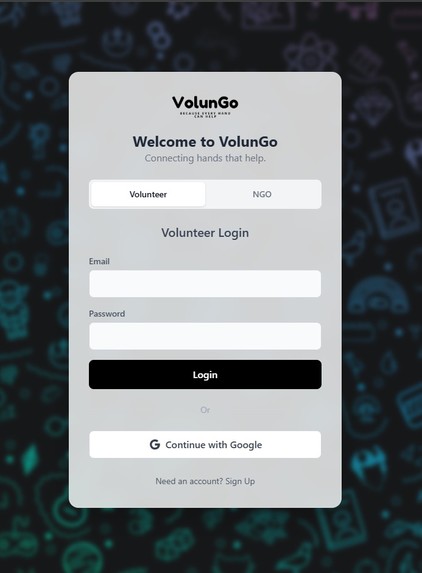
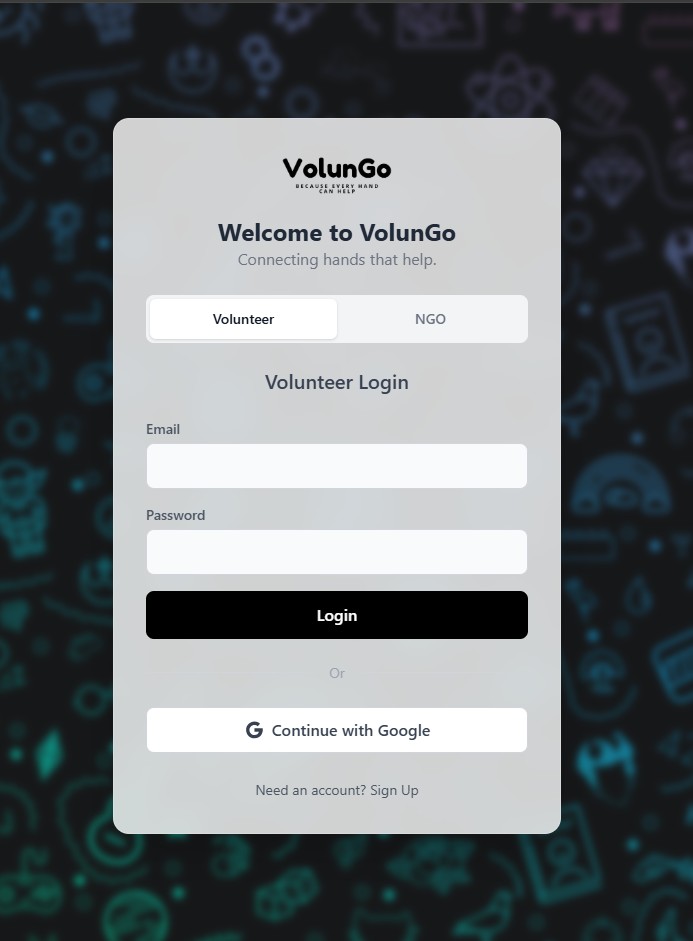
Login Page
-
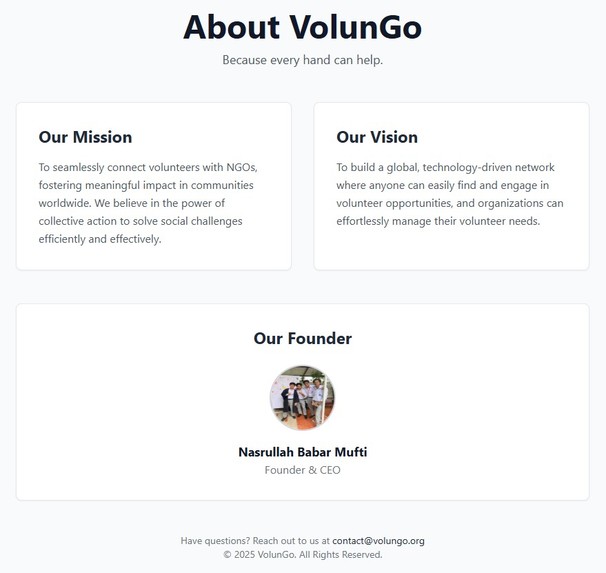
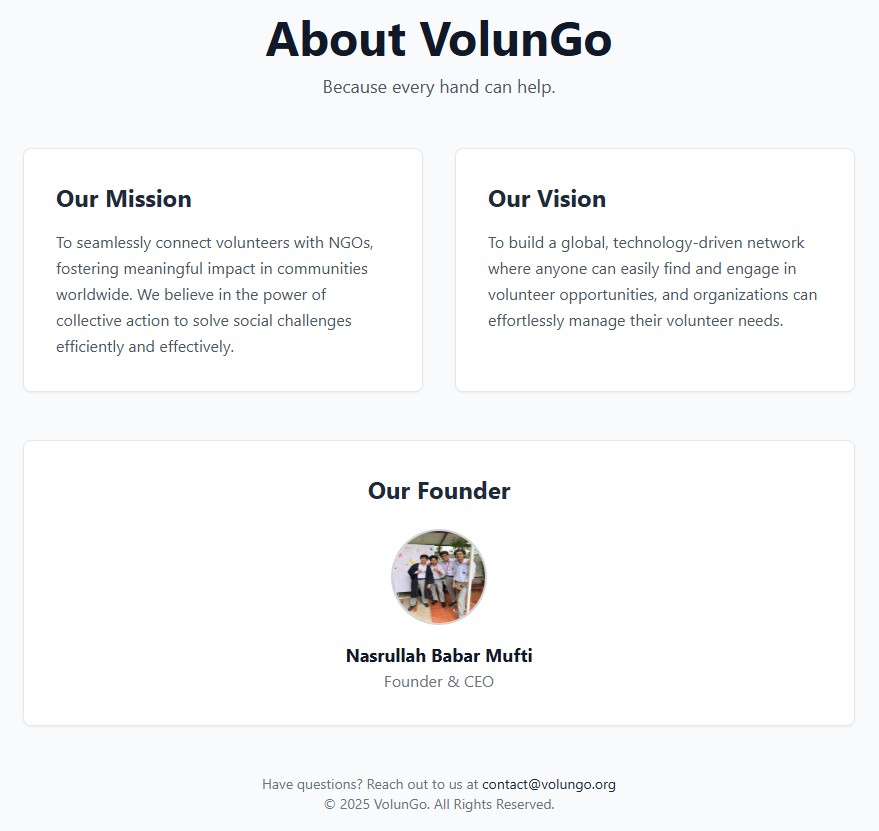
About
-
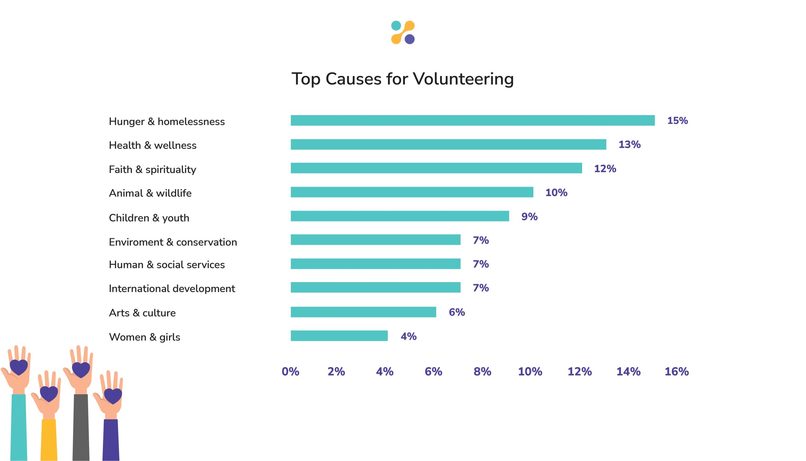
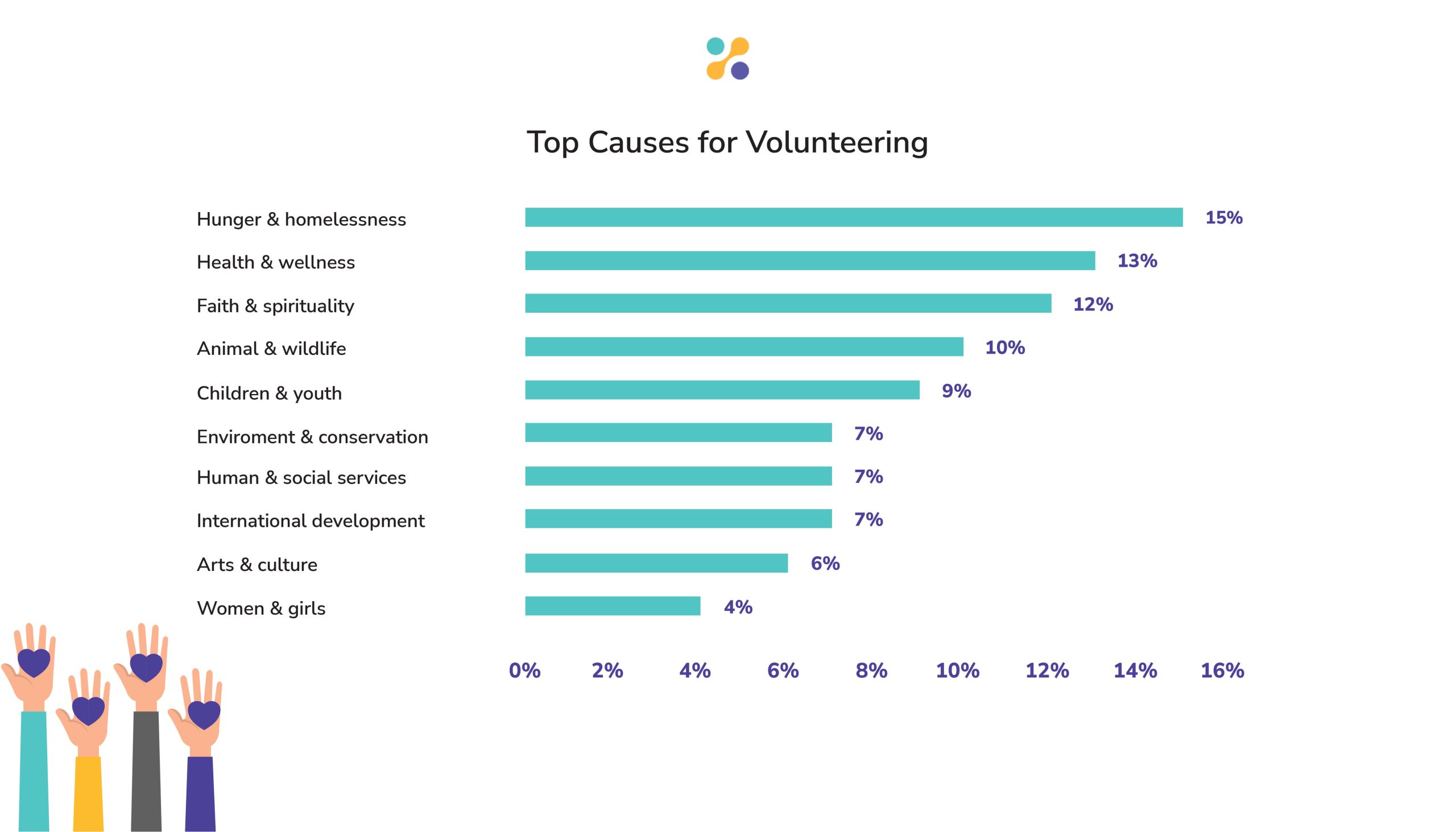
Top Causes For Volunteering
-
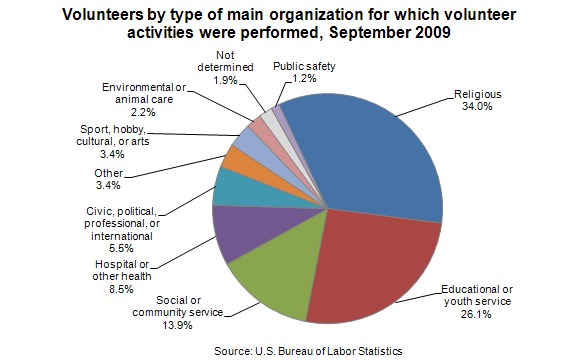
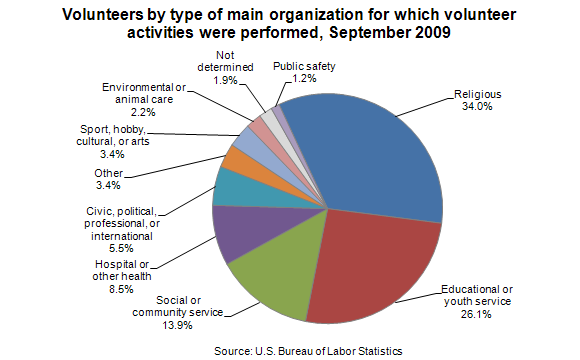
Volunteers by Category
-
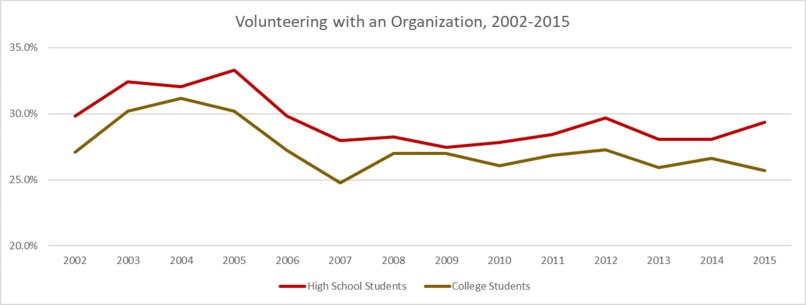
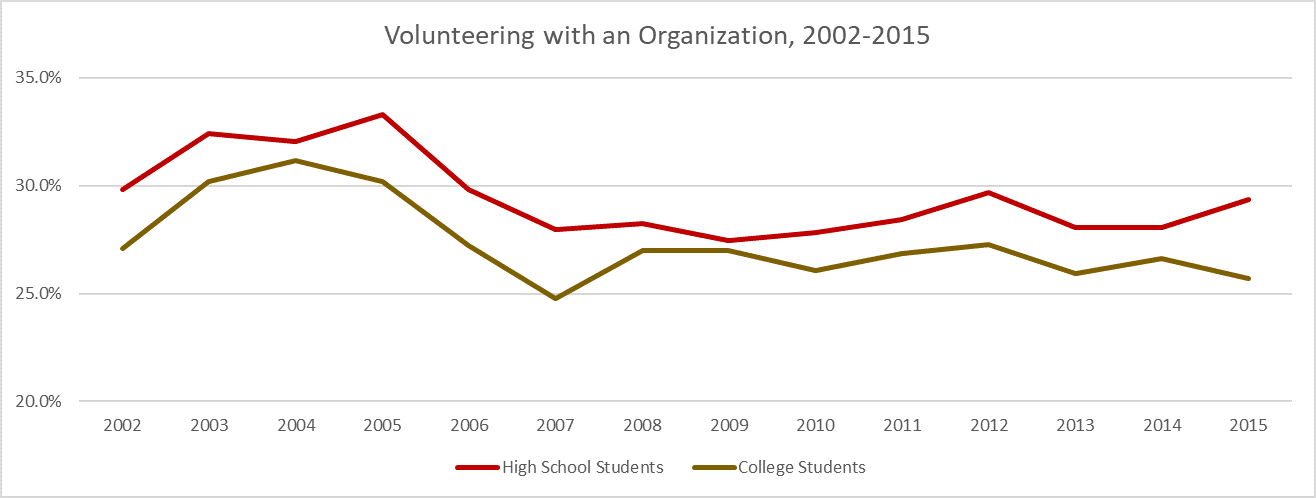
Volunteering Decline Data Uptil 2015
Inspiration
The idea for VolunGo wasn't born in a boardroom; it came from personal frustration. During my time at university, I took a course called "Civics and Community Engagement" that required students to complete social work hours. I was excited to get involved, but I immediately hit a wall. Finding opportunities was a scattered, difficult process of searching through social media, making calls, and hoping for a response. It felt disconnected and inefficient.
Later, a conversation with an executive at a prominent NGO confirmed the other side of the problem. She told me how they were always short on volunteers, especially for urgent, time-sensitive needs. They had the work, but no effective way to broadcast their needs to the people who were ready and willing to help right now.
That's when the inspiration struck: What if helping your community was as easy as ordering a ride? What if I could use technology to close this gap between intent and action in real-time? I wanted to create an "Uber for volunteering"—a live, map-based platform that makes finding and participating in volunteer opportunities immediate, engaging, and rewarding.
What it does
VolunGo is a full-stack, real-time web application that connects two key audiences: NGOs and public volunteers.
For NGOs:
-A secure dashboard to post new volunteer requests with specific details like location, number of volunteers needed, and redeemable points.
-The ability to schedule events with a specific date and time.
-A "Volunteer Roll Call" system to verify attendance, ensuring accountability.
-The power to mark tasks as complete, which automatically awards points and reputation to the verified volunteers.
-The creative option to upload "Before & After" images to visually showcase the impact of their projects.
For Volunteers:
-A live, interactive map—a "Community Impact Hub"—that displays open volunteer opportunities as fun, category-specific emoji markers (🍕, 🌳, ❤️).
-A floating "Mission Control" bar to search for opportunities by location or filter them by category.
-A detailed information sheet for each opportunity, showing the event time, distance from the user, and points available.
-A full "Navigation Mode" that appears after accepting a request, drawing the route directly on the map and displaying a persistent "in-ride" panel with travel time and a cancel button.
-A gamified rewards system with two types of points: Redeemable Points to spend on partner offers and permanent Reputation (RP) to level up.
-The "Story of a Request" feature, which allows volunteers to click on their completed tasks (marked by a ⭐) and see an animated timeline of their achievement, complete with the "Before & After" image slider.
P.S. If you want to test out the NGO feature, use the: id: [email protected] password: taha1234
How we built it
I built VolunGo as a modern, full-stack application using a robust and scalable tech stack, with a deep integration of various APIs and SDKs to create a seamless experience.
Frontend: The user interface is a responsive single-page application built with React. I used Tailwind CSS for a clean, utility-first design system and Framer Motion to bring the UI to life with fluid, meaningful animations.
The heart of the frontend is the Google Maps Platform, which we integrated using the @react-google-maps/api library. I didn't just display a map; but leveraged several of its powerful services:
-The Maps JavaScript API to render the map. -The Markers Service for placing my custom emoji markers and animated live avatars. -The Places API's Autocomplete feature to power the intelligent location search for NGOs. -The Directions Service to calculate and draw the visible, "Uber-like" routes for volunteers directly within the app. -Geolocation API to immediately center the map on the volunteer's current location
Backend: a powerful and secure API is built with Node.js and the Express framework. It communicates with our MongoDB Atlas database via Mongoose, which allowed me to leverage powerful geospatial queries for location-based features.
-Authentication & Real-time Layer: Security and live updates were paramount. -I used the Firebase Client SDK on the frontend for user sign-up and login. The ID tokens generated were then sent to the backend. -On the backend, the Firebase Admin SDK securely verified these tokens, making it the gatekeeper for the API.
To make the map feel truly live, I integrated Socket.IO. The client-side library connects to our Node.js server, allowing me to instantly push events like new requests or task completions to all users without needing a page refresh.
Third-Party Services: For image uploads, I pivoted to the ImgBB API. It provided a simple, free, and reliable REST API for handling the "Before & After" image uploads, which I called from the frontend using Axios.
Challenges we ran into
The biggest challenge was perhaps the complexity of integrating multiple cloud services, especially during deployment.
I ran into persistent Google Maps API loading errors that were incredibly frustrating. I learned that the order and method of loading the script were critical, and solved it by creating a single, centralized script loader in our main App.js component.
Deployment was another major learning curve. I faced a barrage of issues, from CORS errors between our Netlify frontend and Render backend to obscure build failures caused by strict CI/CD environments. The solution was to meticulously configure our environment variables and use a netlify.toml file to enforce the correct build settings, which taught us the importance of being explicit with deployment configurations.
Finally, I learned a valuable lesson in feature design. My initial idea for a heatmap "Impact View" was visually exciting but proved to be technically unreliable and buggy. I made the tough but correct decision to remove it in favor of more stable and equally creative features like the "Story of a Request" and the animated "in-ride" panel, which ultimately provided a much better user experience.
Accomplishments that we're proud of
I'm incredibly proud of building an application that is not just functional but also fun and rewarding to use. My biggest accomplishment is transforming the map from a simple utility into a Live Community Impact Hub.
The real-time features—like the sound effect and spinning animation for new requests, and the "Impact Made! ✨" alert that appears for everyone when a task is completed—make the app feel alive and connected.
The "Story of a Request" modal with the "Before & After" image slider is a feature I'm particularly proud of. It's a powerful storytelling tool that provides tangible, visual proof of a volunteer's impact, which is far more rewarding than just seeing a number go up.
Finally, the dual-point system (Redeemable Points vs. Reputation) create a compelling gamification loop that encourages long-term engagement and celebrates a volunteer's journey.
What we learned
This project was a deep dive into the complexities of building a modern, full-stack, real-time application.
The Power of a Single Source of Truth. I learned that centralizing critical logic—whether it's the Google Maps script loader, the user's authentication state in App.js, or the API URL in a config file—is essential for stability and avoiding bugs.
Deployment is a Skill in Itself. Getting a full-stack application with multiple cloud services to work together seamlessly requires careful configuration of CORS, environment variables, and build settings.
User Experience Over Everything. I learned to be ruthless in cutting features that, while cool on paper, were buggy or detracted from the core experience (like the heatmap). Pivoting to more stable, user-centric features like the "in-ride" panel was always the right decision.
What's next for VolunGo
This is just the beginning! I have a clear vision for how VolunGo can grow:
Corporate Partner Dashboard: I've already laid the groundwork for a third user role. The next major step is to build out a dashboard for corporate partners, allowing them to sponsor events and create exclusive volunteer opportunities for their employees.
Personalized Recommendations: I want to make the app even smarter. By learning a volunteer's preferences, I can build a "For You" section that proactively highlights the most relevant opportunities on their map.
Built With
- axios
- express.js
- firebase
- framer-motion
- google-maps
- google-maps-directions-api
- google-maps-geocoding-api
- google-maps-javascript-api
- google-maps-places-api
- imgbb-api
- mangodb-atlas
- mongoose
- node.js
- react
- react-google-maps/api
- socket.io
- tailwind.css


Log in or sign up for Devpost to join the conversation.