-
-
Transforming Computer Interaction for a Futuristic, Hands-Free Experience
-
Inspiration
The way we interact with computers has remained largely unchanged for decades—keyboard, mouse, and touchscreens. However, what if we could control our digital environment entirely through voice? Inspired by the need for a hands-free, efficient, and seamless computing experience, I developed VoiceOS—an AI-powered voice assistant that allows users to navigate, type, and control applications effortlessly with natural language commands.
What it does
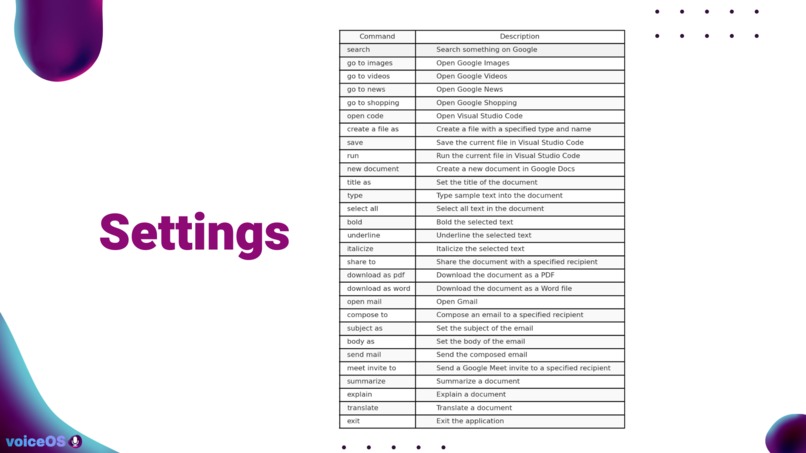
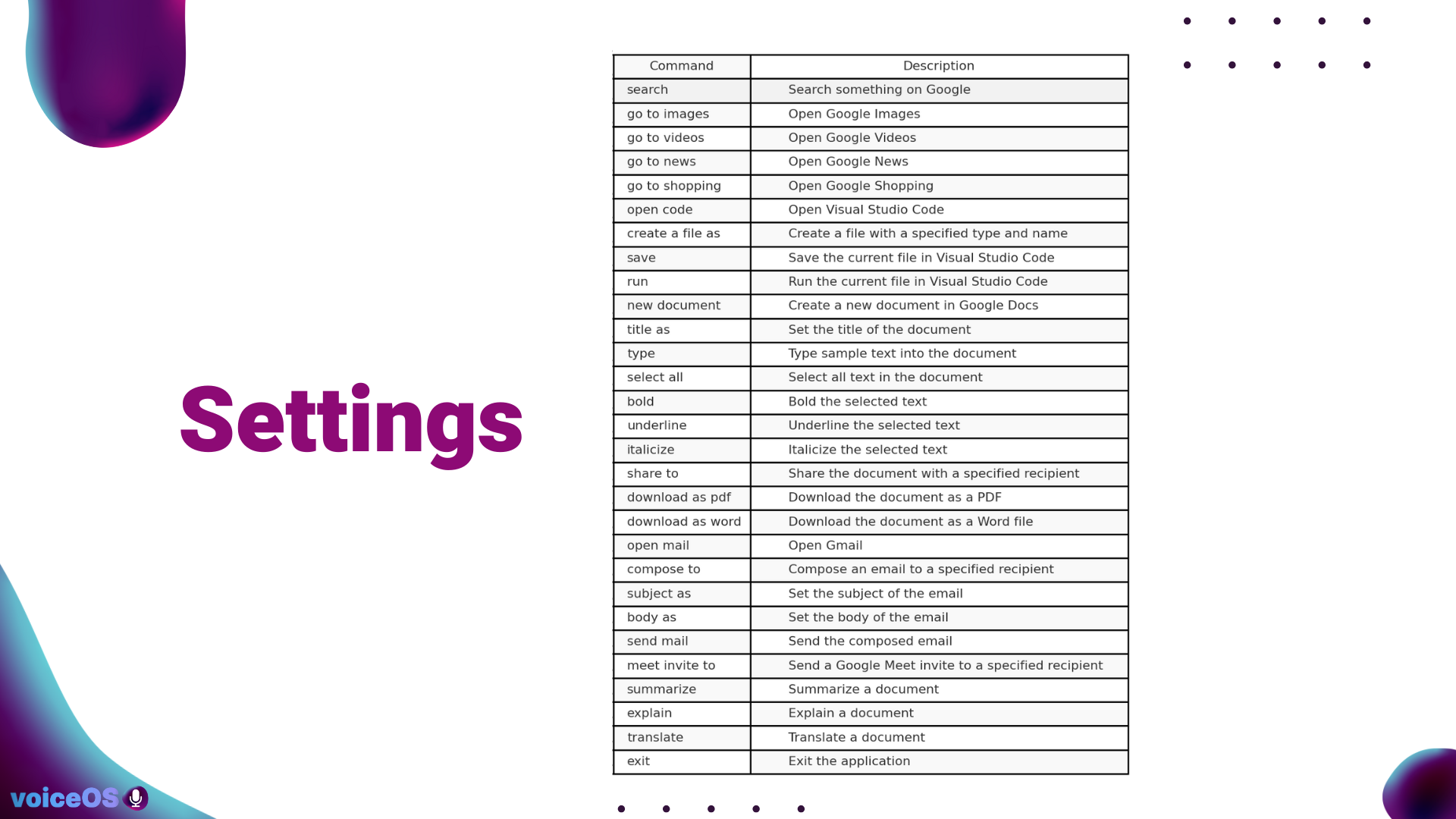
VoiceOS is an intelligent voice-controlled operating system that integrates real-time speech recognition, AI-driven task execution, and browser automation. Users can open applications, summarize text, send emails, translate documents, and even browse the web using only their voice. It utilizes OpenAI’s Whisper for transcription, GPT-4 for contextual understanding, and OpenAI's text-to-speech (TTS) to provide natural-sounding voice feedback.
How we built it
VoiceOS was developed using Python, incorporating:
- OpenAI Whisper for high-accuracy speech recognition.
- GPT-4 for intelligent task execution, allowing users to dictate commands naturally.
- PyAutoGUI for automating mouse and keyboard interactions.
- BeautifulSoup & Selenium for fetching and summarizing web content.
- Pydub & OpenAI TTS API for generating spoken responses.
- NLTK & Transformers for text processing and summarization.
I structured VoiceOS into modules that handle different functionalities, such as document summarization, email automation, and web navigation.
Challenges we ran into
One major challenge was latency—ensuring that voice commands trigger responses in real-time. Initially, the system had delays in transcription and execution. To optimize this, I asynchronously processed voice input, reduced unnecessary API calls, and refined the pipeline to improve responsiveness.
Another challenge was making the voice output feel natural. OpenAI’s TTS provided multiple voice options, and I experimented with different models to achieve a more human-like response system.
Accomplishments that we're proud of
- Successfully integrated real-time voice recognition and AI-generated responses to create an intuitive experience.
- Optimized text summarization and translation using GPT-4, allowing users to condense information and switch between languages effortlessly.
- Implemented browser automation for hands-free web navigation, a feature that could help individuals with accessibility needs.
- Enhanced AI-generated speech responses, making interactions feel smoother and more natural.
What we learned
Through this project, I learned the complexities of voice-based AI systems, including:
- Latency optimization for real-time speech recognition and response.
- Efficient API usage to balance performance and cost.
- Integrating NLP models to understand and execute contextual commands.
- Human-computer interaction principles, ensuring intuitive and seamless control.
What's next for VoiceOS
- Expanding VoiceOS functionalities, such as AI-powered coding assistance and document generation.
- Enhancing personalization, allowing users to customize command preferences and voice responses.
- Developing a mobile version, enabling seamless cross-platform use.
- Exploring accessibility applications, making computing more inclusive for individuals with physical disabilities.
VoiceOS aims to redefine how we interact with computers—faster, smarter, and entirely hands-free. 🚀
Built With
- beautiful-soup
- keyboard
- language
- natural
- nltk
- openai
- pyautogui
- pydub
- pyperclip
- python
- regular
- requests
- selenium
- transformers
- tts
- whisper


Log in or sign up for Devpost to join the conversation.