Voice2Ticket: Stop Typing. Start Talking.
Voice2Ticket captures your voice and instantly structures it into perfect Jira tickets—summary, description, and acceptance criteria included. Stop spending hours typing up what you've already explained in meetings; just say it, and let AI handle the admin work.
The Codegeist Challenge: A Tale of Two Architectures
For this hackathon, I set a bold goal: take my existing app and rebuild it to be 100% "Runs on Atlassian" compliant.
The Vision: I architected a version that would rely on zero external servers.
- Transcription: Handled purely client-side using the browser's native capabilities (Web Speech API) or local WASM models.
- Structuring: Powered entirely by the new Forge LLM capabilities, keeping all data within the Atlassian trust boundary.
The Reality: While the code is ready and the architecture is sound, I am currently waitlisted for Forge LLM EAP access. Despite my best efforts to get the keys in time for the deadline, the access didn't arrive.
The Solution: Rather than submitting a compliant but broken demo, I am submitting the fully functional, production-ready version of Voice2Ticket. It uses my external backend to demonstrate the seamless, high-quality user experience that is possible right now.
The best part? The "Runs on Atlassian" architecture is lurking just beneath the surface. The moment EAP access is granted, I can flip the switch, and Voice2Ticket will move from a hybrid app to a fully native Atlassian citizen.
The Moment It Clicked
I was in a bug triage meeting. A tester found a critical issue, explained it perfectly in 30 seconds—the exact steps, what went wrong, what should have happened. Everyone understood.
Then came the silence. "Can someone create a ticket for this?"
Twenty minutes later, that 30-second explanation had become a 200-word ticket. Half the context was lost. The acceptance criteria were vague. And the tester had already moved on to other bugs, trying to remember what they'd said.
That's when it hit me: Jira has no audio. We have video attachments, image uploads, rich text formatting—but the most natural form of human communication? Speaking? Nothing.
Every day, millions of tickets are created. By developers who just finished debugging. By QAs who just reproduced a bug. By product managers fresh out of a stakeholder call. They all have one thing in common: they've already explained the issue out loud. To a colleague. In a meeting. On Slack huddle.
Then they open Jira and type it all over again.
What Voice2Ticket Does
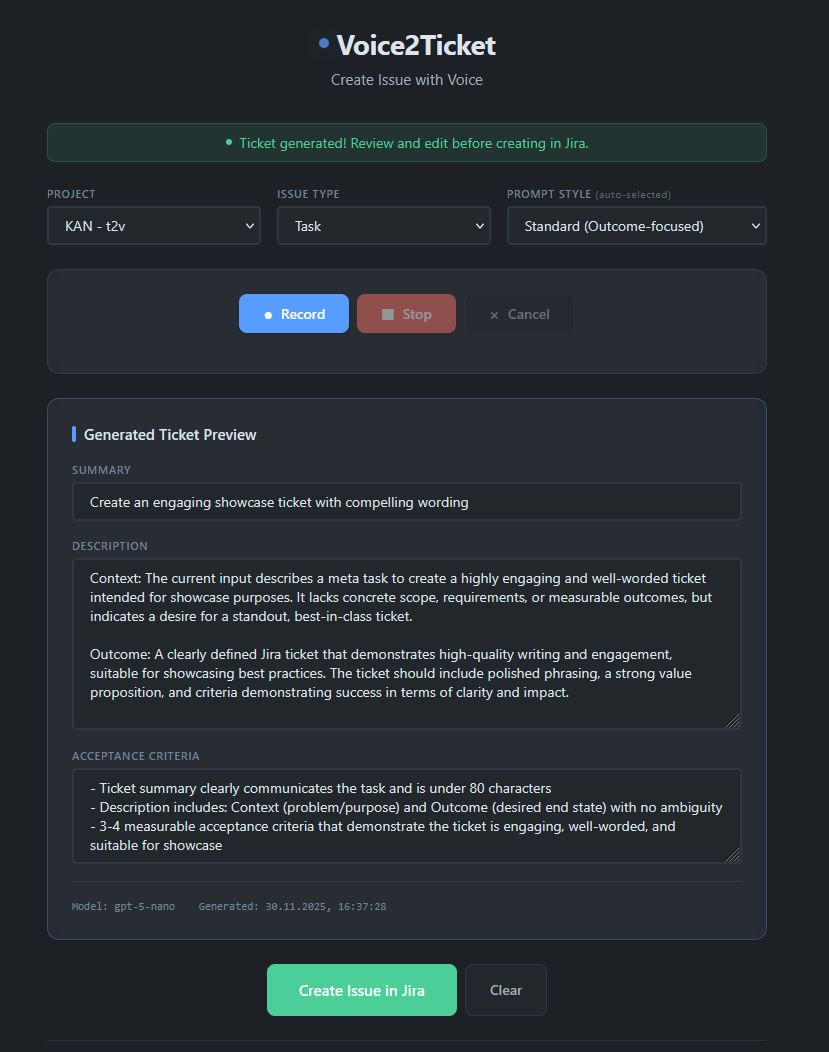
Voice2Ticket is deceptively simple: record your voice, get a structured ticket.
But the magic is in the details:
- Speak naturally. No commands, no special syntax. Just explain the issue like you would to a colleague.
- AI does the heavy lifting. The AI transforms your stream of consciousness into a properly formatted ticket—summary, description, acceptance criteria.
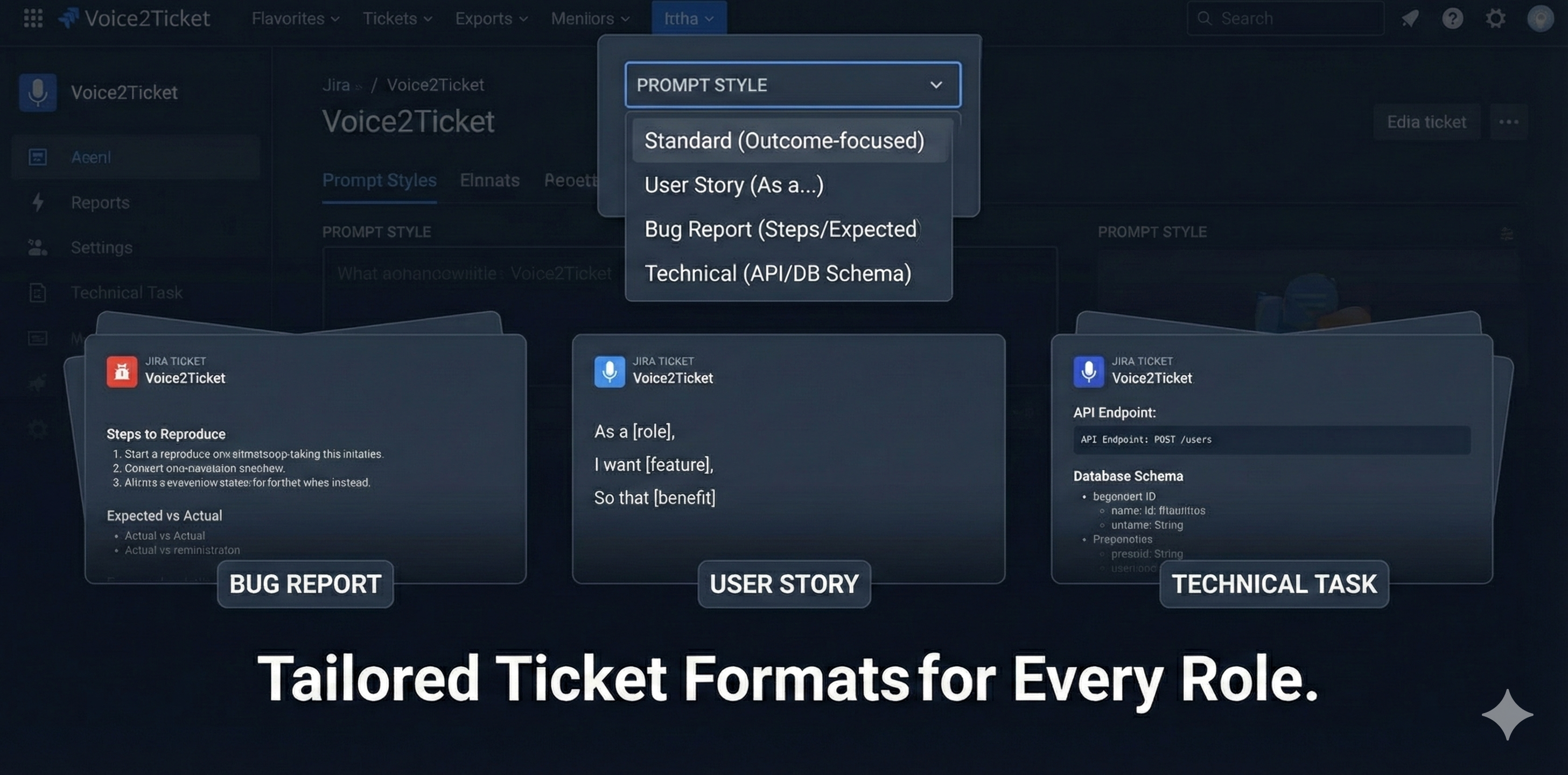
- Your company's standards, automatically. Admins configure prompt templates (User Story, Bug Report, BDD/Gherkin), and every ticket follows the same structure. No more "how do I write a good ticket?" questions from new team members.
- Works where you work. Right inside Jira—in the issue panel for updates, or the global page for new tickets.
The Technical Journey
Challenge 1: Forge's 512KB Limit
Atlassian Forge has a hard limit: 512KB per request payload. A 30-second voice recording? Easily 400-600KB. A minute of audio? Forget it.
I couldn't just "compress more." WebM/Opus was already optimized. So I built a chunked upload system: the frontend splits audio into smaller pieces, uploads them to a session, then the backend stitches them together before processing.
It sounds simple. It wasn't. Handling interrupted uploads, cleanup of abandoned sessions, ensuring chunks arrive in order—edge cases everywhere.
Challenge 2: Making AI Output Consistent
LLMs are powerful but unpredictable. Sometimes they return beautifully structured JSON. Sometimes they add markdown code blocks. Sometimes they decide "acceptance_criteria" should be "acceptanceCriteria" because why not.
The solution was a combination of:
- Strict prompts with explicit JSON schemas
- Security rules to prevent prompt injection (yes, people will try to make your AI do weird things)
- Language matching—German input must produce German output, not suddenly switch to English
Built With
- Atlassian Forge — The app runs natively inside Jira Cloud
- JavaScript — Frontend with vanilla JS, Web Audio API, MediaRecorder
- Python + FastAPI — Backend API handling transcription and structuring
- OpenAI GPT-4o — Transcription (GPT-4o Mini Transcribe) and structuring (Architecture ready for Forge LLM swap)
- PostgreSQL (Neon) — Multi-tenant data storage
- Railway — Backend hosting with automatic deployments
What I Learned
1. The best features feel obvious in hindsight. When I demo Voice2Ticket, people say "why doesn't Jira have this built-in?" That's the reaction you want. It means the problem is real and the solution is intuitive.
2. Constraints breed creativity. Forge's 512KB limit seemed like a dealbreaker. It forced me to build something better—chunked uploads that handle any audio length, with better error recovery than a single upload would have.
3. AI is 10% magic, 90% engineering. The "wow" moment is instant transcription. The work is prompt engineering, error handling, output validation, security hardening, and making it reliable at scale.
Try It
Voice2Ticket works with any Jira Cloud instance. Install it, click the microphone, and see for yourself.
Because you've already explained that bug to three people today. Why explain it to Jira with your keyboard?
Stop typing. Start talking.
Built With
- fastapi
- forge
- javascript
- openai
- postgresql
- python

Log in or sign up for Devpost to join the conversation.