-
-
Adobe Voice Room Addon - Realtime Collaboration With your team inside Adobe Express
-
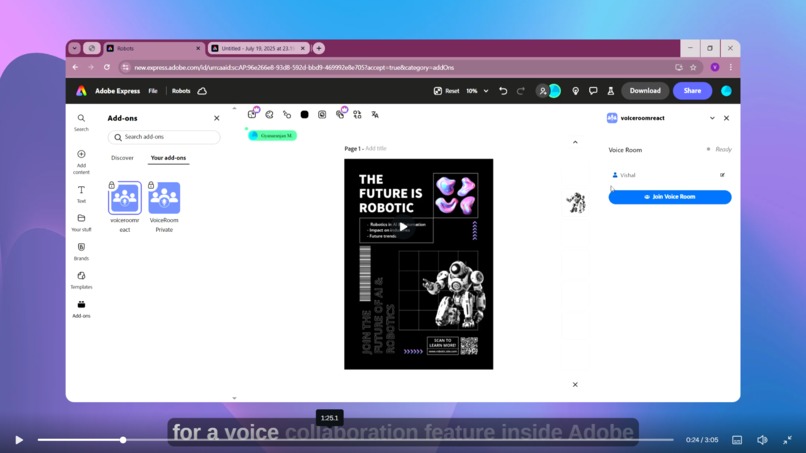
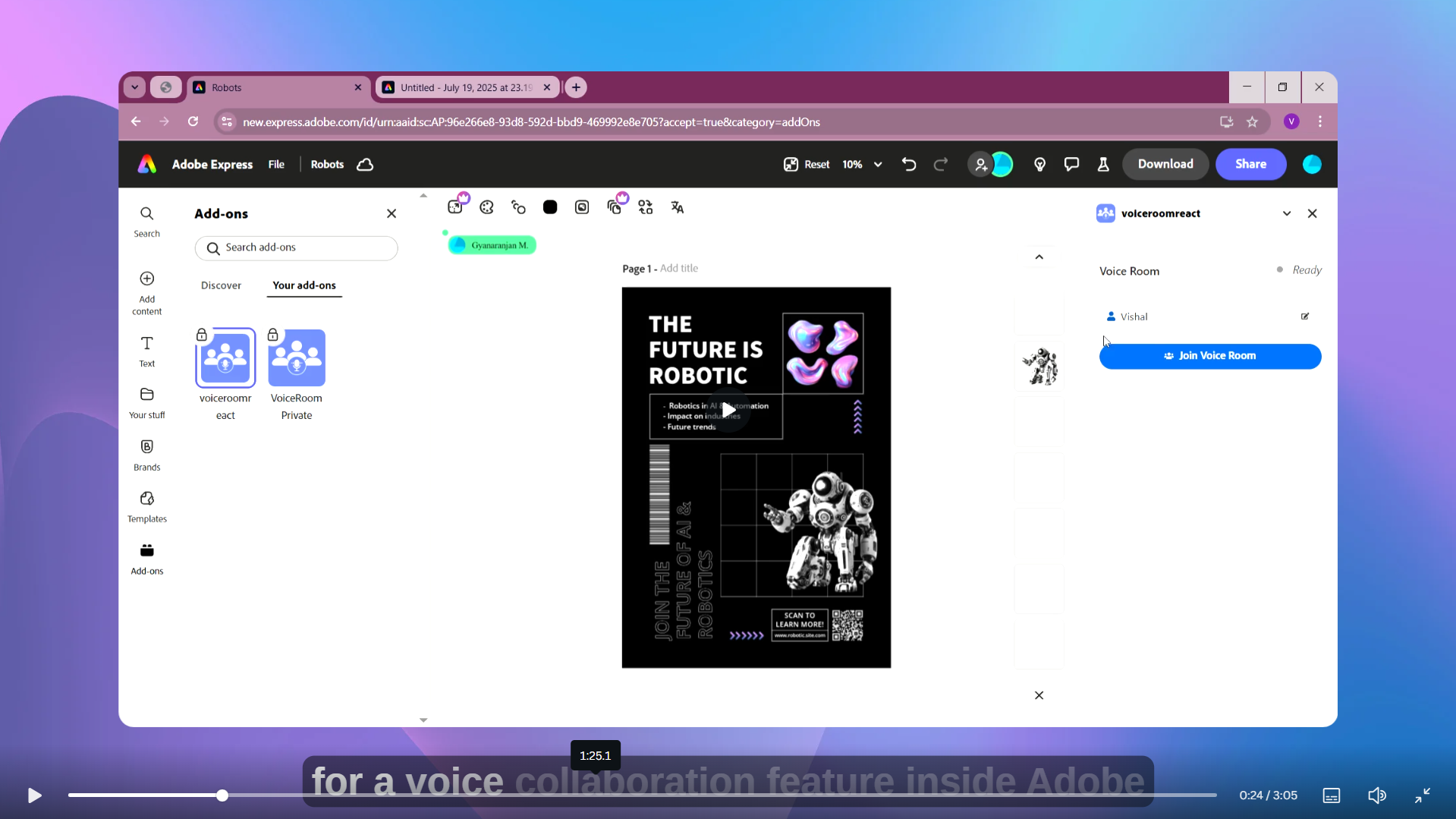
Joinig a Voice Room
-
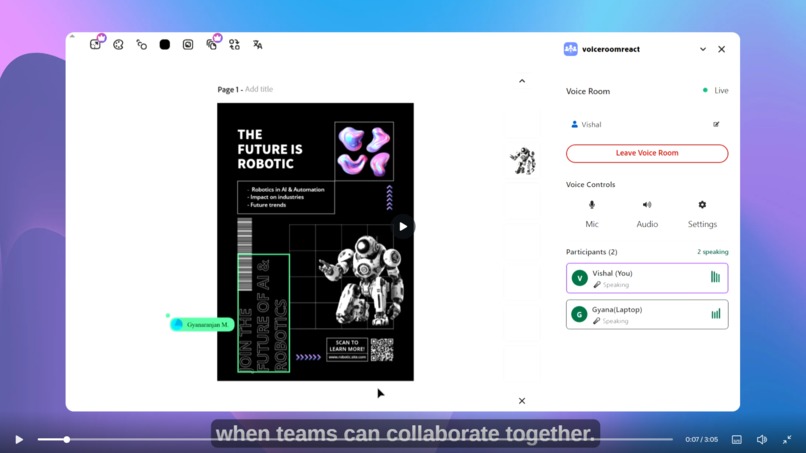
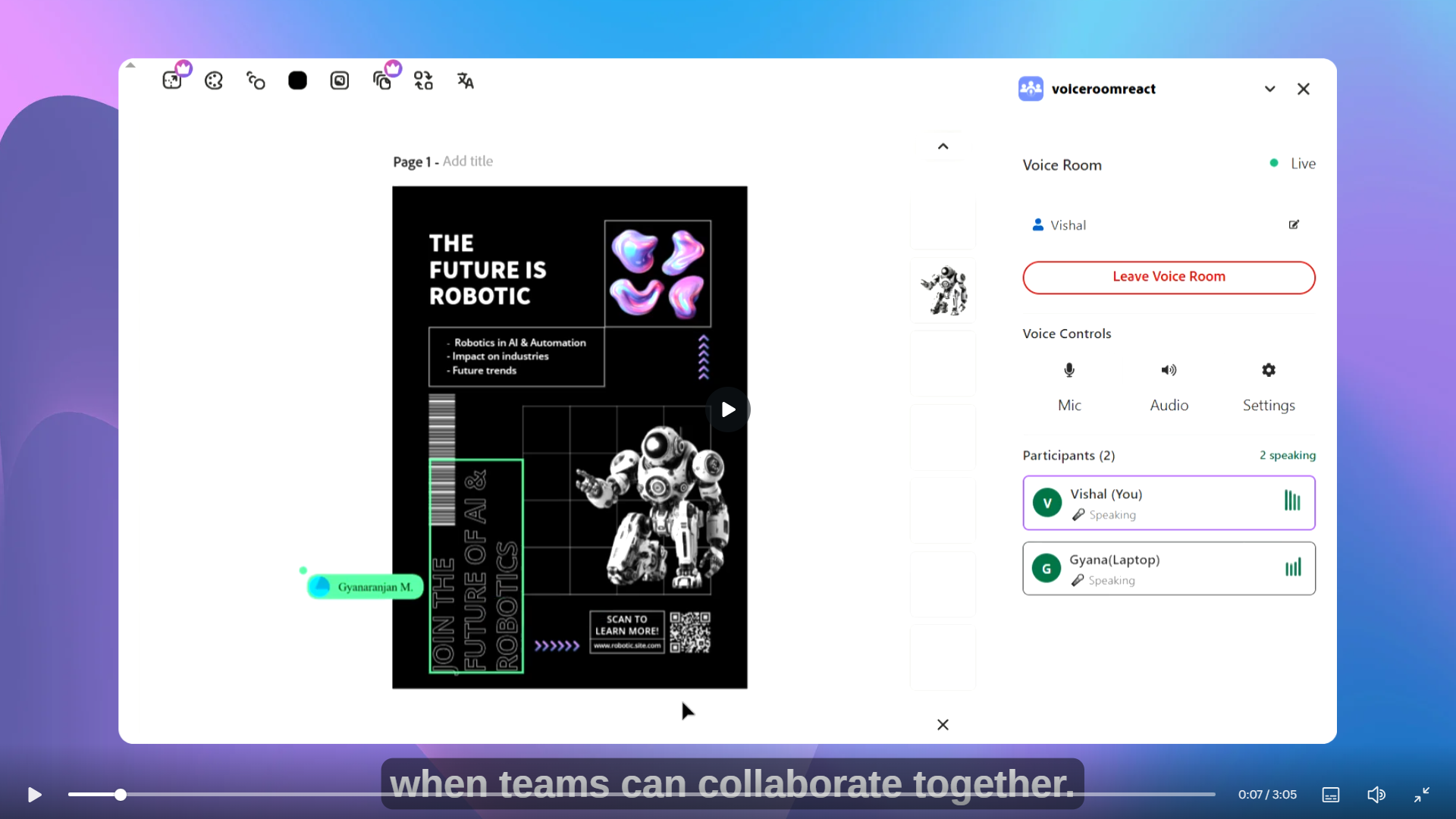
Live Voice Room Collaboration Activity
-
-
Please Try It Out
I'm a software developer and often use Figma and Adobe Express to design and present ideas with my team. While working remotely, I've seen how hard it is to communicate clearly while designing together.
Current Pain Points:
- Communication Disconnect: Teams use external tools like Google Meet or Zoom while designing in Adobe Express
- Context Switching: Constantly switching between design tools and communication apps disrupts workflow
- Network Issues: Poor connectivity leads to video/voice glitches during critical design discussions
- Unprofessional Workflow: Managing multiple tools simultaneously creates a fragmented experience
- Collaboration Friction: Delays in communication lead to misaligned design decisions and reduced productivity
The Reality:
"Most design teams struggle with real-time communication during design sessions, leading to longer project timelines, miscommunication, and frustrated team members."
The Solution: Voice Room
Voice Room is a real-time voice collaboration addon for Adobe Express that enables seamless team communication without leaving your workspace. You can communicate only with collaborators who have access to your project through Voice Room. No outsider can access your voice room—only people who are already added as collaborators on the same Adobe Express project can join the conversation.
Key Value Proposition:
- Integrated Communication: Voice chat directly within Adobe Express
- Document-Based Rooms: Automatic room creation based on your current project
- Professional Workflow: No more juggling multiple apps
- Optimized for Design: Built specifically for creative collaboration needs
How to Join and Invite Collaborators
- Joining a Voice Room:
- Open your Adobe Express project.
- Launch the Voice Room addon from the project interface.
- Enter your name if prompted, and click "Join Room." You will be connected to the voice room linked to your current project.
- Inviting Collaborators:
- Add your teammates as collaborators to your Adobe Express project using the standard Adobe Express sharing options.
- Once they have access to the project, they can open the same project and launch the Voice Room addon to join the conversation automatically.
Only project collaborators can join the voice room. Outsiders or users without access to the project cannot enter or listen in.
Features & Capabilities
Core Features:
- Real-time Voice Communication
- WebRTC-based peer-to-peer voice chat
- Crystal clear audio quality
- Low latency for natural conversation
- Smart Room Management
- Automatic room creation based on document ID
- See who's currently in your project
- Real-time participant status updates
- Intuitive Audio Controls
- One-click mute/unmute
- Speaker controls for focus mode
- Visual speaking indicators
- Adobe Spectrum Integration
- Native Adobe design language
- Responsive and accessible UI
- Seamless visual integration with Express
- Professional Features
- Username management
- Device selection (microphone/speakers)
- Speaking detection with visual feedback
- Clean leave/join functionality
User Experience
The Journey:
- 1. Open Adobe Express → Start working on your design
- 2. Launch Voice Room → One-click addon activation
- 3. Enter Username → Quick identification setup
- 4. Join Room → Automatically connects to document-based room
- 5. Collaborate → Talk while you design, no context switching
Technlogy Used
Architecture:
- Frontend: React with Adobe React Spectrum components
- Real-time Communication: Socket.IO for signaling
- Voice Streaming: WebRTC for peer-to-peer audio
- Audio Processing: Web Audio API for speaking detection
Key Technical Features:
- Automatic Device Management: Smart microphone and speaker selection
- Network Resilience: Handles connection drops gracefully
- Cross-browser Compatibility: Works on Chrome, Firefox, Safari, Edge
- Scalable Architecture: Supports multiple participants per room
Market Impact
Target Users:
- Design Teams: Working remotely on collaborative projects
- Creative Agencies: Managing multiple client projects
- Freelancers: Collaborating with clients and contractors
- Educational Institutions: Design classes and workshops
Business Value:
- Increased Productivity: Reduces time spent switching between tools
- Better Collaboration: Improves design decision-making speed
- Professional Image: Keeps teams within Adobe ecosystem
- User Retention: Increases Adobe Express usage and engagement
Monetization Potential
Revenue Streams:
- Premium Features: Advanced collaboration tools
- Enterprise Plans: Team management and analytics
- Integration Services: Custom deployment for large organizations
- Training Programs: Workshops for design teams
Future Roadmap
Our current servers can support up to 1000 users at the same time. To help more teams and make sure everyone has a smooth experience, we need to scale our backend. With support from the Adobe Fund for Design, we plan to:
- Upgrade our backend servers to handle more users
- Ensure low-latency voice, even for large teams
- Improve performance for low bandwidth connections
- Add more collaboration features based on user feedback
Our goal is to make Voice Room reliable, easy to use, and helpful for all creative teams.
Project Story
About the Project
Voice Room was inspired by the real challenges our team faced while working together on design projects. We often had to use separate video calls while designing in Adobe Express, which made collaboration harder and less efficient. We wanted a simple way to talk with our team directly inside the design tool.
What We Learned
Building Voice Room taught us a lot about real-time communication, WebRTC, and how to create a smooth user experience. We learned how important it is to keep things simple and reliable, especially when teams depend on the tool for their daily work.
How We Built It
We used React and Adobe React Spectrum for the user interface, Socket.IO for real-time updates, and WebRTC for voice streaming. We focused on making the setup easy and the interface clean, so teams can start collaborating right away.
Challenges We Faced
Some of the main challenges were handling network issues, making sure audio quality stayed high, automatic device switching and supporting many users at once. We also worked hard to make the tool work well even with slow internet connections.
We believe communication is the heart of collaboration. With Voice Room, we want to remove barriers from the design process and help creative teams do their best work together.
Voice Room doesn't just add voice chat to Adobe Express - it revolutionizes how design teams collaborate, making remote design work as natural and efficient as being in the same room.
Use Case Scenarios
Scenario 1: Marketing Team Design Review
Context: A marketing team designing a campaign poster
- Team lead opens Adobe Express with the campaign design
- Activates Voice Room addon
- Team members join automatically when they open the same document
- Real-time feedback on design elements while making live changes
- Quick decisions without scheduling separate meetings
Scenario 2: Client Presentation
Context: Designer presenting concepts to a client
- Designer shares Adobe Express project with client
- Both join the same Voice Room
- Designer explains design choices while navigating the project
- Client provides immediate feedback
- Live edits based on client suggestions
Email for communication : voiceroom.live@gmail.com
Built With
- adobe-express-addon-sdk
- express.js
- gooogle-cloud-run
- react
- react-spectrum
- socket.io
- webrtc


Log in or sign up for Devpost to join the conversation.