Inspiration
Public speaking is one of the most common fears there is, and the usual advice is “just practice.” But practicing alone in your bedroom feels nothing like standing in front of 40 people who might ask you a hard question. Coaches and speaking clubs help, but they cost money, run on someone else’s schedule, and are intimidating in their own right.
We wanted to close that gap. What if you could describe any room you’re nervous about, like a hackathon demo for judges, a wedding toast, or a class presentation, and then actually stand in it? A real audience that reacts to you, asks questions about what you just said, and tells you exactly what to fix afterwards.
What it does
Voca is an iOS speaking coach. Its headline feature, Stage, turns your phone into an immersive practice room:
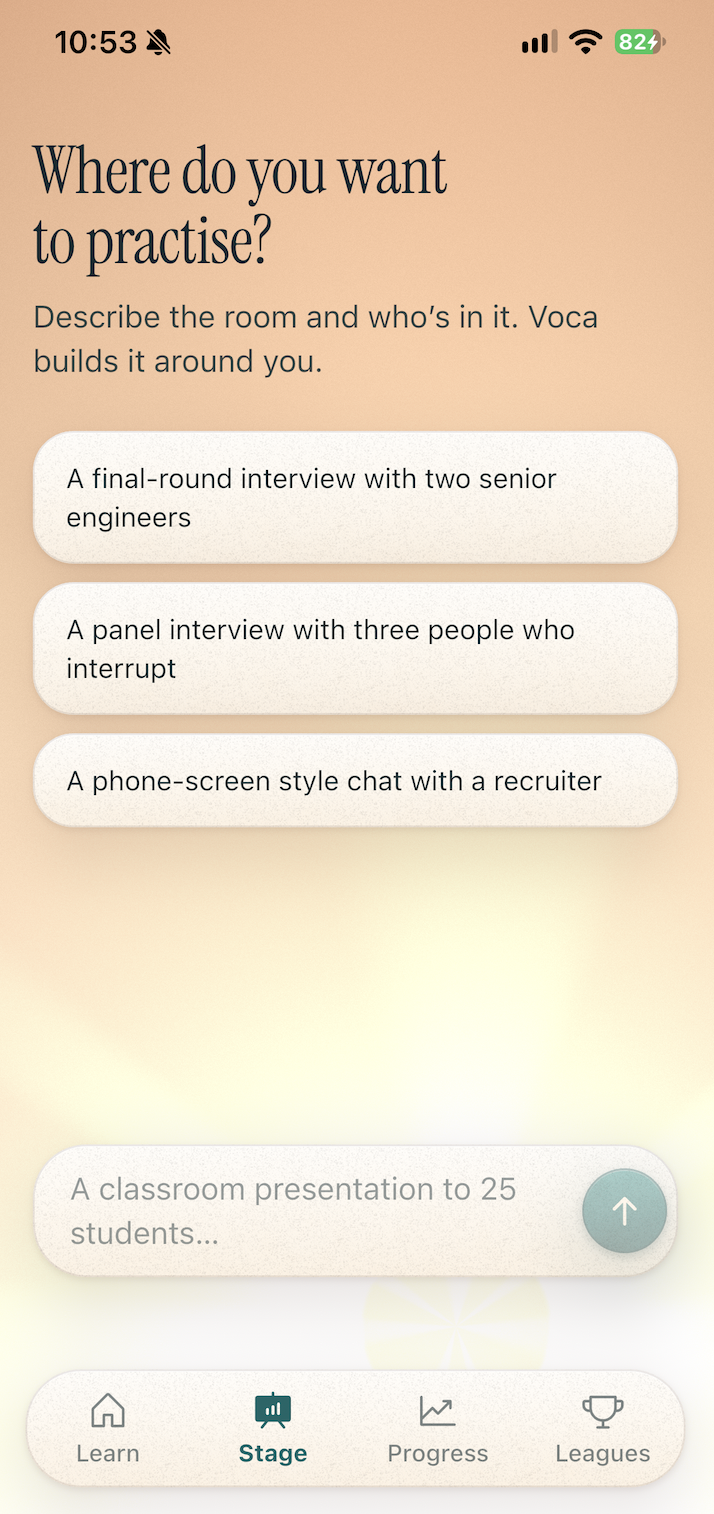
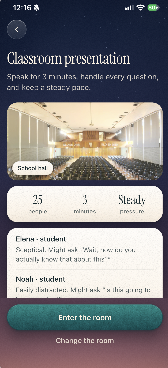
Describe the room. In a chat, you type something like “Hackathon presentation to 44 kids.” An AI producer asks a follow-up if it needs more detail, then builds a plan: the venue, the crowd size, named audience members with their own personalities, and when they’ll interrupt.
Step inside. Voca generated a 360° photographed environment (lecture halls, auditoriums, offices and more) with realistic, seated people. You move your phone and the room turns with you. AI Agents simulating people look at you, lose interest when you ramble, and raise their hands to ask questions.
Get coached live. While you speak you see:
- a live transcript with every “um” and “uh” highlighted
- a pace meter showing your words per minute
- a filler counter that pops each time you say one
- “Say it tighter” cards that rewrite your last sentence on the spot
- floating thoughts above people’s heads, like “I wish they’d get to the point”
- a live transcript with every “um” and “uh” highlighted
Answer real questions. Audience members ask questions about what you actually said, spoken aloud in natural ElevenLabs voices. If you dodge, they follow up.
Debrief. Afterwards you get a score, your full transcript with fillers and long pauses marked, before-and-after rewrites of your weakest sentences, how you handled each question, and who you made eye contact with.
How we built it
App: Flutter for the interface, with native Swift for everything immersive. The room uses ARKit and RealityKit: the environment is a high-resolution panorama wrapped around the viewer, and the audience is placed on the real seats in each photo by projecting seat positions from the image into 3D.
Environments: 19 HDRI panoramas from Poly Haven. We checked every one by hand, mapped its seating, and removed any with real people in them.
People: 12 Microsoft Rocketbox avatars (MIT licensed). We wrote a Blender script that hooks up their textures, poses each one seated, and exports them for iOS. In the app, each person’s head and neck are driven so they look at you, and their jaw moves when they talk.
AI agents: a TypeScript backend on Vercel calls models through OpenRouter. Separate agents handle building the room, tailoring questions to your speech, deciding on follow-ups, writing audience thoughts, rewriting sentences live, and writing the debrief. Each one returns structured JSON that we validate with Zod, and the room planner checks its own plan and repairs it if something’s wrong, such as the wrong crowd size.
Speech: a few seconds of your audio at a time goes to ElevenLabs Scribe for word-accurate transcription that keeps filler words. Apple’s speech recogniser fills in instantly in the meantime. Audience lines are spoken with ElevenLabs text-to-speech and played through echo cancellation, so their voices never end up in your transcript.
Scoring: a versioned rubric scores pace, pauses, filler words, clarity and vocal variety from the timed words, plus loudness and pitch measured on the phone.
Challenges we ran into
The silent microphone. For a long time Stage heard nothing at all. Permissions were fine and the mic opened, but no audio arrived. Device logs showed that the AR camera session was quietly reconfiguring the phone’s audio and stopping our audio engine. We now restart the engine whenever iOS changes the audio setup, and a watchdog restarts it if the mic ever goes quiet.
The AI ignoring the user. Early on, “Hackathon presentation to 44 kids” produced a coffee chat for 6 people. We added a planning check that compares the plan against what the user actually asked for and sends it back for repair, and we made the local fallback understand far more kinds of rooms.
People in the wrong places. Getting avatars onto the actual chairs in a 2D photo meant converting image coordinates into real distances and directions, then choosing seats people would actually be visible from.
Heads that wouldn’t behave. Turning a character’s head toward you meant converting rotations through each joint’s parent frame, and two different skeleton standards tilted the head in opposite directions.
The room shrinking into a ball. The environment was anchored where you started, so walking around made it collapse into a sphere. It now follows your eye position every frame.
Speed. Questions have to feel live, so we voice each one in the background before it’s due and tailor it to your speech only seconds earlier.
Accomplishments that we’re proud of
- Describe a room in one sentence and be standing in it within seconds.
- Audience questions are about your actual speech, not generic prompts.
- Feedback is specific and actionable: your own sentence crossed out, with a better version right underneath.
- Realistic, seated, attentive people in real photographed venues, all running on a phone.
- Graceful fallbacks everywhere: if the cloud is slow or unavailable, the app still transcribes, speaks and scores on the device.
What we learned
- Making people feel immersed is mostly about small reactions: someone looking away, a raised hand, a voice that sounds like the person asking.
- AI is far more reliable when every output is checked against the user’s actual request and repaired automatically when it misses.
- Mobile audio is fragile. Camera, AR, speakers and microphone all compete for the same audio system, and you have to plan for it changing at any moment.
- Feedback lands best during the moment of speaking, not only afterwards.
What’s next for Voca
- Full-body animation, including people reacting, nodding and checking their phones.
- Practice modes for interviews, pitches and classroom presentations.
- Progress across sessions, so you can see your filler words and pace improve week by week.
- A privacy consent step before any audio is sent for transcription, and stronger data controls.
- TestFlight, then the App Store.

Log in or sign up for Devpost to join the conversation.