VizWord: Learn a New Language with Viz & AI!
Inspiration
In today’s world, learning a new language is an essential skill, but traditional methods can often feel dull and uninspiring, especially for kids. We wanted to create a fun, interactive, and AI-powered way for children to explore languages through play. That’s why we built VizWord: an engaging web app where a little AI mascot, Viz, helps kids learn new words by recognizing real-world objects.
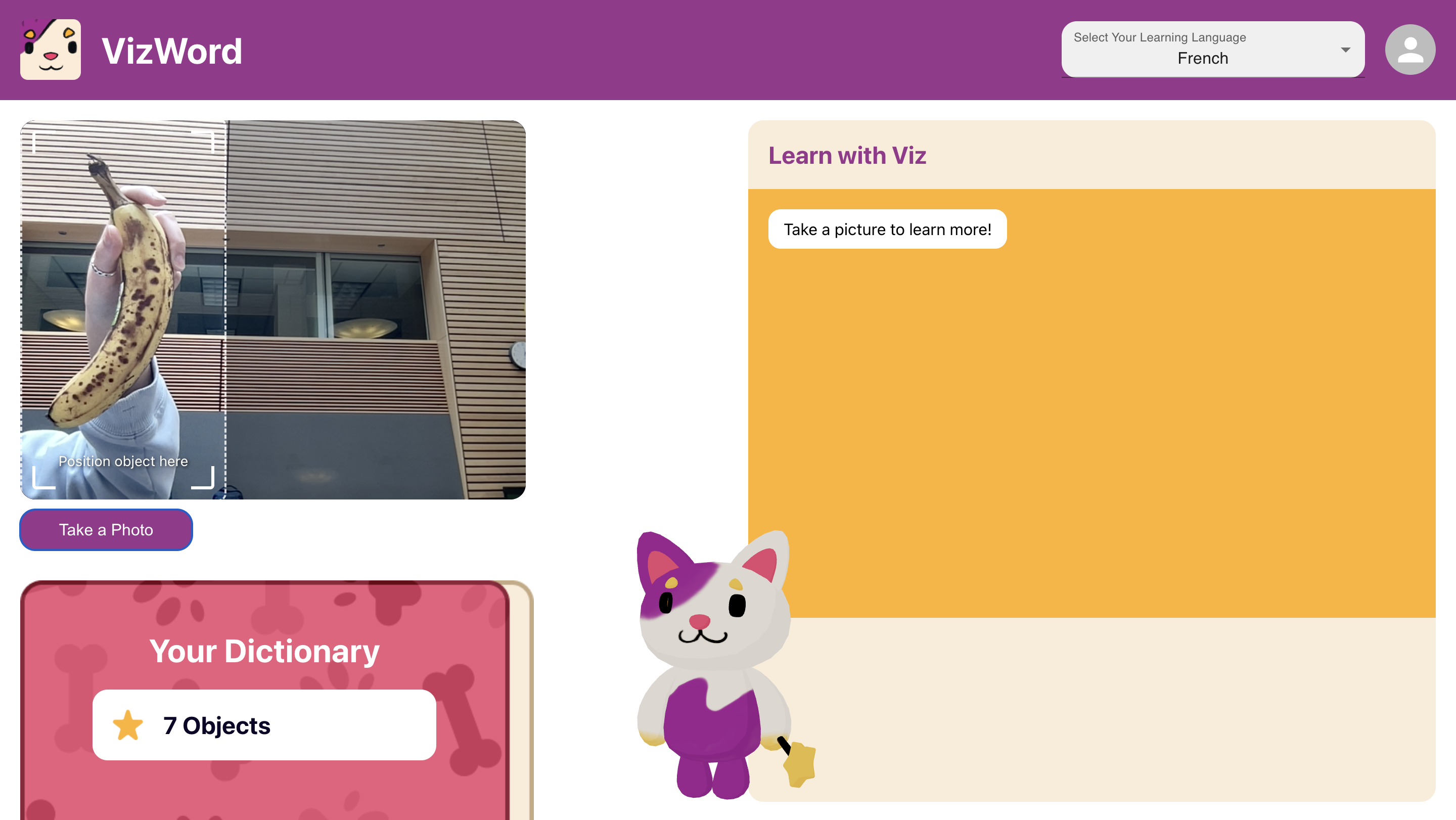
VizWord brings learning to life by combining computer vision, generative AI, and an interactive 3D character to help kids explore new words naturally. Instead of flipping through flashcards, kids can show an object to their webcam, and VizWord will:
- Recognize the object in real-time using YOLOv11
- Retrieve its translation in a chosen language via Gemini AI
- Generate three descriptive adjectives to build richer vocabulary
- Interact with a 3D mascot (Viz), who guides and encourages the user
What It Does
VizWord transforms everyday objects into learning opportunities! Here’s how it works:
- The user selects their target learning language (French by default if none is selected)
- The user shows an object to their webcam to fit in the target box
- YOLO (You Only Look Once) detects and classifies the object in real-time
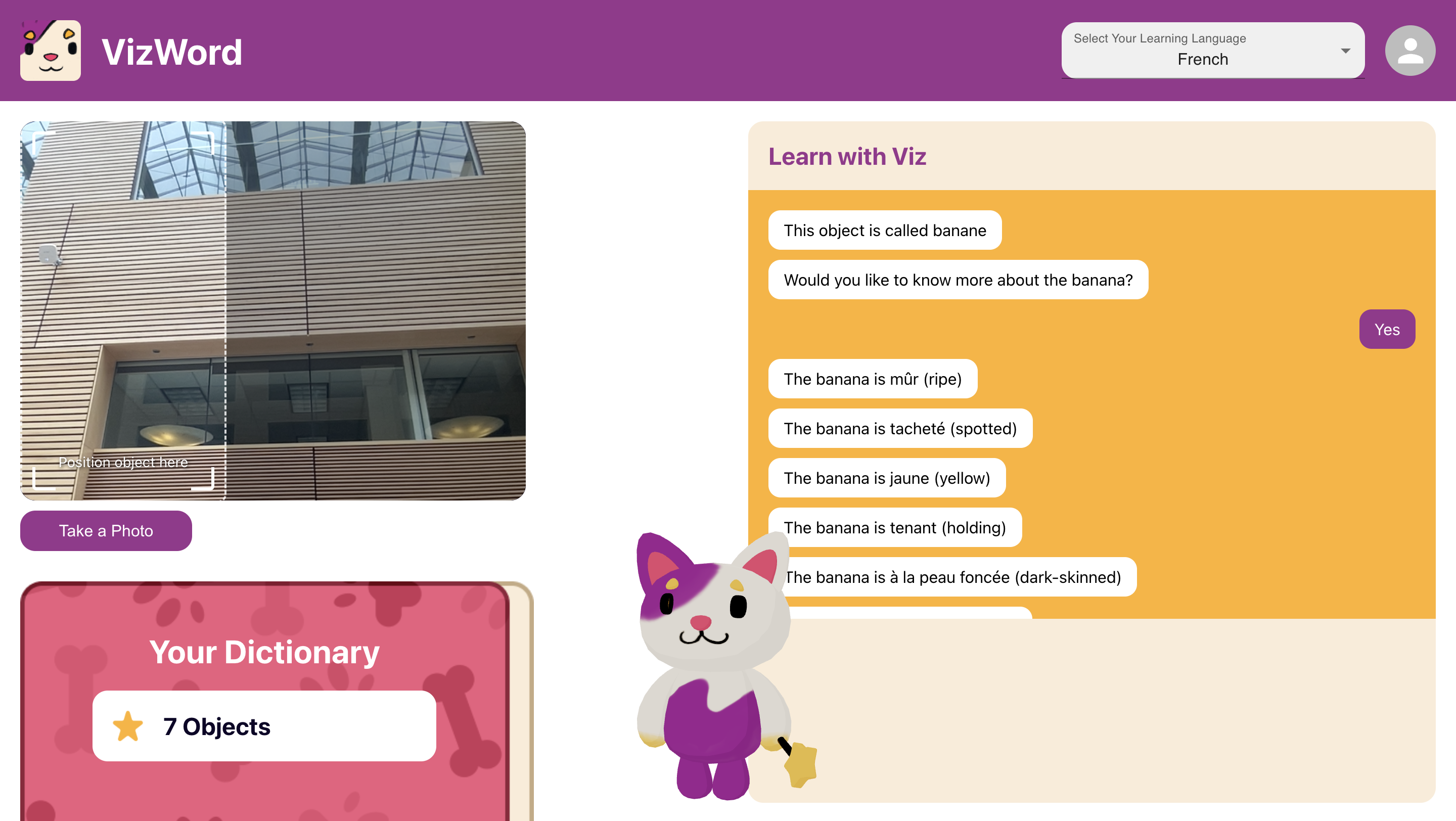
- The detected object is sent to Gemini for processing. Gemini provides:
- The translation of the object in the selected language
- Three descriptive adjectives in that language to expand vocabulary
- The child interacts with Viz, the friendly mascot, for an interactive experience
This multi-sensory approach helps kids see, hear, and engage with language in a way that feels more natural and exciting.
How We Built It
To bring VizWord to life, we engineered a multi-layered full-stack architecture, integrating real-time computer vision, AI-generated language processing, and chat interactions with our 3D mascot.
Backend Architecture
- Express.js (Node.js Server): The main backend that handles API requests, orchestrates data flow, and integrates with various services
- Flask (Python Server for Computer Vision): A dedicated Flask microservice for real-time object detection using YOLOv11, optimized for fast inference
- Inter-Service Communication: The Express server sends requests to the Flask server to classify objects and then processes the response before calling the Gemini API for language-related tasks
Computer Vision & AI Processing
- YOLOv11 (You Only Look Once v11): Detects and classifies objects from live webcam input, providing fast and accurate predictions
- Gemini API (Google AI): Handles language generation tasks, including:
- Translating detected objects into the target language
- Generating three descriptive adjectives related to the object
- Providing contextually relevant explanations to enhance learning
- AXIOS (for API calls): Handles POST requests efficiently between our servers and external AI services
Frontend – Interactive & 3D UI
- React.js: Powers the core front-end experience, making the UI dynamic and responsive
- Material UI: Provides a clean and modern design system for our components.
- React Three Fiber (R3F) & Three.js: Enables real-time 3D rendering of our AI mascot (Viz), creating an interactive and immersive experience
- Blender: Used to design and animate the 3D mascot before importing it into Three.js
- WebRTC & TensorFlow.js: Enables real-time webcam integration, ensuring seamless live object detection
Data Flow & Integration
- The user shows an object to their webcam
- The frontend captures the image and sends it to the Express.js server
- The Express server forwards the image to the Flask-based YOLOv11 model for object detection
- The Flask server returns the detected object label to the Express server
- The Express server calls the Gemini API, sending the object image and the detected object name
- Gemini returns:
- The translated word in the selected language
- Three descriptive adjectives
- The Express server sends the response to the frontend, which:
- Displays the translated object noun and adjectives
Challenges We Ran Into
- Optimizing YOLOv11 for speed and accuracy: Ensuring real-time object detection while maintaining high accuracy was challenging. We had to fine-tune inference settings and optimize server calls to keep detection both fast and reliable.
- Prompt engineering for Gemini API: Crafting effective prompts to consistently retrieve structured responses (translations + adjectives) required careful tuning. We experimented with different formats to ensure Gemini provided accurate and contextually relevant translations.
- Integrating a 3D mascot into our web app: Building Viz with React Three Fiber, Three.js, and Blender was complex. We faced issues with lighting and texturing, where our model initially looked like an uncolored clay figure. Fine-tuning materials, shaders, and scene lighting helped bring Viz to life.
Accomplishments We’re Proud Of
- Successfully integrating real-time object detection into a learning app
- Building a seamless AI pipeline that connects computer vision with language processing
- Designing an interactive 3D mascot that responds dynamically to learning
- Creating an engaging and fun educational tool that makes language learning immersive
What’s Next for VizWord
- Expanding beyond COCO classes: Currently, we use a pre-trained YOLO v11 model that detects 80 common objects (COCO dataset). In the future, we aim to train a custom model to recognize more objects, including educational and kid-friendly items.
- Adding a Vocabulary Section: We plan to introduce a database component that stores previously detected words, displayed as the dictionary in the bottom left corner. This will allow users to review and practice past words, making learning more effective.
- User Authentication: We aim to implement an authentication system to allow multiple users to create personalized profiles and track their learning progress.
- Provide pronunciation feedback with AI-driven voice analysis
- Developing a mobile version for on-the-go and more extensive real-world learning
- The app provides text-to-speech (TTS) functionality so kids can hear the correct pronunciation of the words in their target language
Built With
- apis
- axio
- blender
- computer-vision
- express.js
- flask
- javascript
- node.js
- object-detection
- python
- react
- three.js
- yolo


Log in or sign up for Devpost to join the conversation.