-
-
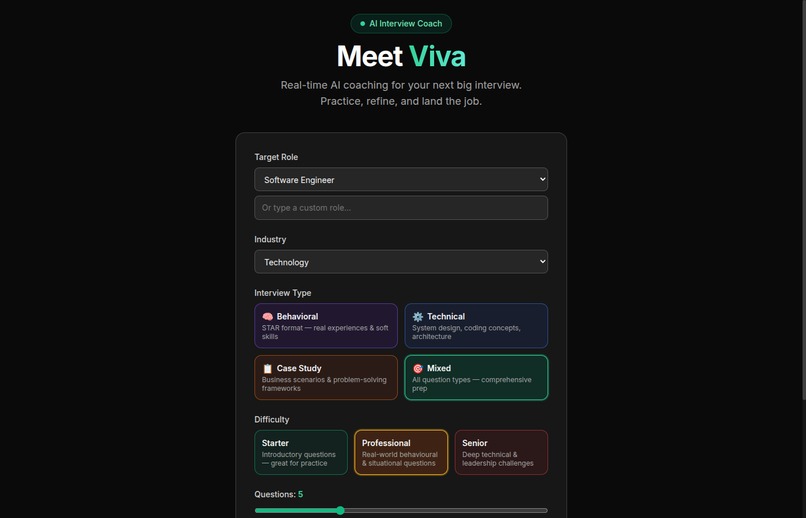
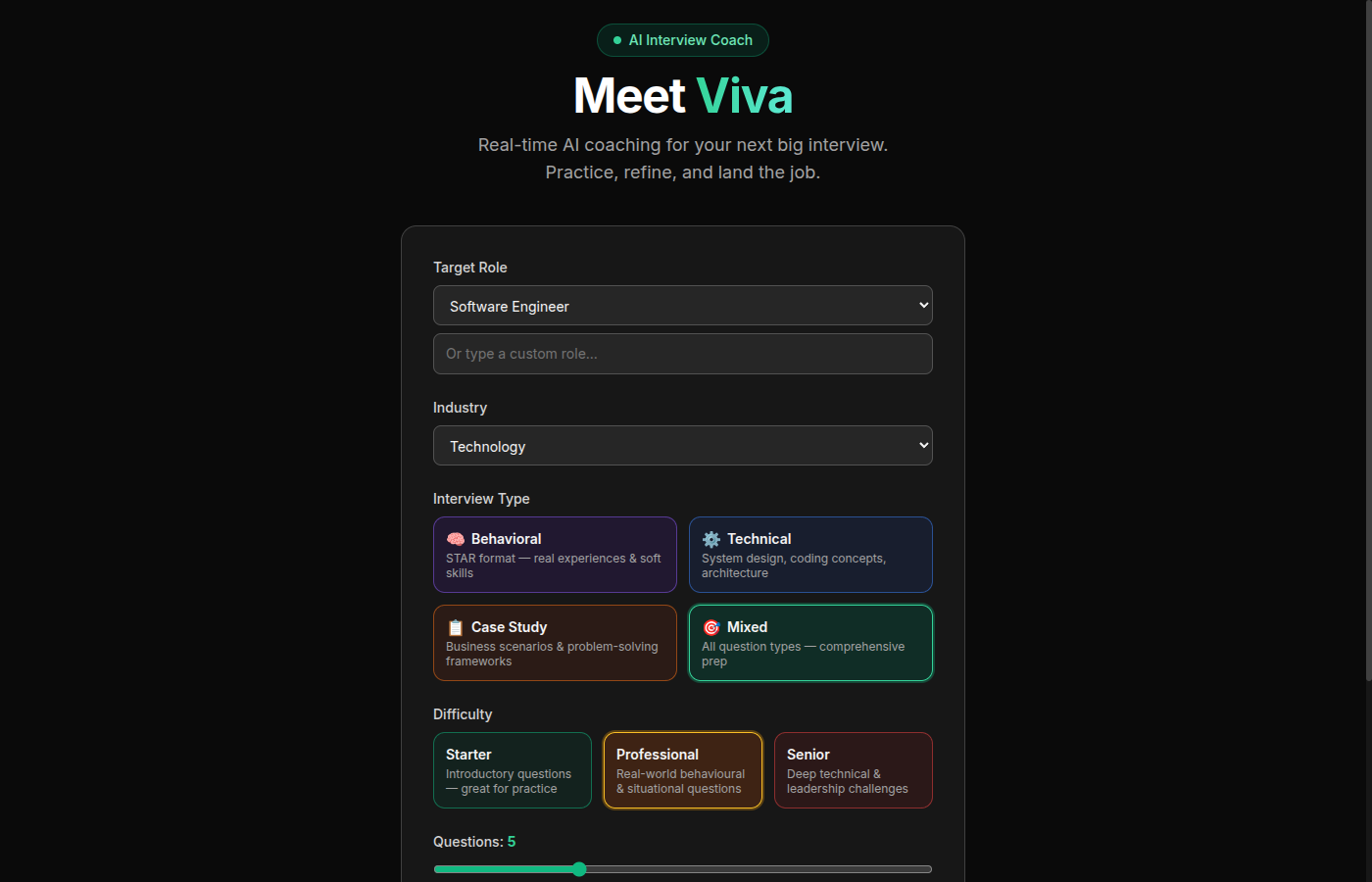
Interview setup -- choose role, industry, type, and difficulty
-
Live interview session with real-time AI coaching
-
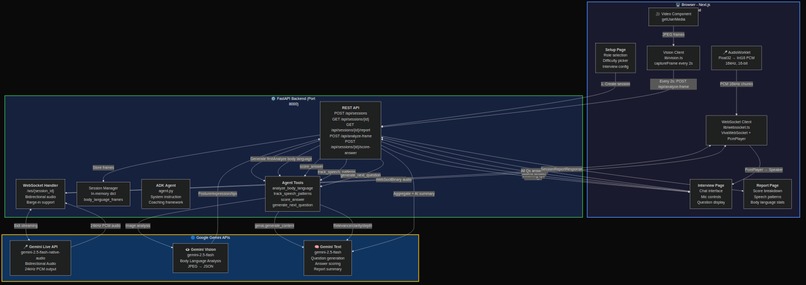
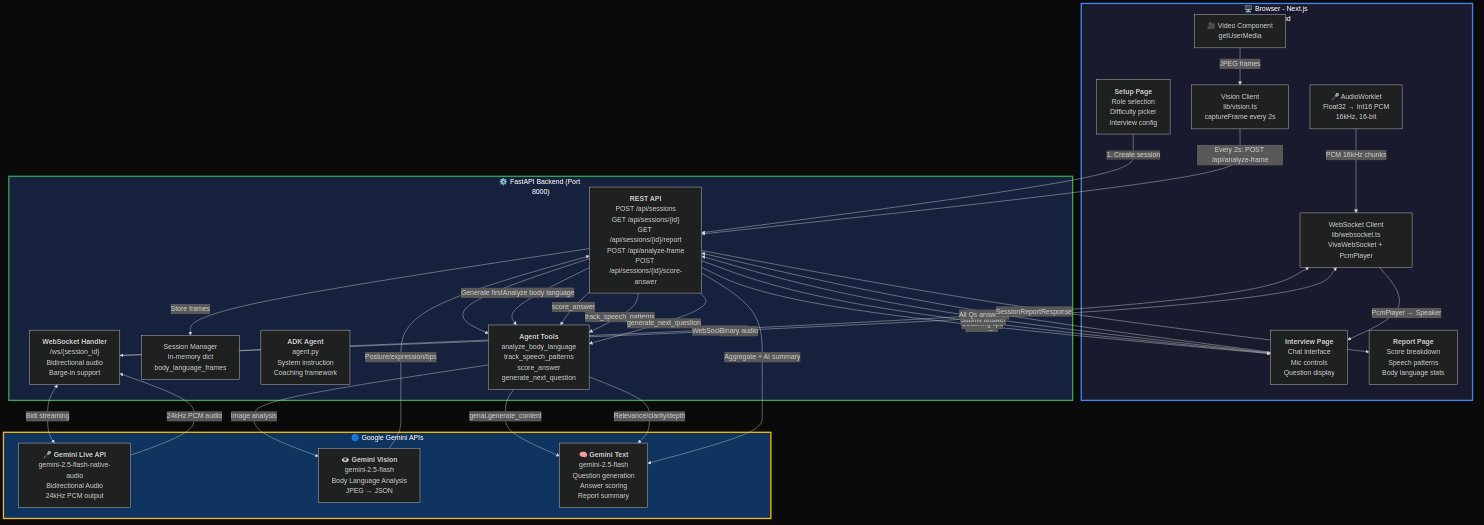
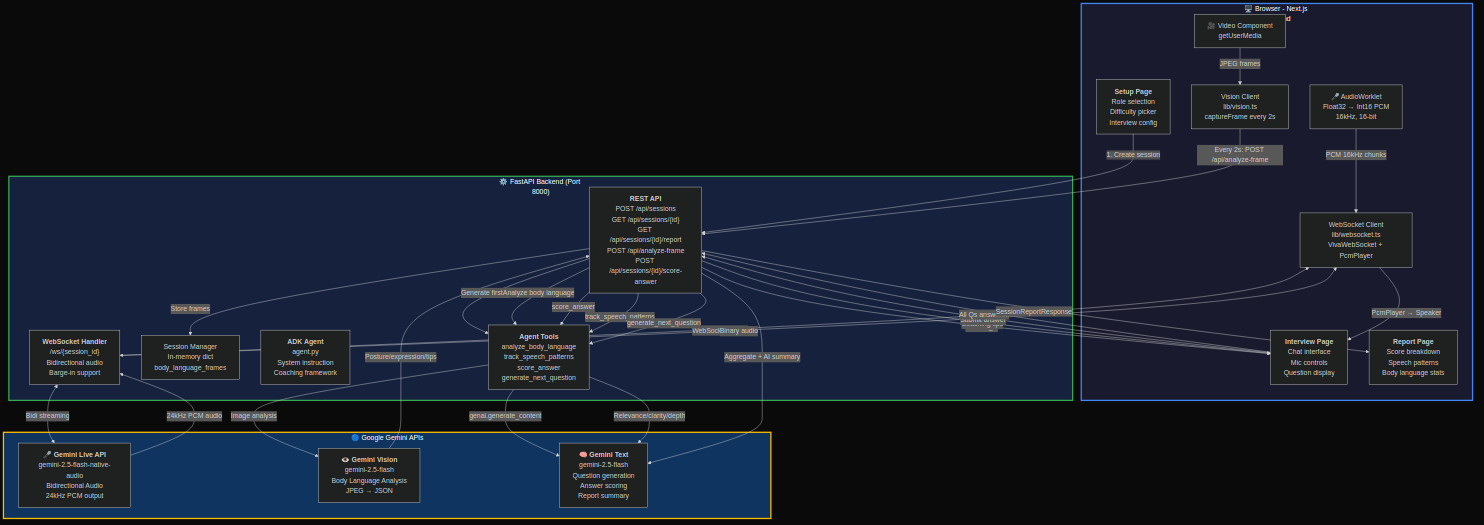
System architecture -- three concurrent Gemini pipelines
Inspiration
Interview anxiety affects 92% of job candidates. Traditional prep tools offer static question lists or text-based chatbots, but real interviews are multimodal: your voice, your body language, your confidence all matter as much as your words. We asked: what if an AI coach could see you, hear you, and respond in real-time, just like a real interviewer?
Viva was born from this insight: the best interview prep should feel like an actual interview, not a text box.
What it does
Viva is a real-time AI interview coach that conducts live mock interviews using three simultaneous Gemini-powered pipelines:
Voice conversation via Gemini Live API -- Viva speaks interview questions aloud and listens to your answers through bidirectional audio streaming. The conversation is natural, with proper turn-taking and barge-in support so you can interrupt just like a real interview.
Body language coaching via Gemini Vision -- Every 2 seconds, Viva captures a frame from your webcam and analyzes your posture, eye contact, facial expressions, and gestures through Gemini Vision. Live coaching tips appear in real-time ("Maintain eye contact with the camera", "Relax your shoulders").
Answer scoring and adaptive questioning -- After each answer, Viva's ADK agent scores your response on relevance, clarity, and depth, then generates the next question based on your performance. Struggling with behavioral questions? Viva adjusts difficulty. Acing technical questions? It pushes harder.
After the session, you get a comprehensive scorecard: per-question breakdowns, speech pattern analysis (filler words, pace, confidence trends), body language summary, and an overall readiness score.
How we built it
Backend (FastAPI on Cloud Run)
The backend orchestrates three Gemini models simultaneously:
Gemini Live API (
gemini-2.5-flash-native-audio-preview) handles bidirectional audio streaming via WebSocket. Raw PCM audio flows from the browser mic (16kHz, 16-bit) through an AudioWorklet, gets sent over WebSocket to the backend, which pipes it to Gemini Live API. Gemini's audio response (24kHz PCM) streams back for playback through a custom PcmPlayer.Gemini Vision (
gemini-2.0-flash) processes JPEG frames from the webcam every 2 seconds via REST. Each frame gets a natural-language description of the candidate's body language, which the ADK agent interprets into actionable coaching tips.Gemini Text (
gemini-2.5-flash) powers four ADK agent tools:analyze_body_language-- interprets frame descriptions into coaching feedbacktrack_speech_patterns-- detects filler words, estimates speaking pace, scores confidencescore_answer-- evaluates answers on relevance, clarity, and depth (1-10 scales)generate_next_question-- adaptive question selection based on role, difficulty, and identified weak areas
Frontend (Next.js 14)
The frontend manages three real-time data streams simultaneously:
- AudioWorklet captures mic input as Float32 PCM, converts to 16-bit 16kHz, and sends via WebSocket
- PcmPlayer buffers and plays back Gemini's 24kHz audio response with minimal latency
- Vision client captures webcam frames as JPEG every 2 seconds and sends via REST
The interview UI shows the live camera feed, current question, chat transcript, coaching tips, and session timer all updating in real-time.
Infrastructure (Google Cloud)
Deployed via deploy.sh (IaC): Cloud Build creates the container image, Secret Manager stores the API key, and Cloud Run serves the backend with auto-scaling (0-3 instances). Frontend deploys to Vercel with the Cloud Run URL injected at build time.
Challenges we ran into
Audio pipeline latency -- Getting bidirectional audio to feel natural required careful engineering. The browser's AudioWorklet captures Float32 samples at the native sample rate, which we resample to 16kHz 16-bit PCM before sending. On the playback side, Gemini outputs 24kHz PCM which we buffer and play through a custom PcmPlayer to avoid gaps. The entire round-trip had to stay under 500ms to feel conversational.
Barge-in handling -- When a user starts speaking while Gemini is still talking (a natural conversational pattern), we need to gracefully interrupt the AI's audio stream, flush the playback buffer, and signal the model to start listening. Getting this right without audio glitches took multiple iterations.
Three concurrent Gemini streams -- Running Live API (WebSocket), Vision (REST every 2s), and Text (ADK tool calls) simultaneously meant careful session management. Each stream needed independent error handling without crashing the others. A Vision API timeout shouldn't kill the audio conversation.
Sample rate mismatch -- The mic captures at 44.1kHz or 48kHz (browser-dependent), Gemini Live API expects 16kHz input but outputs 24kHz. We handle three different sample rates across the pipeline with zero audible artifacts.
Accomplishments we're proud of
- The audio conversation genuinely feels natural -- proper turn-taking, no robotic pauses, smooth barge-in
- Body language coaching updates in real-time without interrupting the conversation flow
- The adaptive questioning engine actually makes interviews progressively harder or easier based on performance
- Full mock mode that works without any API keys, making it easy for anyone to try the codebase
What we learned
- Gemini Live API's bidirectional streaming is remarkably capable for real-time conversation -- the latency is low enough to feel natural, and the barge-in support means the AI doesn't awkwardly keep talking when you start answering
- AudioWorklet is essential for low-latency mic capture in the browser -- the older ScriptProcessorNode adds too much latency for real-time conversation
- Running multiple Gemini models concurrently requires careful session isolation -- each API call needs its own error boundary so a Vision timeout doesn't kill the audio stream
- ADK agent tools are powerful for structuring complex AI behavior -- instead of one monolithic prompt, breaking coaching into four specialized tools (body language, speech patterns, scoring, question generation) made each capability more reliable and testable
What's next
- Real-time transcript display from Gemini's speech-to-text capabilities
- Custom question bank upload so users can practice with their company's actual interview questions
- Session recording and playback with Cloud Storage, so users can review their performance over time
- Multi-language support leveraging Gemini's multilingual capabilities
- Interview analytics dashboard showing improvement trends across sessions
Built With
- fastapi
- gemini-live-api
- google-adk
- google-cloud-run
- google-gemini
- next.js
- python
- typescript
- web-audio-api
- websocket


Log in or sign up for Devpost to join the conversation.