-
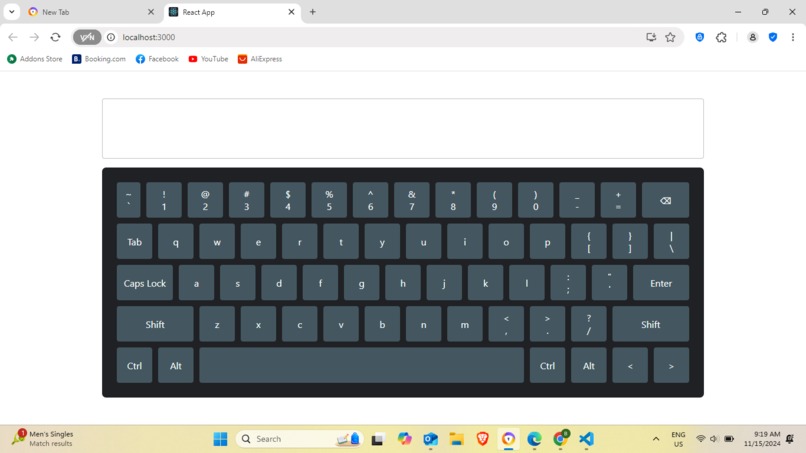
My visual keyboard

🧠 Inspiration The inspiration for this project came from a mix of modern and retro design trends. I wanted to create a visual keyboard that balanced aesthetic appeal with user-friendliness. Cyberpunk art, minimalist interfaces, and classic arcade designs sparked ideas for a keyboard that would feel interactive, intuitive, and immersive. The goal was to make typing visually engaging, with subtle animations and responsive designs that cater to a wide range of users, from tech enthusiasts to casual users.
📚 What I Learned Throughout this project, I learned a lot about both the design and technical aspects of creating a functional visual keyboard. Key takeaways include:
UI/UX Design Principles: Developing a visually pleasing keyboard taught me about the importance of color psychology, typography, and interactive elements. Animation & Transitions: I explored how small animations, like hover effects and press feedback, can improve user engagement without being overwhelming. CSS & JavaScript Skills: Fine-tuning animations, handling key presses, and creating responsive layouts gave me deeper insights into CSS and JavaScript. Accessibility Considerations: Designing with accessibility in mind (high-contrast options, readable fonts, etc.) ensured the keyboard would be functional for a broader audience. 🔨 Build Process Building this project was a multi-step journey:
Ideation & Design: I started by sketching out design concepts, drawing inspiration from futuristic themes and nature-inspired colors. Once I had a solid visual direction, I created wireframes to outline the keyboard layout.
Developing the Layout: Using HTML and CSS, I built a grid-based structure to ensure that the keys aligned consistently. I experimented with color schemes, deciding on a palette that balanced functionality with style.
Adding Interactivity: JavaScript was used to detect key presses and apply animations. I implemented hover effects, smooth transitions, and press feedback to make the keys feel dynamic and responsive.
Testing & Refining: User testing was crucial. I collected feedback on how the keys felt, the animation speed, and accessibility. Iterating on these insights helped me polish the design.
🛠️ Challenges Faced No project is without its challenges! Here’s what I encountered along the way:
Creating Smooth Animations: Ensuring animations were smooth across different devices was challenging. I had to balance the visual effects with performance, especially on mobile. Maintaining Consistency Across Browsers: Each browser rendered certain styles differently, so I spent time troubleshooting and adjusting to ensure a consistent experience. Accessibility: Making sure the keyboard was accessible while still visually appealing required additional CSS adjustments, especially in color contrast and font size. 🌟 Final Thoughts Building this visual keyboard was an incredible experience, blending creativity with technical skills. The end result is a keyboard that I’m proud of, offering a unique, interactive typing experience. The challenges taught me the importance of patience and iteration, while the successes showed the power of thoughtful design and careful execution.

Log in or sign up for Devpost to join the conversation.