-
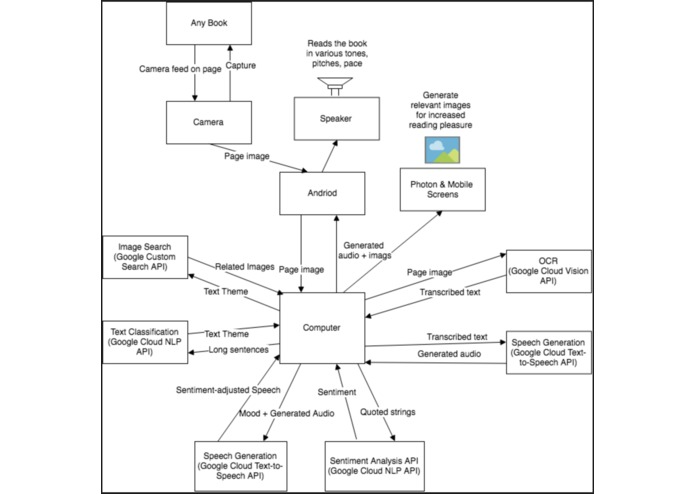
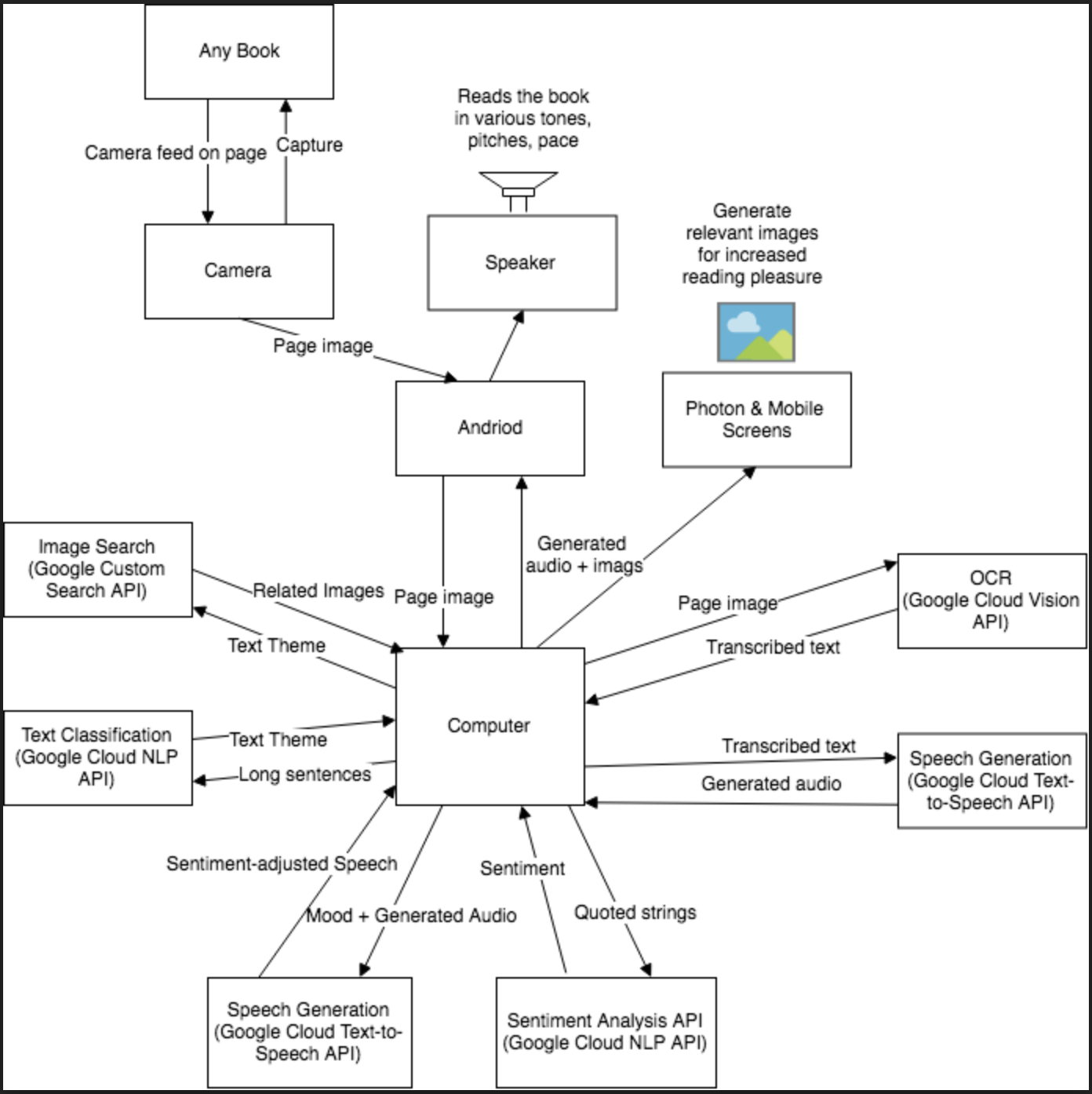
Block diagram for the project
Inspiration:
Whenever people are on the car, especially for long-distance road trips, people get bored. Many people are motion sick, and constantly staring at texts on a book will cause motion sickness. As such, our app enables anyone who prefers the book to be read to them instead of reading the book themselves to do just that. There is a catch: the voices used in the narration are generated based on the sentiment and content analysis of the phrases. Therefore, characters will act out interesting conversations and are therefore a lot more engaging that previously existing automated text-to-audio models. Also, images will be projected for each scene such that it also suits younger audiences who like visual effects.
What it does
Given some text (in the form of screenshots or real time photos taken with your phone), our web app interprets the text, create various different voices (with different pace, volume, pitch) based on the sentiment and content analysis of each character's phrases, and plays out the scene. At the same time, a picture is generated for each scene (arbitrary scene) and is displayed on both the phone screen as well as the Arduino LCD. This allows the users to get another dimension of information, and this is especially useful when kids are using this web app to read books.
How we built it
We started off with a block diagram linking all components of the app, and we independently tested all the various components. We used a lot of Google Cloud APIs (Vision, Text-to-speech, Natural Language) in the process of developing our app, and more specifically, we included OCR, sentiment analysis, content analysis just to name a few. As we got each component working, we incrementally built feature by feature. The first feature is audio from image, then varying the pitch/speed based on the sentiment calculation. After these, we worked on content analysis, and using the results of the content analysis, we made our own Google Custom search engine to perform image searching. Then we feed the results of image search back to the phone as well as the Arduino. Arduino receives the BMP version fo the image search results and displays each image using a bitmap that is generated for each image. At last, we made an app that integrates both the picture taking, audio outputting, visual/image outputting.
Challenges we ran into
We initially wanted to use the Raspberry PI camera as the main camera to take pictures, however, the Raspberry PIs that we received at the Hackathon couldn't boot up, so we had to resort to using Arduino Photon to receive the BMP file which caused a lot of additional overhead.
Accomplishments that we're proud of
The quality of the outputs are surprisingly good. The conversations are engaging and very entertaining to the listener. We also flip the gender of the characters randomly to make it more interesting.
What we learned
- Clear up questions regarding APIs early on during a hackathon to prevent wasting time on something easy to solve.
- Start off the braining storming for ideas more systematically. For example, have a deadline for the project idea to be decided on so that we do not waste time braining storming, but rather on the actual coding/designing of the project.
- Talk to other teams about how to use certain tools! Do not limit yourself to only asking for advice from the mentors. Other teams and other hackers are usually down to help out and very insightful!
What's next for Visual Audio
- Add AR effects to the images. So instead of the images being displayed on the phone screen/Arduino LCD, we project these images using AR technologies so it's even more engaging, especially for children.
- Add more robust context analysis for gender inference.
Built With
- android
- arduino
- camera
- flask
- google-cloud
- html
- mobile
- motor
- natural-language-processing
- photon
- python
- search-engine
- speech
- vision


Log in or sign up for Devpost to join the conversation.