-
-

-
initial loading screen
-
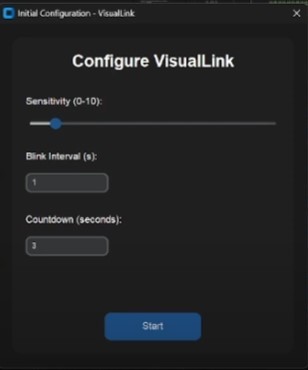
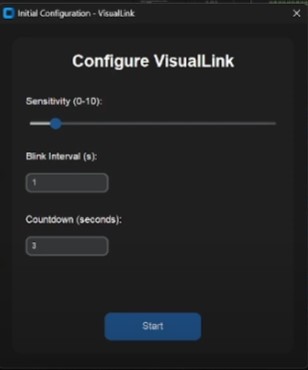
initial configuration
-
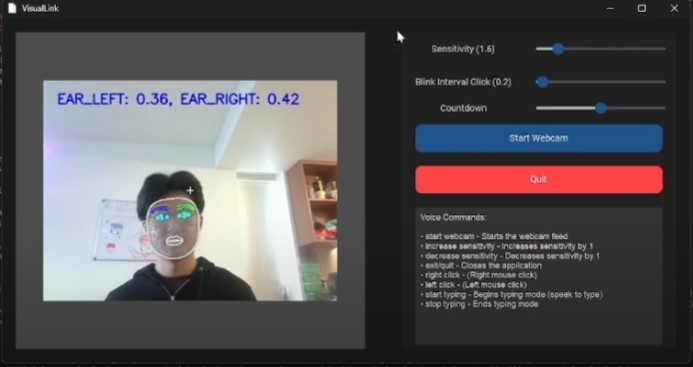
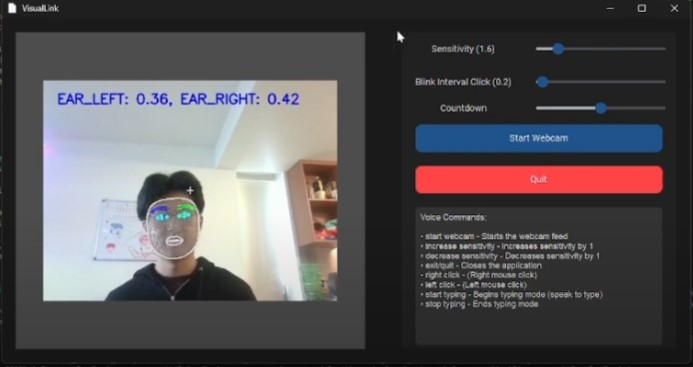
main software UI

VisLink: Hands-Free Control Software
VisLink is designed to empower individuals with mobility impairments by allowing them to control their computers without physical input devices, requiring only a standard webcam.
Inspiration
Computers are integral to the lives of billions, yet traditional input devices can be a barrier for those with limited hand functionality. While specialized hardware exists, it is often expensive and inaccessible. VisLink requires only a webcam in order to provide an affordable, hands-free control solution for individuals with mobility disabilities.
What it does
Head Movement Tracking: Uses Google MediaPipe to track head movements and map them into mouse movements
Blink Detection for Clicks: Detects blinks and translates them into clicks. We use a double-blinking system (2 consecutive blinks for a click) in order to reduce false positives
Voice Commands: Allows users to perform actions like typing, clicking, and controlling the software with voice commands - reducing the need for physical interaction with the computer
Customizations: We offer adjustable settings for mouse sensitivity, blinking intervals, and voice configurations for individual needs
Ease of Setup: Designed to be easy to use: Install and Run
Designed to be set up with initial assistance from a caretaker, afterwards VisLink can be fully configured by the user themselves without the need for caretaker intervention.
How we built it
-Primary Language: Python (for both frontend and backend)
- Key Libraries & Frameworks:
- OpenCV & MediaPipe: For real time head and blink tracking
- CustomTkinter: To create an intuitive and accessible UI
- NumPy & SciPy: To optimize movement tracking algorithms
We built VisLink using Python, OpenCV, and MediaPipe's Face Landmarker, integrating real-time facial landmark detection to track head rotation (roll, pitch, yaw) and eye blinks for cursor control (calibrated using blink flags).
The cursor movement is computed using rotation vectors, mapping head angles to a smoothed movement vector - applied by exponential smoothing with an adjustable alpha factor.
Blink detection uses Eye Aspect Ratio (EAR) calculations on specific eye landmarks, dynamically adjusting thresholds for users with glasses. The system includes adaptive blink interval filtering which allows us to differentiate between an intentional blink signal or a natural blink to prevent false mouse input.
Additionally, we implemented a dead zone filter which eliminates cursor drift from minor head tremors.
Challenges we ran into
Accurate Blink Detection
Problem:
- Blinks, being natural, often caused false positives when used to trigger clicks
- Users wearing glasses experienced landmark occlusions, distorting our Eye Aspect Ratio (EAR) calculations
Solution:
- Tracked 4 key eye landmarks (top, bottom, inner, outer) and computed the EAR as:
EAR = (|| top - bottom ||) / (|| inner - outer ||)- Implemented a double-blink system to reduce accidental clicks.
- Dynamically adjusted EAR thresholds during initialization based on the user's natural eye state
- Compensated for glasses interference by incorporating head tilt data
Mapping Head Movements To Cursor Movements
Problem:
- Raw 3D head tracking data needed to be translated into 2D cursor movements seamlessly
- Direct mapping resulted in jittery and chaotic cursor movement due to minor head tremors
Initial Approach:
- Used movement vectors from head rotation which caused the cursor to jitter and be unstable
Solution:
- Implemented exponential smoothing to combine new movement vectors with previous data points
- This method reduced cursor drift during stillness and provided a smooth "linear" motion of the mouse
- For more details on exponential smoothing, see this article
Accomplishments that we're proud of
Technical Accomplishments: We successfully integrated head movement tracking with blink detection and allowed for smooth mouse navigation
Team Collaboration: Throughout the development process, our communication remained constant and collaboration remained effective between both frontend and backend teams, minimizing code conflicts and streamlined the development process in order to deliver high quality and maintainable code.
User Empowerment: We were able to create a product that was not only functional but also has the potential to scale and deliver real world impacts in industries such as education, healthcare, and entertainment
What we learned
Technical Skills:
- We deepened our understanding of computer vision and real-time tracking algorithms
- Enhanced our ability to implement algorithms and problem solve
Soft Skills
- Recognized the importance of thorough testing and iterative development, never settling for something less
- Strengthened collaboration and communication across both teams, allowing for a smooth development process
What's next for VisLink (Visual Link)
Future Enhancements:
- Eye Tracking: In the future we plan on implementing eye tracking rather than head tracking to create an even more seamless user experience - in line with our project name: Visual Link.
- Automation:
Develop a solution that allows VisLink to launch automatically at startup which removes the need for
caretaker setup and further empowers the user - Machine Learning Integration: In the future, we hope to leverage AI for more adaptive and personalized adjustments based off user user movement patterns to help reduce manual configuration
- Platform Expansion We want to expand VisLink to beyond just PCs but to also include mobile devices, gamign consoles, and assistive technology platforms through an open API
- Potential Applications: We genuinely believe in the potential of VisLink to make a broader impact on society beyond just every day computing. VisLink could provide significant benefits in fields such as healthcare and education by lowering the physical technology barriers
VisLink is more than just a software - it's a step towards making technology more accessible to everyone, ensuring that the digital landscape serves all members of our community

Log in or sign up for Devpost to join the conversation.