Inspiration
We noticed that there was a need for a device that would help the visually impaired in their daily life with mundane tasks that would normally be difficult. The more personal inspiration came from our friend with minor visual impairment. With this, we set to create a device that would help millions of people.
What it does
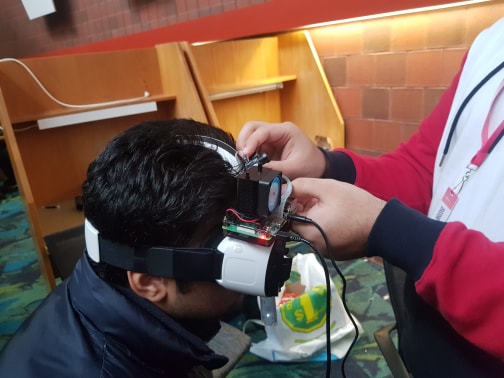
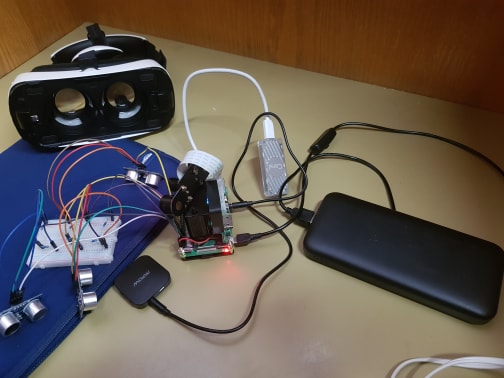
VisionX is based on the TensorFlow framework. We are currently using a model trained with thousands of images by Google. We are using the pre-trained model to recognize fruits and vegetables to assist the visually impaired with any mundane tasks such as grocery shopping. We also used a mixture of machine learning and ultrasonic sensors to detect objects and people for help with navigating difficult terrain. We also incorporated a feature for sending an SOS in an emergency situation. It can also detect text and read it back to the user.
How I built it
VisionX is built for the raspberry using the TensorFlow framework, coded in the python language. We were originally using the ‘Faster RCNN’, but we switched to TensorFlow Lite and decided to use the ‘Mobile SSD’ model for object recognition. For Google Assistant we used the Google AIY Python Library 1.0.1. This allowed us to implement custom commands.
Challenges I ran into
This was our first time working with machine learning and object detection, resulting in a steep learning curve of the entire team. This, along with the limited time created a very stressful and challenging project. The Raspberry Pi is also very underpowered compared to some other computers, thus we tried different models and optimized the code to obtain a working FPS that was very difficult.
Accomplishments that I'm proud of
We were able to accomplish object detection, uploading and retrieving data from a server, implementing a grocery list, implementing subsections to the camera module. We also incorporated google assistant to better help the user navigate through systems, different modes and recognize the voice. With our camera module, we’ve implemented a night vision mode using infrared sensors. We also used ultrasonic sensors to detect object distance, collisions and more. Lastly, we managed to incorporate an SOS feature through the use of a GPS module.
What I learned
The most difficult and time-consuming items we learned were:
- Learning TensorFlow and getting Object/facial detection to work
- Obtaining a workable FPS with the Raspberry Pi and heat management
- Achieving a moderate voice recognition system within google assistant.
What's next for VisionX
- Add further facial recognition capabilities and a larger library system.
- Condensing the size of the entire module and achieving a higher fps rate.
Built With
- api
- breadboard
- coded-in-the-python-language.-we-were-originally-using-the-?faster-rcnn?
- fasterrcnn
- google-cloud
- googleaiypythonlibrary1.0.1
- lite
- mobilessd
- python
- raspberry-pi
- tensorflow
- ultrasonicsensor
- vr


Log in or sign up for Devpost to join the conversation.