-
-
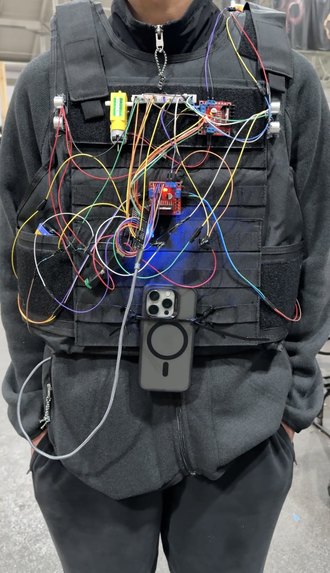
Physical vest
-
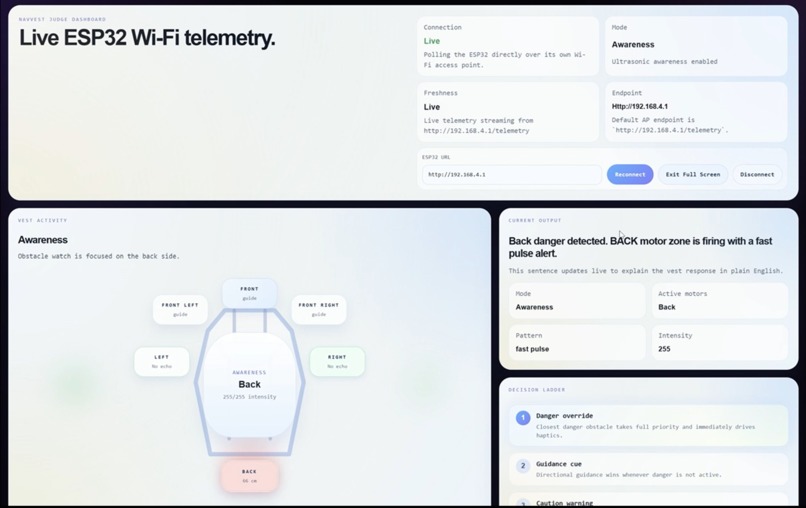
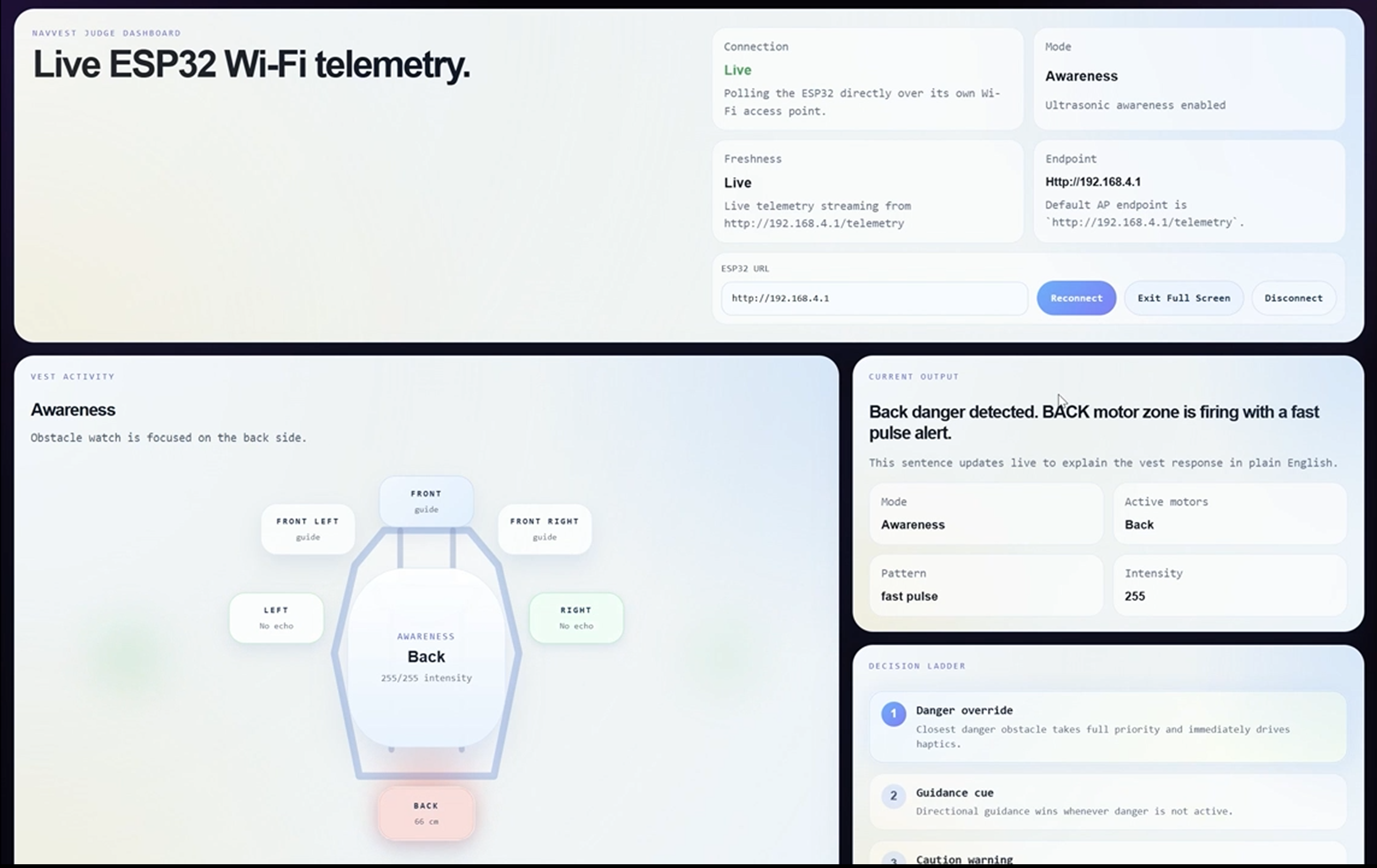
Dashboard to log data
-
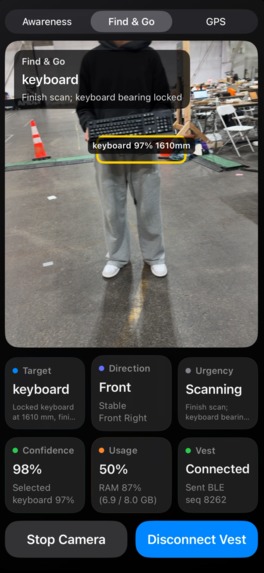
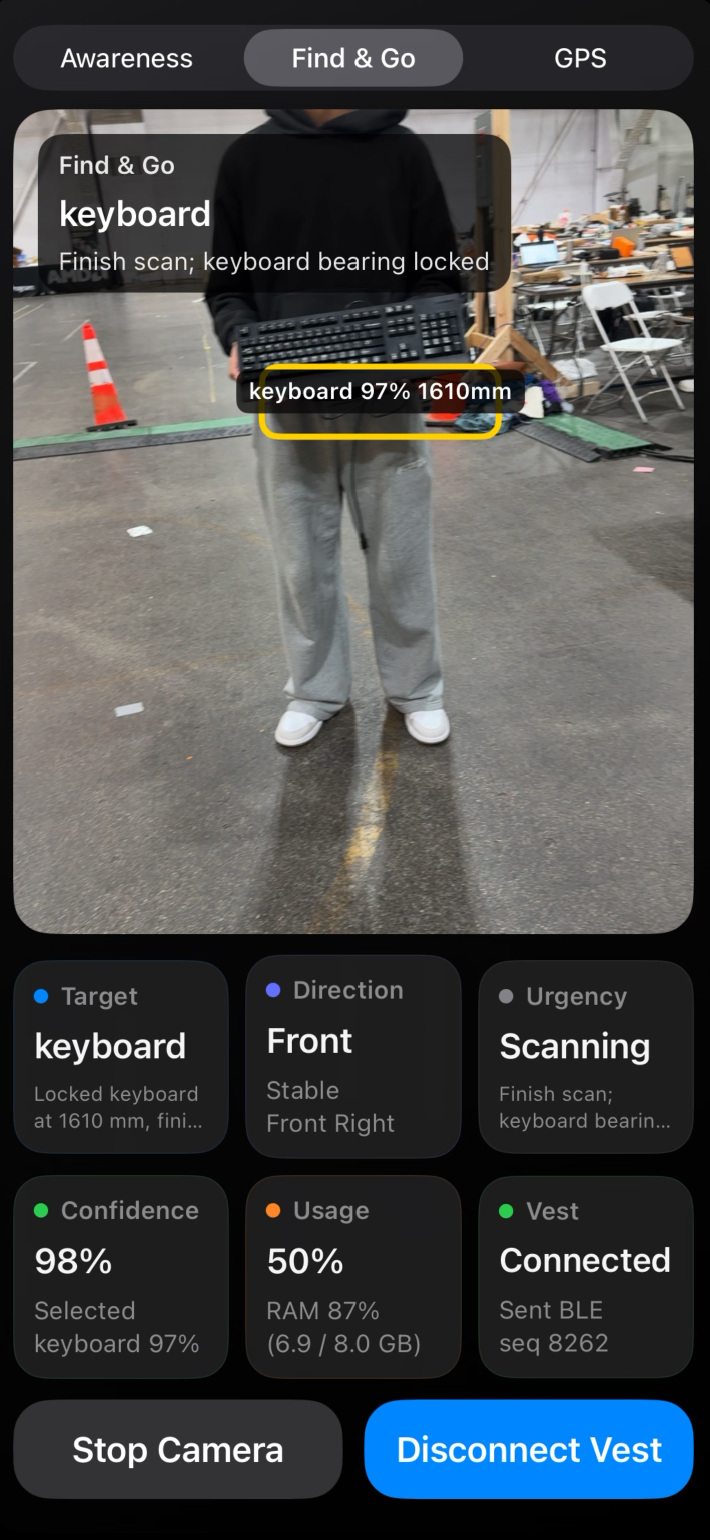
Vision interface for YOLOv11 model
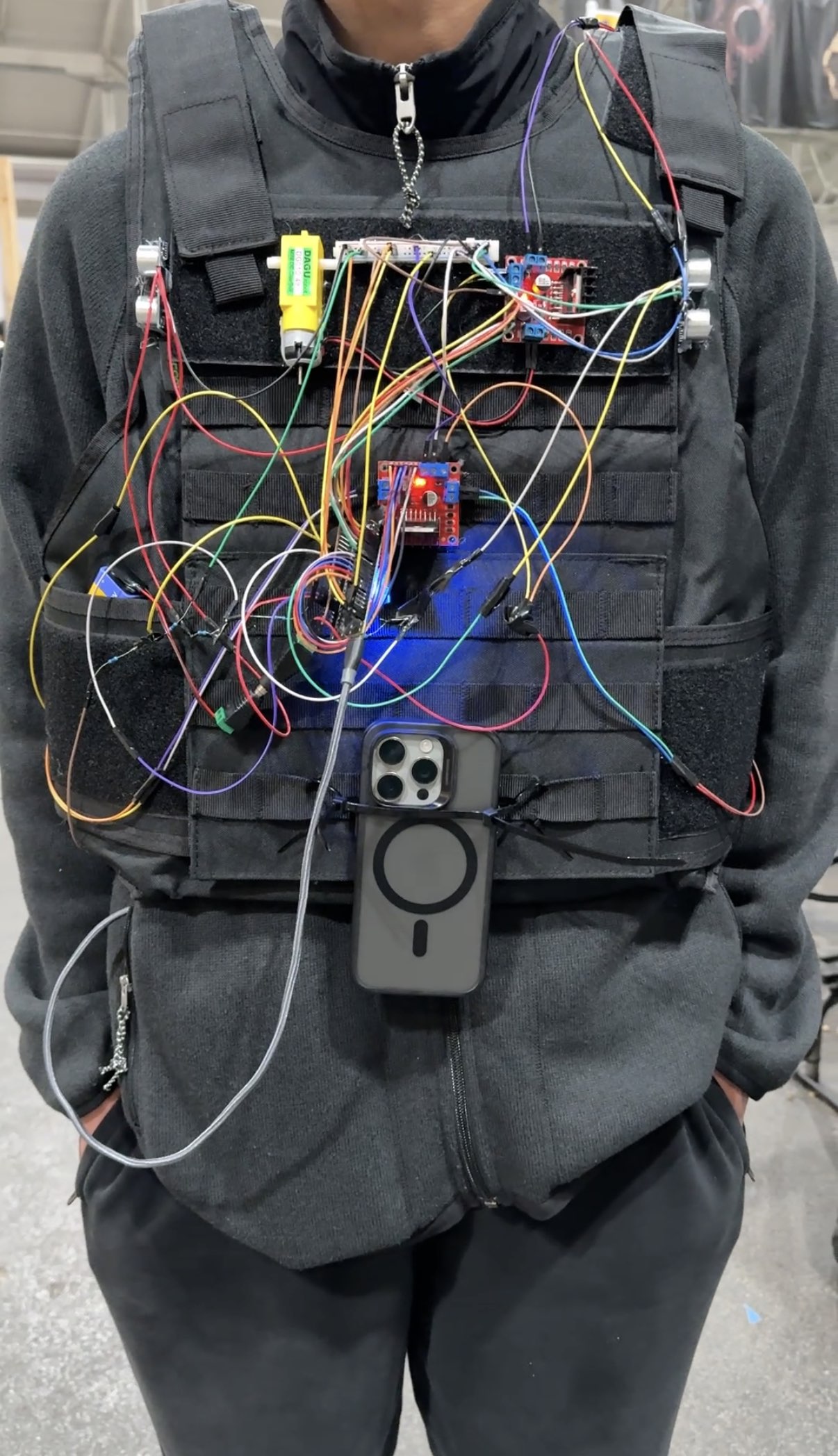
About the Project
Inspiration
We started with a pretty simple question: what does it actually feel like to navigate the world without being able to see it?
Most tools built for blind and low-vision users lean heavily on audio. Audio works, but it also competes with everything else a person needs to hear. Traffic. Voices. Footsteps. A crosswalk signal is counting down. The last thing someone needs in that situation is another voice in their ear telling them to turn left.
So we started thinking about touch instead. What if the vest itself could talk to you, not with words, but with physical cues that feel immediate and natural? That question became VisionVest.
The idea is simple: instead of telling you where to go, the vest shows you. A buzz on the left means go left. A rapid pulse means something is close. The iPhone handles the hard work of seeing and thinking, and the vest handles the job of communicating it to your body in a way that doesn't get in the way of everything else around you.
What We Built
VisionVest is a wearable assistive navigation system built out of three pieces that work together:
- An ESP32-powered haptic vest
- An iPhone app for perception and mode control
- A live Wi-Fi dashboard for demos and debugging
The vest has directional DC vibration motors placed around the wearer and ultrasonic sensors covering the back, left, and right sides. The ESP32 receives commands from the iPhone over BLE and translates them into haptic patterns in real time. It also runs its own local awareness logic, so if something gets too close, it can warn the wearer even without the phone doing anything.
On the phone side, the iPhone acts as the brain of the system. It decides what mode the user is in: Obstacle Awareness, Find and Go, or GPS, and sends structured JSON packets over BLE to the vest. In Find and Go mode, the phone can guide the wearer in any direction and then trigger a full-vest buzz when the scan is complete and the target is found.
We also built a live judge dashboard that connects to the ESP32's Wi-Fi access point and shows exactly what the vest is doing in real time, such as the current mode, hazard state, which motors are firing, and the full Find and Go state. It turned out to be one of the most useful things we built.
How We Built It
Hardware
The hardware is built around an ESP32-S3 controlling:
- Four-directional DC motors for haptic output
- Three ultrasonic sensors covering the back, left, and right
- A NeoPixel LED for quick visual status feedback
Each motor maps to a direction on the body, so the vest can communicate turning cues or hazard alerts purely through touch. After testing different PWM levels, we settled on running the motors at full power, as it gave the clearest, most unmistakable feedback, which matters a lot when someone is relying on it to navigate.
Firmware
The firmware is written in Arduino C++ for the ESP32. It handles a lot at once:
- Parsing BLE JSON commands from the iPhone
- Managing navigation and awareness modes
- Reading ultrasonic sensors without blocking the main loop
- Deciding when to follow the phone and when to override it with a local safety warning
- Streaming live telemetry over Wi-Fi for the dashboard
We designed the firmware around explicit modes so every behavior is tied to a clear state:
awarenessfind_searchobject_navgps_navmanualfind_scan_complete
The packet protocol between the iPhone and ESP32 uses structured JSON with fields for mode, direction, intensity, pattern, priority, TTL, confidence, distance, and a sequence number. We also added neutral mode-switch packets so the vest can update its state immediately, even before a directional cue starts coming in.
As the project evolved, we added a grouped telemetry state called find_and_go so the dashboard could show the full Find and Go experience cleanly, even when the underlying mode was briefly switching between find_search, object_nav, or the scan-complete event internally.
iPhone Integration
The iPhone is the perception and control layer of the system. It sends BLE packets to the vest to switch modes, guide directions, trigger scan-complete feedback, and transition between object navigation and GPS navigation.
This split was intentional. The vest is responsible for being responsive, wearable, and reliable. The phone handles the heavier sensing and navigation logic. Neither side needs to know everything the other is doing; they just need to agree on the packet format.
Dashboard
The React + Vite dashboard reads telemetry from the ESP32 over Wi-Fi and displays it live. During development, it let us see whether BLE packets were arriving correctly, which mode the vest was in, whether the ultrasonics were active or muted, which motors were being driven, and whether the Find and Go state was being represented correctly end to end.
Honestly, building the dashboard was one of the best decisions we made. Debugging a wearable system without visibility into its internal state is mostly guesswork. With the dashboard, we could see exactly what was happening and fix things in minutes instead of hours.
Key Features
- Directional haptic guidance: motors placed around the body communicate direction through touch
- Obstacle awareness mode: ultrasonic sensing on the back, left, and right for local hazard detection
- Find and Go workflow: search for a target, get guided toward it, feel the confirmation buzz when you arrive
- Object navigation mode: driven by phone-side perception using LiDAR and YOLO detection
- GPS navigation mode: directional haptic cues for outdoor routing
- Live telemetry dashboard: real-time visibility into vest state over Wi-Fi
- BLE command protocol: structured JSON communication between iPhone and vest
Challenges We Faced
1. Keeping the phone, vest, and dashboard in sync
This was probably the hardest thing we dealt with. At one point, the iPhone could switch into Find and Go, but the ESP32 would still think it was in awareness mode. It turned out to be a combination of issues, such as packet timing, mode transitions, and how the vest was interpreting incoming commands.
We had to redesign how mode switches worked, support neutral state packets, handle repeated identical packets gracefully, and expose the grouped find_and_go state before everything finally felt solid. It was frustrating, but it taught us something real: in a distributed embedded system, the communication design is just as important as the sensing or actuation.
2. Knowing when to listen to the phone and when to ignore it
We also had to figure out when the ultrasonic sensors should override phone guidance and when they should stay quiet.
In awareness mode, the ultrasonics are the whole point. But in Find and Go, object navigation, or GPS navigation, those same sensors become a problem if they keep firing while the phone is actively guiding the wearer. We ended up muting ultrasonic overrides in those modes, which made the vest feel much more predictable and trustworthy. Less noise, clearer signal.
3. Training our own data to improve the model
On the iPhone side, getting the perception layer right meant going beyond off-the-shelf models. Pre-trained models get you pretty far, but they are not built for the exact objects, angles, and real-world conditions we care about in something like this.
This is why we ended up collecting our own data. We took over 700 images of different objects around the Armory and used those to fine-tune the model so it could actually recognize things reliably in that space.
That part took more effort than we expected. Getting good data is slow, labeling has to be consistent, and real environments are messy. What surprised us most was how much even small improvements in accuracy changed the experience of using the vest. It made it clear that a lot of ML performance really comes from the data, not just the model.
4. Debugging something that you have to wear
Debugging a haptic wearable is completely different from debugging a normal app. When something feels wrong, the bug could be anywhere: the packet format, the mode logic, the motor mapping, the PWM strength, the pulse timing, or just the way a particular cue feels on a real body.
We spent a lot of time asking ourselves what "correct" actually means here. A direction that is technically right in the code is not always the cue that feels natural when you're wearing the vest and relying on it. That's a hard problem, and we're still learning.
What We Learned
Firmware gets a lot easier when state is explicit
Once we tied every behavior to a clear mode and made every transition deliberate, the whole system became easier to reason about and debug. Implicit state is the enemy.
Haptics are a design problem, not just a hardware problem
Vibration is not just on or off. Pattern, placement, intensity, timing, and context all change whether a cue feels meaningful or confusing. Designing haptic feedback is as much about how people interpret sensation as it is about electronics.
Visibility into your system pays off immediately
Building the dashboard changed how fast we could work. Being able to see the live internal state turned multi-hour debugging sessions into quick fixes. If you're building something embedded and wearable, invest in your tooling early.
Better data beats better code
Working on model refinement made it obvious that prediction quality comes from the data pipeline, not just the architecture. Collecting, curating, and iterating on training examples was one of the most important technical lessons of the whole project.
Why We Are Proud of It
VisionVest works. You can put it on, stand in a room with obstacles, and feel the vest respond to what's around you. That sounds simple, but getting there required pulling together hardware, embedded firmware, BLE communication, real-time control, iPhone perception, and a live dashboard, and making all of it work together reliably enough to demonstrate under pressure.
We're proud that we built something physical and tangible instead of a software demo. We're proud that we pushed through the hard parts, state synchronization, communication reliability, model refinement, and haptic design, instead of working around them. And we're proud that we built it around a real problem that real people face every day.
VisionVest is the kind of project we actually wanted to build.


Log in or sign up for Devpost to join the conversation.