-
-
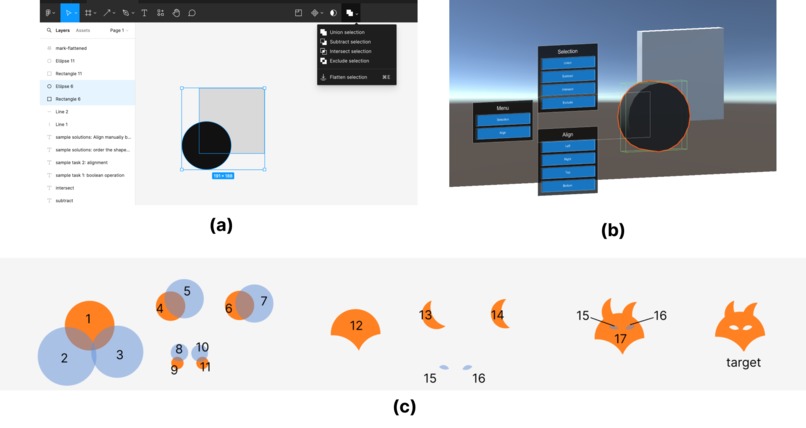
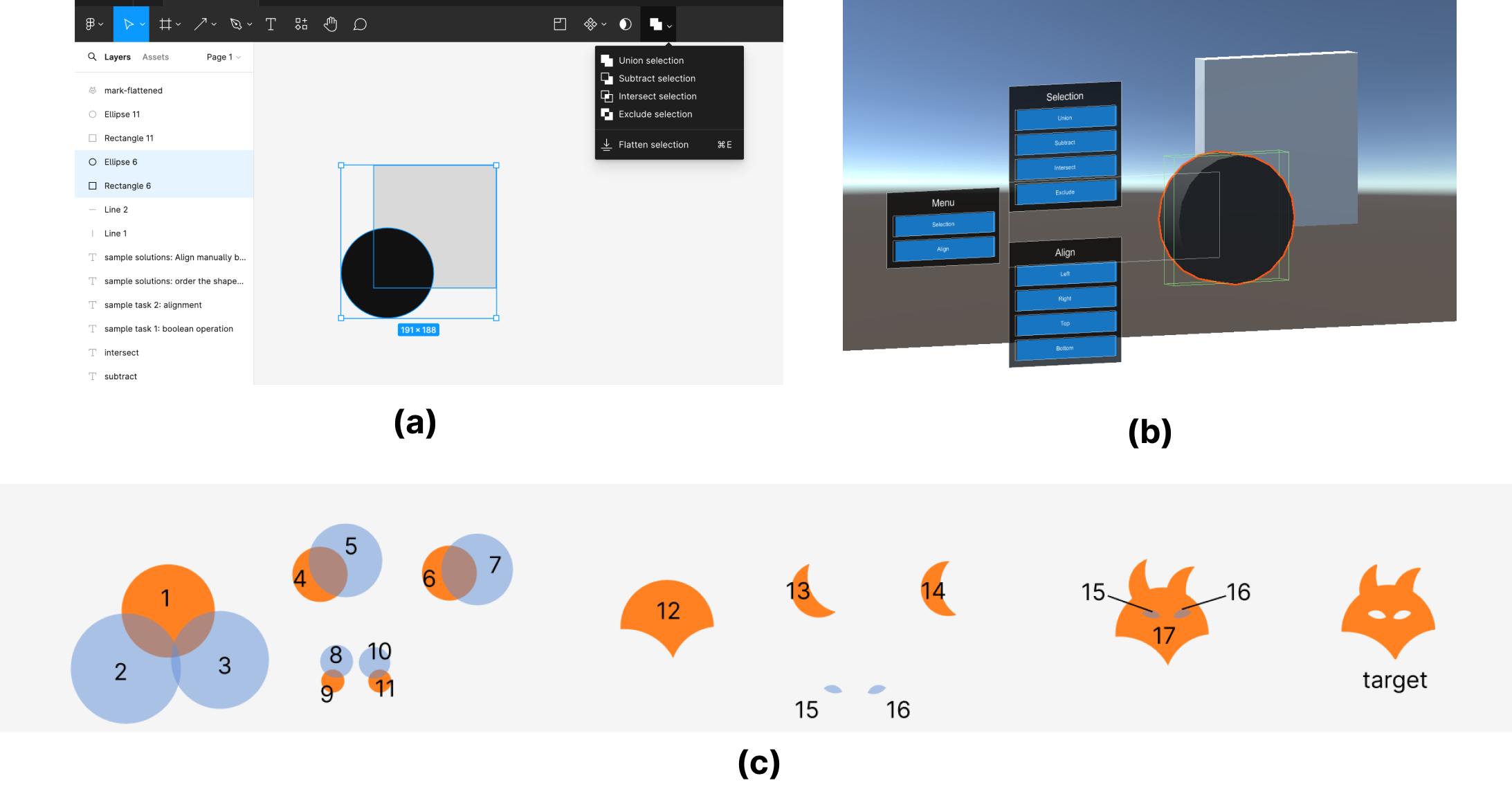
Experiment Design (a) Tutorial Task on 2D Speech Interface. (b) Tutorial Task on 2D Speech Interface. c) Evaluation Task.
-
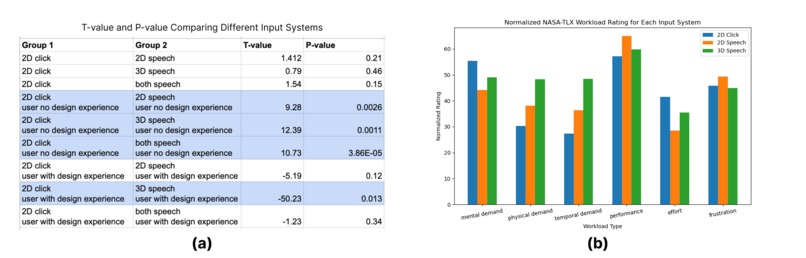
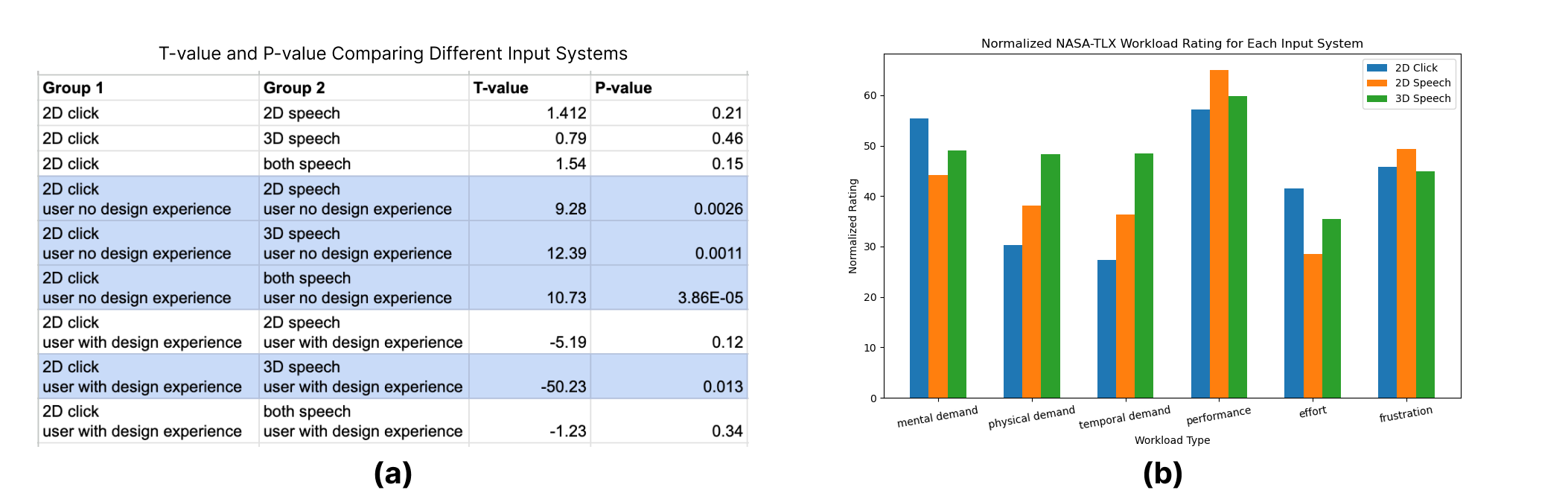
User study results. (a) T-value and P-value comparing the time spent. (b) Normalized NASA-TLX Workload ratings
Inspiration
Graphic design software often features hierarchical menus, where accessing a nested menu item using regular click-based input control necessitates multiple input actions to navigate down the menu layer by layer. Our hypotheses are as follows:
- Users can complete a complex design task faster using the speech input system compared to regular click-based control.
- The speech input system in 2D or 3D design tutorial exhibits superior performance and lower workload demand in comparison to the regular click-based input.
What it does
We propose that employing speech input enables users to access any item faster with a single voice command. Using speech interfaces, beginner designers can find their target functions faster, and advanced users can enhance their workflow by quickly accessing spread-out items in the complex hierarchy. We first present design tutorials featuring speech input on both 2D software and 3D Virtual Reality (VR) platforms to instruct users on voice commands. Subsequently, we evaluated the speech input system for graphic design software by analyzing the time taken to complete a design task involving complex boolean operations.
How we built it
The 3D speech interface is implemented on a Meta Oculus Quest 2 headset, utilizing Unity as the software platform. We employed the XR Interaction Toolkit to emulate a graphic design environment and integrated Meta Voice SDK to facilitate speech recognition.
Initially, we constructed 3D game objects representing the black circle and grey square within the tutorial class. Subsequently, we implemented 3D menu buttons to replicate the hierarchical structure found in Figma and similar graphic design software.
This hierarchy comprises two layers of menus: the first layer includes buttons for 'Selection' and 'Align', each of which, when activated, reveals the next layer of nested menu options. For instance, selecting 'Selection' unveils further options such as union, intersect, subtract, and exclude. Similarly, selecting 'Align' reveals alignment options like left, right, top, and bottom. Pressing the 'Selection' or 'Align' buttons while the next layer of nested menu options is already displayed toggles the visibility of the nested layer, effectively hiding it if it's already visible. This functionality mirrors the behavior found in graphic design software such as Figma, where multiple functions are accessible through toggling menu layers.
We also implemented 3D distance-based control for layer ordering through the use of the grab interactable in the XR Interaction Toolkit. This functionality allows users to manipulate the order of shapes within the virtual environment. By directing the controller ray onto a shape (circle or square) and holding the grip button on the XR Controller, the selected shape becomes attached to the intersection point of the controller ray and the shape's surface. Users can then adjust the layering of shapes by dragging the selected shape closer to or farther away from the head-mounted VR headset.
Challenges we ran into
One limitation in our evaluation is that prior design experience plays a pivotal role in the assessment of input system for graphic design. For users who already familiar with click-based input control, learning and using a new speech input system impedes their efficiency in completing complex boolean operation tasks. This indicates that while click-based control initially presents a steeper learning curve, users can achieve greater mastery over it once they become familiarized.
Accomplishments that we're proud of
The speech interface holds promise for expediting the completion of design tasks by facilitating quicker access to nested items within hierarchical menus within design software. In order to instruct users in utilizing the speech interfaces, our results suggests that conducting tutorials in a 2D design interface proves more effective than utilizing a 3D tutorial in VR. However, future advancements such as reducing the weight of head-mounted devices and eliminating latency in Unity speech recognition could potentially make VR a more favorable environment for implementing speech interfaces in design software.
What we learned
- Users with no prior design experience demonstrate faster completion of design tasks involving complex boolean operations when utilizing the speech input system compared to conventional click-based controls (t-value = 10.73, p-value = 3.86e-05). Although click-based control entails a steeper learning curve at first, users can attain greater mastery over it with familiarity.
- The 2D speech input system shows superior performance and lower workload compared to traditional click-based input. However, the 3D speech input system suffers from higher latency and requires more extensive body movement, presenting a disadvantage.
What's next for VisionSpeech
For participants lacking design experience, employing speech input necessitates consistently accessing the dropdown menu to access a comprehensive list of boolean operation commands. Thus, another limitation of our study is the necessity for improved tutorialization to aid users in understanding design techniques while acquainting them with the speech input system. Additionally, users express semantic needs, such as inquiring about the possibility of redoing their previous actions. This highlights the potential for future studies to leverage large language models instead of fixed speech commands, aiming to enhance usability and functionality in graphic design software.


Log in or sign up for Devpost to join the conversation.