Inspiration
Project management tools are built around human clicks. But increasingly, the people using VisionBoard also have AI agents running alongside them — in their browser, their IDE sidebar, their chat interface. Those agents can see the page but they can't reliably act on it. They scrape DOM structure that changes, guess at button labels, and have no access to the actual data and logic underneath.
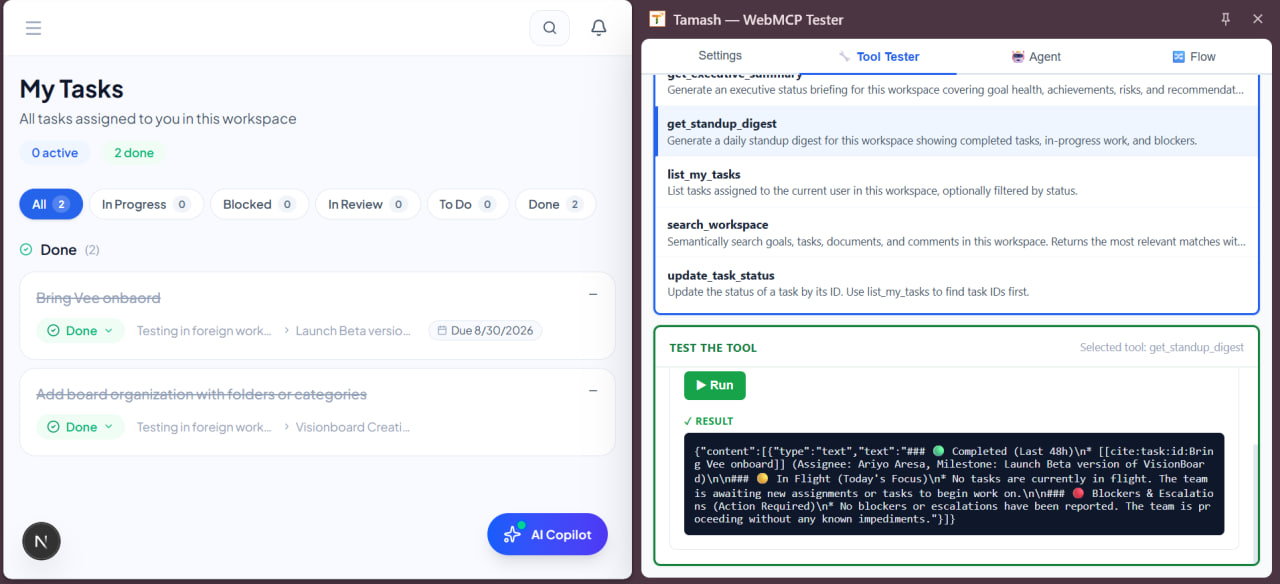
The W3C WebMCP spec (document.modelContext) landed in Chrome 149 and changed that framing entirely. Instead of an agent trying to reverse-engineer your UI, your app declares exactly what it can do — as typed, callable tools with JSON Schema contracts. The agent calls the function directly. No DOM scraping, no screenshot interpretation, no fragile selectors.
VisionBoard already had the right ingredients: structured workspace data, five AI features, semantic search over all content. The question was just whether to expose them through a standard the browser itself now understands.
What it does
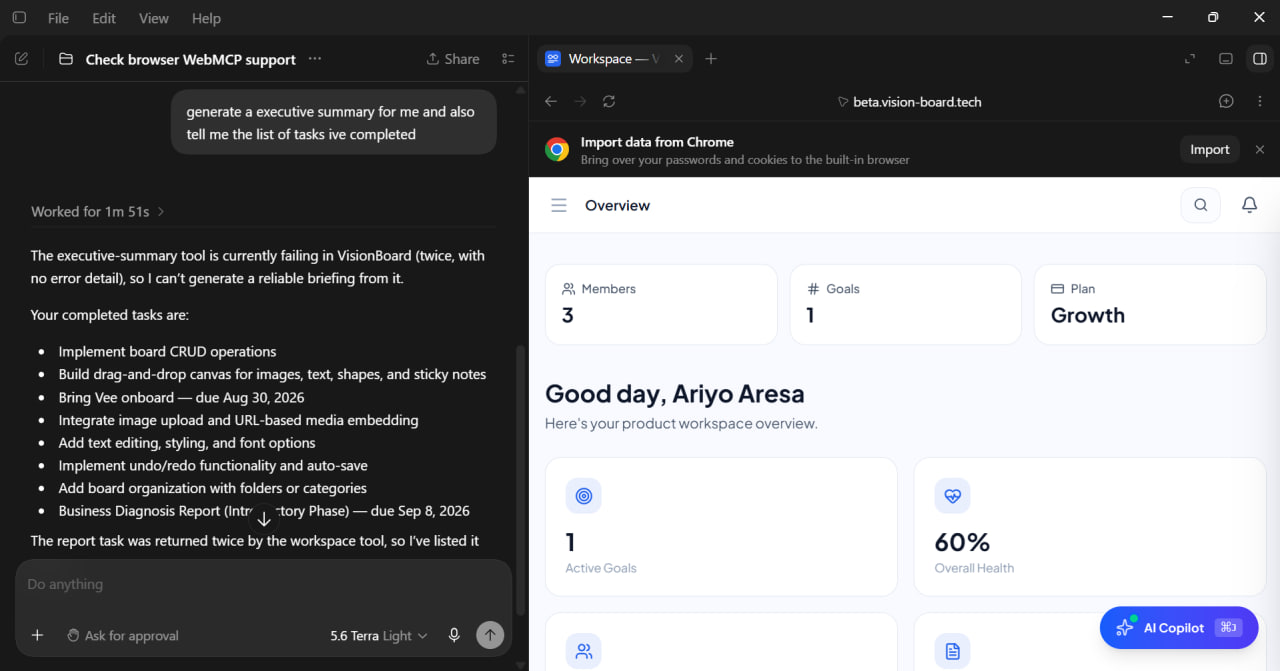
When a user has VisionBoard open in Chrome, any WebMCP-aware agent running in the same browser can discover and call a set of structured tools — using the user's existing logged-in session. No API keys, no separate authentication flow, no configuration.
Nine tools are registered across the workspace, split into shared and page-specific:
Always available on any workspace page:
search_workspace— semantic search across all goals, tasks, documents, and comments using the pgvector knowledge baselist_my_tasks— tasks assigned to the current user, filterable by statusupdate_task_status— change a task's status (todo → in_progress → done, etc.)get_standup_digest— AI-generated daily standup: completed, in-flight, and blockedget_executive_summary— AI executive briefing covering goal health, risks, and recommendations
Goals page only:
list_goals— all workspace goals with health scores, status, and progresscreate_goal— create a new goal with title, objective, and optional target date
Tasks page only:
create_task— create a task inside a milestone
Roadmap page only:
generate_roadmap— AI-powered roadmap generation from a plain text description
The tools appear and disappear with the page. Navigate away from the goals page and create_goal unregisters. Come back and it registers again.
How we built it
Polyfill initialization. Chrome 149+ supports document.modelContext natively via origin trial. Every other browser doesn't. @mcp-b/webmcp-polyfill fills the gap. It's initialized once via a dynamic import in lib/webmcp/init.ts — the dynamic import keeps it out of the SSR bundle entirely, so it only loads in the browser.
import("@mcp-b/webmcp-polyfill").then(({ initializeWebMCPPolyfill }) => {
  initializeWebMCPPolyfill();
});
Tool components. Each tool lives in a "use client" React component. Tools register on mount and unregister on unmount via AbortController. The lifecycle is pure React — no global state, no manual cleanup calls. Unmounting the component (route navigation, tab close) automatically aborts all registered tools.
const controller = new AbortController();
await document.modelContext.registerTool({
  name: "search_workspace",
  description: "...",
  inputSchema: { type: "object", properties: { query: { type: "string" } }, required: ["query"] },
  annotations: { readOnlyHint: true, untrustedContentHint: false },
  async execute({ query }) { /* fetch("/api/ai/copilot/search", ...) */ }
}, { signal: controller.signal });

// cleanup
return () => controller.abort();
Session-based auth. Every tool's execute callback calls the existing VisionBoard API routes using fetch. The user's session cookie is sent automatically. There's no separate auth layer — if you're logged into VisionBoard, the tools work. This is the core advantage of WebMCP over server-side MCP: the agent inherits the user's already-authenticated session.
Context-aware mounting. WorkspaceWebMCPTools mounts inside AppShell which wraps every workspace page — those 5 tools are always registered. GoalsWebMCPTools mounts inside GoalsList, TasksWebMCPTools inside TasksFilteredList, RoadmapWebMCPTools inside RoadmapView. The tool set changes as the user navigates, matching what's actually visible and actionable on the current page.
Origin trial. Chrome requires either chrome://flags/#enable-webmcp-testing for local dev, or an origin trial token served as <meta http-equiv="origin-trial"> for production. The token is injected from NEXT_PUBLIC_WEBMCP_ORIGIN_TRIAL_TOKEN in the root layout. Origin-Agent-Cluster: ?1 is set on every HTML response in the middleware — required for origin isolation, without which getTools() silently returns [].
Challenges we ran into
getTools() returning [] with no error. registerTool() resolves successfully even when the native API isn't active — the polyfill accepts the call but Chrome ignores it. There are actually two separate requirements that both need to be met: the origin trial token and Origin-Agent-Cluster: ?1 for origin isolation. Either one missing produces the same symptom: an empty array, no error, no warning. Debugging this required reading the Chrome WebMCP security docs closely enough to find the origin isolation requirement buried in a separate section from the token instructions.
The spec moved twice during implementation. The entry point shifted from navigator.modelContext to document.modelContext, provideContext() was removed entirely in favor of registerTool(), and navigator.modelContext was deprecated in Chrome 150 — all within about six months. Any tutorial written before May 2026 describes a dead API. The authoritative source ended up being the Chrome imperative API docs and the W3C Community Group draft directly, not any third-party write-up.
Polyfill timing vs. React mount timing. The polyfill loads asynchronously. If a tool component mounts before the polyfill has installed document.modelContext, the registration silently does nothing. The fix was a retry loop inside each component's useEffect — polling every 100ms for up to 2 seconds before attempting registration. It's inelegant but reliable across the range of network speeds and browser performance.
SSR. Anything that touches document crashes during server-side rendering. The polyfill import, the document.modelContext access, the window.location.origin calls inside tool execute callbacks — all of it runs inside useEffect which is client-only, but the import itself needed the typeof window !== "undefined" guard in init.ts to survive being imported from a server component context.
Accomplishments that we're proud of
The tool set is genuinely context-aware rather than a flat list. A browser agent calling document.modelContext.getTools() on the goals page gets 7 tools. On the roadmap page it gets 6 different ones. On a non-workspace page it gets none. The tools reflect what's actually on screen, which is the whole point of the browser-side API.
The execute callbacks call the real application API — the same routes the UI uses, with the same auth, the same Prisma queries, the same plan limit enforcement. There's no parallel implementation, no simplified version for agents. An agent calling create_goal goes through exactly the same path as clicking "New Goal" in the UI, including RBAC, validation, and the activity log write.
The annotations are set correctly throughout. Read-only tools (search_workspace, list_goals, list_my_tasks) carry readOnlyHint: true. Write tools and tools that return user-generated content carry untrustedContentHint: true. These are the signals a browser agent uses to decide whether to ask for user confirmation before acting — getting them right makes the integration genuinely safer.
What we learned
Browser WebMCP and server MCP solve different problems. Server MCP is for agents acting asynchronously — generating roadmaps from a CLI, polling for task updates, running in CI. Browser WebMCP is for agents acting in the moment — the user is looking at the goals page and asks their assistant to create one. The browser agent doesn't need an API key because it inherits the session. The server agent doesn't need the page to be open because it has a persistent key. They complement each other rather than overlap.
The spec being a moving target is actually fine. The changes between February and August 2026 were all security-motivated — provideContext() was removed specifically because it allowed third-party scripts to silently overwrite your tools. registerTool() throwing on duplicate names is a stronger contract. Following the spec as it stabilizes means your implementation gets more secure over time, not less.
document.modelContext is the right primitive. The alternative — teaching agents to click buttons and fill forms — has a ceiling. Every UI change breaks the agent. Tool definitions are versioned, typed, and stable across redesigns. Once you've declared create_goal with a JSON Schema, your agent doesn't care what the "New Goal" button looks like or whether you moved it to a different part of the screen.
What's next for VisionBoard
The execute callbacks currently refresh the page with a return string — the agent sees the result but the UI doesn't update live. The right next step is wiring tool results back into the React state so that create_goal returning success actually appends the new goal to the list the user is looking at, making the human-agent collaboration feel seamless rather than sequential.
The toolchange event (document.modelContext.addEventListener("toolchange", ...)) lets a page notify an agent when the available tools change — useful for locking down write tools when the user is in a read-only view, or surfacing new tools when a modal opens. That kind of fine-grained context signaling is the natural evolution of what's been built.
The origin trial runs through November 2026. Between now and then the goal is to track the spec as it finalizes, stay on document.modelContext, and be ready to drop the polyfill when Chrome ships it by default.
Built With
- chrome
- next.js
- pgvector
- postgresql
- react
- supabase
- typescript
- vitest
- webmcp

Log in or sign up for Devpost to join the conversation.