VisionAid 2026 — Project Story
Inspiration
- Noticed how many public signs, menus, and paper forms are still inaccessible to visually impaired folks, especially in multilingual settings.
- Wanted a weekend build that could instantly see → read → translate → speak without specialized hardware.
What it does
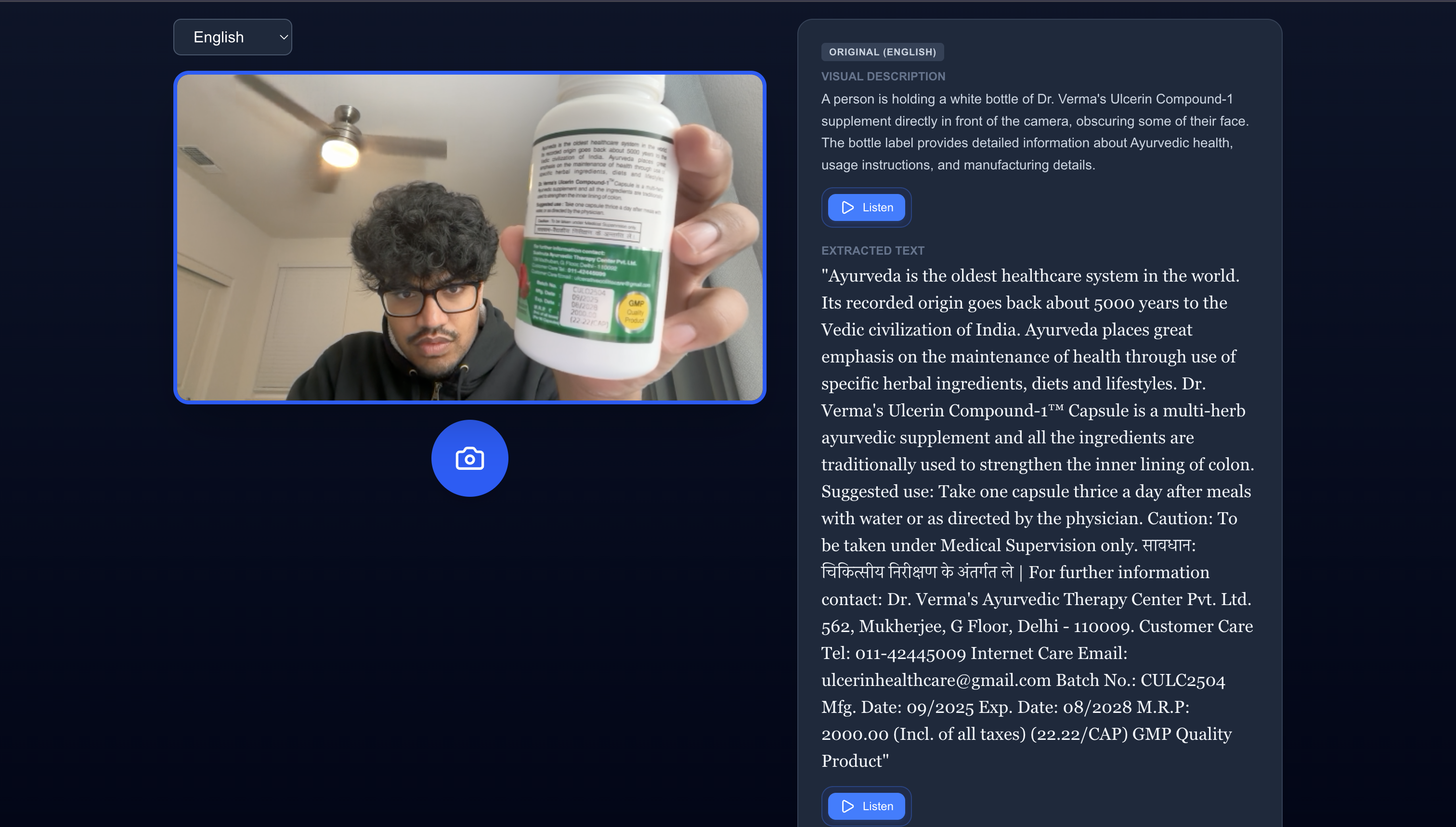
- Live camera capture (or upload) feeds a Gemini Vision prompt that returns: short scene description, extracted text, and translation to the selected language.
- Reads the result aloud via Web Speech, keeping the experience hands‑free.
- Keeps the UI simple: camera on the left, results on the right, with large controls and strong contrast for accessibility.
How we built it
- Frontend: Next.js 16 (app router), React 19, Tailwind v4 utility classes,
react-webcamfor capture, and Web Speech API for TTS. - Backend route:
/api/processcallsgemini-3.1-flash-lite-previewwithresponseMimeType: application/json, then sanitizes/validates the JSON before returning it. - State flow:
CameraView→processImage→ API → results panel; translation language is stored in local component state. - Dev tooling: TypeScript, ESLint 9, gradient theming, and ARIA labels for better keyboard/screen‑reader support.
What we learned
- Prompt design matters: constraining the response to JSON greatly reduces parsing failures.
- Handling malformed model output robustly (strip code fences, guard
JSON.parse) is as important as UI polish. - Environment hygiene: server-side keys (
GEMINI_API_KEY) must stay out of the client to avoid “unregistered caller” errors. - Small layout tweaks (grid columns, aspect-ratio camera) dramatically improve perceived quality during demos.
Challenges
- Gemini occasionally returns non‑JSON content; added defensive parsing and clearer error messaging.
- Camera permissions differ across browsers—built fallback messages and loading overlays to guide users.
- Balancing latency and accuracy; the lightweight “flash” model keeps demo response times low (≈1–2 s empirically, though dependent on network).
Next steps
- Add image upload + sample image for judges without camera access.
- Map language dropdown to locale codes for better TTS pronunciation.
- Ship a minimal healthcheck/metrics endpoint and an integration test for
/api/process(e.g., 400 on missing image). - Package the story and demo GIF into the README for resume/portfolio use.
Built With
- gemini-3.1-flash-lite-preview
- google-gemini-vision
- javascript
- next.js
- react-19
- react-webcam
- tailwind-css-v4
- typescript
- vercel-ready-next-app
- web-speech

Log in or sign up for Devpost to join the conversation.