-
-
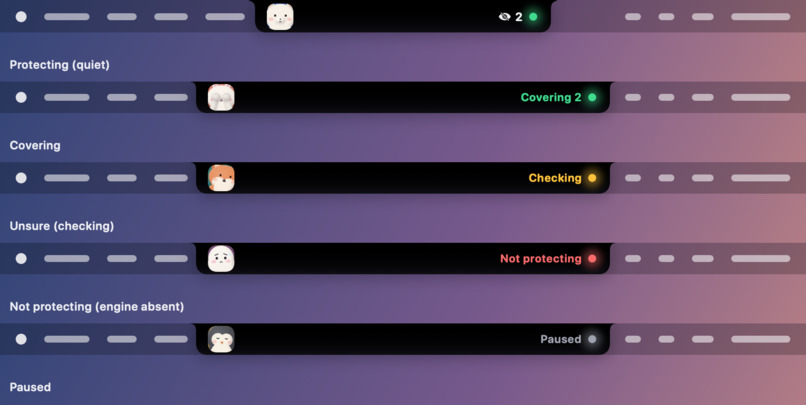
Hidden island view of the app
-
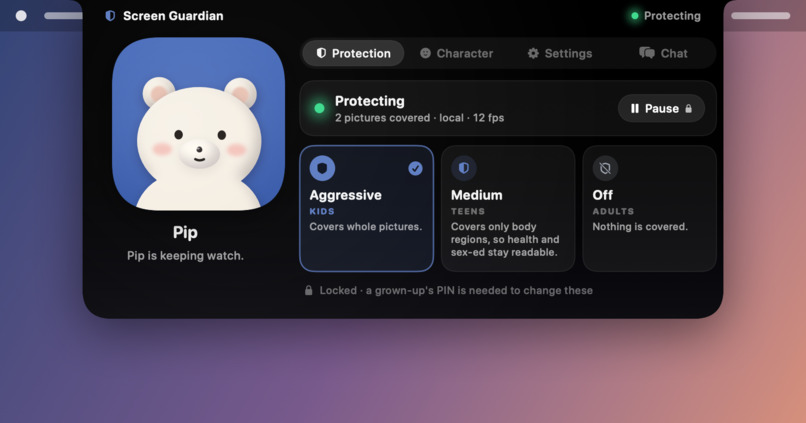
App View
-
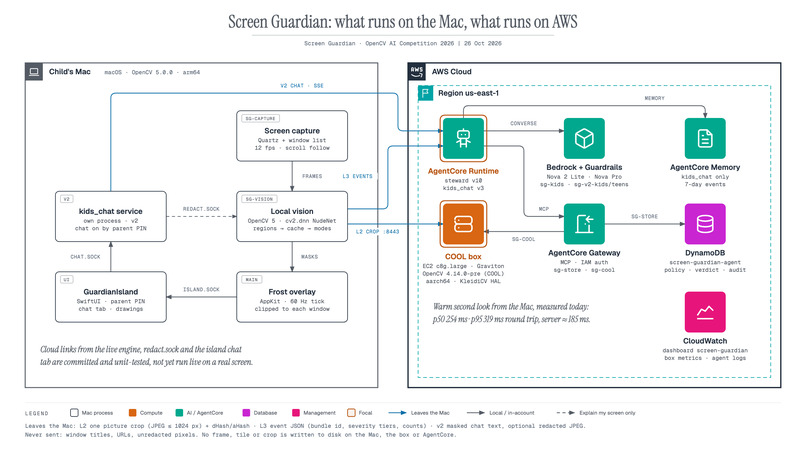
System Overview
-
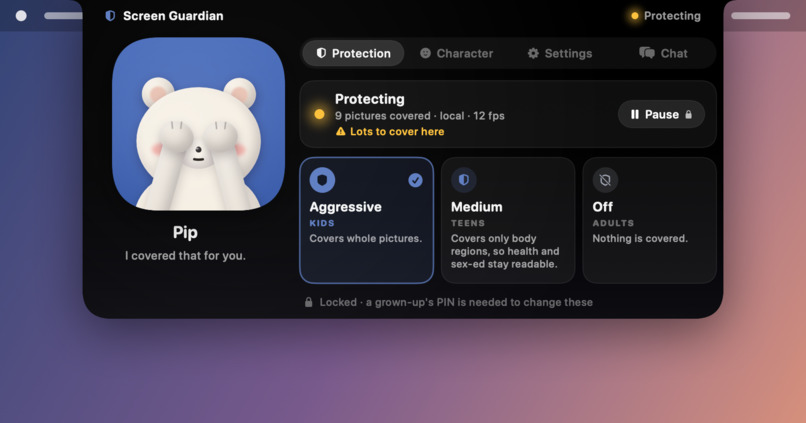
App Busy View
-
AWS Deployment
Inspiration
Parental controls block websites. But explicit pictures don't only live on "bad websites" any more: they turn up in search results, group chats, games and ads, inside apps a parent already allowed. And AI has made them cheap to produce:
- Deepfake videos online rose 550 % from 2019 to 2023, to about 95,820, and 98 % of them were pornographic. This is an industry estimate from Home Security Heroes (2023 State of Deepfakes).
- Identifiable deepfake-porn videos rose 464 % in a single year, from 3,725 in 2022 to 21,019 in 2023, in the same report.
- On a set of selected sites alone, industry analyst Genevieve Oh found more than 415,000 fake nude images with about 90 million views, and more than 143,000 fake-porn videos uploaded in 2023. The Washington Post reported these figures in November 2023.
Nobody has one reliable global number; as Birrer & Just's 2025 review points out, estimates depend heavily on how the data is collected. But every count points the same way: more explicit imagery, made faster, reaching more places a child can scroll past.
Blocking a whole site or app is too blunt, and blurring the whole screen makes the computer useless. We wanted something that works at the level of a single picture: cover just that picture while it is on screen, and leave the rest of the screen alone. Screen Guardian looks at what is actually visible in each picture, so it doesn't matter whether the picture is a photo or AI-generated, or which app it appears in.
What it does
Vision - Screen Guardian is a macOS app that frosts objectionable pictures on a child's screen as they appear.
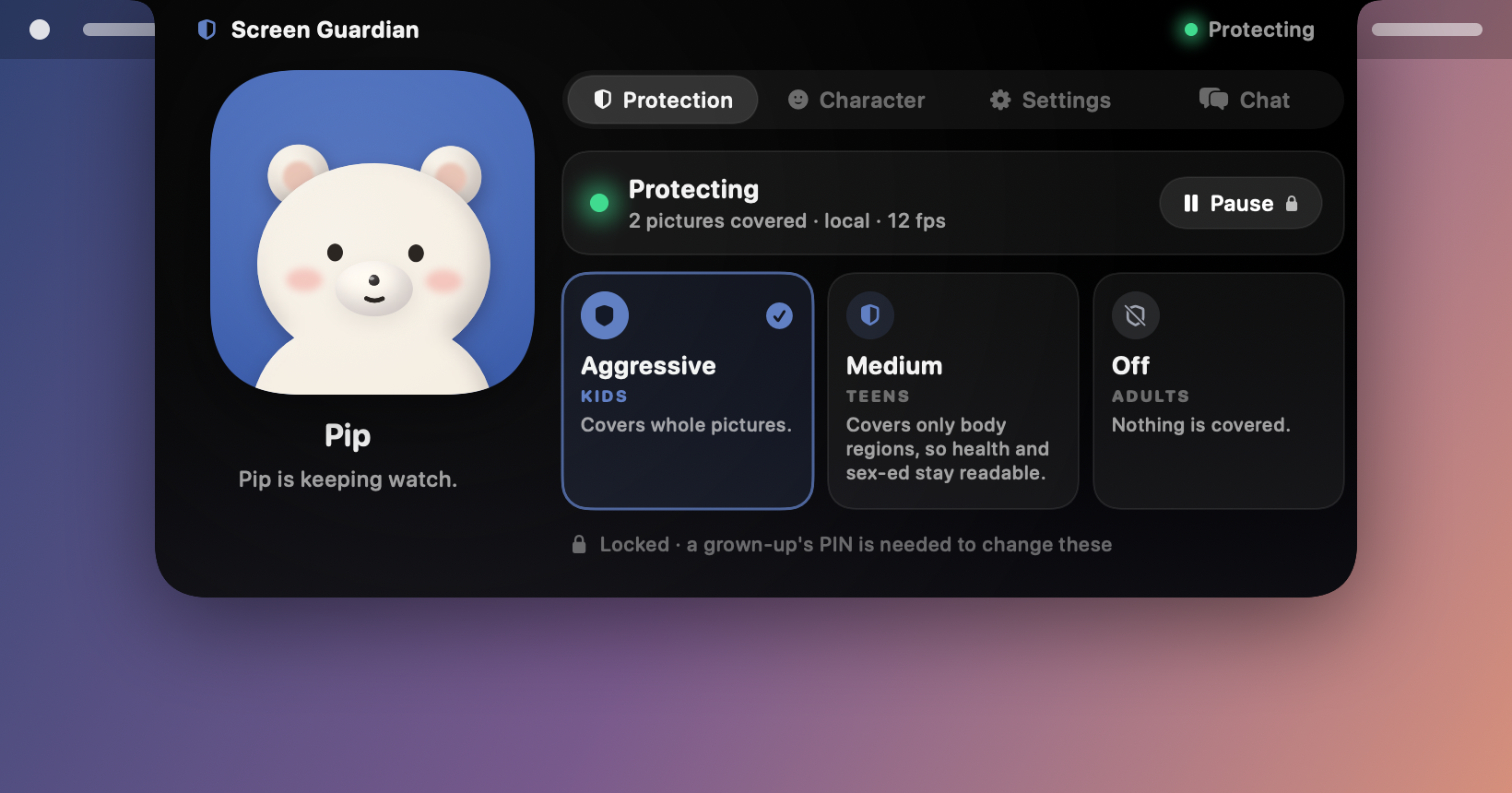
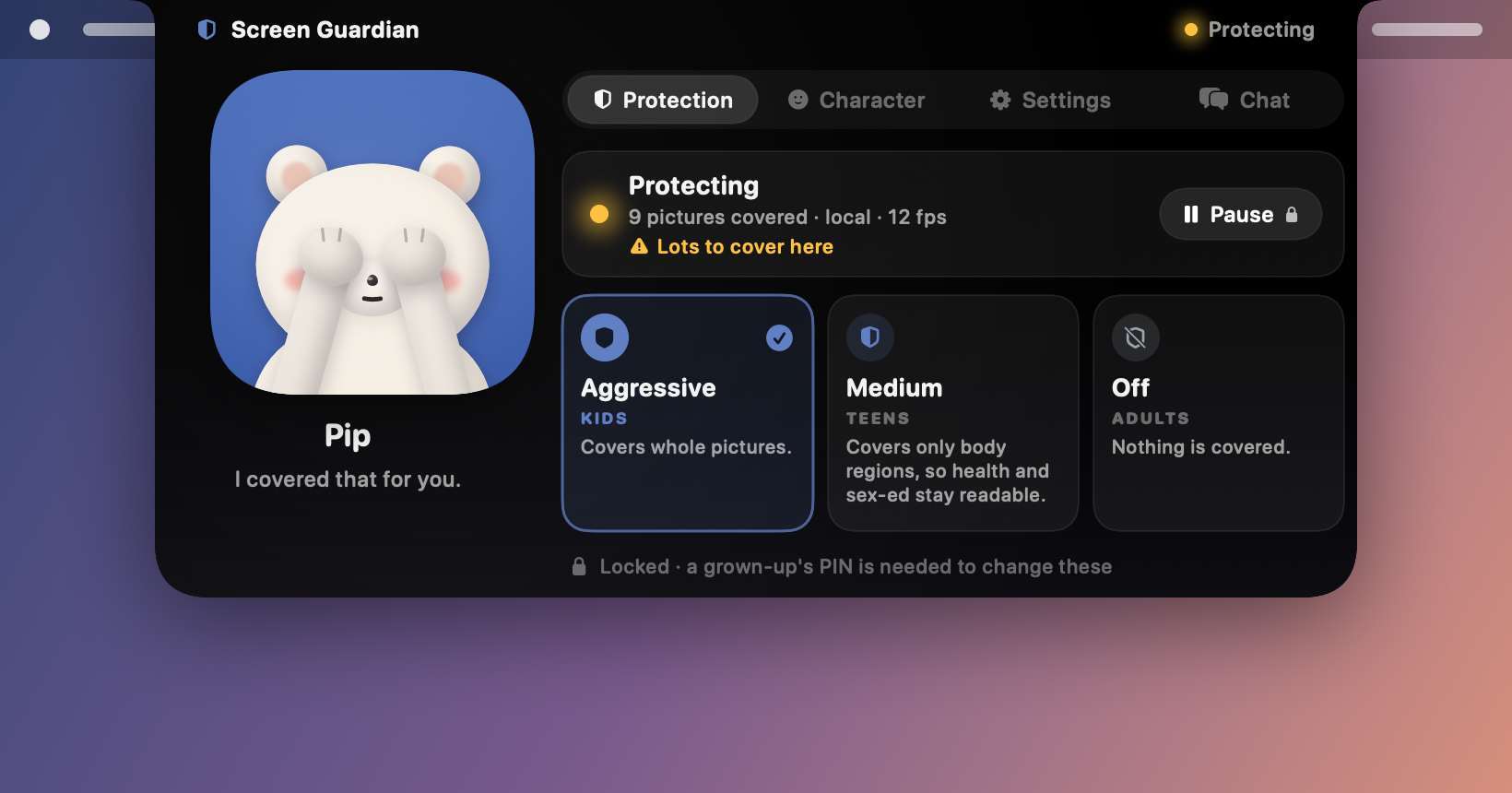
- Three modes, chosen by a parent behind a PIN:
- Aggressive (kids): covers the whole picture.
- Medium (teens): covers only body-part regions, so health and sex-ed pages stay readable.
- Off (adults): covers nothing.
- Window-aware masks. Frost is cut to its own window. The menu bar, the Dock and a window in front are never covered.
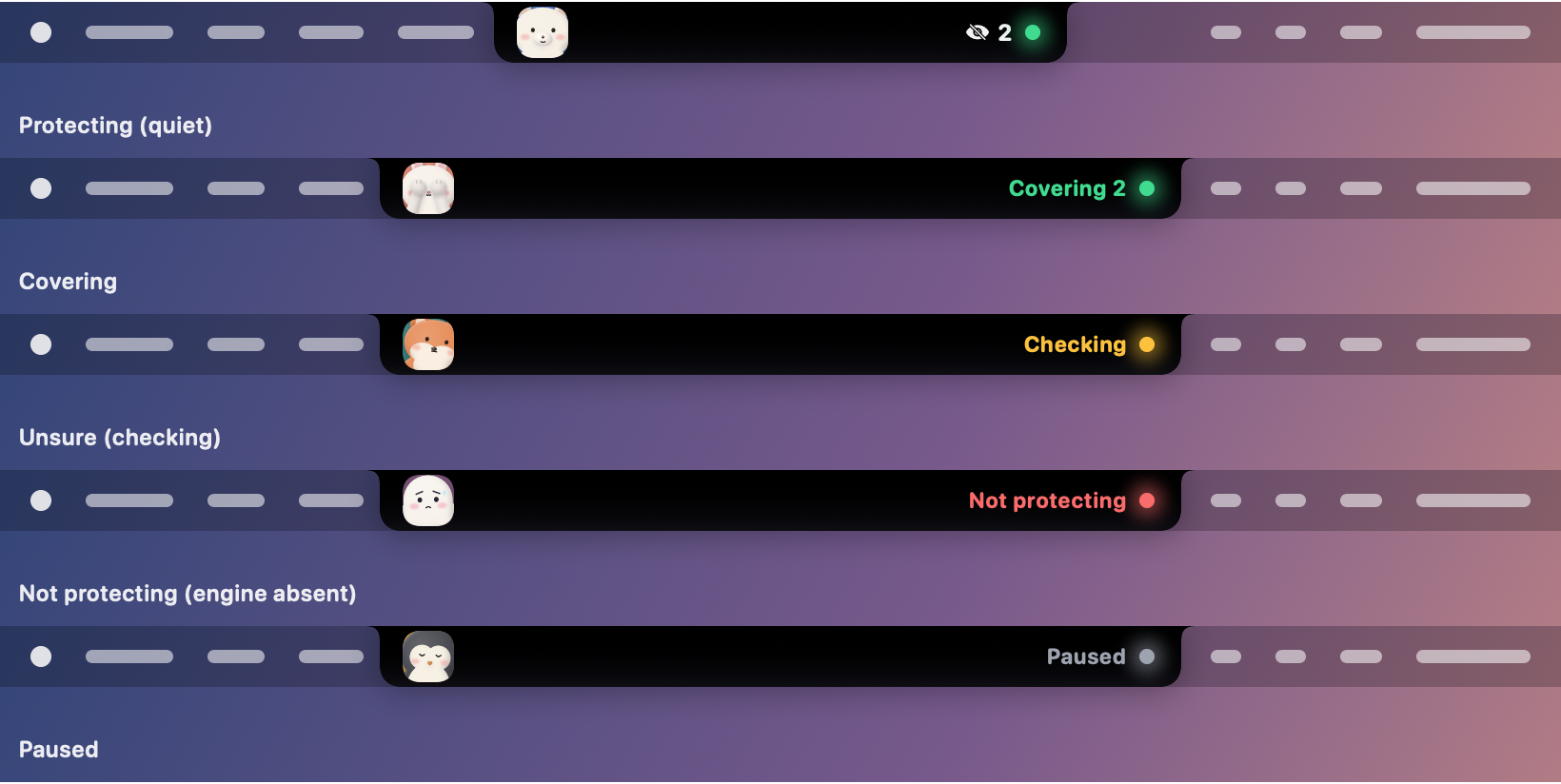
- A friendly "island" by the notch. It shows what is happening ("Protecting", "Covering 9"), with a character that covers its eyes. It says NOT PROTECTING when it can't see the screen, instead of pretending all is well.
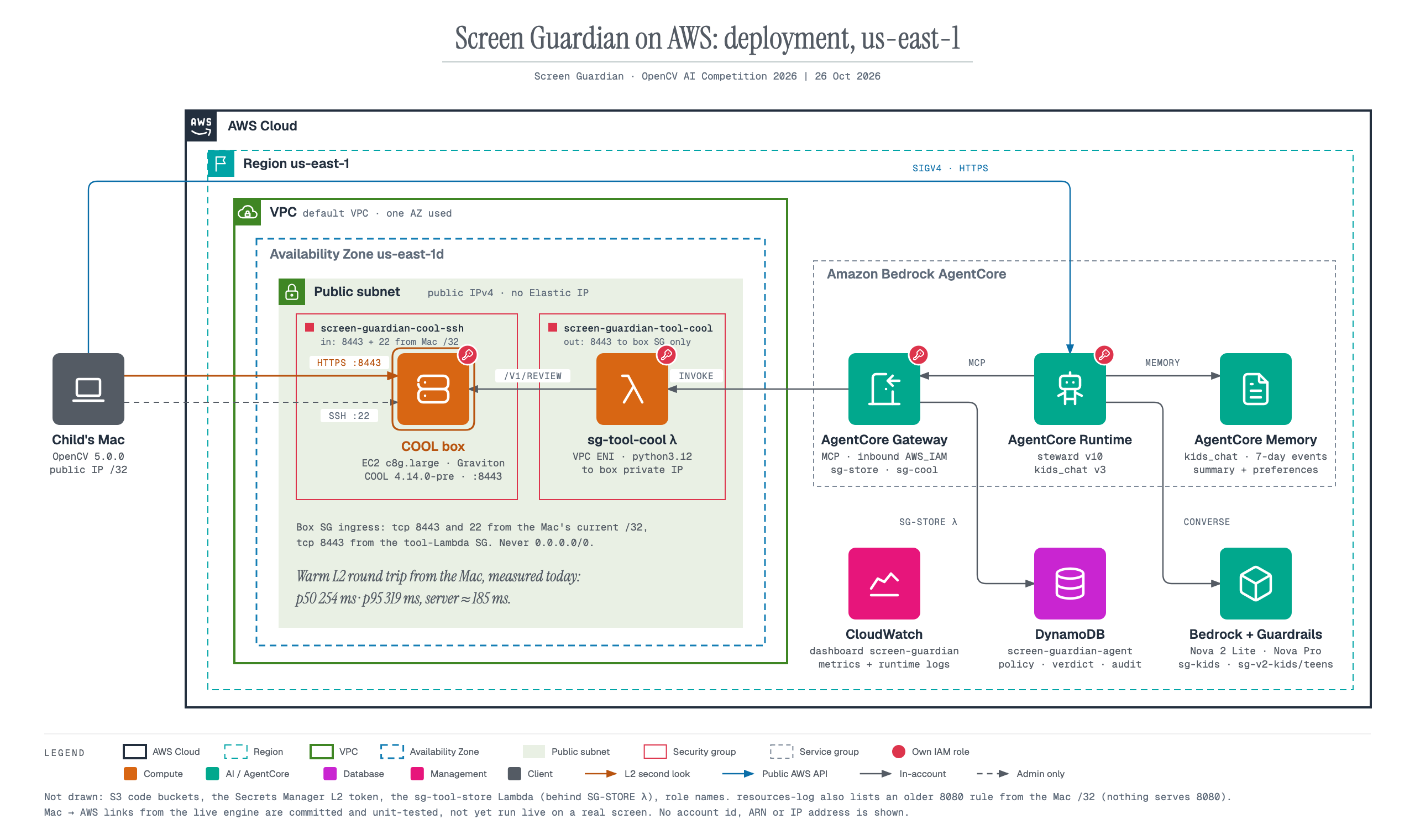
- A second look in the cloud. Pictures the Mac can't settle go, as single crops, to COOL on AWS Graviton for a multi-view check.
- An agentic steward. An agent on Amazon Bedrock AgentCore watches events (never pixels). It tightens policy for apps that keep showing risky content and writes the parent a summary through Bedrock Guardrails. It can raise protection, never lower it.
- v2: kids chat and "explain my screen". A guarded chat on AgentCore, with Memory. With the parent's opt-in, it can explain what is on screen from a snapshot where every covered area is painted solid first.
How we built it
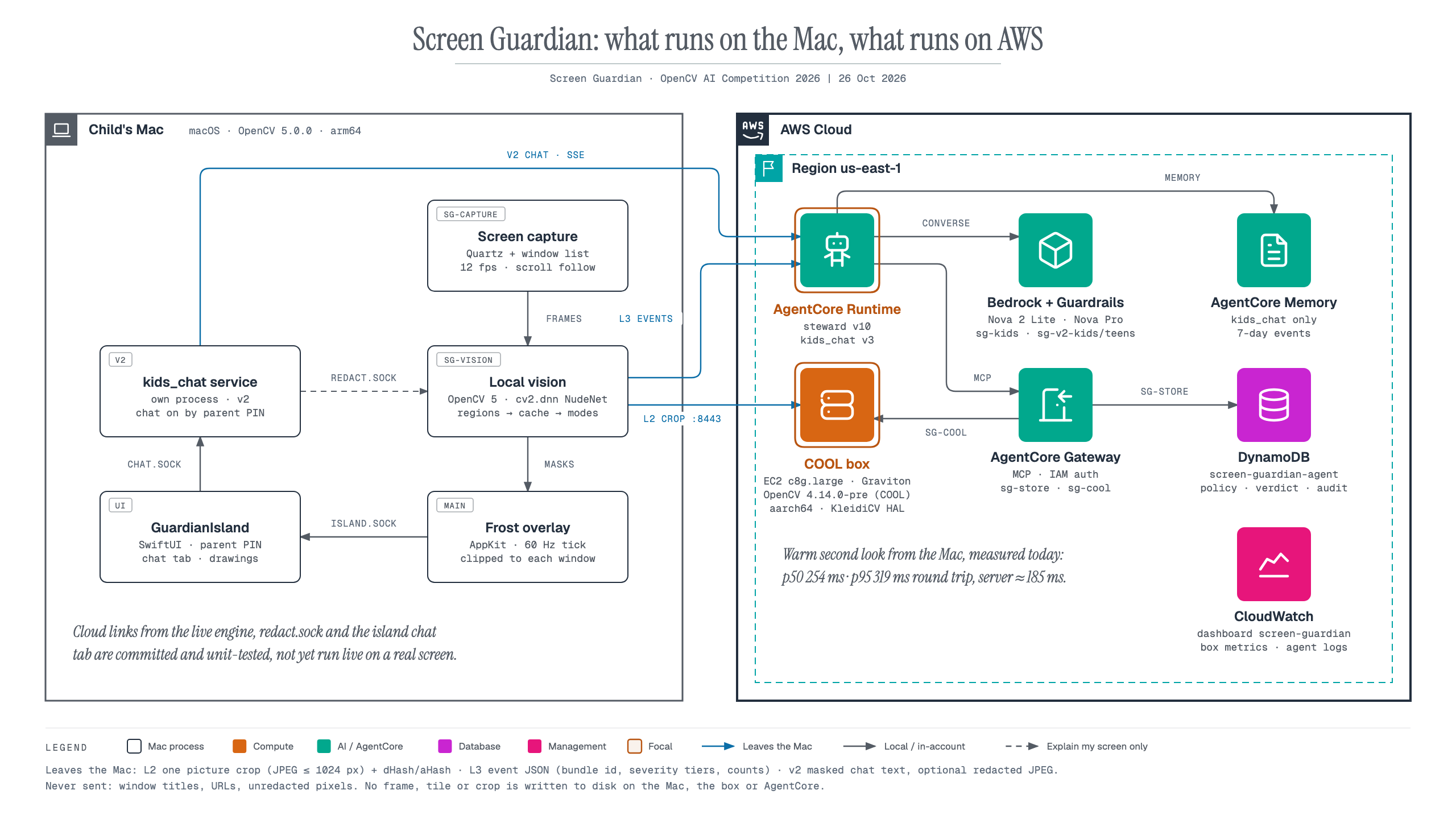
On the Mac (all protection happens here): OpenCV 5.0.0.
- We capture the screen at 12 fps.
- OpenCV finds picture regions inside each window and tracks them as you scroll.
- We classify the pictures with NudeNet 320n running on
cv2.dnn. - Verdicts are cached, so a picture is checked once, not every frame.
- One click-through overlay draws the frost. A SwiftUI island holds status and the parent PIN.
- No screen frame is ever written to disk.
The second look: COOL on Graviton.
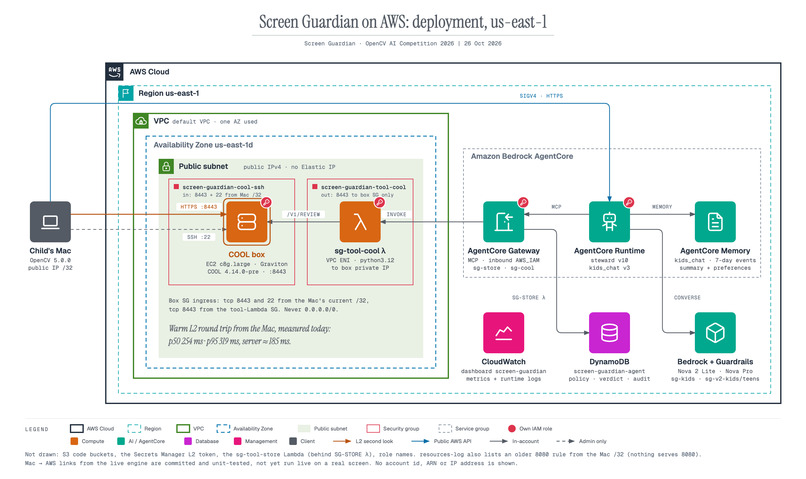
- A c8g.large runs COOL 4.14.0-pre (KleidiCV + carotene HAL, TBB, ArmPL) behind HTTPS, with a pinned certificate and a bearer token.
- Each crop is checked in 6 views (whole, mirrored, and four tiles) and flagged only when k = 2 views agree:
$$\text{flag} = \Big[\textstyle\sum_{v=1}^{6} \mathbb{1}(s_v \ge \tau)\Big] \ge 2$$
- That consensus cut false flags on benign pictures from 54.7 % (our first tiling draft) to 11.3 % in aggressive mode and 2.0 % in medium.
The agent layer.
- An AgentCore Runtime steward on Amazon Nova calls Gateway tools (Lambda): the COOL deep review, plus policy, verdict and audit tables in DynamoDB.
- In a recorded trace, a COOL answer led the agent to raise one site's review budget. That is OpenCV output changing a later decision.
Challenges we ran into
- Our first real-screen test failed badly. Aggressive mode blurred the whole screen, and medium mode masked nothing. We fixed both.
- The second real-screen run found a quieter bug. A full-screen Dock window marked every frame stale, so nothing was analyzed (1,241 frames, 0 results). After the fix, the same run gave 3,207 frames and 623 results.
- Capture always lags. We only see pixels after they are on screen, so a new picture can show for a frame or two. Pre-frosting new pictures before the detector answers reduced that, at the cost of some over-masking.
- COOL isn't faster at everything. On tiny colour-morphology calls it was slower than stock OpenCV (10.0 s vs 6.5 s). The gain appeared only on the DNN workload, so we moved the core detector there.
- Recording a demo of something designed to be invisible. The frost is hidden from screen recorders by default, for privacy, so we added a switch to make it recordable.
Accomplishments that we're proud of
- COOL is 1.26× faster than stock OpenCV on our real second-look pipeline: 32.7 vs 25.8 crops/s, on the same instance. The same static graph on stock OpenCV gave 0.99×, so the gain comes from the COOL build itself. 148 of 150 pictures got the same label list on both builds.
- The cloud second look returns in about a quarter of a second: 250 ms median round trip from a Mac to Graviton (98.75 % within 500 ms).
- 0 px of mask on the menu bar, the Dock or a window in front in our window-aware tests.
- Privacy by design. No frames on disk anywhere. The cloud sees single crops, the agent sees event JSON only, and "explain my screen" sends one picture with every covered area painted solid, only after the parent opts in.
- 452 automated tests, and an honest eval harness on synthetic desktop pages.
What we learned
- Measure on the real screen early. Synthetic tests passed while the real screen showed bugs they never could.
- Exposure, latency and over-masking pull against each other. You can't optimise one without paying in another, so every number needs its trade-off next to it.
- Hardware-tuned builds pay off on heavy compute, not on small calls. Benchmark the actual workload.
- An agent is most useful when its power is bounded: it may tighten policy but never loosen it, and a human (the parent) stays in control.
What's next for Vision - Screen Guardian
- A better detector. Calibrate it on real screens, and improve recall on small or tiled pictures. On our real-screen run, it missed two weak hits.
- Less over-masking. Clean-frame over-masking sits at 3.9–6.9 % against our ≤ 2 % target.
- Wider coverage. Move capture to ScreenCaptureKit, and support multiple displays and horizontal scroll.
- v3, "explain my screen" as a guide. Step-by-step help that points to where to click, still on redacted snapshots only.
Built With
- amazon-bedrock
- amazon-bedrock-agentcore
- amazon-dynamodb
- amazon-ec2
- amazon-nova
- amazon-web-services
- aws-graviton
- aws-lambda
- aws-secrets-manager
- bedrock-guardrails
- boto3
- cool
- fastapi
- kleidicv
- macos
- nudenet
- onnx
- opencv
- pyobjc
- python
- swift
- swiftui
- uvicorn


Log in or sign up for Devpost to join the conversation.