-
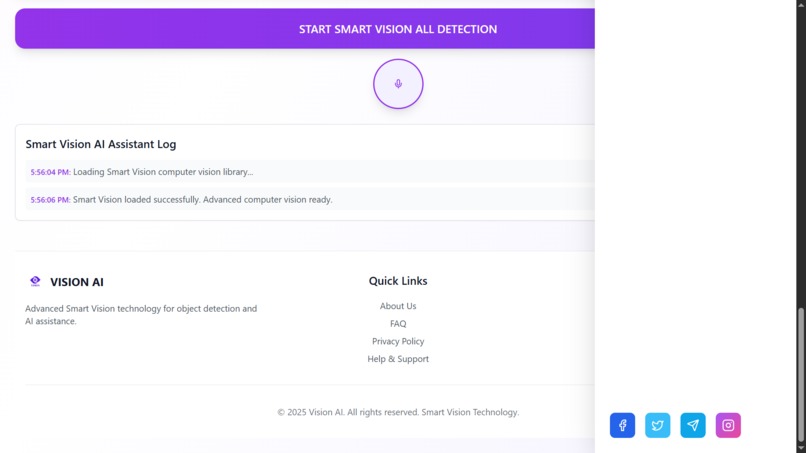
VISION-AI v1 INTERFACE
-
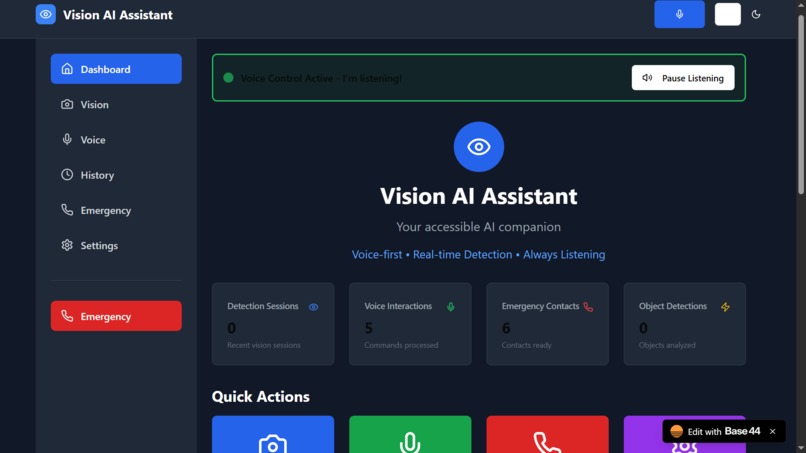
VISION-AI v2 INTERFACE (Increased features and capability)


VisionAI – Voice Assistant
VisionAI is our project designed to empower blind and visually impaired individuals by combining computer vision, voice-first interaction, and real-time guidance into one accessible mobile app. It represents the fusion of empathy and cutting-edge AI technology, built to provide independence, safety, and confidence to those who struggle with visual impairment.
Inspiration
The idea for VisionAI was born from personal experiences and observations. One teammate's father suffers from a degenerative vision condition where his eyesight worsens as the day progresses. By evening, he struggles to recognize obstacles and often collides with objects, raising serious safety risks.
Witnessing these challenges firsthand sparked our mission: to build a companion that serves as "eyes" for the visually impaired, restoring confidence and dignity. We wanted to use AI not just as technology, but as a life-changing tool for accessibility and empowerment.
What It Does
VisionAI is a mobile-first AI assistant designed to help users safely navigate their surroundings.
Key features include:
- Real-time Object Detection: Identifies obstacles like vehicles, trees, furniture, or people.
- Depth Estimation & Tracking: Measures distance to objects and tracks them as the user moves.
- Text Recognition (OCR): Reads signs, menus, and written text aloud.
- Voice Guidance: Provides spoken feedback and instructions in natural, conversational tones.
- Offline Speech Recognition: Converts spoken commands into actions even without internet.
- Haptic Feedback: Vibrations for urgent alerts (e.g., nearby vehicle).
- Emergency SOS: Lets users trigger calls or notifications to caregivers.
- History & Caregiver Dashboard: Stores analyzed scenes for later review, allowing family members to monitor challenges faced daily.
The app is voice-first — users don't need to look at or touch the screen. Everything is designed around accessibility and hands-free interaction.
Technical Stack
Frontend
- Framework: React (Web based application)
Backend
- Framework: Spring Boot (Java REST API, JWT-secured)
- Database: PostgreSQL (Supabase-hosted, JSONB for AI outputs)
AI/ML Components
- Object Detection: YOLOv8 (TensorFlow Lite)
- Depth Estimation: MiDaS (for spatial awareness)
- Tracking: DeepSORT for continuous object tracking
- OCR: EasyOCR / Tesseract (optimized for mobile)
- Speech Recognition: Vosk (offline STT)
- Voice Guidance: flutter_tts (text-to-speech) with Azure fallback
Cloud Services
- Supabase (database + auth)
- Azure Cognitive Services (fallback TTS/STT)
- Hugging Face (optional cloud ML inference)
- Google Cloud & Facebook OAuth (secure sign-in)
Key Features
- Lightweight and optimized for real-time mobile inference
- Fully offline AI for core vision + voice features (ensures privacy)
- Seamless sync with cloud for logs, feedback, and caregiver dashboard
- Modular, scalable backend + database design
- CI/CD enabled for rapid deployment and iteration
Challenges We Faced
- Accuracy & Reliability: Training YOLO and OCR models to handle diverse environments (day/night, indoor/outdoor).
- Performance Optimization: Reducing latency on mobile devices without overheating or draining the battery.
- Accessibility Testing: Ensuring the app works seamlessly with screen readers and voice-only flows.
- Authentication Flow: Managing OAuth integrations (Google, Facebook) while keeping login voice-friendly.
- Connectivity Issues: Designing the system so it works offline first, with cloud as fallback.
- Data Security: Protecting sensitive user data while enabling caregiver visibility.
Accomplishments
VERSION 1 - HAS BEEN HOSTED : [link] https://app--vision-ai-assistant-a4c2cb95.base44.app/Vision
- Built a production-ready technical architecture (frontend, backend, database).
- Integrated real-time object detection and OCR into a Flutter mobile app.
- Achieved offline voice-first workflows, reducing dependency on internet.
- Designed and deployed a Supabase PostgreSQL schema tailored to AI-driven JSON outputs.
- Developed a dual-feedback system: voice + haptic.
- Created an emergency workflow for safety-first use cases.
- Passed accessibility and testing milestones on real devices.
What We Learned
- AI Model Optimization: Converting heavy ML models into TFLite for mobile deployment.
- Cross-Platform Development: Building scalable Flutter apps while maintaining performance.
- Full SDLC: From ideation → architecture → development → deployment → testing.
- Agile Practices: Iterative sprints with feedback cycles.
- Teamwork: Coordinating across frontend, backend, and AI/ML roles.
- Security Best Practices: Managing credentials through .env and JWT.
- Accessibility First: Designing for inclusivity from the ground up.
Future Enhancements
- Indoor Navigation: Use Bluetooth beacons and depth estimation for indoor pathfinding.
- More Languages: Expand voice guidance to multiple languages and dialects.
- Smart Glasses Integration: Adapt app for AR headsets/smart glasses.
- Community Data: Enable user feedback to improve object recognition models.
- Faster On-Device Inference: Explore quantization and pruning for ML models.
- Real-Time Translation: Read signs and instantly translate to user's preferred language.
Getting Started
Installation and setup instructions will be added as soon as our hackathon build stabilizes.
Contributing
We welcome contributors passionate about AI, accessibility, and human-centered design. Contribution guidelines will be published after the hackathon phase.
Built With
- github
- java
- mern
- netlify
- postgresql
- python
- springboot
- supabase
- tensorflow


Log in or sign up for Devpost to join the conversation.