Inspiration We began with a straightforward query: what if your camera could communicate with you? People, poles, stairs, and crosswalks are all simple for humans to understand, but they might be challenging if you have poor vision or are balancing a phone and a bag. We wanted a lightweight helper that can identify barriers, distinguish between "uphill" and "downhill," and narrate what's important. It should be quick enough to be of service and easy enough to use on a laptop.
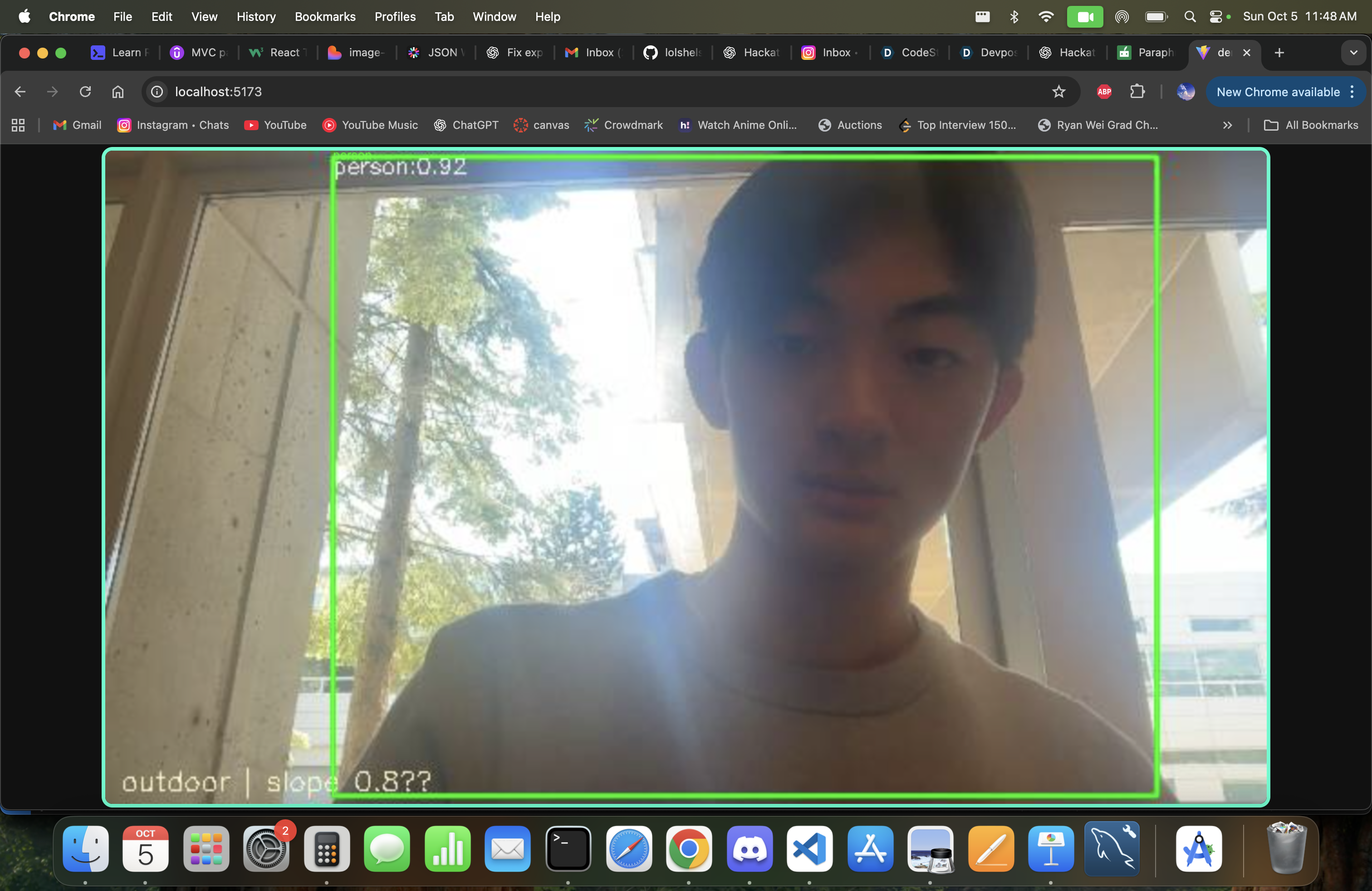
What it does: Aid in Visibility transforms a live webcam feed into real-time direction: uses YOLOv8 to identify obstructions, such as people, vehicles, furniture, etc. uses MiDaS to estimate depth and slope in order to alert users to gentle or steep uphill or downhill conditions. Recognizes context (roughly "indoor vs. outdoor") to adjust alerts. overlays boxes over the video and narrates brief, rate-limited messages (such as "Obstacle ahead: person"). allows you to view the camera feed and detections with minimal latency by streaming to the browser user interface.
How we built it: Brain (Python): We run YOLOv8 for object detection and MiDaS for monocular depth. A small heuristic computes slope from the depth gradient. We aggregate detections into short, helpful sentences and (optionally) speak them with pyttsx3.
Bridge (Flask + Socket.IO): A tiny Flask server with Flask-SocketIO (eventlet) streams JSON + base64 JPEG frames to the browser in real time. It’s our “pipe” between Python and the UI.
UI (React): A single React canvas draws the incoming annotated JPEG frames and shows toast messages. This kept the frontend simple and responsive.
Performance touches: Frame skipping: run heavy inference every N frames; reuse the last results in between. Lower JPEG quality: smaller payloads → smoother streaming. macOS camera backend: prefer cv2.CAP_AVFOUNDATION for more reliable capture.
Challenges we ran into One app, two worlds: browser UI vs. Python AI. We became proficient in "Socket.IO" so they could work together. Ports and procedures: Issues with threading, eventlet oddities, and :5000 while maintaining server responsiveness. Choosing the appropriate OpenCV backend and managing permissions for camera access on macOS. Math coordination: Maintaining the alignment of the bounding boxes after they have been resized to fit the canvas. Latency & FPS: Keeping things fluid by adjusting JPEG quality and skip rate while striking a balance between model fidelity and real-time requirements.
Accomplishments we’re proud of: A working end-to-end pipeline: webcam → Python AI → Flask streaming → React canvas—live, annotated, and narrated. Context-aware guidance: short messages that change based on indoor/outdoor and slope, not just raw detections. Simple, demo-friendly UX: one canvas, clear toasts, minimal setup for judges to see it in action.
What we learned: How to bridge Python CV with a JavaScript UI cleanly (Socket.IO FTW). Practical performance tuning: when to skip frames, where to compress, and how to avoid blocking the event loop. The importance of accessibility-minded design: concise, rate-limited speech is more useful than a flood of words.
What’s next for Visability Aid Edge/Mobile: Run on Jetson Nano / Raspberry Pi or stream from a phone camera (WebRTC) for wearable scenarios. Haptics & audio beacons: Gentle vibration or spatial audio to guide left/right corrections. Better terrain understanding: Curb/stair detection, surface quality, and safe-path hints. Model optimizations: Quantization, ONNX/TensorRT for higher FPS on low-power hardware. Offline maps & GPS: “Crosswalk ahead in 20m,” or “Entrance is to your right.” PWA packaging: Installable app that launches straight into the live view.
About the project: Visability Aid is a real-time obstacle awareness tool that combines object detection, monocular depth, and simple narration. We built it to help people navigate cluttered spaces more confidently, and we learned a ton about marrying fast computer vision with a friendly web UI along the way.


Log in or sign up for Devpost to join the conversation.