-
-
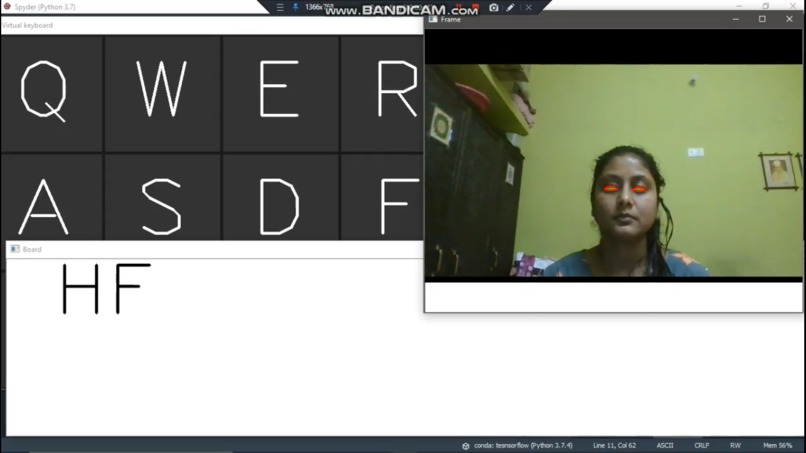
How blinking will be captured using eye recognition and how it will converted to typing letters.

Inspiration
In everyday life, we often do not think about how do the differently abled people live, what problems they have to face. And the point here is not so much in spiritual insensitivity as in the fact that there are very few points of contact between people with disabilities and society. Often the world of such people is confined by the walls of the apartment where they live, and the circle of communication is limited only by the closest relatives. computers and Smartphone’s play an important role in people’s daily lives. People type messages to communicate with others through WhatsApp, We Chat and LINE every day.
What it does
The keyboard is the typical device for interacting with computers. In this paper, we study a new keyboard design for people with disabilities. Basically, the keys on a keyboard are operated with the help of persons eyes. Disabled people suffering from many problems related to communication and typing can be a difficult task for them. The main objective of this project is to provide an easy way of communication and learning for the physically disabled and needy.This project is based on Image processing and it uses libraries like Dlib, OpenCV and other libraries with the help of which we would be able to detect points on face like eyes. After detecting eyes V.K.D will calculate the blinks and compare them with the standard MOSS codes with the help of blink detection and eye detection we are able to find out the Character which a person wants to express. With the help of this project the people with specially abilities can write just using their eyes. An example could be taken of Stephen Hawkins a great researcher an idol to many with just two fingers he was able to write many theories and to the beyond what if he would be able to write using his eyes also .
Feasibility Study:-
This project is very useful for special people who suffer from problems related to paralysis, deaf and dumb and many more and because of which they face problem communicating. This project is based on Image processing and it uses libraries like Dlib, OpenCV and other libraries with the help of which we would be able to detect points on face like eyes. After detecting eyes V.K.D will calculate the blinks and compare them with the standard MOSS codes with the help of blink detection and eye detection we are able to find out the Character which a person wants to express. We Chat and LINE every day. The keyboard is the typical device for interacting with computers. In this paper, we study a new keyboard design for people with disabilities. Basically, the keys on a keyboard are operated with the help of persons eyes. An example could be taken of Stephen Hawkins a great researcher an idol to many with just two fingers he was able to write many theories and to the beyond what if he would be able to write using his eyes also .
Methodology/ Planning of work:-
The whole project is being divided into phases they are as followed
Phase 1:- Planning
In this we planned the output with my teammate
Phase 2:- Environment setup
In this phase we setup all the necessary environments like installing libraries, setting up python and many more.
Phase 3:- User Interface
We planned the UI that how it will look in future
Phase 4:- Implement User Interface
We implement UI
Phase 5:- Back Hand
We work on backhand.
Phase 6:-Integration
We integrate the product.
Innovations in Project:-
This project is based on Image processing and it uses libraries like Dlib, OpenCV and other libraries with the help of which we would be able to detect points on face like eyes. After detecting eyes V.K.D will calculate the blinks and compare them with the standard MOSS codes with the help of blink detection and eye detection we are able to find out the Character which a person wants to express.
Software and Hardware Requirements:-
Hardware required:- A camera and a laptop Software required:- Python IDE, OpenCV, Dlib, Time and other libraries.
Inspiration:-
One of greatest source of inspiration for this peoject would be Stephen Hawkins, a great researcher and an idol to many. With just two fingers he was able to write many theories. Deriving motivation from these people and determined to provide them with the luxury of using computers and typing, we have developed an eye-controlled keyboard which can be used to train physically disabled people to read and write just by blinking their eyelashes.
Objective:
The main objective of our project is to propose useful BCI (Brain Computer Interface) that monitors the blinking pattern of the challenged users and converts these bioelectric signals and use them as appropriate commands to allow them to communicate. Implementation Requirements
Hardware Requirements:-
A camera and a laptop is sufficient
Software Requirements
Python IDE with Libraries like OpenCV, Dlib, Time and other Libraries Installed
Source Code Explanation
1) Importing The Libraries
2) Loading sound
3) Loading webcam
4) Defining the keys
5) Drawing the letter on keyboard
6) Setting and aligning text
7) Drawing and dividing the whole window into 2 parts left and right
8) Calculating midpoint of the eyes
9) Calculating the blink ratio using the mid points
10) Using landmark points in the face to detect multiple points of the face
11) Starting the search
12) Making a counter for counting the blink detected
13) Starting the webcam and converting the feed in gray scale in background
14) Selecting between Left and Right menu and showing the buttons accordingly
15) Displaying the letters on keyboard
16) Showing the output and resetting the board
(images attached)
Output validation and comparison
This project is based on Image processing and it uses libraries like Dlib, OpenCV and other libraries with the help of which we would be able to detect points on face like eyes. After detecting eyes V.K.D will calculate the blinks and compare them with the standard MOSS codes with the help of blink detection and eye detection we are able to find out the Character which a person wants to express.
to see the working of our project i.e virtual keyboard refer to link provided in the try it out section.
Built With
- dlib
- imageprocessing
- opencv
- time


Log in or sign up for Devpost to join the conversation.