-
-
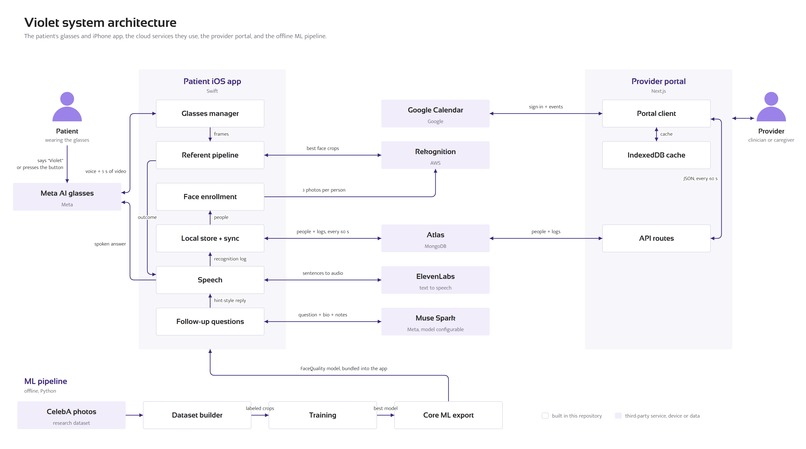
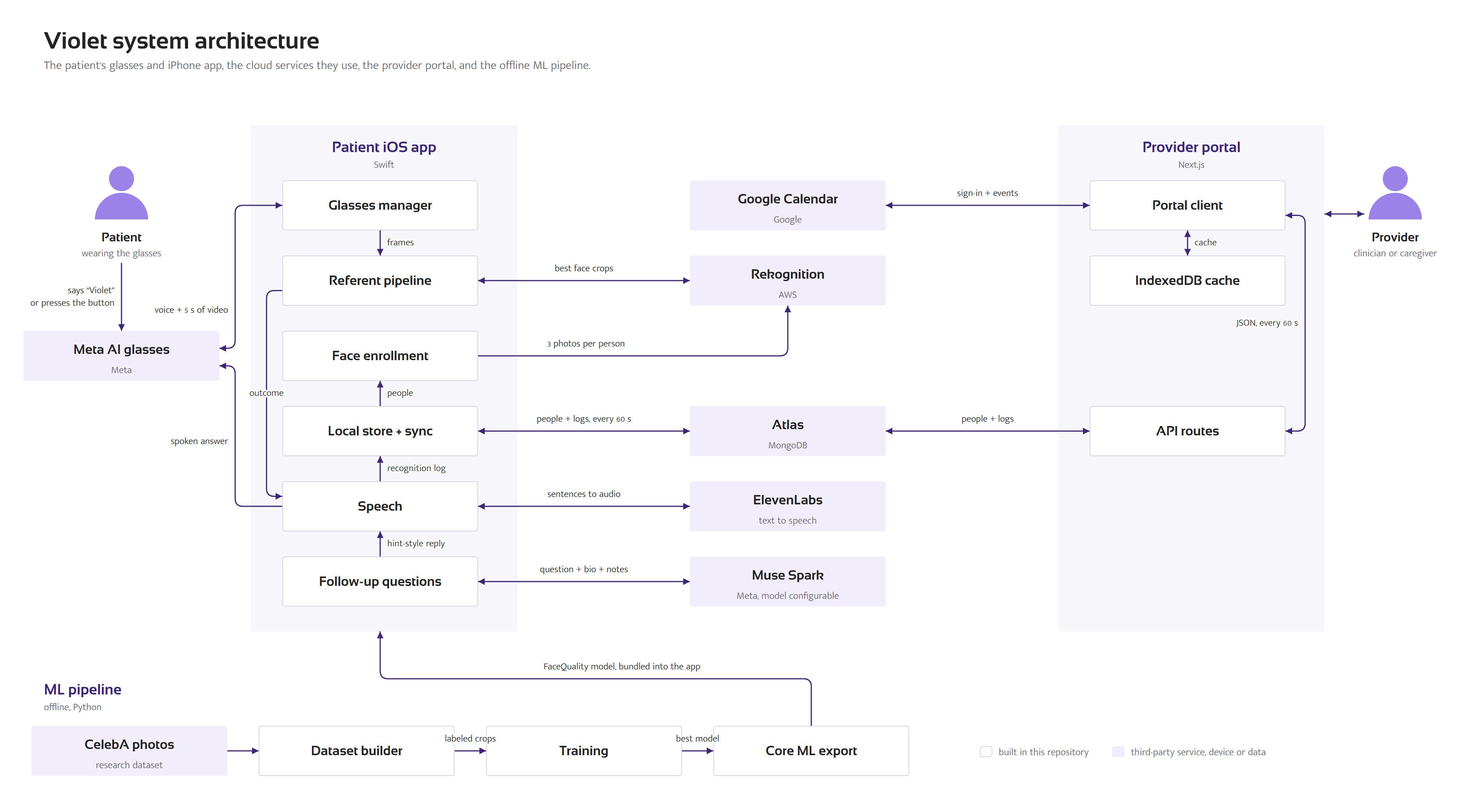
Violet system architecture: glasses, iOS app, cloud services, provider portal, and offline ML pipeline.
-
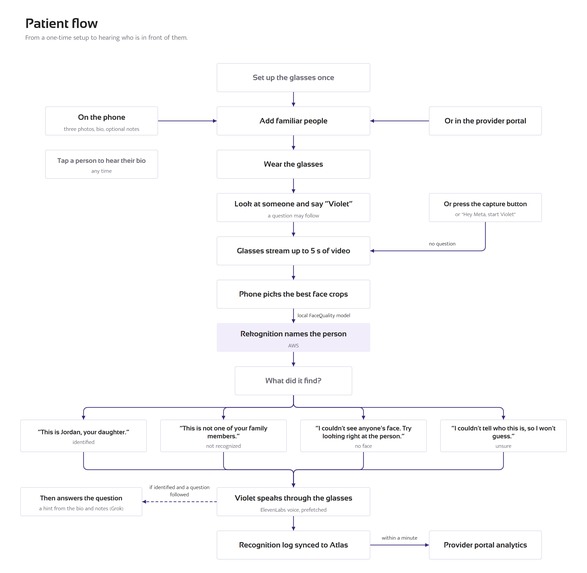
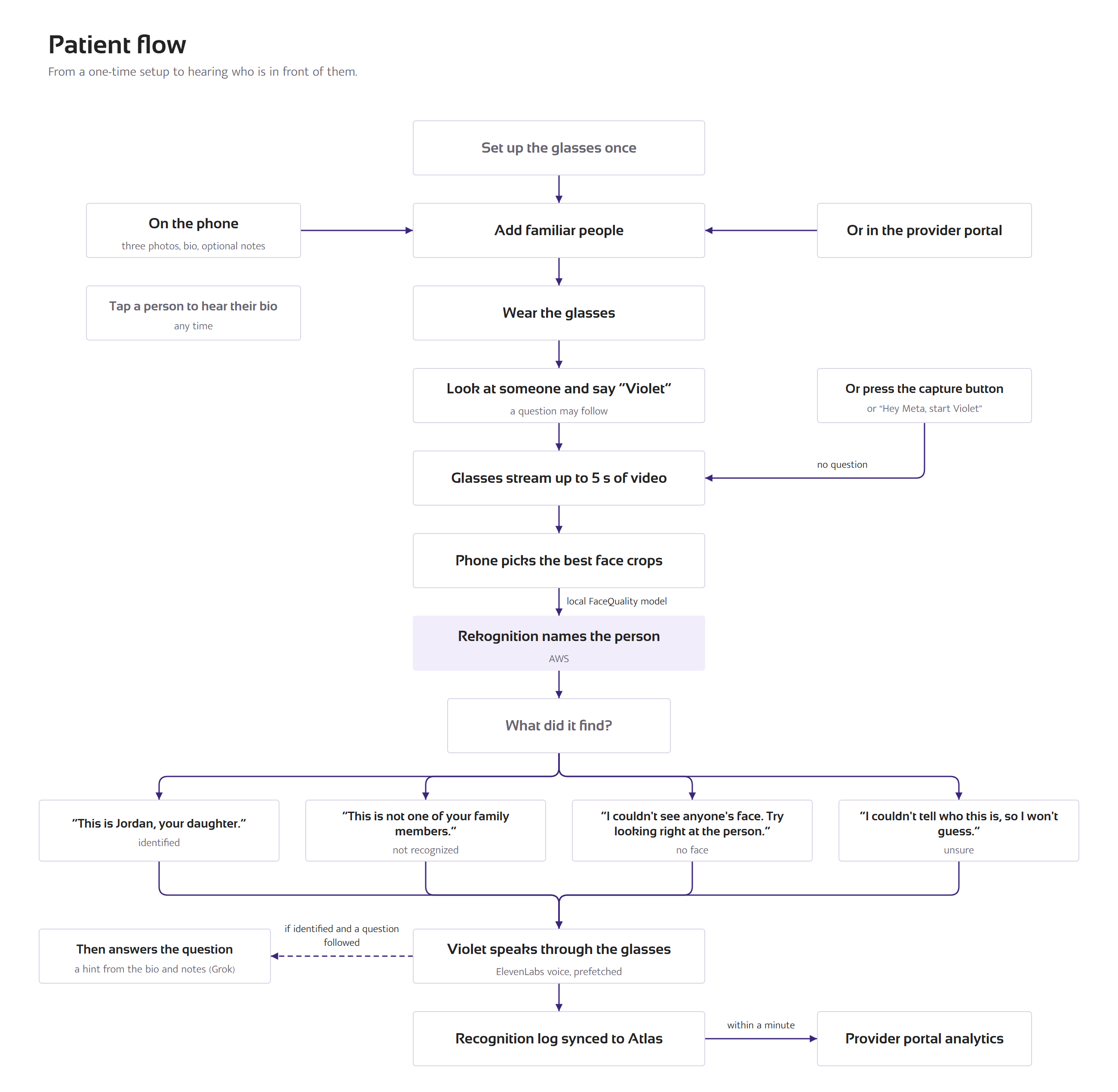
Patient user flow: setup to recognition, spoken outcome, and optional follow-up answer.
-
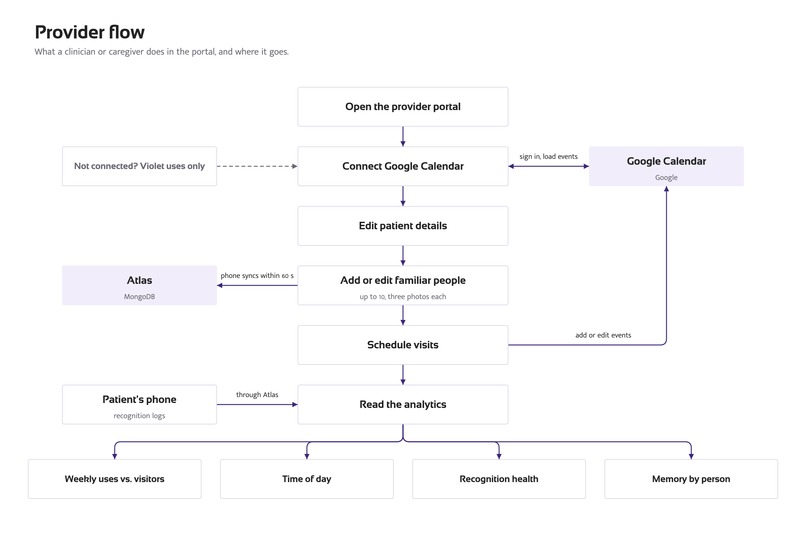
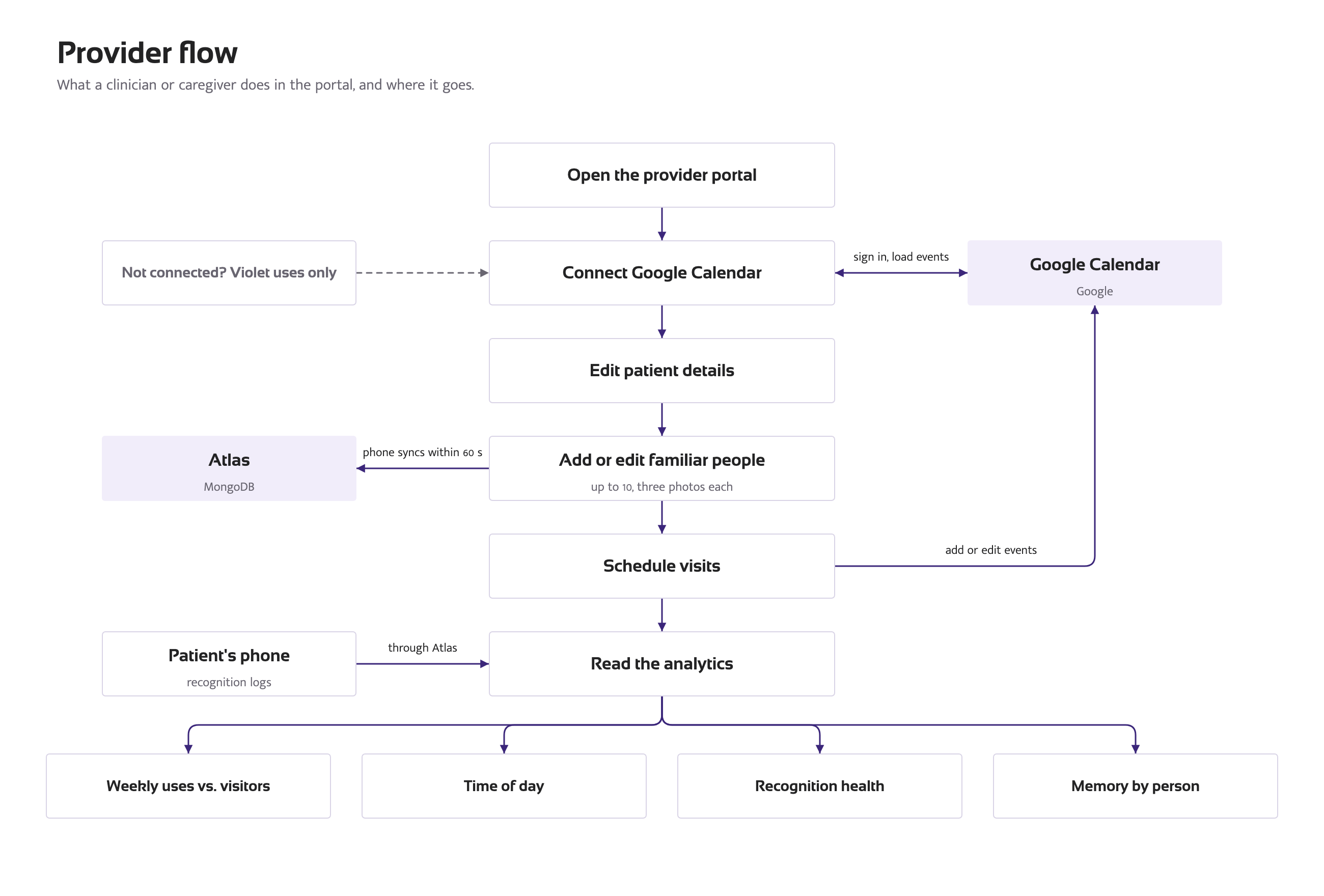
Provider user flow: portal actions and where each one ends up.
-
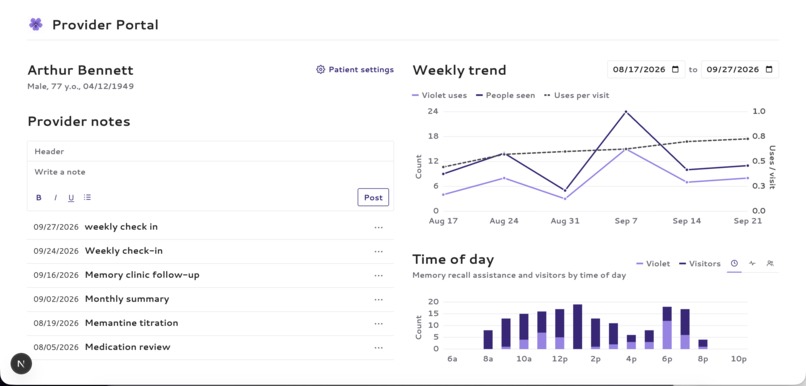
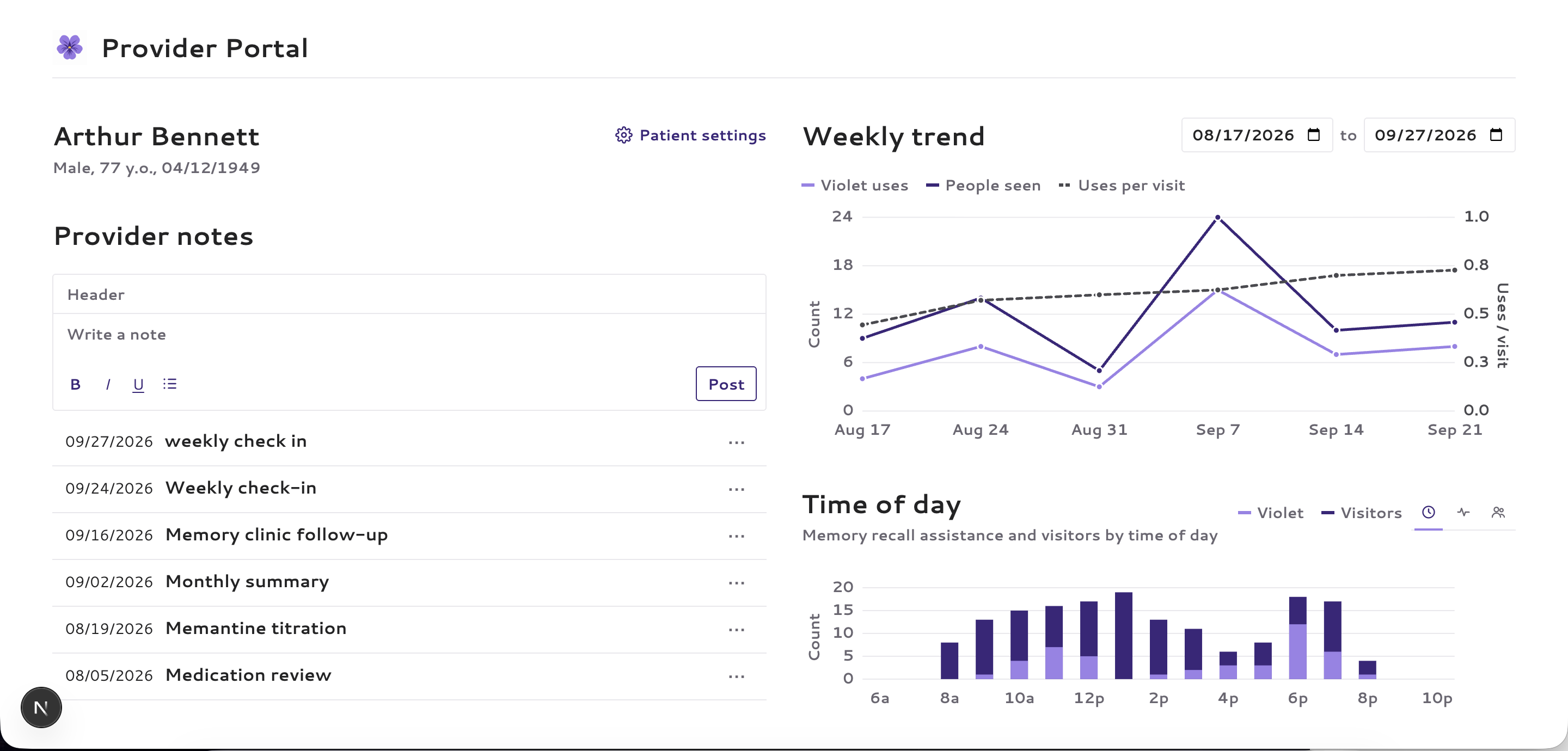
Provider Portal: a dashboard to manage user symptoms
-
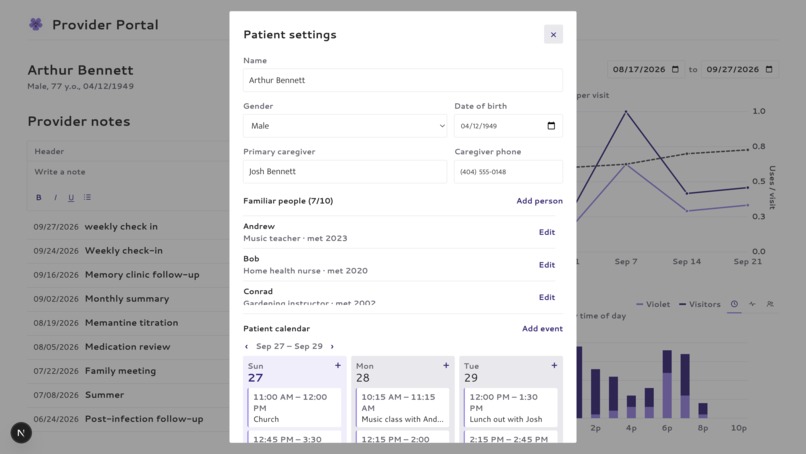
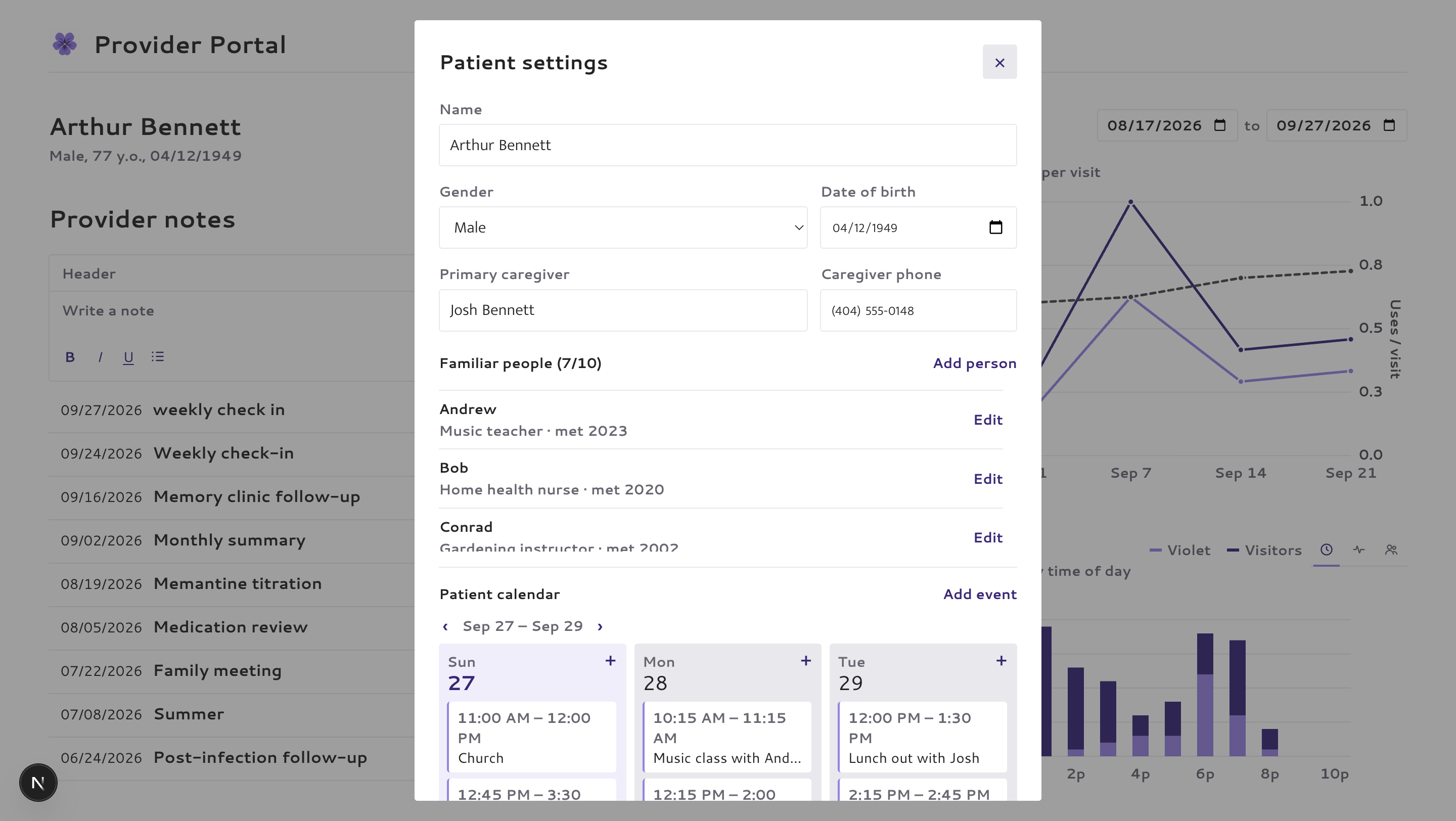
User settings: where details of the user can be edited
Inspiration
For people living with memory loss, or those who care about them, it can be a very painful experience to lose connection with your loved ones.
This is unfortunately something that a large number of people experience. Around 57 million people worldwide live with dementia, with nearly 10 million new cases each year (World Health Organization, 2026). While there is currently no known cure, early intervention and continued support can make a huge difference. Cognitive stimulation, social engagement, and pharmacological support can help improve daily functioning (World Health Organization, 2026).
This idea was what motivated Violet. Rather than replacing the cognitive effort of memory, Violet provides context clues such as shared experiences, recent events, and relationships to help people reason through their own memories. These cues provide both cognitive stimulation and allow patients to stay connected and engaged with their loved ones.
Violet also supports caregivers and clinicians. With the user's consent, the caregiver portal can track trends in usage and use that to assess the state of the user's condition.
What it does
Violet is a wearable memory assistant designed to help people with dementia recognize the people around them and recall the context of their relationships using smart glasses and a mobile app. Violet then logs and monitors these symptoms on a caregiver dashboard.
Before recognition can happen, a caregiver helps enroll familiar people into Violet with their consent. Enrollment includes a few reference photos along with information such as the person's name, relationship to the user, and any relevant notes or memories.
When a user says "Hey Violet", the smart glasses begin to capture the people on camera. Violet identifies familiar faces and retrieves relevant information like the relationship to the user, the person's name, recent interactions, and other relevant entered information. A language model then parses this information and returns a summary of the most recent information, attempting to omit key details to encourage active recall. For instance, rather than saying "This is Mark, your grandson who started a new job as a Radiologist at Emory Hospital 6 days ago", Violet would say "This is Mark, your grandson who told you about his job last week." The user can optionally include a follow-up question after "Hey Violet", at which point the language model will also determine the question and append an additional response to the base response.
Because a user might feel embarrassed about forgetting someone, we also let the user manually invoke Violet without speaking. The user can either click a given face to hear a bio on them or manually run the image recognition workflow by clicking a button on their Meta glasses.
Violet also includes a caregiver portal that securely syncs with the patient app to view relationship information and longitudinal trends in the user's memory, including Violet usage frequency, usage distribution over the day (which might indicate sundowning), and increases or decreases in usage for specific enrolled people.
How we built it
The Facial Recognition Pipeline
If using Violet during a real-time social interaction, latency, cost, and minimizing battery usage are critical. Rather than having the Meta glasses constantly stream video, Violet only receives streaming when the user says "Hey Violet." Meta's on-device speech recognition detects the wake phrase and activates the pipeline.
Sending every captured frame to the cloud would be both slow and expensive, so we instead stream at 15 FPS and process faces locally first. Apple Vision generates face crops with landmarks, which are then sent to a fine-tuned on-device quality model that detects face crops and filters out poor candidates before sending the strongest one to AWS Rekognition. Rekognition then returns the best matching enrolled identity for each crop along with its confidence scores, noting no match when a face is absent from the enrolled database.
When multiple recognized people are visible, Violet uses a deterministic score to estimate who the wearer meant. The score combines face centrality, bounding-box size, and temporal weighting, favoring people who were centered in view and visible closer to when the wake phrase was spoken.
Recognition also starts while the glasses are still capturing. As soon as a new face appears, its best crop is sent to Rekognition, with several calls running in parallel. Once Violet is confident in an answer, it ends the capture early instead of waiting out the full five seconds, and a hard five-second deadline means a slow network never leaves the wearer waiting.
Choosing the on-device Model
This local model reduces unnecessary Rekognition calls while avoiding the latency and battery cost of a heavier one. We fine-tuned pretrained face-recognition networks and attached a small multilayer perceptron that predicts how useful each face crop will be for Rekognition.
We compared three backbone candidates of increasing size to measure the tradeoff between predictive performance and on-device efficiency:
- MobileFaceNet (~2M parameters)
- EdgeFace-S (~3.65M)
- ArcFace iResNet-50 (~44M)
Each backbone feeds a lightweight quality head using the pre-normalization face embedding and effective face resolution. We tested both frozen (the backbone parameters aren't allowed to move) and partially fine-tuned variants and ran a 162-configuration hyperparameter sweep on two T4 GPUs.

The fine-tuned versions all outperformed their frozen variants. The smallest model, MobileFaceNet, conveniently had the best performance when fine-tuned, and thus allows us to perform this on-device quality assessment in subsecond time.
Building the Dataset
To train the quality model, we built a dataset from 570 CelebA identities, split by person into train, validation, and test sets. For each identity, we enrolled three reference images into Rekognition and generated roughly 10,000 query crops, with about half synthetically degraded to simulate blur, poor lighting, compression, and sensor noise. We then ran every query through Rekognition and used its actual recognition performance as the training signal.
Voice and Audio
The Meta glasses automatically transcribe audio, so the user only has to say "Hey Violet." A short chime tells the wearer the glasses heard them. Violet's answer is voiced by ElevenLabs and plays through whatever output is active, including the glasses' speakers. There are four spoken outcomes: a named person, an unknown person, no face, and an unsure answer where Violet won't guess.
Waiting on text-to-speech after recognition would add a noticeable pause, so Violet generates and caches every sentence it could say ahead of time. When the portal edits a person's bio, their lines are regenerated in the background. If an answer still takes longer than three seconds, Violet says a short filler line like "One moment," so the wearer isn't left in silence.
The provider portal was built for caregivers and doctors. It's built with Next.js and MongoDB Atlas, with the patient's Google Calendar synced so that recognition can be matched with scheduled visits.
The portal and the patient's phone share the same Atlas database, so a familiar person added or edited in the portal reaches the glasses within a minute. The phone then regenerates that person's voice lines and re-enrolls their photos in Rekognition. Every recognition is logged on the phone and uploaded to Atlas, and the portal turns those logs into the charts described below by matching them against calendar events that name an enrolled person. Both sides keep a local cache, so the phone keeps working offline and the portal loads instantly before refreshing in the background.
Clinicians can also keep rich-text notes on the patient, alongside their caregiver contact and latest MoCA score.
User-Centric Design (Ensuring Usability for People With Dementia)
Given that our target users are patients with dementia, our team put heavy consideration on designing around memory loss.
iOS app: how do we keep the interaction simple for the patient?
- The only feature the patient must remember is the keyword “Violet” or pressing the glasses button.
- Our model will never guess. It will only name someone when the match is highly confident, since a confident wrong answer would confuse someone who can't check it.
- Answers carry context and not just a name. For example, "This is Jordan Lee, your daughter."
- The delete action for people is purposefully missing from the phone so a confused patient can’t remove family members.
Webapp: what USEFUL information should we provide for caregivers/doctors
- Recognition health: For each scheduled visit, when Violet is prompted, does the identified match the person scheduled? Since this can be caused by wrong calendars or unrecognized people, this metric lets caregivers know if the other data can be trusted.
- Weekly trend: By looking at the ratio of uses per visit, caregivers can track the progression of the disease.
- Time of day calls: Tracking Violet calls across the day shows caregivers when sundowning (late-day confusion and agitation) sets in, so they can anticipate high-risk windows for wandering and plan extra support ahead of time.
- Memory by person: Violet calls plotted against time known. In dementia, recent memories usually leave before old ones, so frequent Violet calls on recently met people fit that pattern. But if long-known family members start coming up too, the disease may have progressed
System Architecture

Challenges we ran into
Building a Useful Dataset: One of our biggest challenges was creating a dataset with enough variation to train the quality model. We needed clean reference images with landmarks, but also difficult query images with poor angles, blur, compression, and poor lighting.
We investigated datasets like SCFace that met these criteria, but they mostly required access requests that weren't feasible during the Hackathon. We thus decided to use CelebA, which consists of mostly clean images. To make up for this good image quality, we synthetically degraded about half of our query images with blur, poor lighting, compression artifacts, and sensor noise to better approximate wearable-camera conditions.
Even after degradation, Rekognition scores were heavily concentrated near 100. To make those differences learnable, we applied a logarithmic transformation to expand differences near 100.
Designing for someone who may forget new interfaces: Most apps assume users pick up new things over time, but our users may forget advanced functionality on day one. That's why we simplified it to a simple "Violet" call or a press of a button.
Keeping it fast enough for a real conversation: Even a few seconds of silence is awkward when someone is standing in front of you. The glasses camera alone takes about a second to deliver its first frame, so we designed the pipeline to parallelize processing as much as possible. Faces are scored on-device as frames arrive, Rekognition calls start mid-capture and run in parallel (with early stopping if a sufficiently high confidence face is identified), and all speech is generated ahead of time.
Accomplishments that we're proud of
- This was Andrew's first Hackathon, and he successfully owned integration with the Meta wearables SDK, including debugging issues like speech recognition stalling and implementing a watchdog to reset from failures.
By the end of the first night, we had identified a usable dataset, designed the sampling and degradation strategy, and generated enough labeled data to get our on-device quality model and ML pipeline working early on Day 2.
What we learned
We learned to choose model complexity based on the dataset and task rather than assuming bigger is better. On our limited dataset, the smallest backbone generalized best while also being the easiest to deploy on-device.
Throughout Violet, we learned that good product decisions had to start with the needs and limitations of people with dementia. That meant keeping interfaces simple, avoiding unnecessary features, using familiar interactions like voice, and even choosing a human name like “Violet” so the assistant felt easier to understand and interact with.
We found that AI works better here as several specialized components. Face-quality scoring, identity matching, referent selection, and conversational context each solve a narrower problem more reliably than asking one giant model to do everything. Separating these components also made them easier to test, debug, and develop in parallel.
What's next for Violet
- Automatic Memory Updates: In the future, Violet could briefly retain and transcribe audio for a short time after being invoked for an enrolled person. With the user’s consent, a language model could extract important details from that short interaction and update the person’s notes automatically, giving Violet more recent context the next time they meet.
- Adaptive Cues: Learn how much information a user typically needs before they remember someone, then gradually give more detail only when necessary instead of always giving the same-size response
- Multimodal Queries: Integrate multimodal reasoning into the LLM answering follow up questions.
Built With
- amazon-web-services
- elevenlabs
- mongodb
- next.js
- python
- pytorch
- ruby
- swift
- typescript


Log in or sign up for Devpost to join the conversation.