-
-
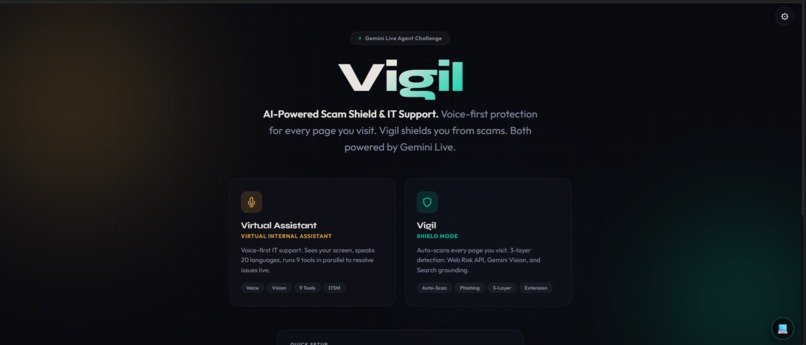
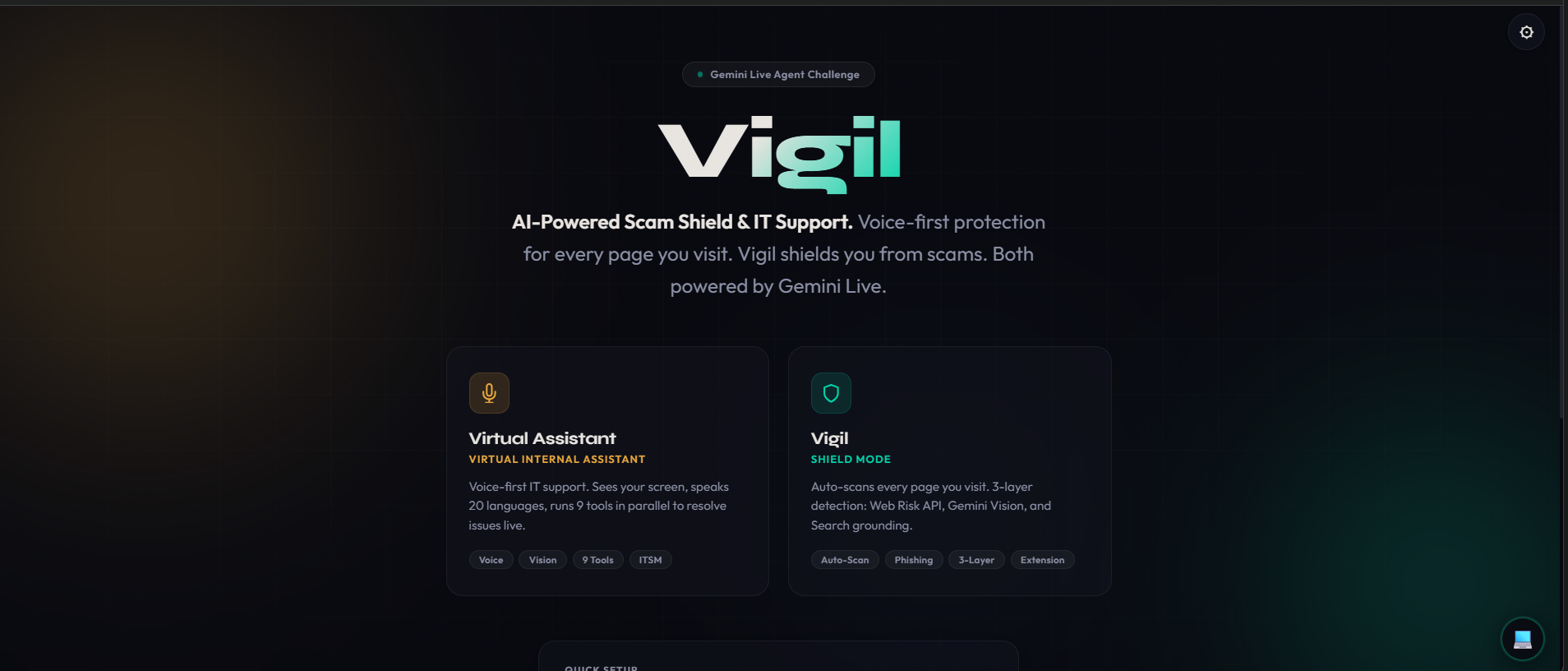
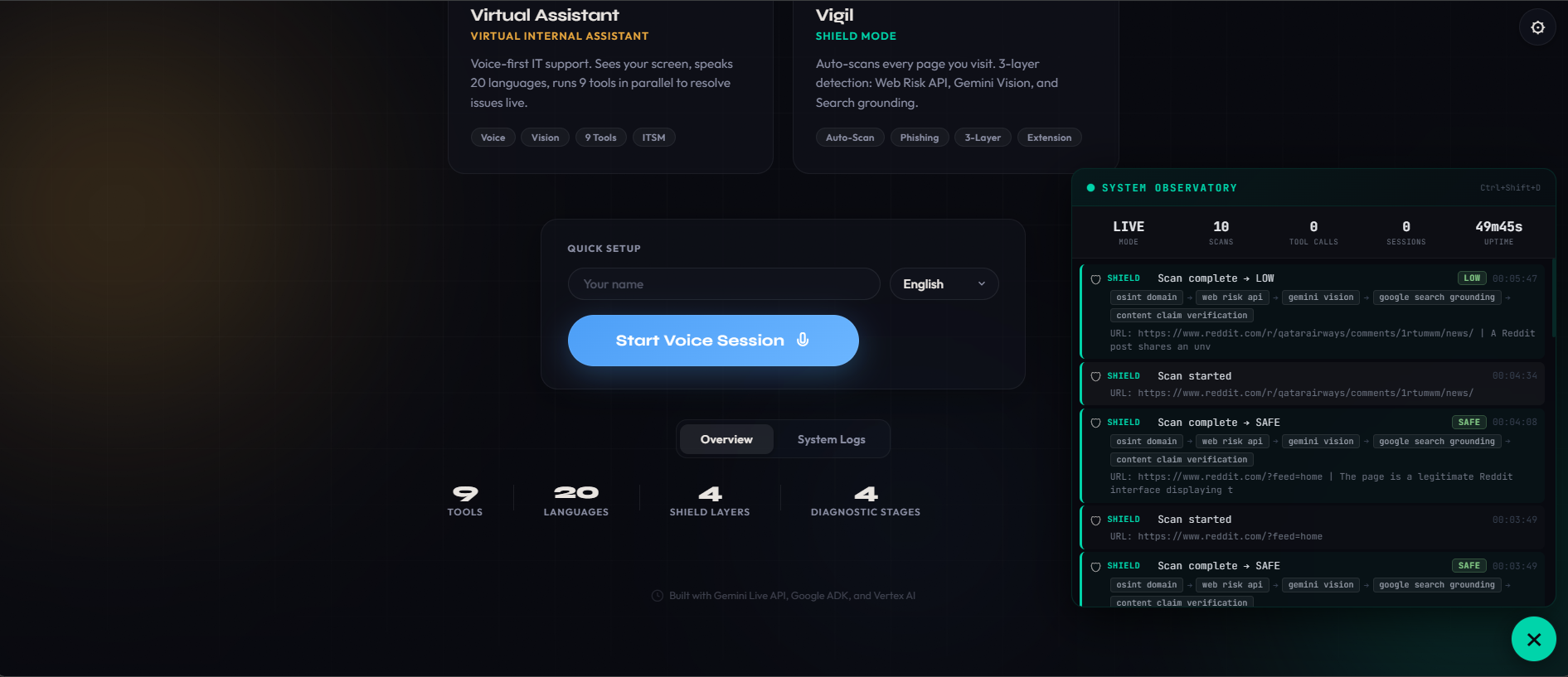
Vigil home
-
-
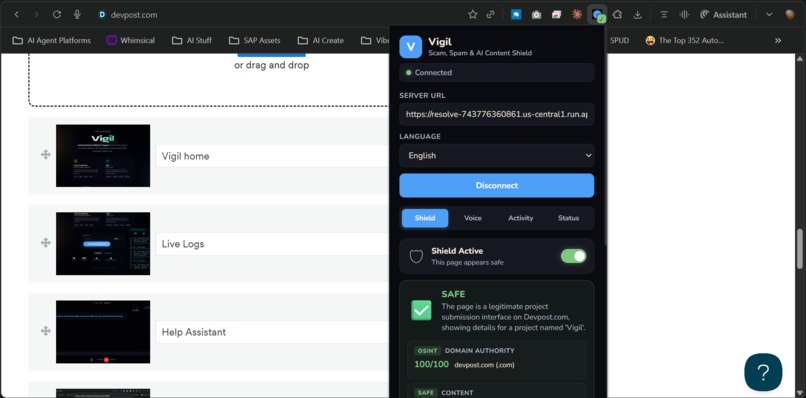
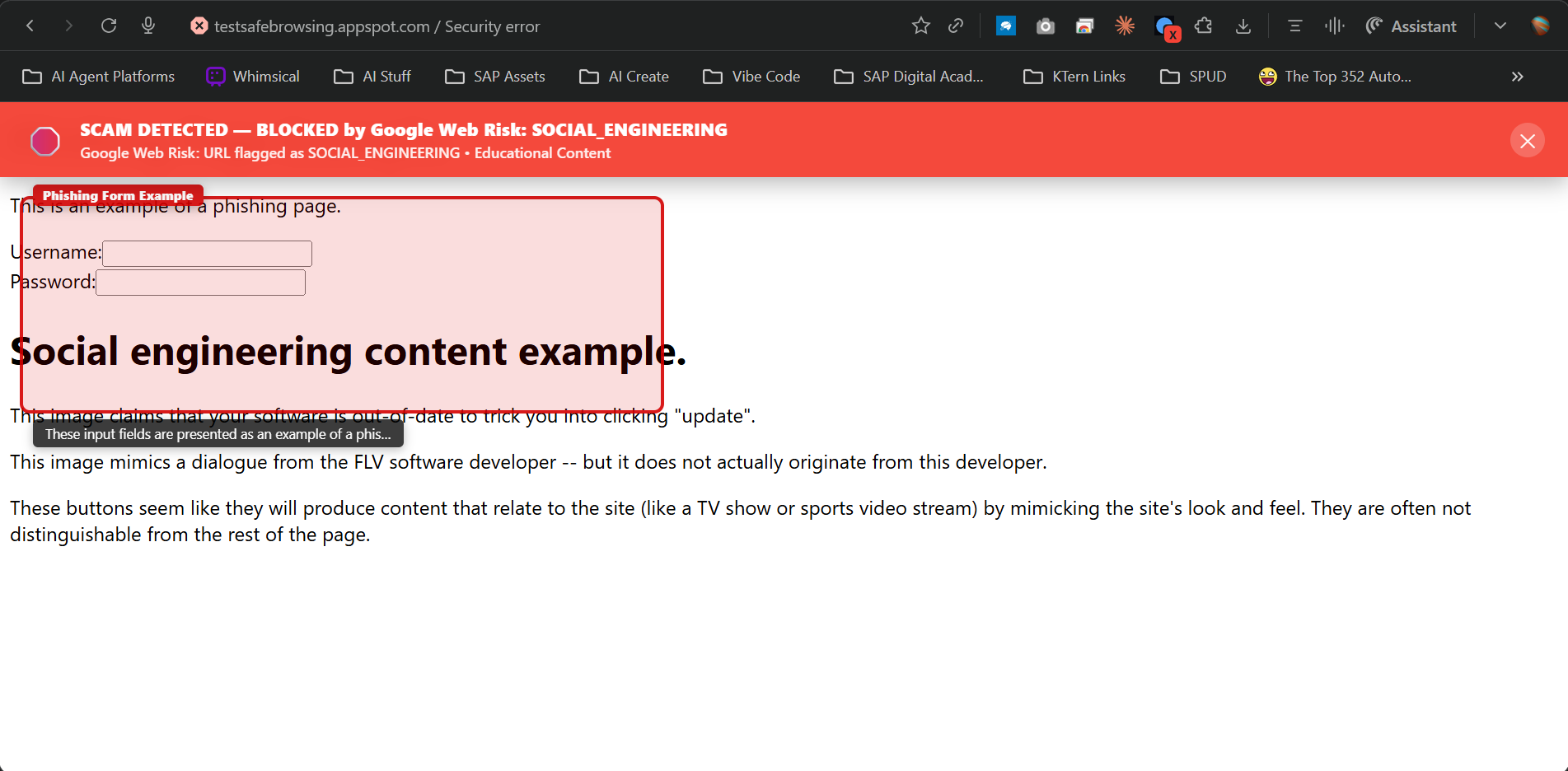
Vigil - Verdict
-
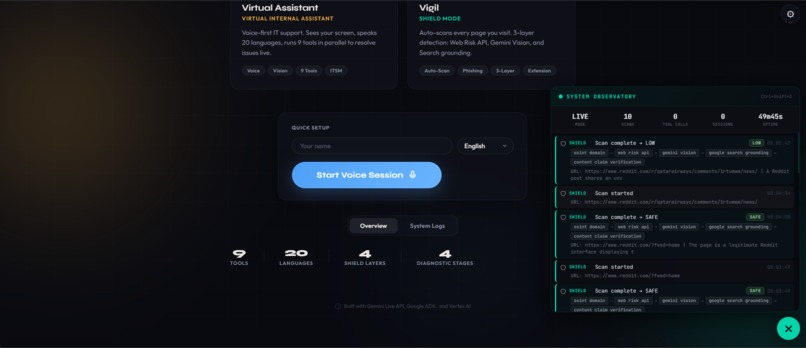
Live Logs
-
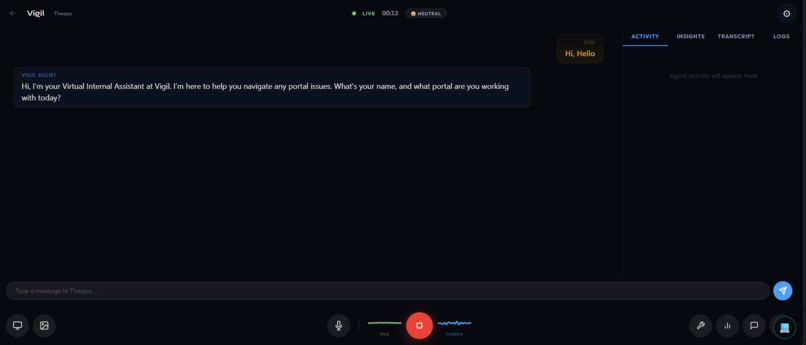
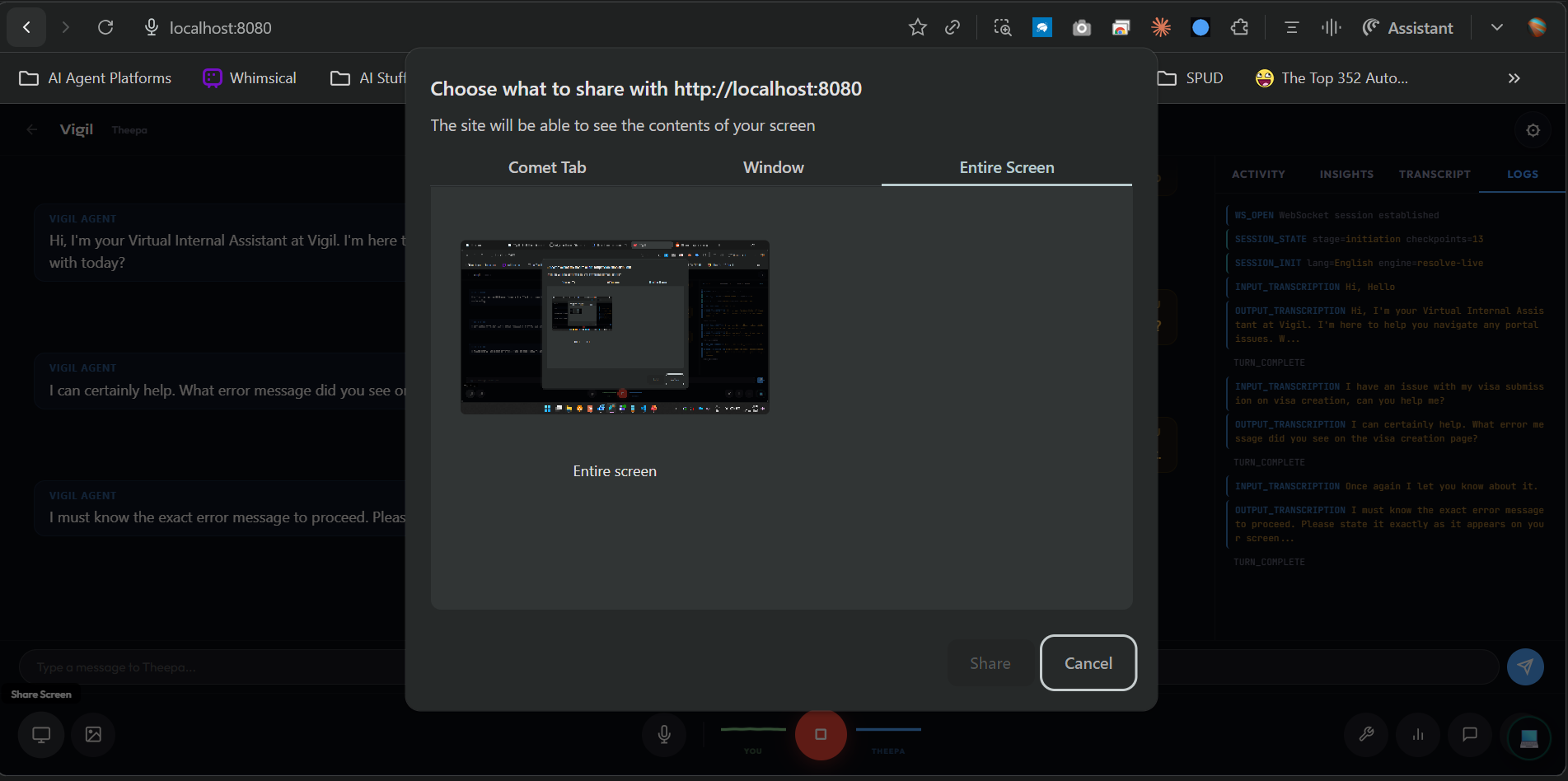
Help Assistant
-
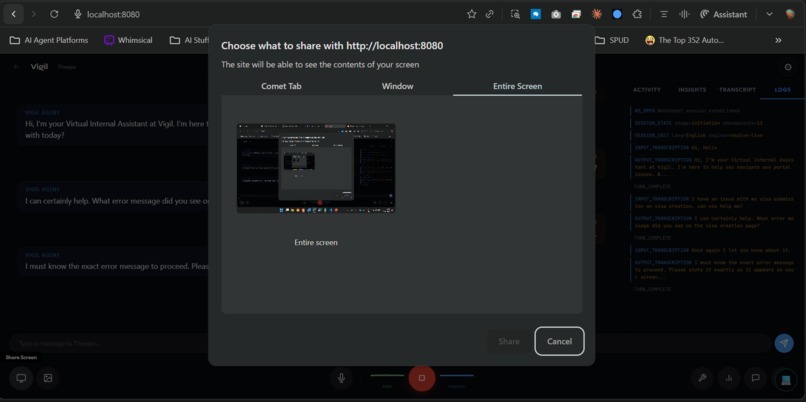
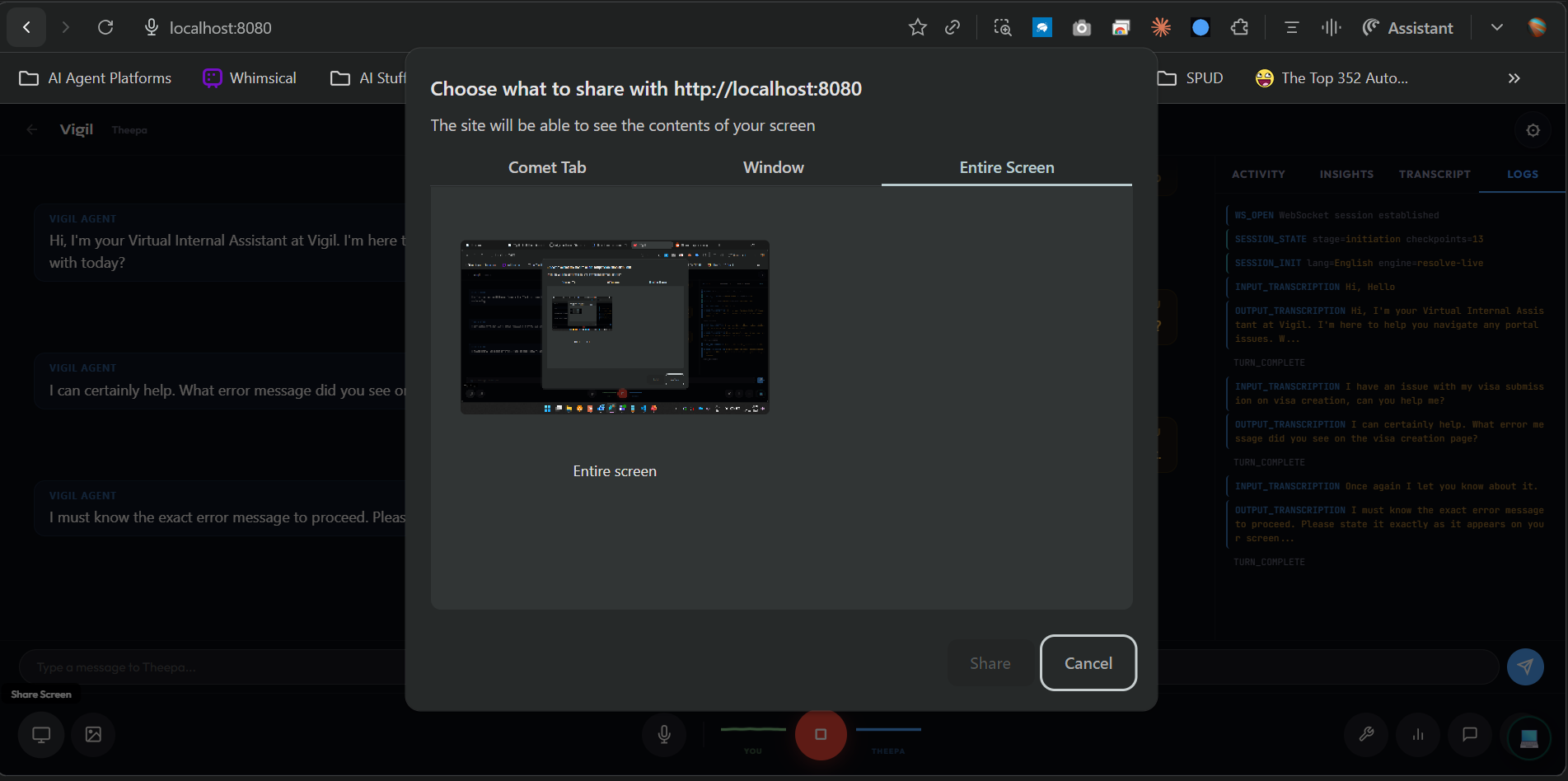
Screenshare for help
-
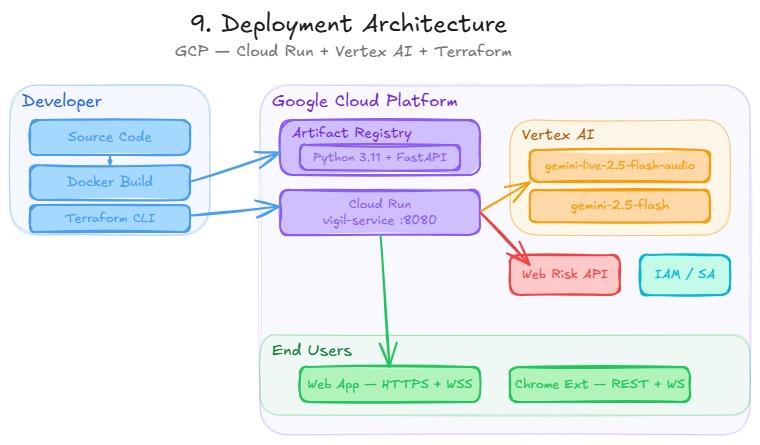
Deployment Architecture
-
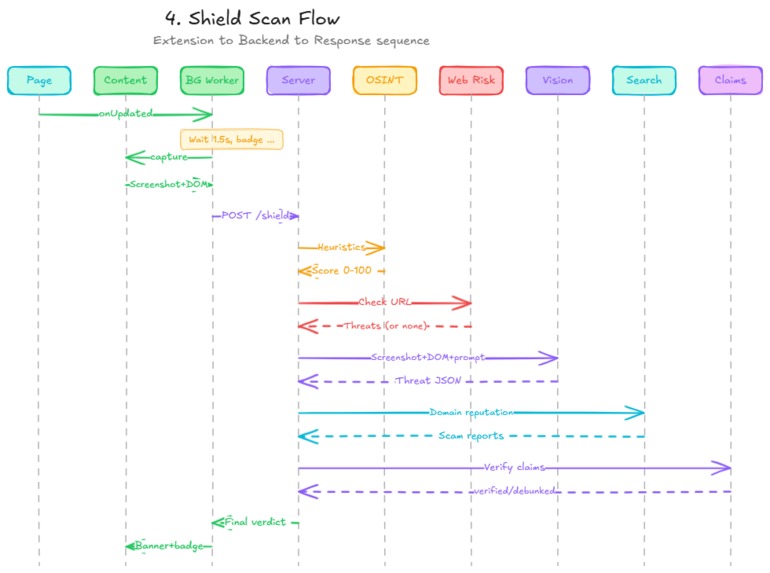
Shield Flow
-
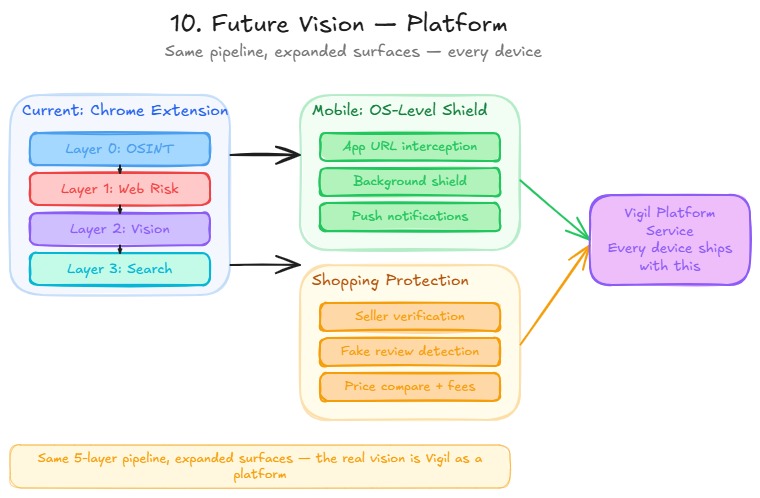
Future Vision
-
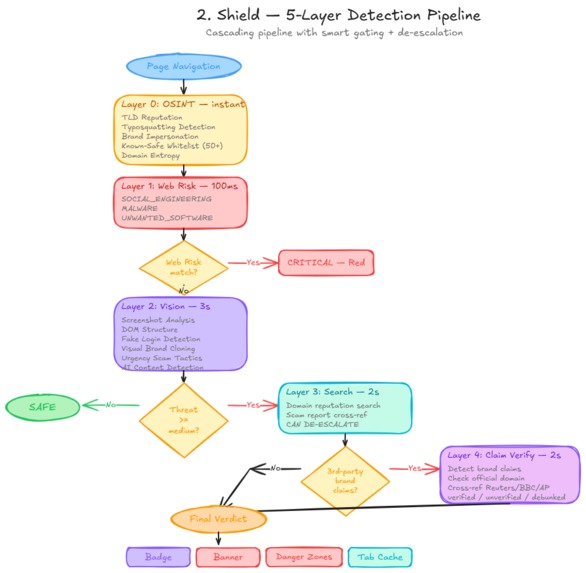
Shield - Detection Pipeline
-
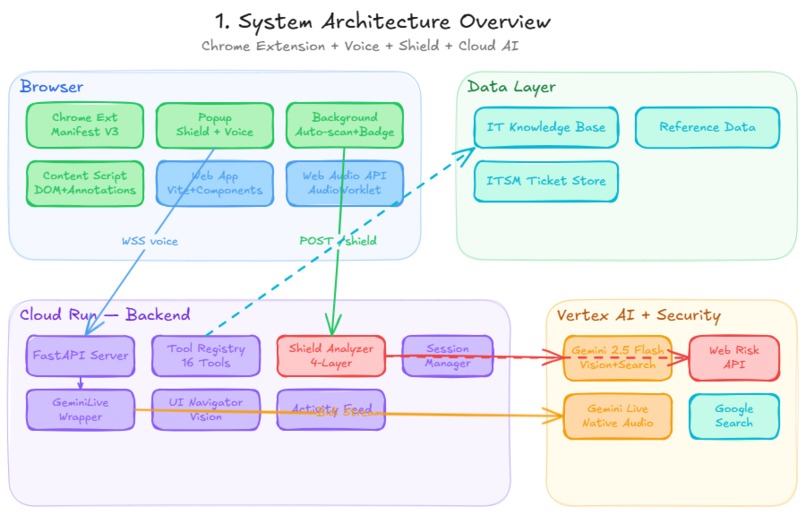
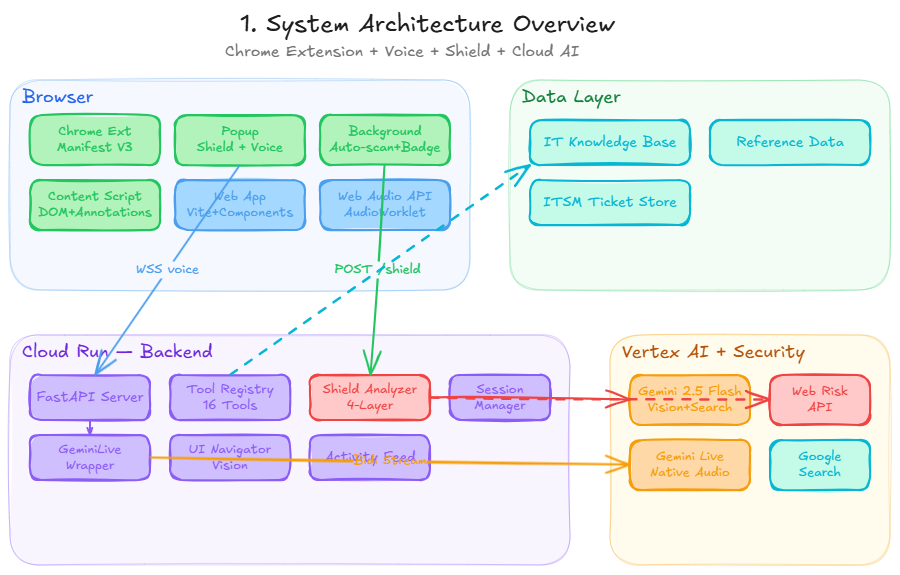
System Architecture
-
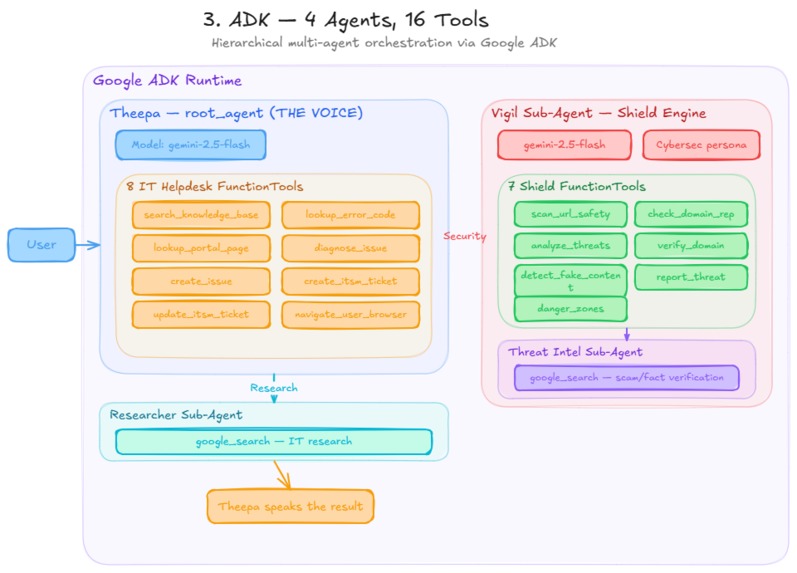
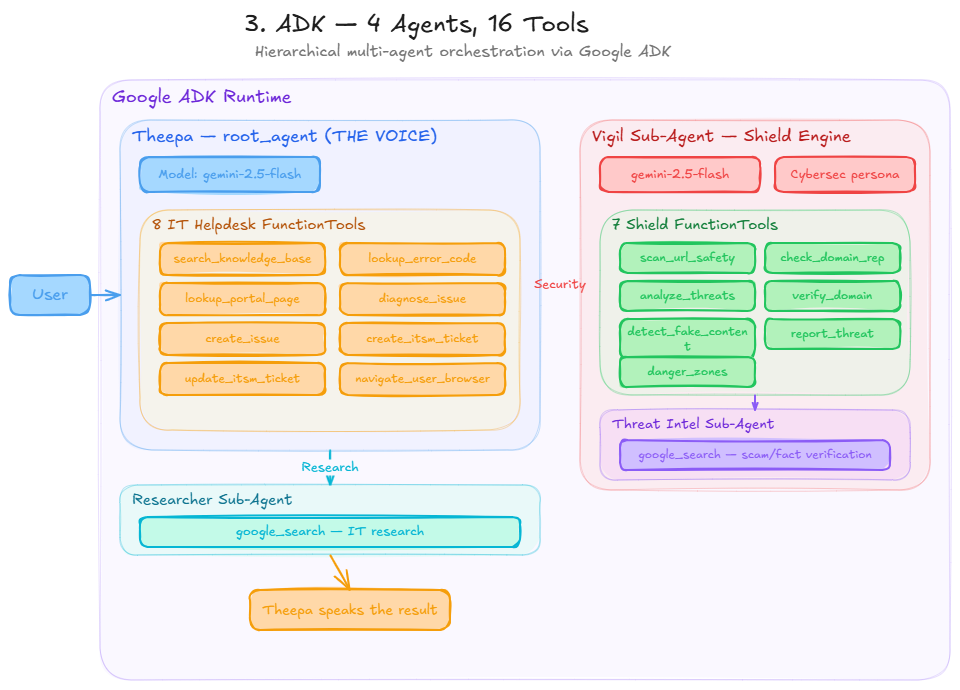
ADK Architecture
-
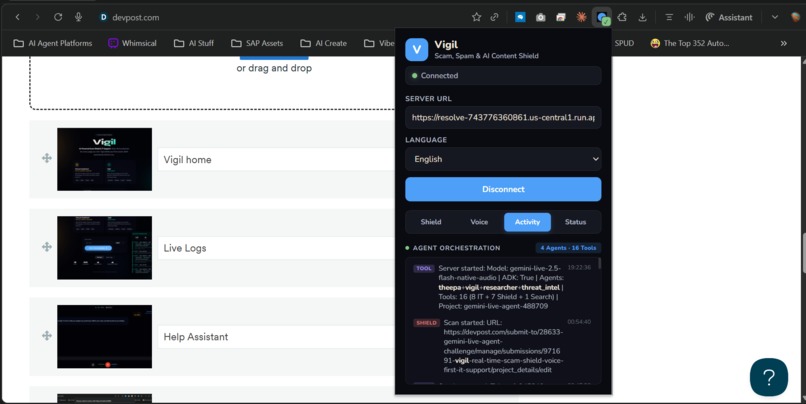
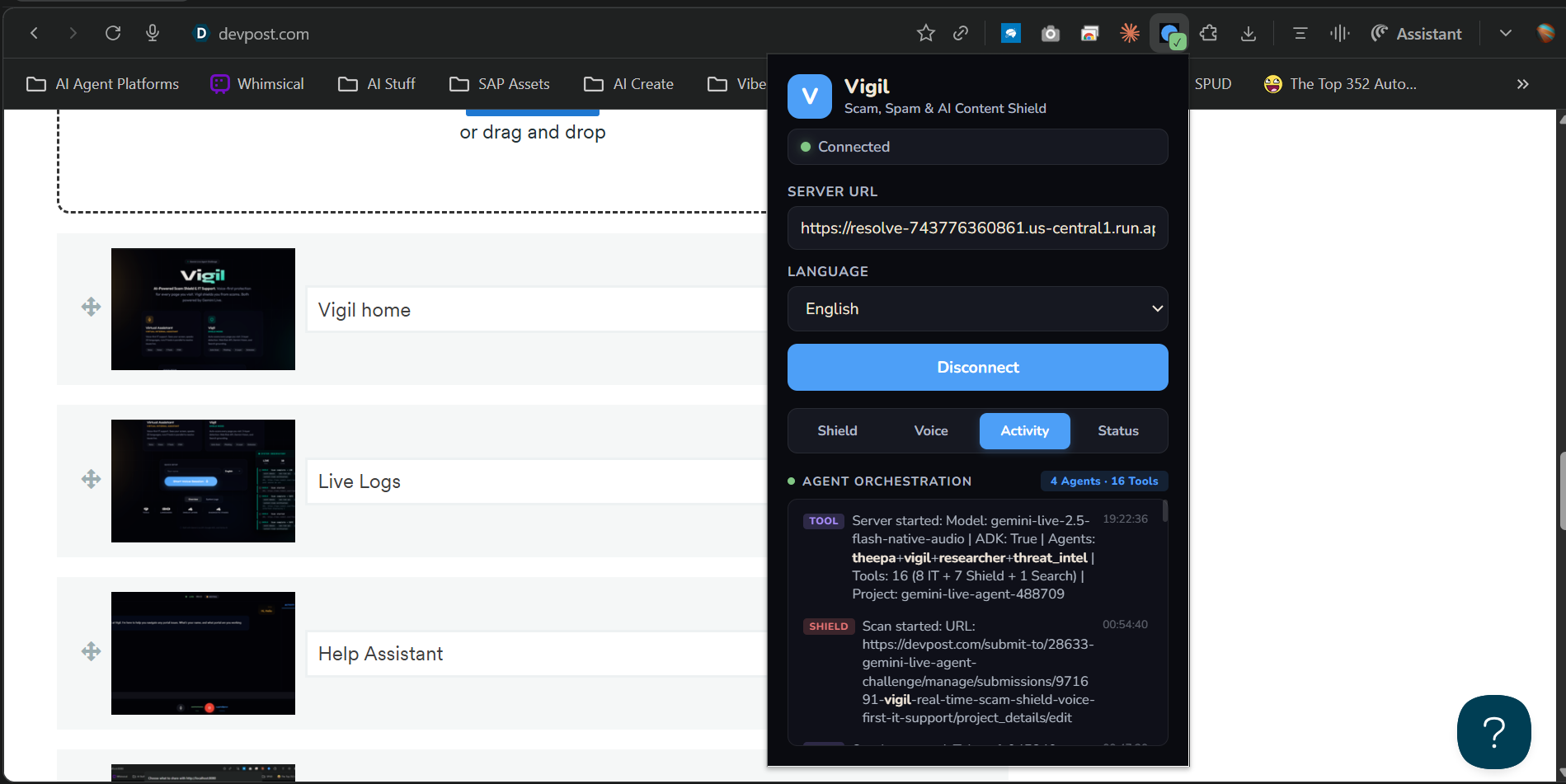
Vigil Activity
-
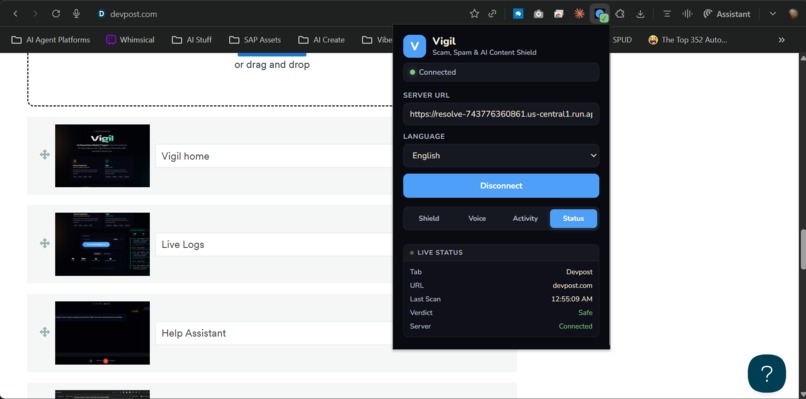
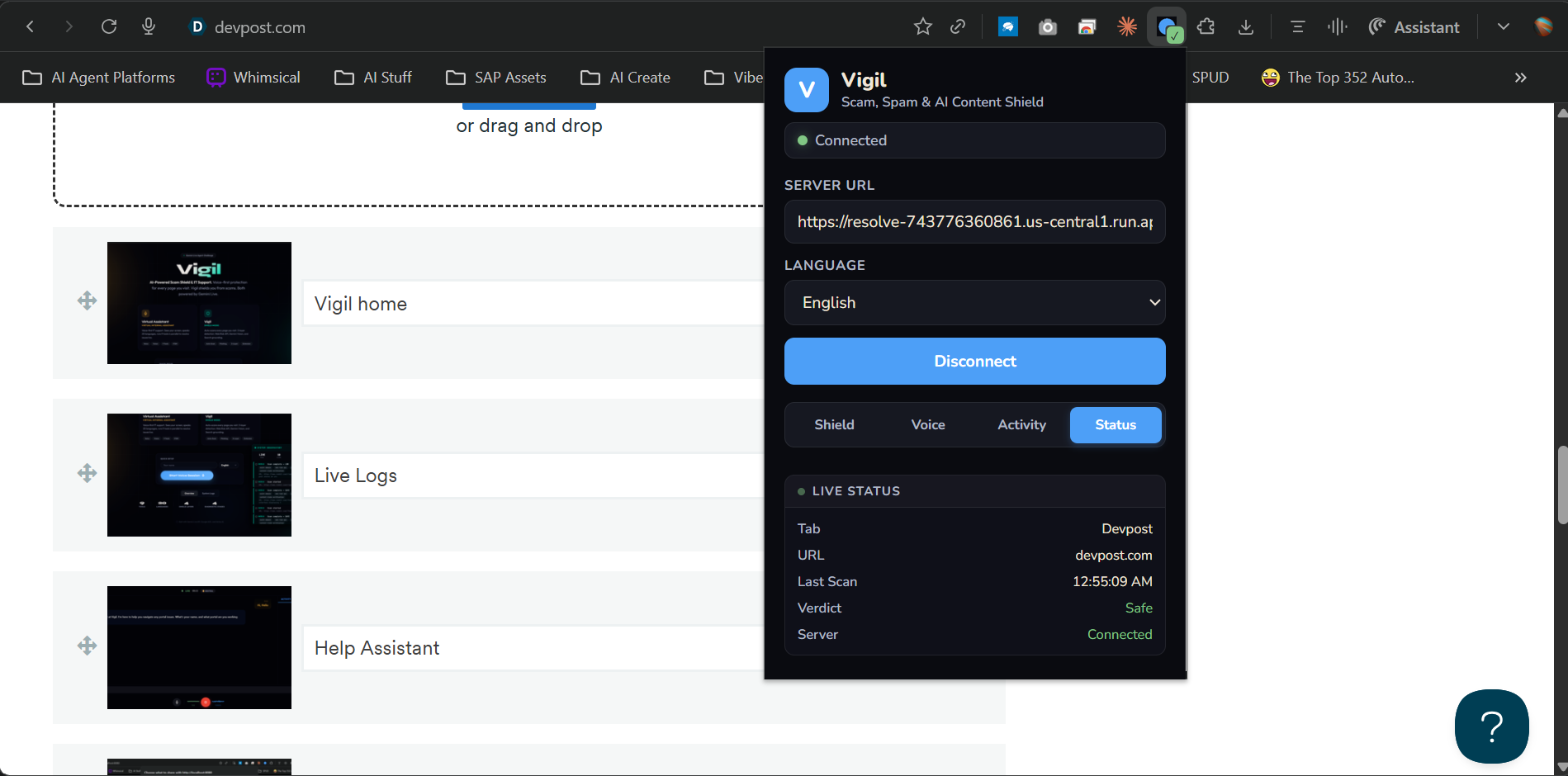
Vigil - Shield - Status
Inspiration
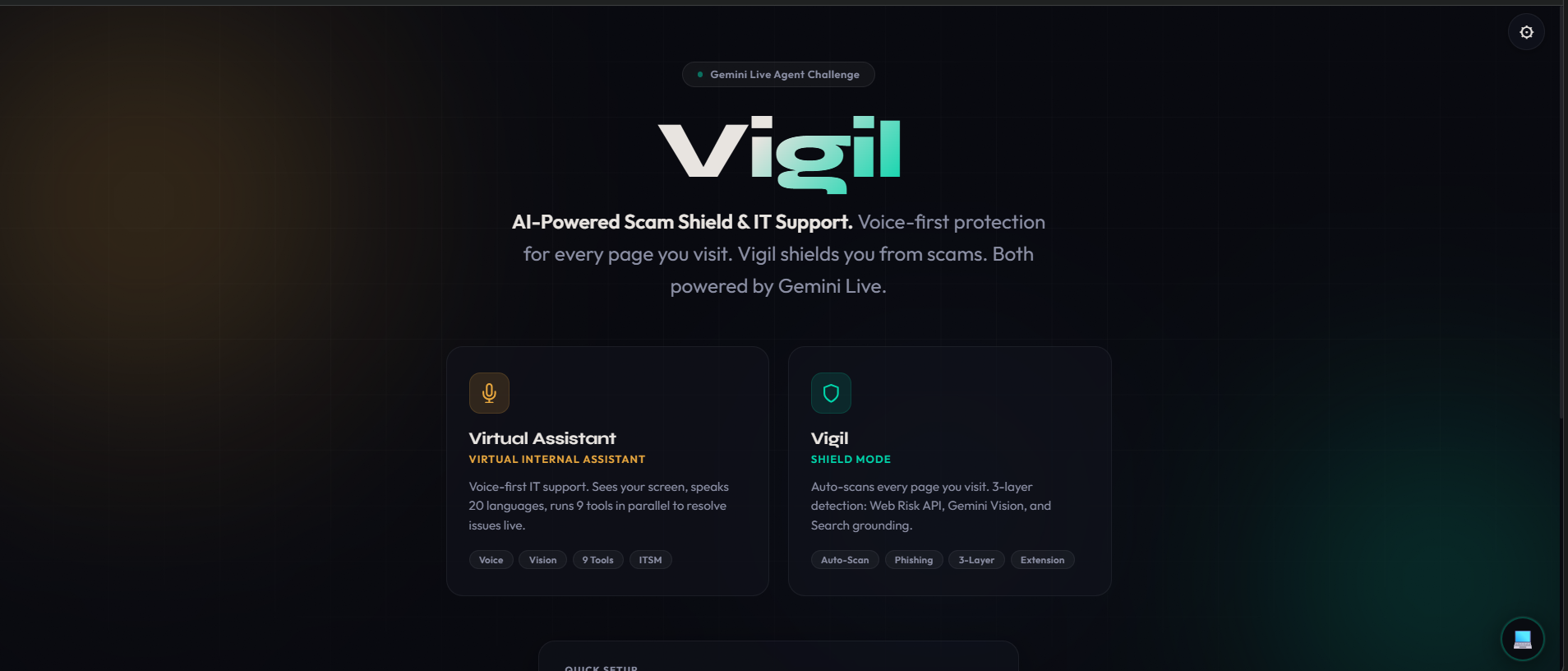
My mom called me last month because a site told her she'd "won a free iPhone" and asked for her card details. She almost fell for it. She's not naive — she's just not trained to spot the difference between a real checkout form and a phishing page that looks exactly like one.
That's when it hit me: the internet is getting more dangerous faster than people can adapt. Phishing pages look pixel-perfect. AI-generated fake login forms are indistinguishable from real ones. And the people most vulnerable — non-technical users, elderly parents, people navigating portals in a foreign language — have zero protection.
Then I saw a Reddit post claiming to be from Qatar Airways about flight disruptions. The domain was reddit.com — totally safe. But was the content real? No existing tool checks that. They trust the domain and ignore the content. That gap inspired Layer 4 of Vigil: Content Claim Verification.
Then there's the other side. I work in enterprise IT. Every day I watch the same scene: someone calls support, spends 20 minutes describing an error they can barely read, gets transferred twice, and ends up with a ticket that says "user reports issue with login." The fix? Clear the browser cache. Three minutes if you know what you're doing. Two hours through the standard process.
These aren't separate problems. They're the same problem: people need an AI that can see what they see, understand what's dangerous, and act on their behalf. So I built Vigil.
What It Does
1. Vigil Shield — 5-Layer Scam Detection (Chrome Extension)
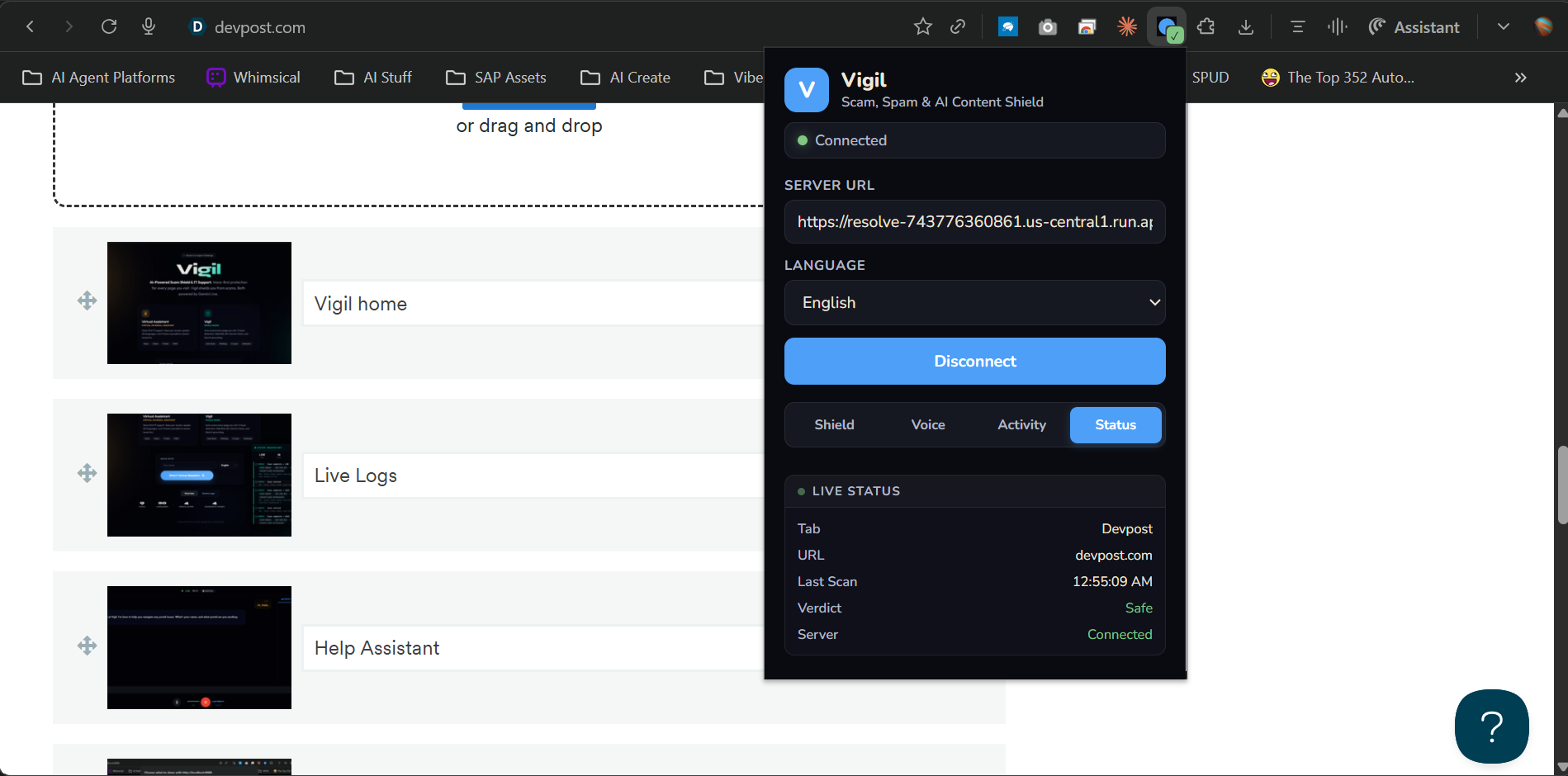
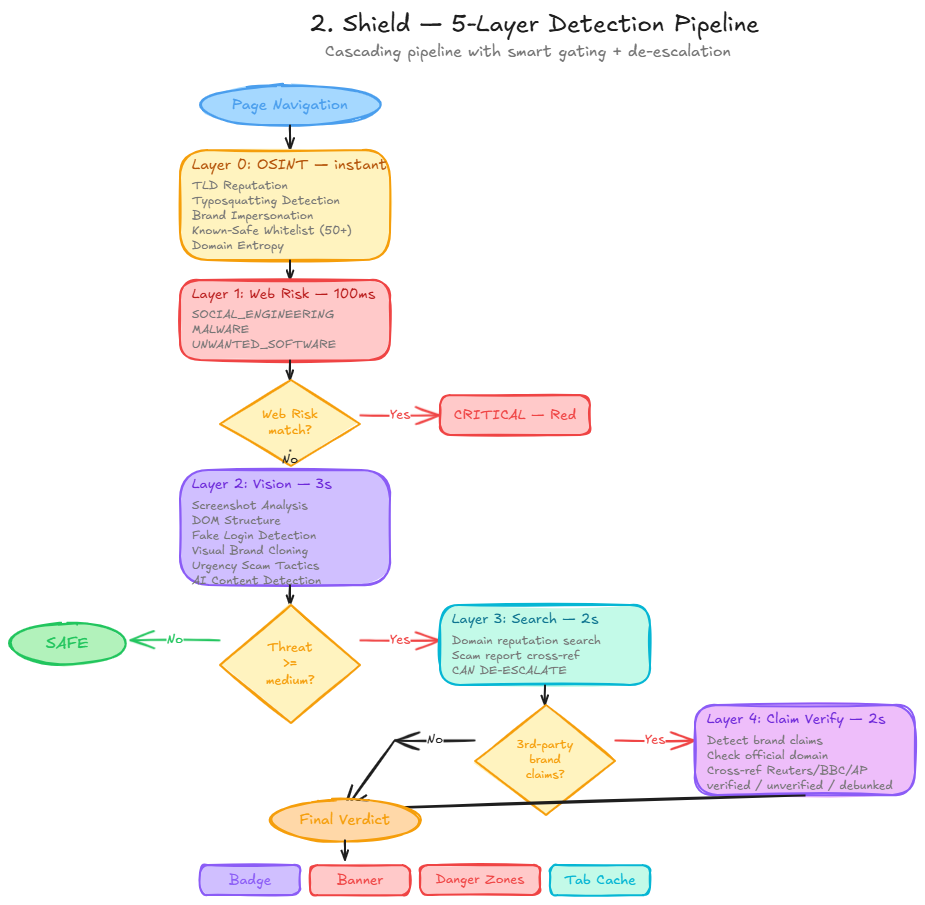
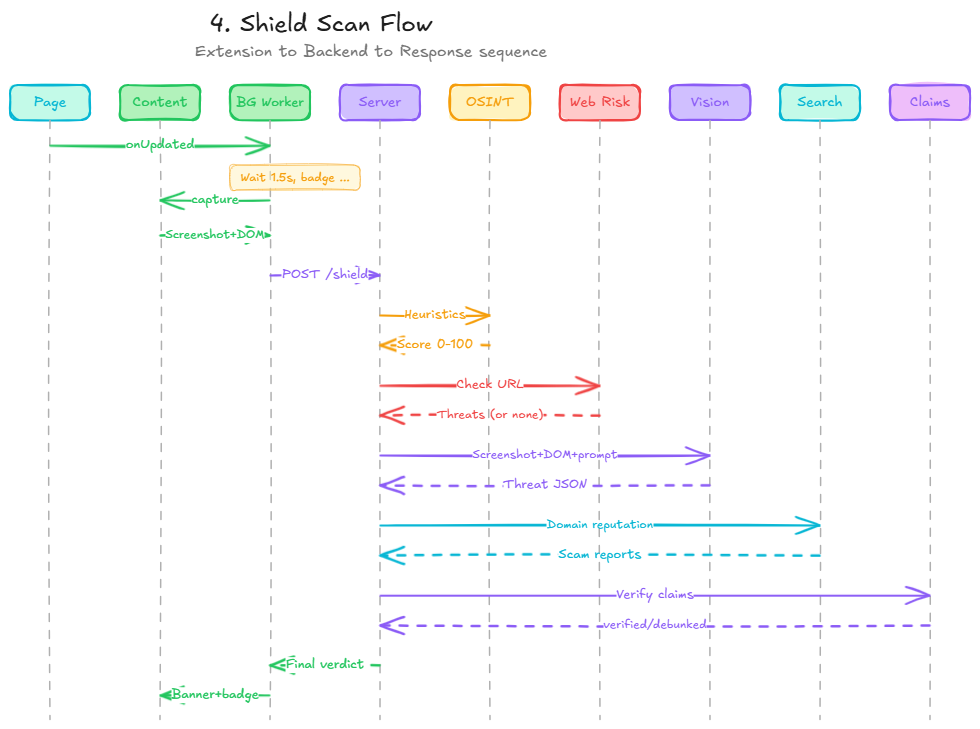
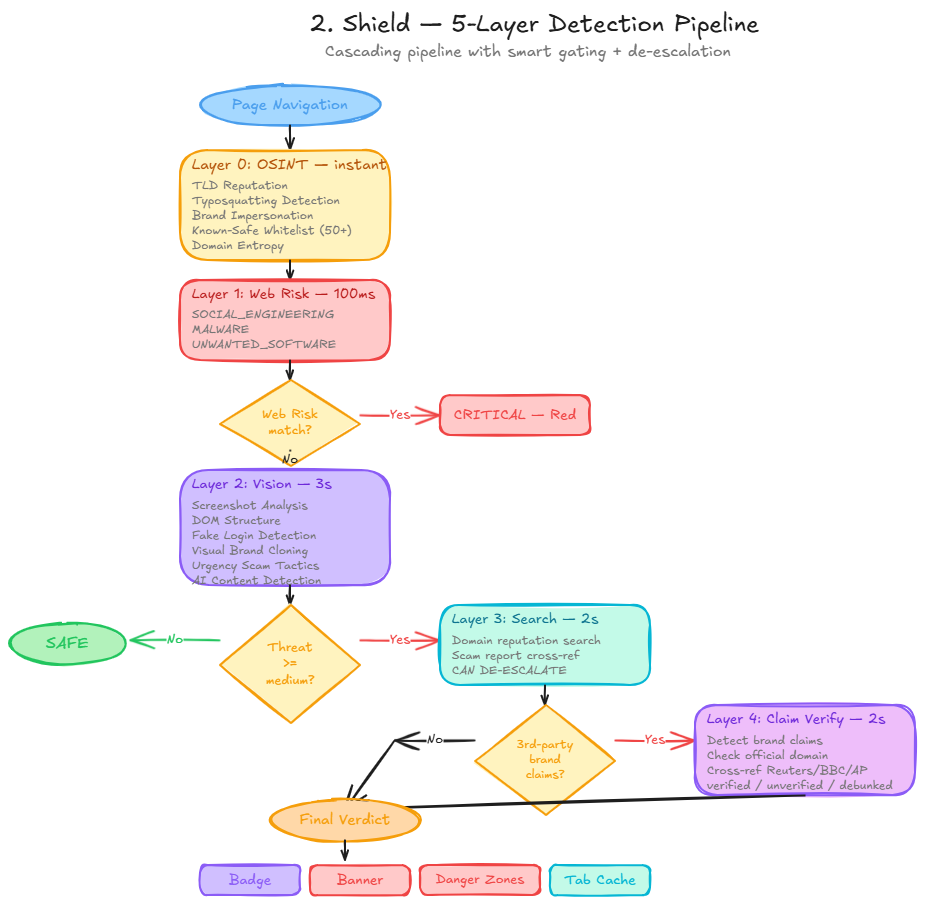
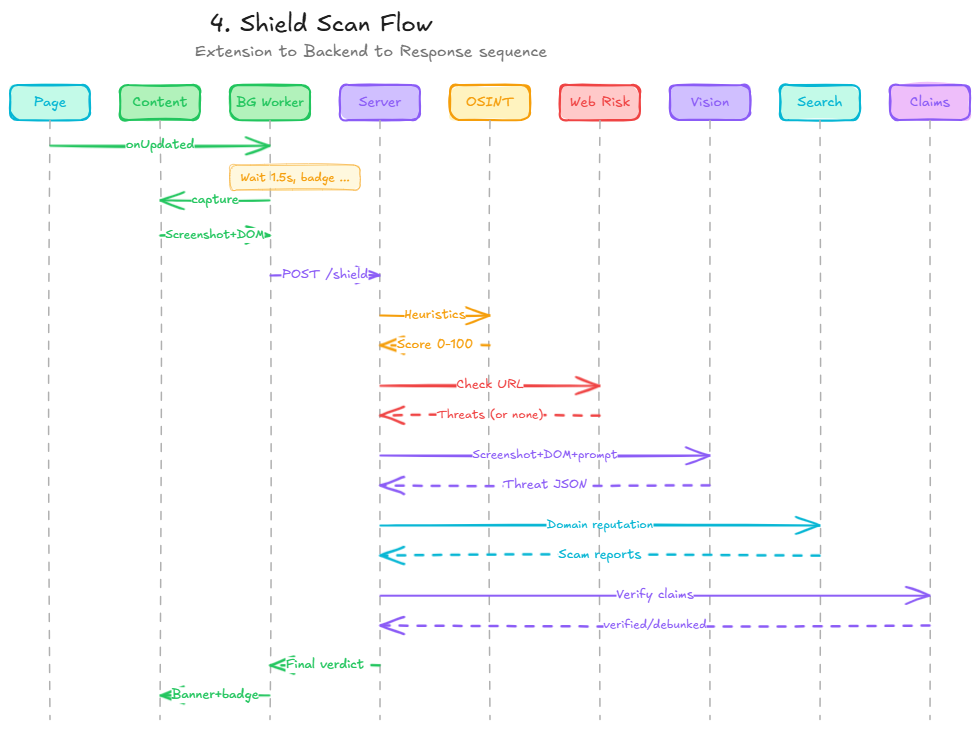
This is the core of Vigil. A Chrome extension that silently scans every page you visit with a 5-layer AI pipeline. No button to click — it just works:
| Layer | What | Speed | How |
|---|---|---|---|
| 0. OSINT | Domain heuristics | <1ms | TLD reputation, typosquatting detection, brand impersonation, known-safe whitelist, domain authority score (0-100) |
| 1. Web Risk | Google's threat database | ~100ms | Known phishing, malware, social engineering URLs |
| 2. Vision | Gemini sees the page | ~3s | Screenshot + DOM analysis for fake forms, visual cloning, urgency scams, deepfake/AI-generated content |
| 3. Search | Google Search verification | ~2s | Only triggers if Vision flags something. Cross-references domain against scam reports. Can de-escalate — if search confirms it's legit, threat level goes down |
| 4. Claims | Content claim verification | ~2s | If content references a third-party brand (e.g. "Qatar Airways" on Reddit), verifies against official sources + Reuters/BBC/AP. Returns: verified, unverified, or debunked |
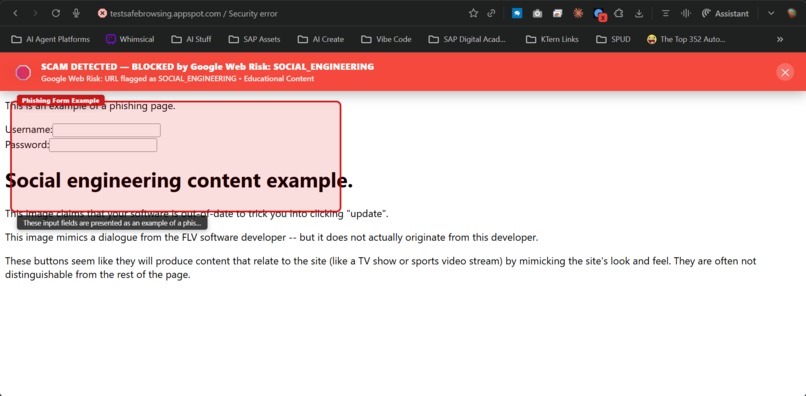
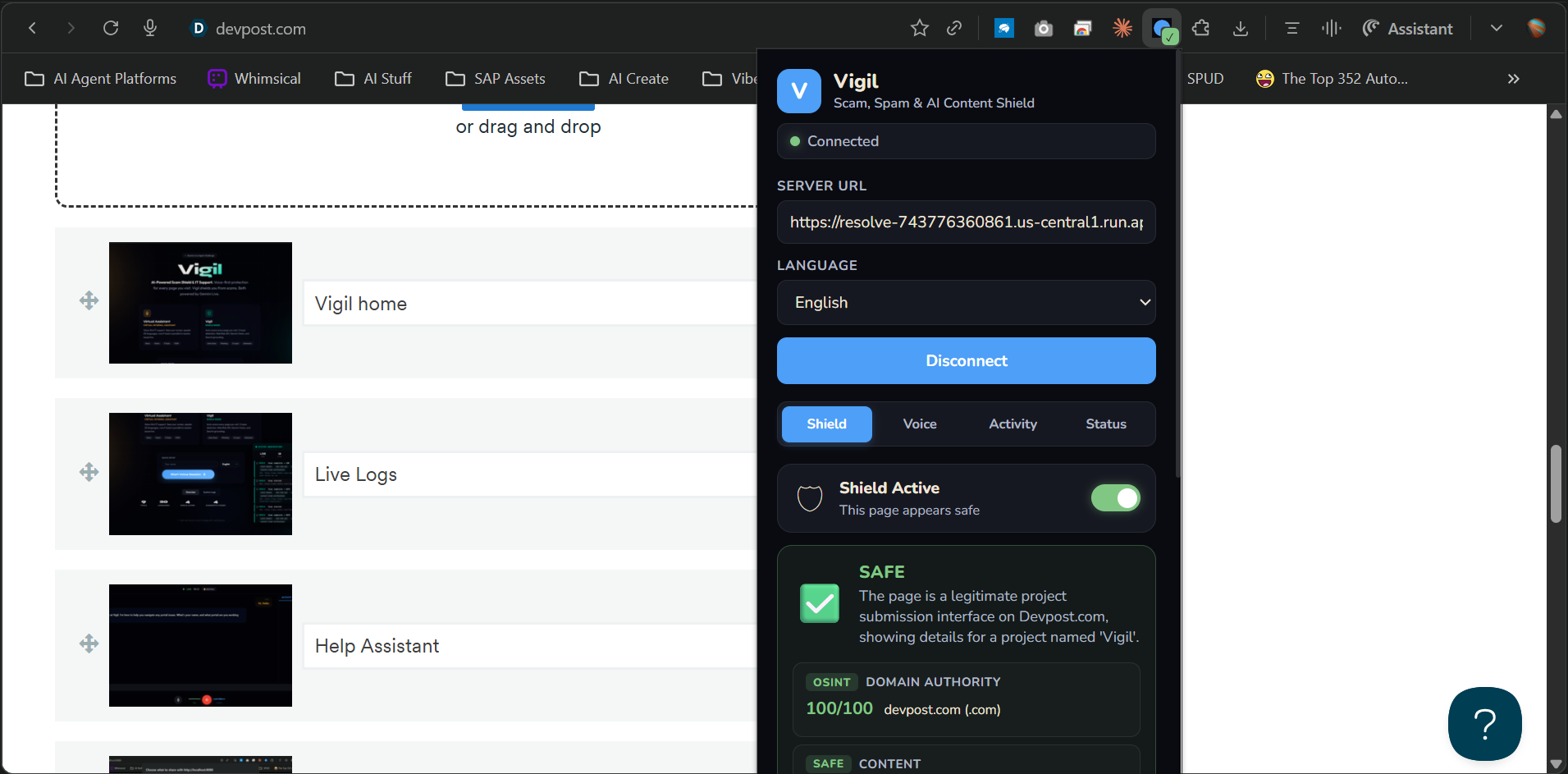
The green checkmark on the extension icon? That means all 5 layers ran and your page is clean. The red warning banner that slides down from the top? That means get out.
Smart de-escalation is the key innovation: most security tools only escalate. Vigil can lower a threat level when Google Search confirms a flagged site is legitimate. Because flagging google.com as a scam (which our first version did) is worse than missing one.
2. Fake Content Detection + Danger Zone Annotations
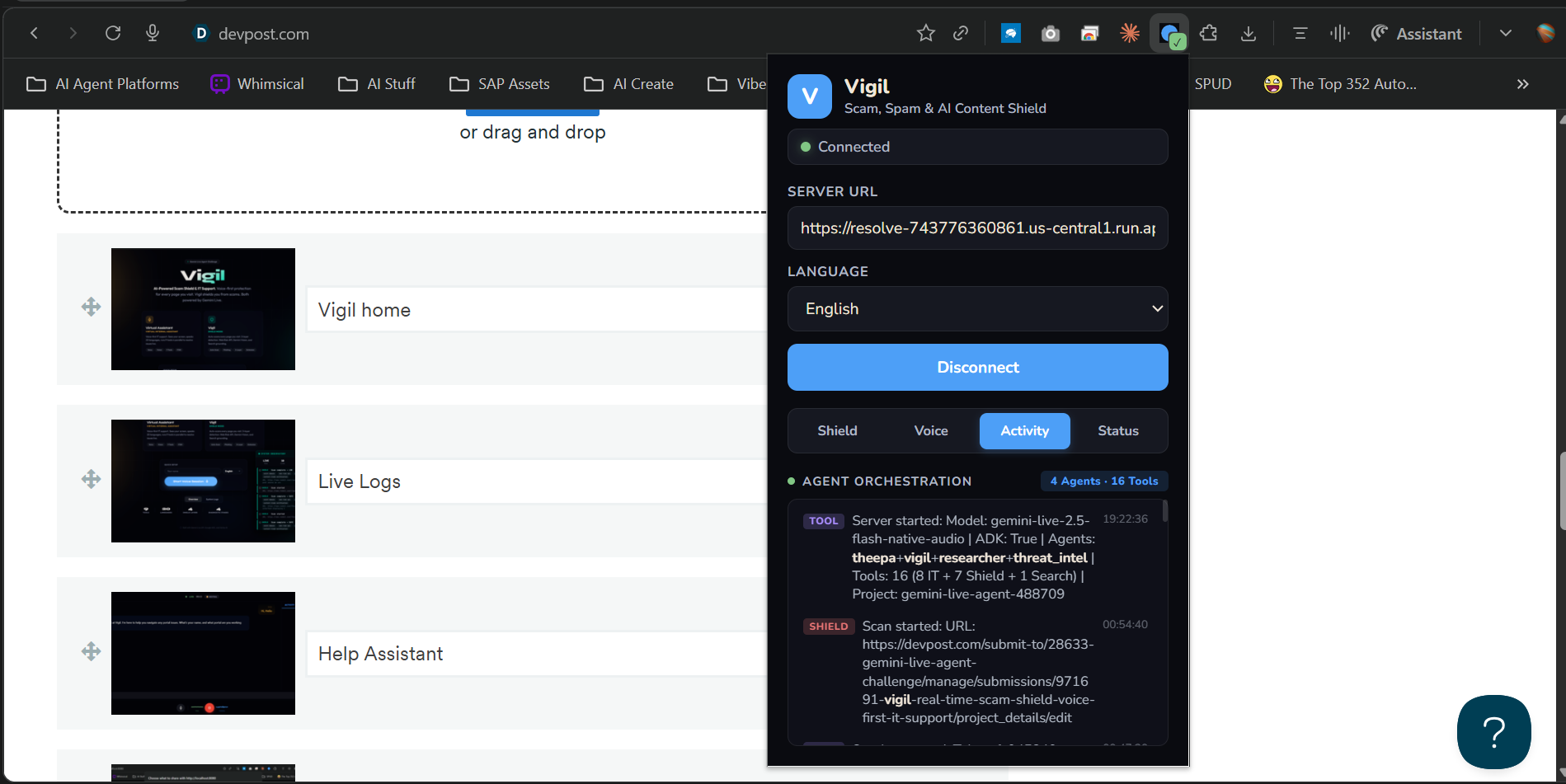
Vigil doesn't just scan URLs — it reads the page:
- Fact-checking with citations: "Is this article true?" → Vigil cross-references against Reuters, BBC, AP. Returns citations with source URLs.
- Deepfake / AI-generated image detection: Gemini Vision examines every image for AI artifacts — unnatural skin, warped fingers, inconsistent lighting. Flagged images get colored warning overlays directly on the page.
- Danger zone annotations: Vigil identifies deceptive UI elements — fake buttons, hidden redirects, dark patterns — and the Chrome extension renders red warning overlays directly on the page.
- Content claim verification: "Qatar Airways cancelled flights" on Reddit → Vigil checks qatarairways.com + Reuters/BBC/AP. Returns verified, unverified, or debunked with annotation overlays.
3. Voice-First IT Support (Theepa)
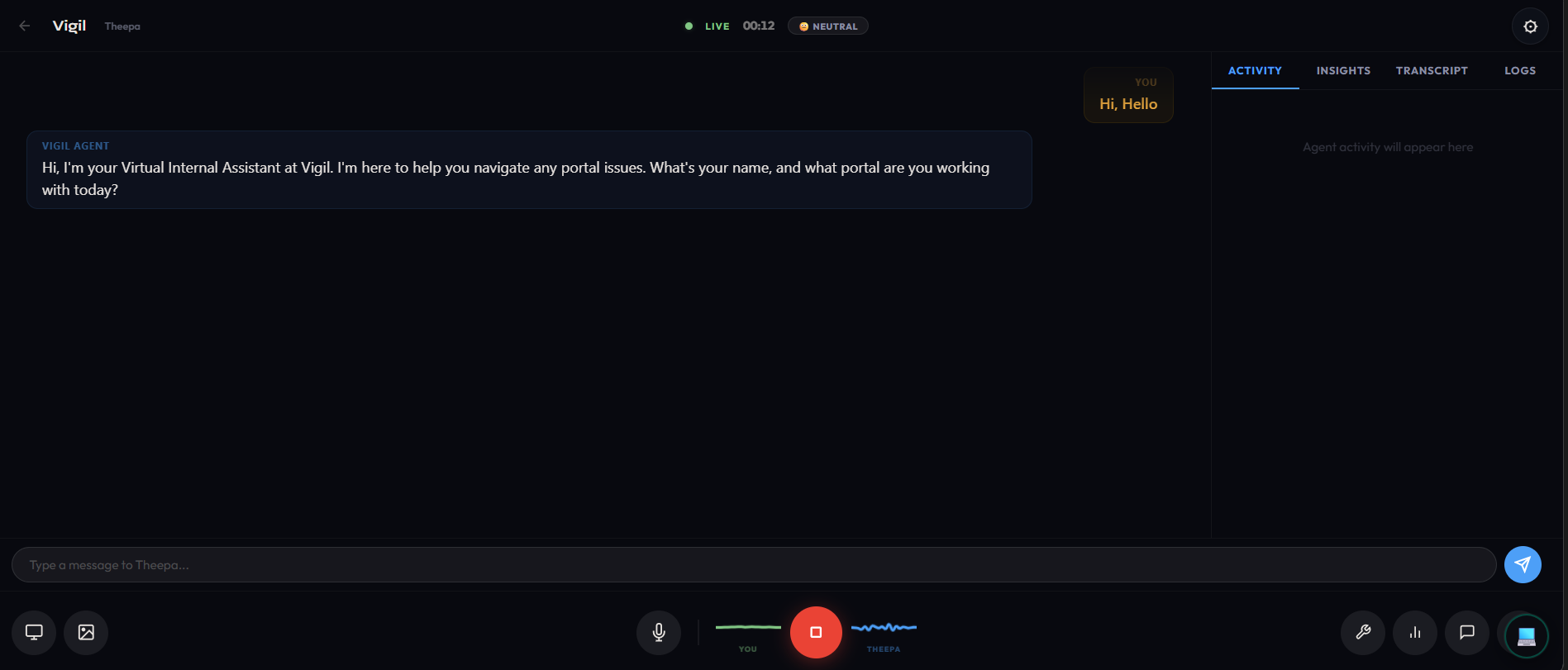
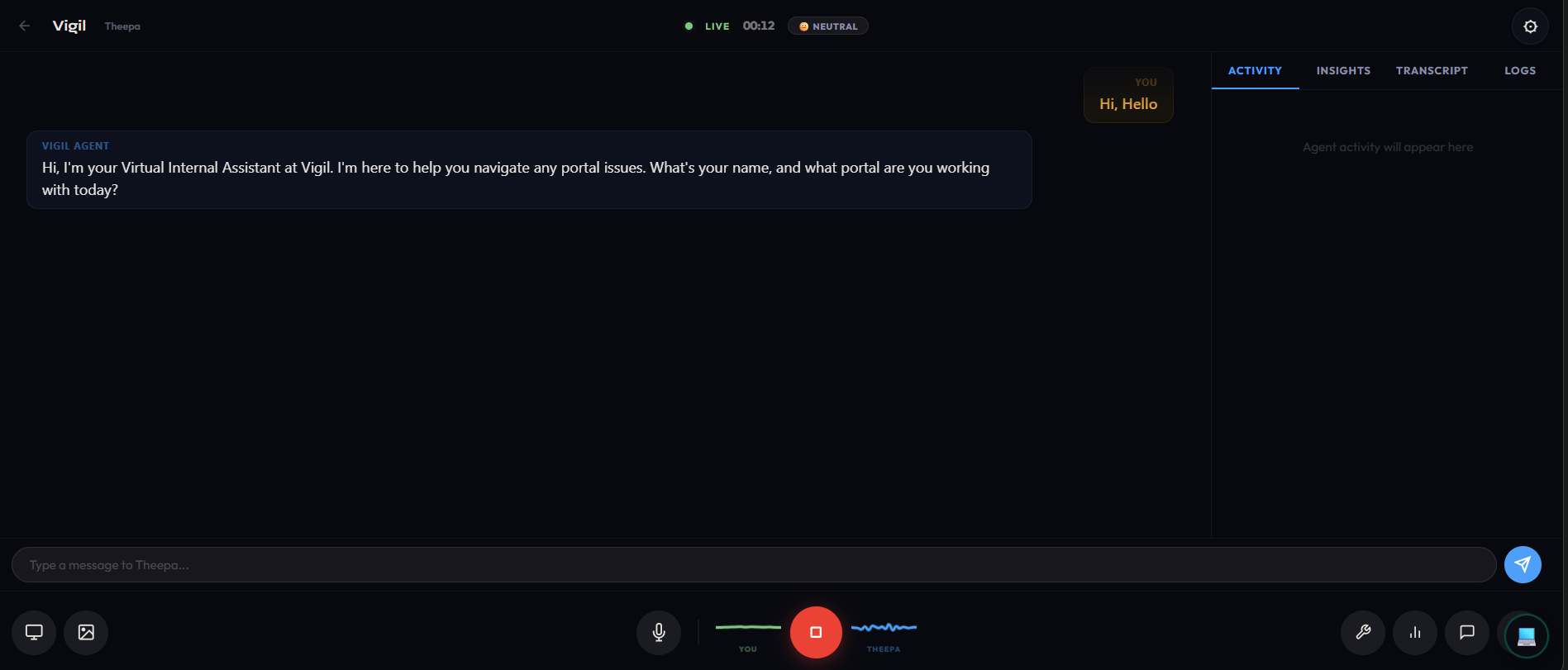
We extended the same Gemini-powered architecture to enterprise IT support. You talk to Theepa like a real person. She listens, sees your screen, and runs through a 4-stage diagnostic protocol:
- Identify: What's the error? What page? How bad is it? (Priority P1/P2/P3 set automatically)
- Diagnose: Searches the knowledge base, looks up error codes, checks portal status, cross-references everything — tools fire in parallel, not one at a time
- Resolve: The agent calls
navigate_user_browser, which triggers the Chrome extension to capture your page, send it to Gemini Vision, and render pulsing annotations right on the elements you need to click - Verify: Confirms the fix worked, creates an ITSM ticket with a full diagnostic report, or escalates with context
It speaks 20 languages natively. Not translation — the Gemini Live model actually thinks in Tamil, Hindi, German, Japanese.
4. Voice-Driven UI Navigation
There's no text box in the extension. When you're in a voice session and say "I can't find the upload button," here's what happens:
- Gemini Live calls
navigate_user_browser(a tool, mid-conversation) - The server tells the Chrome extension to capture the page
- Extension grabs a screenshot + 150 interactive DOM elements with bounding boxes
- Server sends everything to Gemini Vision
- Vision returns: "element #23, selector
#upload-btn, label 'Click here to upload'" - Extension renders a pulsing green overlay on that exact button with a step number
- Agent says: "I've highlighted the upload button on your screen — it's the blue button in the top right"
Voice is the single control plane. One conversation handles diagnosis AND page navigation.
How We Built It
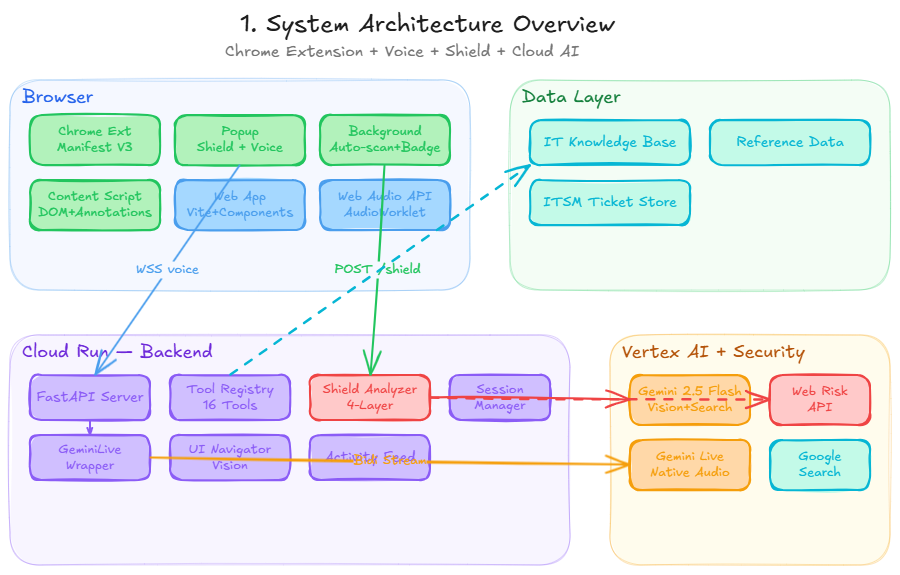
The honest version: The Chrome extension (Manifest V3) has a service worker that auto-scans every page navigation, sending screenshots + DOM snapshots to a FastAPI backend. The backend runs the 5-layer shield pipeline: OSINT heuristics first (instant, free), then Google Web Risk API (~100ms), then Gemini Vision for deep page analysis (~3s), then Google Search grounding only if something looks suspicious (~2s), then Content Claim Verification if the page references third-party brands (~2s).
For voice, a WebSocket pipes raw PCM audio to gemini-live-2.5-flash-native-audio on Vertex AI. AudioWorklet processors on the frontend handle mic capture and playback with basically zero latency.
The hard part wasn't any single piece — it was making them all talk to each other. Shield scan → voice session → tool call → extension capture → different Gemini model for vision → back to voice model → speaks the answer. All in real time.
ADK Multi-Agent Orchestration (4 Agents, 16 Tools)
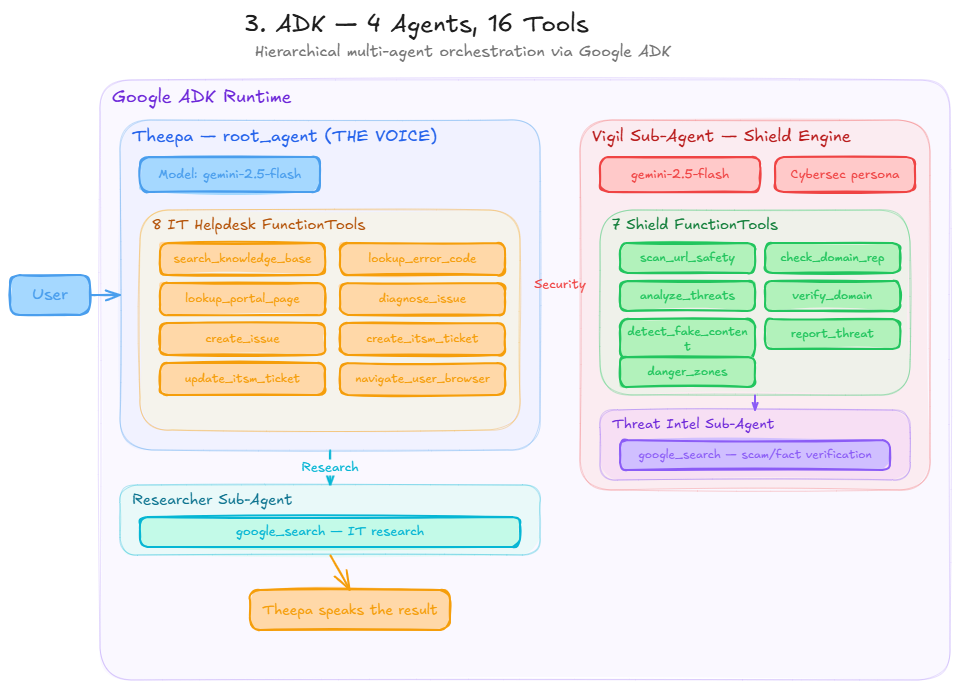
Google ADK with four agents in a hierarchical graph:
- Theepa (root agent, 8 FunctionTools) — the voice interface. Speaks for everything.
- Vigil (sub-agent, 7 FunctionTools) — the shield engine. 5-layer scam detection + fake content + danger zones.
- Researcher (
google_search) — IT research. Isolated because ADK'sgoogle_searchliterally cannot coexist with other tools. - Threat Intel (
google_search) — scam/fact verification. Vigil's own search agent for domain reputation and fact-checking.
Vigil Shield Tools (7):
| Tool | What It Actually Does |
|---|---|
scan_url_safety |
Full 5-layer scan — OSINT + Web Risk + Vision + Search + Claim Verification |
check_domain_reputation |
Instant OSINT heuristics + Web Risk API domain check |
analyze_page_for_threats |
Gemini Vision detects fake forms, impersonation, deepfakes, urgency scams |
verify_domain_legitimacy |
Google Search cross-references domain against scam reports |
detect_fake_content |
Fact-checks claims on news/social media — returns citations from Reuters, BBC, AP |
report_threat |
Logs confirmed threats with evidence chain to threat database |
highlight_danger_zones |
Identifies deceptive UI elements → Chrome extension renders red warning overlays |
Theepa IT Tools (8):
| Tool | What It Actually Does |
|---|---|
search_knowledge_base |
Fuzzy keyword search across 20 IT helpdesk articles |
lookup_error_code |
Resolves codes like AUTH-003, PAY-001 across 7 categories |
lookup_portal_page |
"What page am I on?" → navigation paths + known issues |
diagnose_issue |
Cross-references KB + errors + pages → root cause |
create_issue |
Logs problems with auto-severity + dedup |
create_itsm_ticket |
Full ticket with diagnostic report attached |
update_itsm_ticket |
Status updates, resolution notes, escalation |
navigate_user_browser |
Triggers Chrome extension DOM capture + Gemini Vision annotations |
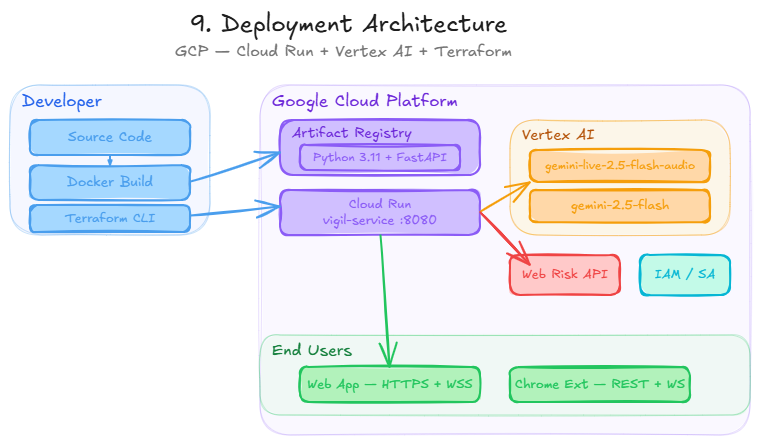
Cloud Deployment
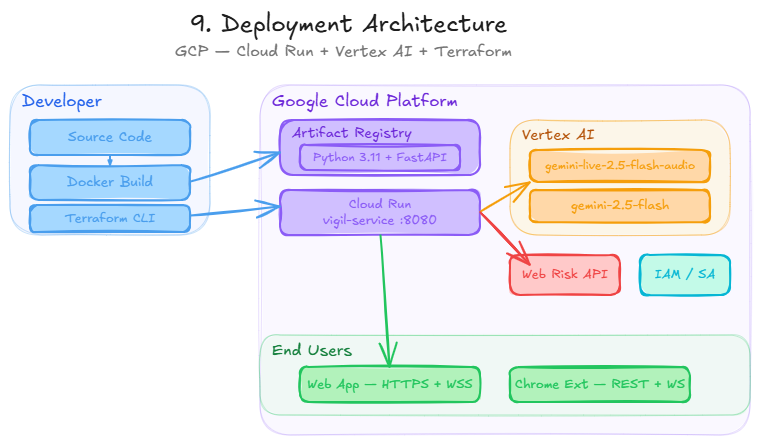
| Component | Technology | Where |
|---|---|---|
| Chrome Extension | Manifest V3 + 5-Layer Shield Pipeline | User's Browser |
| Backend API | FastAPI + WebSocket | Cloud Run |
| Vision/Search | gemini-2.5-flash |
Vertex AI |
| Voice Model | gemini-live-2.5-flash-native-audio |
Vertex AI |
| Threat Database | Google Web Risk API | GCP |
| Agent Framework | Google ADK | Cloud Run |
| Web Frontend | Vite + Web Components + Web Audio API | Cloud Run |
| Infrastructure | Terraform + Docker | Artifact Registry |
Challenges We Ran Into
The real ones, not the polished versions:
Gemini Vision thought Google was a scam. First version of the shield flagged google.com as "suspicious — contains login form." Had to completely rewrite the prompt with a "safe by default" stance and a whitelist of 50+ legitimate sites. Then it flagged GitHub. More prompt engineering. Then it flagged Amazon. More. Getting a vision model to NOT be paranoid is harder than making it paranoid.
google_search broke everything. Added it to the main agent, all other tools stopped working. No error message. Just silence. Turns out ADK requires it in a completely separate sub-agent. This isn't in the docs.
The model ID is wrong in half the examples. It's
gemini-live-2.5-flash-native-audio. Notgemini-2.0-flash-live. Notgemini-2.5-flash-live. I tried every combination before finding the right one.Chrome extension mic access. Manifest V3 popups can't use
getUserMedia. Offscreen documents can't show mic permission prompts. Had to create a dedicated extension popup window (voice.html) opened viachrome.windows.create()— the only way to get mic access in MV3.Content on trusted domains is still dangerous. A Reddit post claiming to be from Qatar Airways gets marked SAFE because reddit.com is trusted. Built Layer 4 (Content Claim Verification) to cross-reference brand claims against official sources — the shield now verifies content, not just domains.
Accomplishments That Actually Matter
- 5-layer shield with smart de-escalation — most security tools only escalate. Vigil can lower a threat level when Search confirms legitimacy. This eliminates false positives.
- Content claim verification — if a Reddit post claims "Qatar Airways cancelled flights," Vigil checks qatarairways.com and Reuters/BBC/AP for confirmation. Returns: verified, unverified, or debunked. No other submission verifies content claims against official sources.
- Deepfake / AI image detection with annotations — Gemini Vision examines images for AI artifacts and renders colored warning overlays directly on the page.
- Fake content detection with citations — "Is this article true?" → Vigil fact-checks against Reuters, BBC, AP. Returns citations.
- Danger zone annotations — Vigil identifies deceptive UI elements (fake buttons, dark patterns) and the Chrome extension renders red warning overlays directly on the page.
- 4-agent multi-agent orchestration — Theepa, Vigil, Researcher, Threat Intel. Not a single chatbot — a team of specialized agents that delegate, transfer, and collaborate. Visible in real-time.
- Voice-driven UI navigation — no other submission does this. The voice agent controls the Chrome extension mid-conversation to annotate and interact with the user's page.
- 20 languages, one model — native speech-to-speech, not translation. The model thinks in the target language.
- Transparent AI — every agent transfer, tool call, and reasoning step is visible in the extension's live activity log. Judges can SEE the orchestration happening.
- Solo build — one developer, full stack: backend, frontend, Chrome extension, Terraform, deployment.
- It actually works — live demo at the URL above. Try it. Scan a page. Break it if you can.
| Typical Submission | Vigil |
|---|---|
| 1 agent, 2-3 tools | 4 agents, 16 tools — multi-agent orchestration with ADK sub-agents |
| No proactive protection | Auto-scans every page — 5-layer pipeline catches threats before you click |
| Security tools only escalate | Smart de-escalation — lowers threat when Search confirms legitimacy |
| No fact-checking | Fake content detection with citations — Reuters, BBC, AP cross-references |
| Trust the domain, ignore content | Content claim verification — "Qatar Airways" on Reddit? Checks qatarairways.com |
| English only | 20 languages natively — speak Tamil, get results in Tamil |
| No transparency | Live orchestration logs — see every agent transfer, tool call, and reasoning |
| Manual deployment | Terraform IaC — one command to production |
What We Learned
- Prompt engineering for security is backwards — you're not teaching the model to find threats, you're teaching it to NOT flag everything as a threat
- Trusting a domain is not the same as trusting the content on it — Reddit is safe, but a fake airline notice on Reddit is not. Layer 4 (Content Claim Verification) was born from this insight
- OSINT heuristics (TLD reputation, typosquatting detection) are cheap and catch obvious scams before you burn API calls on Gemini Vision
- ADK's sub-agent pattern exists for a reason, but the documentation doesn't explain why.
google_searchphysically cannot share an agent withFunctionToolinstances - AudioWorklet processors are the only way to get acceptable voice latency in the browser. MediaRecorder adds 200-500ms. AudioWorklets add <10ms
- Chrome MV3 extension permissions are a maze — mic access requires a dedicated popup window, not offscreen documents
What's Next
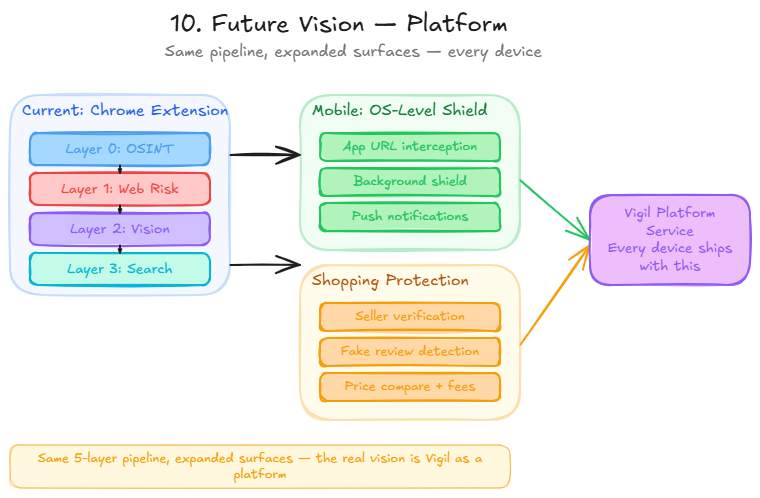
- Mobile-native Vigil — the real vision: every phone comes with this built in. An OS-level scam shield that protects every app, every browser, every interaction. No extension needed — the OS handles it. Vigil as a platform service.
- Safe shopping — same pipeline, expanded prompts. Fake storefronts, AI-generated reviews, seller verification. Voice: "Is this deal legit?" → full analysis with citations.
- Real WHOIS — domain age is a strong scam signal, currently heuristic-only
- Threat intelligence sharing — share confirmed threats across all Vigil users
- Enterprise — SSO, custom KBs, role-based access
Reproducible Testing Instructions
Option A: Live Demo (fastest)
- Visit https://resolve-743776360861.us-central1.run.app
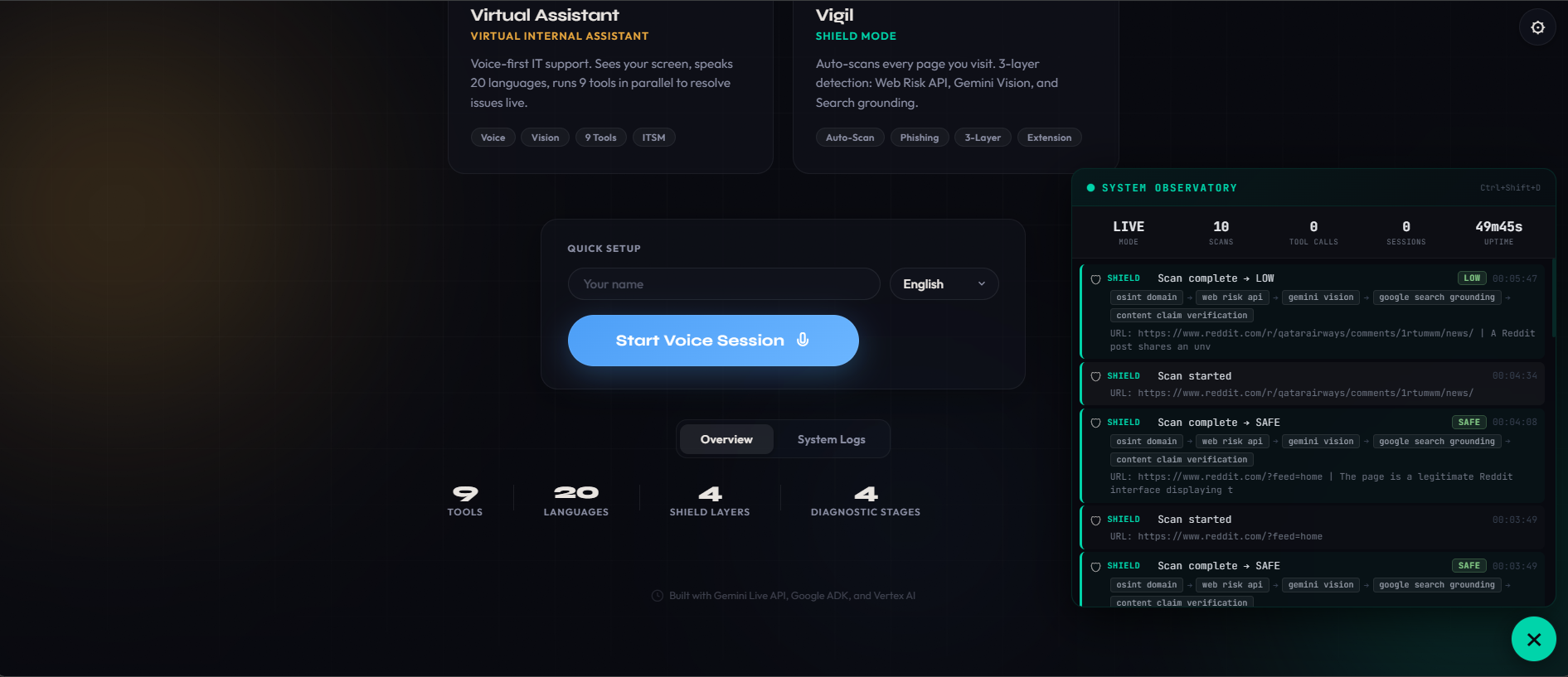
- Click Start Voice Session → speak to Theepa
- Check the System Logs tab → real-time agent transfers + tool calls
Option B: Chrome Extension
- Clone:
git clone https://github.com/vigneshbarani24/resolve-vigil.git chrome://extensions/→ Developer mode → Load unpacked →extension/folder- Click Vigil icon → enter
https://resolve-743776360861.us-central1.run.app→ Connect - Browse to any page → shield auto-scans → green ✓ or red !!
- Open popup → see 5-layer breakdown
- Click Voice tab → mic button starts Gemini Live voice session
Option C: Run Locally
git clone https://github.com/vigneshbarani24/resolve-vigil.git && cd resolve-vigil
pip install -r requirements.txt
cd frontend && npm install && npm run build && cd ..
cp .env.example .env  # Set PROJECT_ID=your-gcp-project-id
python -m uvicorn server.main:app --host 0.0.0.0 --port 8080
What to Test
| Test | Expected Result |
|---|---|
Visit google.com with extension |
Green ✓ badge — SAFE |
| Visit a suspicious URL | Red !! badge + warning banner + danger zone annotations |
| Open extension popup on any page | 5-layer findings: OSINT score, Web Risk, Vision, Search, Claims |
| Visit a Reddit post claiming to be from a brand | Content Claim Verification fires — checks official source |
| Voice: "Is this page safe?" | Vigil shield scan via voice, result spoken back |
| Voice: "I can't find the submit button" | Page annotations appear highlighting the element |
| Voice: "I'm getting error AUTH-003" | IT diagnostic flow: KB search → error lookup → resolution |
| Check System Logs during voice | Real-time agent transfers (Theepa → Vigil → Threat Intel) visible |
Google Cloud Deployment Proof
- Live URL: https://resolve-743776360861.us-central1.run.app
- Health check: https://resolve-743776360861.us-central1.run.app/health
- Deploy script:
deploy.sh - Terraform IaC:
terraform/ - Vertex AI usage:
server/tools/shield_analyzer.py - Gemini Live API:
server/gemini_live.py - Web Risk API:
server/tools/shield_analyzer.py
Built With
- chrome
- docker
- fastapi
- gemini-live-api
- google-adk
- google-cloud-run
- google-genai-sdk
- google-search-grounding
- google-web-risk-api
- javascript
- python
- terraform
- vertex-ai
- vite
- web-audio-api
- web-components

Log in or sign up for Devpost to join the conversation.