-
-
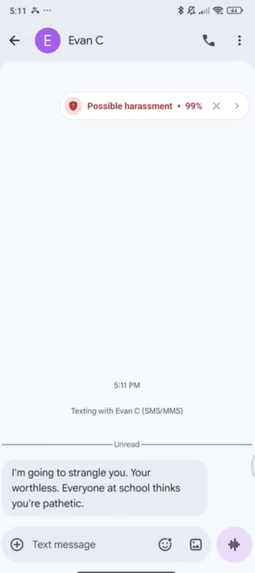
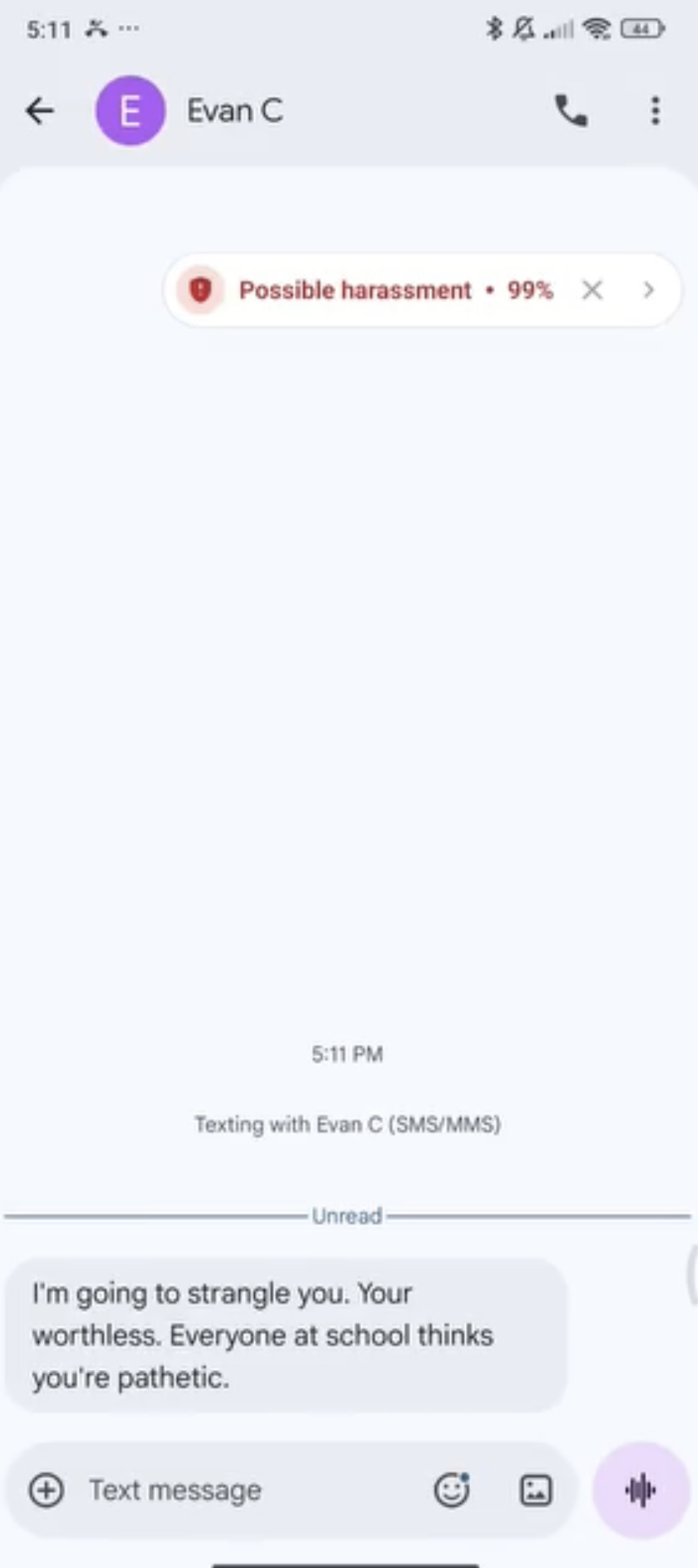
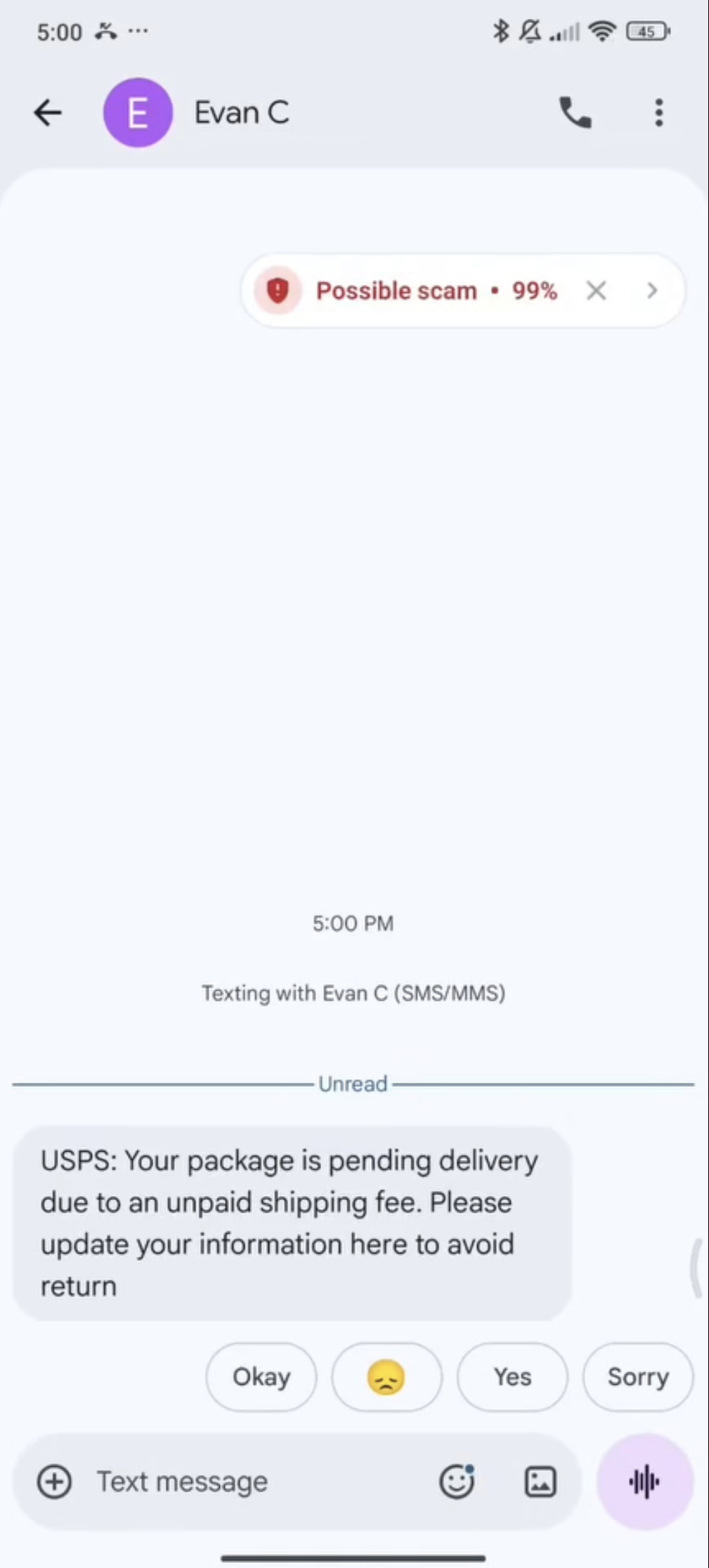
Harassment Popup
-
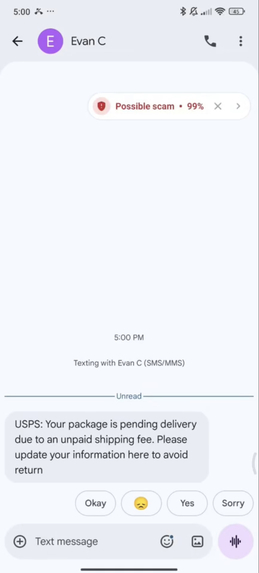
Scam Popup
-
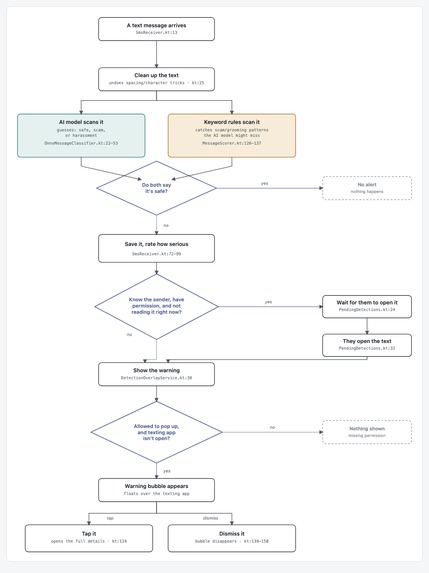
detection flowchart
Inspiration
Text scams cost people $470 million a year (FTC), and 1 in 3 teens have experienced cyberbullying. Most phones do nothing to warn you when a harmful text lands. Vigil does.
Every day, text message scams, phishing, and harassment target those least equipped to recognize them: teens interacting with strangers for the first time and older adults who didn't grow up spotting fake delivery alerts and other digital scams. Their impact extends far beyond stolen money, undermining trust and affecting families, businesses, and entire communities.
Vigil exists because SMS scams and phishing hit hardest the people least equipped to spot them — elderly users, non-native speakers, first-time smartphone owners. Most protection tools cost money, require cloud accounts, or send private messages off-device. Vigil runs entirely on-device: free, private, no data leaves the phone. It gives vulnerable users a shield against fraud without asking them to trust a company with their texts.
Most protection tools attempt to solve this by uploading your messages to a server for analysis, which means the same private conversations you're trying to protect get shipped off to someone else's cloud. Privacy is not guaranteed when this happens, so we built Vigil on the belief that communities should not have to make a trade-off to protect people, with every message classified on-device and nothing ever leaving the phone.
What it does
Vigil watches incoming SMS in real time and classifies each message as SAFE, SCAM, or HARASSMENT using a language model (AI) that runs entirely on-device: no AI API, no API keys, and no internet connection at all. When something harmful comes in, Vigil surfaces a detection card. Alongside detection, Vigil ships an in-app Education tab covering common threats (phishing, cyberbullying, harassment, abusive language), each with warning signs, concrete steps to take, and direct links to real crisis resources (Crisis Text Line, the National Domestic Violence Hotline, the National Elder Fraud Hotline, and others).
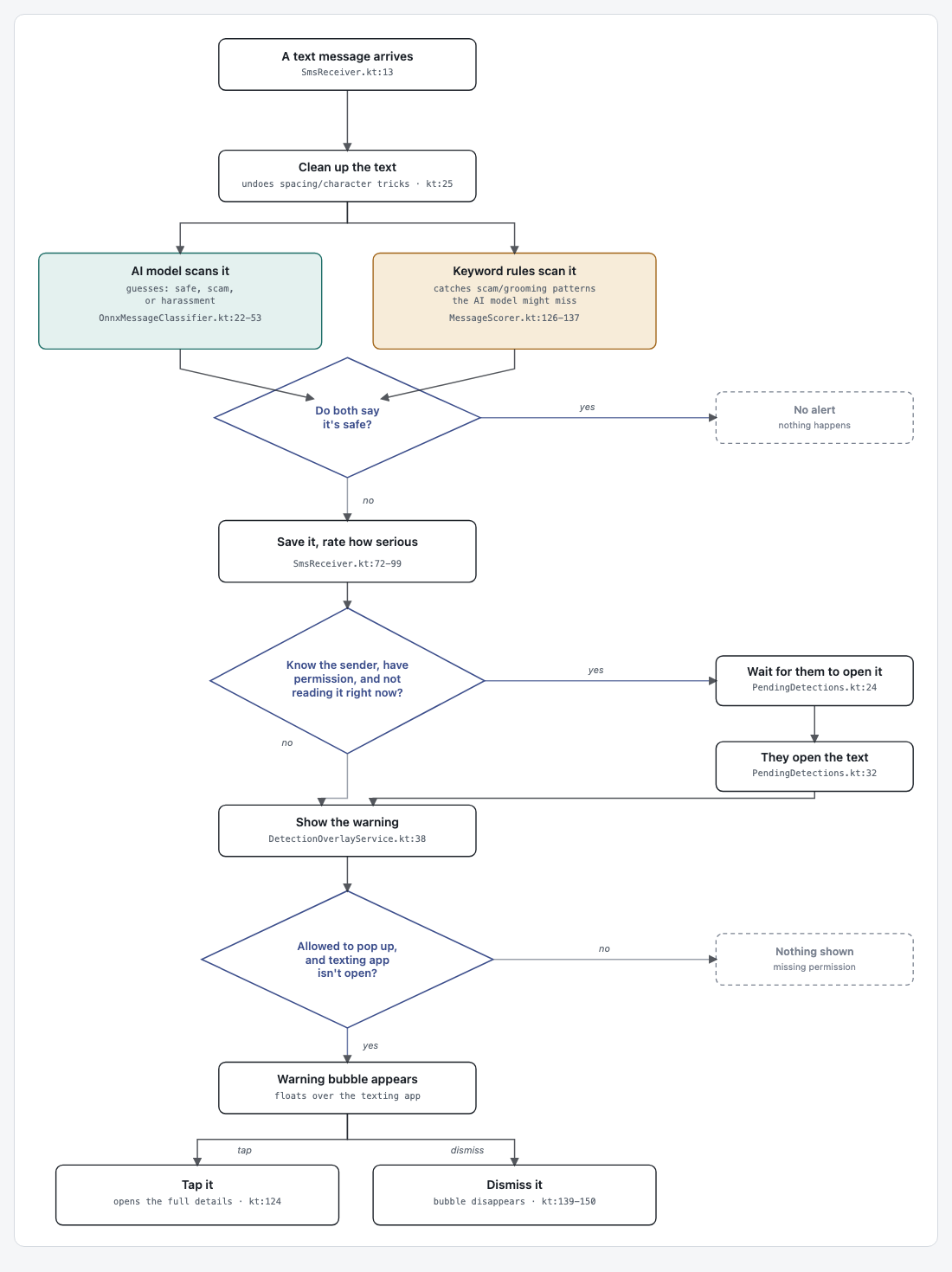
How it works (Flow chart shown in media)
- A text message arrives
- Clean up the text: undoes spacing/character tricks
- Two checks run at once:
- AI model scans it: guesses safe, scam, or harassment
- Keyword rules scan it: catches scam/grooming patterns the AI might miss
- Do both say it's safe?
- Yes → No alert, nothing happens.
- No → continue
- Save it, rate how serious
- Know the sender, have permission, and not reading harmful text right now?
- Yes → Wait for them to open it → They open the text → continue
- No → continue directly
- Show the warning
- Allowed to pop up, and texting app isn't open?
- No → Nothing shown (missing permission)
- Yes → continue
- Warning bubble appears on top right of screen
- Tap it → opens the full details, or Dismiss it → bubble disappears
How we built it
- UI: Kotlin + Jetpack Compose + Material 3, with
AnimatedContenttransitions between screens and a scan demo that mirrors the real detection flow. - Model: a
DistilBertForSequenceClassificationmodel fine-tuned on a combined corpus of ~2.1M labeled examples (1.89M SAFE, ~206K HARASSMENT, and a curated SCAM set), including data integrated from Civil Comments and ConvAbuse to broaden coverage beyond scam text into harassment and abusive language. - On-device inference: the fine-tuned model is exported to ONNX via Hugging Face Optimum and INT8-quantized, shrinking it from 256 MB to 64 MB (a 75% size reduction), small enough to ship inside the APK and run fully offline through ONNX Runtime Mobile. No network call, no server, no message ever leaves the device.
- Persistence: detections are queued through
JobSchedulerwith a content-trigger on the SMS provider and written to disk viaEncryptedSharedPreferences, so a flagged message survives the app's process being killed in the background — the queue drains and shows the detection card the next time the app (or the relevant activity) comes to the foreground.
For a model outputting class probabilities $$p_1, p_2, p_3$$ over {SAFE, SCAM, HARASSMENT}, fine-tuning minimizes the standard cross-entropy loss
$$ \mathcal{L} = -\sum_{i=1}^{3} w_iy_i \log(p_i) $$
against the true one-hot label $$y$$, and we tracked per-class precision/recall
$$ \text{Precision} = \frac{TP}{TP + FP}, \qquad \text{Recall} = \frac{TP}{TP + FN} $$
on a held-out 20% split to keep an eye on false positives specifically, a model that cries wolf on safe messages is one people learn to ignore.
Accomplishments that we're proud of
- A fast threat-detection model that runs entirely on-device with a 92.7% accuracy. No cloud round-trip, no server storing anyone's texts. Everything is secure and private.
- Detection state that survives the app being backgrounded or killed outright.
- A 75% model size reduction through quantization without abandoning the on-device requirement.
- An education section that explains threats and links directly to the hotlines someone would actually need in the moment.
Challenges we ran into
- Android 12+ background restrictions: our first detection architecture started a foreground
Servicedirectly from aJobServicecallback to show the overlay, which Android 12+ silently refuses if the app isn't already in a visible state. We had to redesign around a disk-persisted pending-detection queue instead of trying to push UI from a dead process. - A silent, inverted date filter: a bug in the pending-detection matching logic filtered out exactly the detections it was supposed to keep, so messages were being classified correctly but never shown to the user, the kind of bug that looks like "nothing is happening" instead of throwing an error.
- Severe class imbalance: SAFE messages outnumbered SCAM examples nearly 1,500 to 1 in the raw corpus. We capped SAFE sampling and used stratified splits so the model didn't just learn to always predict SAFE.
- False positives on ordinary language: early versions flagged benign messages too eagerly. We built a dedicated
safe_false_positives.csvset of messages the model got wrong and fed them back into evaluation to specifically track and reduce that failure mode.
What we learned
This was our first project at this scale, our first time writing Kotlin, and our first time working with a language model at all, so most of the learning curve was just getting oriented. Compose's declarative, state-driven UI model took some rewiring to think in after being used to more imperative UI code. On the ML side, we went from not knowing what a transformer was to fine-tuning one, exporting it to ONNX, and quantizing it for mobile, and learned along the way why class imbalance (1.89M SAFE examples versus 1,212 SCAM examples) quietly wrecks a classifier if uncorrected, and why false positives matter more than a headline accuracy number.
What's next for Vigil Safety App
- Grow the SCAM training set specifically
- Expand the model to detect harmful texts in languages other than English.
- Expand beyond SMS to other messaging surfaces where the same on-device model architecture could apply.
- Explore periodic on-device model updates so detection keeps pace with new scam patterns without ever requiring message content to leave the phone.
Credits
Trained on a combined corpus from:
- UCI SMS Spam Collection
- Jigsaw Toxic Comment Classification Challenge (Kaggle)
- SMS Phishing Dataset for Machine Learning and Pattern Recognition — Mishra & Soni, Mendeley Data (CC BY 4.0)
- HateXplain (MIT License)
- A Comprehensive Dataset for Automated Cyberbullying Detection — Ejaz, Razi & Choudhury, Computers in Human Behavior (2023), Mendeley Data (CC BY 4.0)
- Civil Comments — Borkan, Dixon, Sorensen, Thain & Vasserman (2019), Jigsaw/Conversation AI (CC0)
- ConvAbuse — Cercas Curry, Abercrombie & Rieser, EMNLP (2021) (CC BY 4.0)
Fine-tuned from distilbert-base-uncased (Sanh et al., 2019, Hugging Face).
Built With
- android
- distilbert
- hugging-face
- jetpack-compose
- kotlin
- onnx-runtime
- pytorch
- scikit-learn


Log in or sign up for Devpost to join the conversation.