-
-
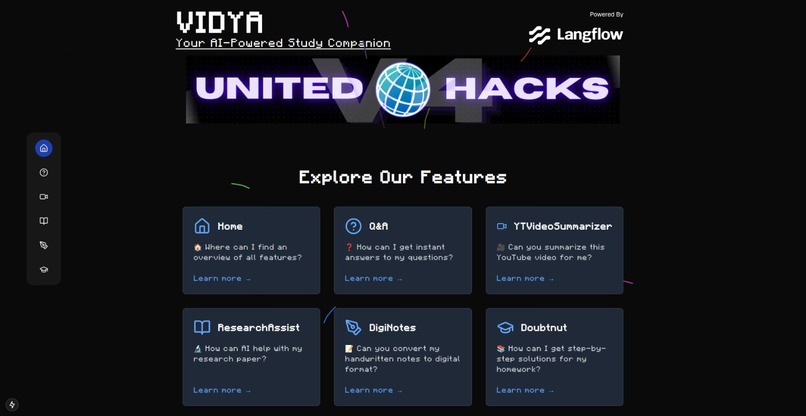
HomeScreen of VIDYA
Inspiration
The inspiration for VIDYA came from our own experiences as students in India. Education here is often a high-stakes journey, with intense competition, limited access to quality resources, and the constant pressure to perform. We’ve seen students struggle with outdated materials, unclear concepts, and a lack of personalized guidance, especially in rural areas. We wanted to create something that could level the playing field—a tool that offers every student, regardless of their background, the same opportunities to excel. That’s how VIDYA was born: as a dream to make learning smarter, more accessible, and tailored to individual needs.
What it Does
VIDYA offers several powerful features that assist students in their learning journey:
- Document Q&A: Upload documents and get precise answers to any questions you have about the content.
- YouTube Video Lecture Summarizer: Summarizes long video lectures into bite-sized, key takeaways to save time and boost learning.
- Digital Notes Generator: Converts handwritten notes into organized, editable digital notes, making it easier to manage and review.
- Doubtnut: Simply upload an image of your doubt, and VIDYA will provide you with a solution in real-time.
- Research Assistant: Just input a research topic, and VIDYA will gather detailed, relevant sources from Google to assist you in your research.
How We Built It
VIDYA was built using a modern tech stack to ensure efficiency, scalability, and a seamless user experience:
- Frontend: We used the React-based framework NextJS with TypeScript to build a responsive and high-performance user interface.
- Backend: The backend leverages Langflow, a low-code tool, to create an AI-powered application pipeline. We also integrated Langchain for advanced data processing and utilized the Tavily Search API with Python for efficient web scraping and search functionalities.
- AI Models: For text generation, we use OpenAI GPT-4o-mini, which delivers natural language processing capabilities. For multimodal capabilities (handling both text and image inputs), we integrated Gemini 1.5 Flash model.
- Design: The app's UI follows a retro-inspired design with a panel dock for easy navigation, ensuring an intuitive and user-friendly experience.
Challenges We Ran Into
- Ensuring accuracy in AI-driven content generation for diverse subjects.
- Handling various input types, like handwritten notes and images, effectively.
- Ensuring fast and real-time processing for features like Doubtnut and Document Q&A.
Accomplishments That We're Proud Of
- Successfully integrating multiple AI-powered tools, including document-based Q&A, video summarization, and research assistance.
- Creating a platform that supports both academic and real-world use cases, from school students to researchers.
- Building a robust system that can process diverse inputs, including handwritten notes and images.
What We Learned
This project has taught us:
- The power of AI to enhance learning in a personalized way.
- The importance of making technology accessible, especially in areas with limited resources.
- How to integrate various AI techniques to create a comprehensive educational tool.
- The value of continuous user feedback in shaping a product that truly meets the needs of its audience.
What's Next for VIDYA
Moving forward, we plan to:
- Expand Feature Set: Integrate more interactive learning tools and subject-specific features for different educational needs.
- Improve AI Models: Enhance the accuracy and contextual understanding of the models used in features like Doubtnut and Research Assistant.
- Multilingual Support: Add regional language support to cater to students across India and beyond.
- Offline Mode: Ensure that students with limited internet access can still benefit from key features of the app.

Log in or sign up for Devpost to join the conversation.