Inspiration
In the era of multimedia content, video and audio are becoming increasingly prevalent. However, extracting and understanding the information from these formats can be challenging. Inspired by the need to make video content more accessible and searchable, we developed the Video2Text Transcriber. This project aims to bridge the gap by providing an easy way to convert video files into text, making it easier for users to extract valuable information from their media content.
What it does
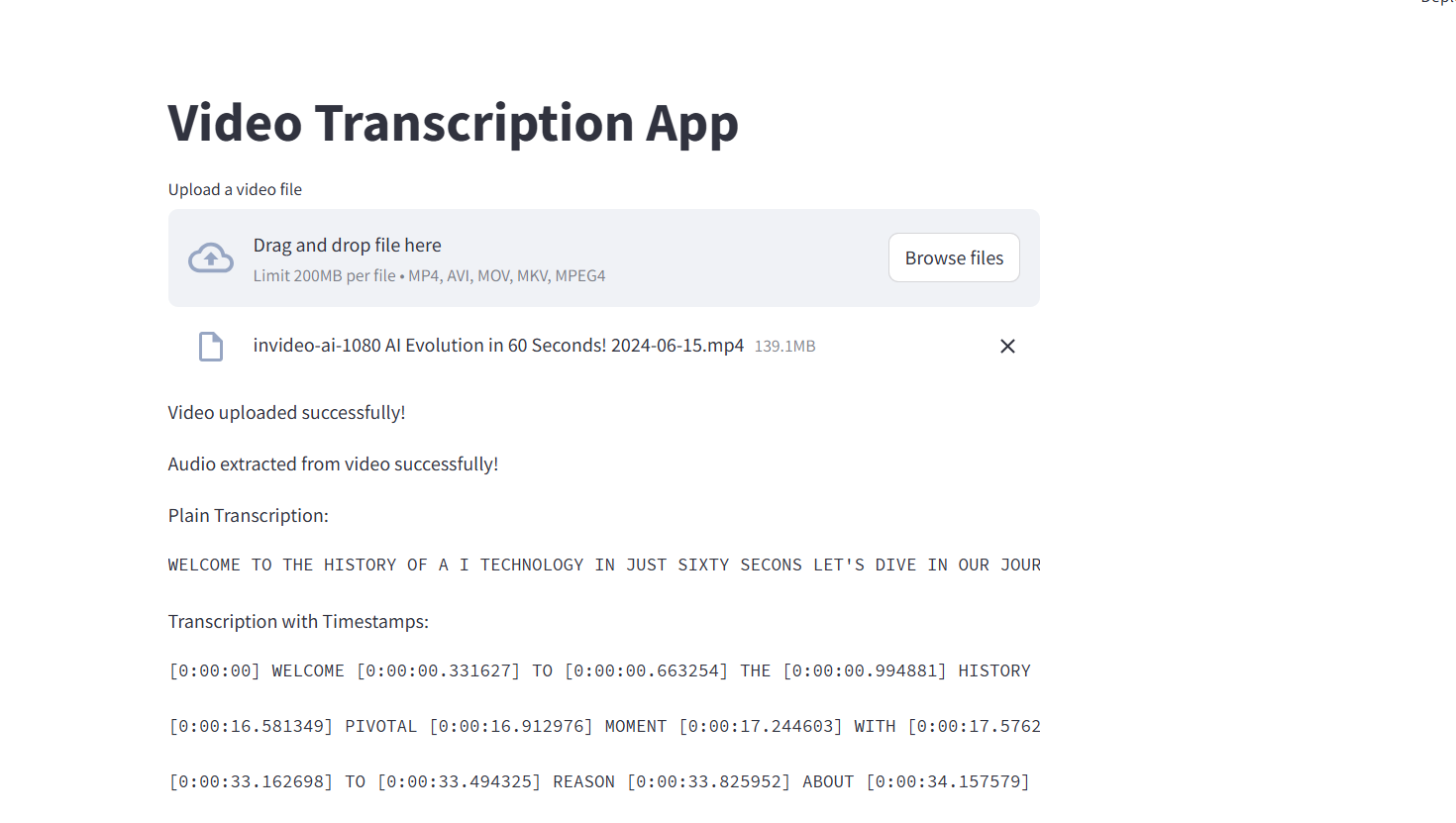
The Video2Text Transcriber is a Streamlit application that performs several key functions:
Converts Video to Audio: It extracts the audio track from a given video file. Transcribes Audio to Text: Utilizes state-of-the-art speech-to-text models to transcribe the audio into text. Generates Timestamped Transcription: Provides a version of the transcript with timestamps for each segment. Saves and Displays Results: Outputs the transcriptions in a user-friendly format both on the Streamlit interface and in text files stored in a project directory.
How we built it
The Video2Text Transcriber was developed using the following technologies:
Python: The primary programming language for developing the application. Streamlit: A web framework used to create an interactive and user-friendly interface. MoviePy: A Python library used for extracting audio from video files. Transformers Library: Utilized pre-trained models from Hugging Face to transcribe audio into text. Librosa: Employed to handle audio processing tasks, including loading and obtaining duration. Tempfile: Managed temporary files and directories for processing video and audio files securely. The application involves several steps:
Upload and Save Video: The user uploads a video, which is then saved temporarily. Convert to Audio: Extract audio from the video file. Transcribe Audio: Convert the audio file into text using a pre-trained speech-to-text model. Format and Save Transcripts: Organize the transcript into paragraphs and save both plain and timestamped versions.
Challenges we ran into
File Access Issues: Handling file permissions and ensuring that files are not being used by other processes was a challenge. We had to carefully manage file access to avoid conflicts. Timestamp Accuracy: Generating accurate timestamps for transcription required precise calculations and adjustments to ensure that the timestamps matched the spoken content effectively. Performance and Scaling: Processing large video files and performing transcription can be resource-intensive. We had to optimize the handling of temporary files and manage resource usage efficiently. Accomplishments that we're proud of Effective Integration: Successfully integrated video processing, audio extraction, and transcription functionalities into a cohesive Streamlit application. User-Friendly Interface: Developed an intuitive and interactive interface using Streamlit that allows users to easily upload videos, view transcriptions, and download results. Formatted Transcripts: Provided transcripts in both plain and timestamped formats, enhancing the usability and accessibility of the transcribed content.
What we learned
Handling Multimedia Files: Gained valuable experience in processing multimedia files and managing file I/O operations in Python. Working with Pre-trained Models: Learned how to leverage pre-trained models from Hugging Face for speech-to-text tasks and integrate them into a Python application. Performance Optimization: Improved our understanding of performance considerations when dealing with large files and intensive processing tasks.
What's next for Video2Text Transcriber
Enhanced Accuracy: Explore advanced models and techniques to improve transcription accuracy and handle different accents or noisy audio. Additional Features: Implement features such as language support, speaker identification, and more detailed timestamping. Deployment and Scaling: Prepare for deployment to cloud services to handle larger volumes of requests and ensure scalability. User Feedback Integration: Gather feedback from users to refine the interface and functionality, making the application even more useful and efficient.
Built With
- llm
- python
- streamlit

Log in or sign up for Devpost to join the conversation.