
Inspiration
AI can build an entire app in minutes. Changing that app afterward is the hard part.
Say you want to make a button a little bigger, change a heading, or point a link to another page. With AI, you describe the change, hope it understands, then figure out what it rewrote. A tiny request can turn into a huge, unpredictable change. Files you never mentioned get edited, styling gets overwritten, or something completely unrelated breaks.
For beginners, it's even harder. If you never understood the code in the first place, how are you supposed to know what the AI changed or whether it changed the right thing?
The problem gets worse when building with a team. Multiple developers and AI agents can edit the same project at once, overwrite each other's work, and quickly lose track of who changed what.
That's why we built Vibez, a visual language built on JavaScript and an IDE designed to make vibe-coded projects easy to understand, easy to change, and easy to build together.
What it does
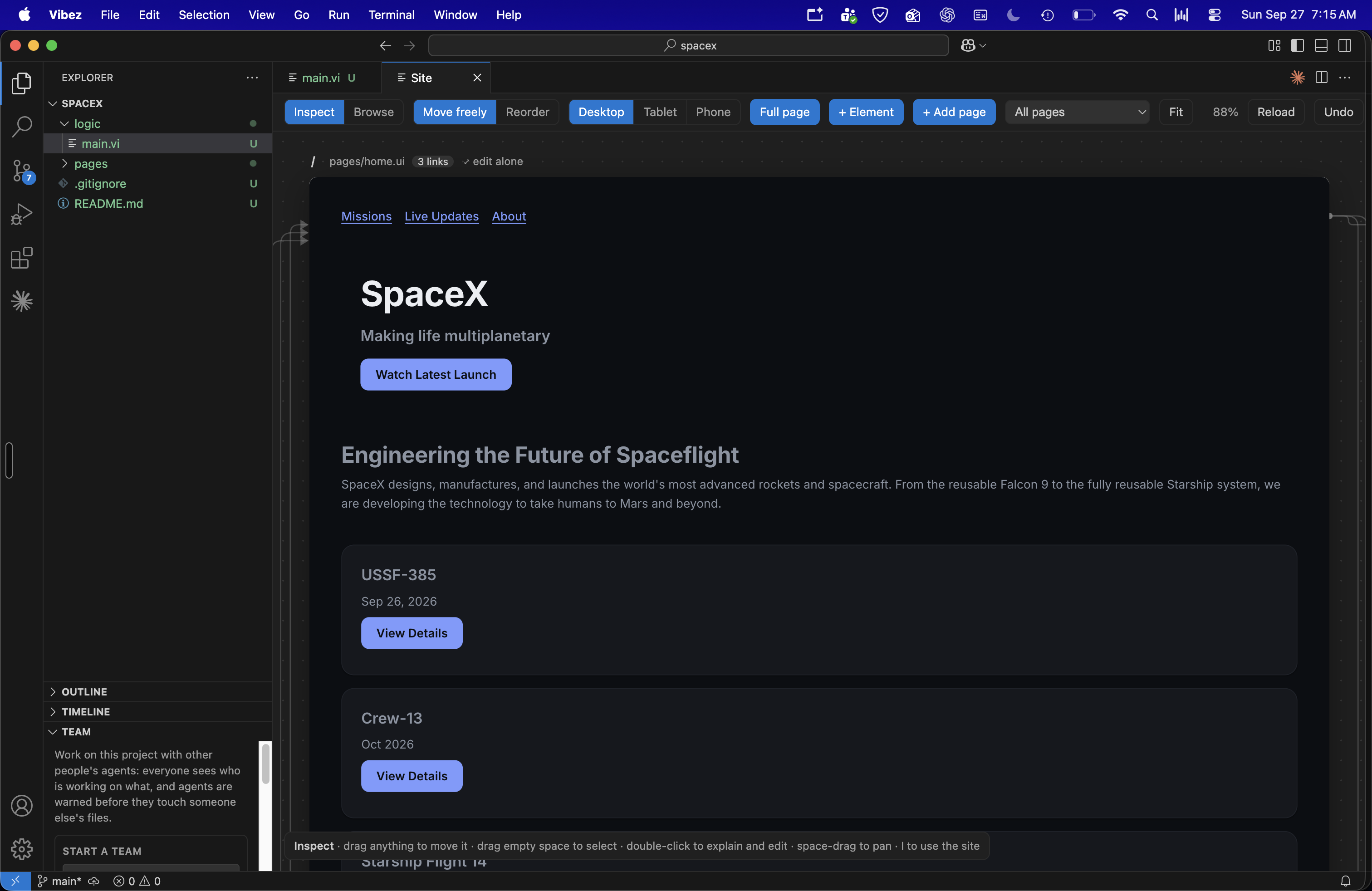
The Site canvas displays every page of your project side by side and running live. Click a button to change its text, size, color, or destination. Drag an element exactly where you want it. Vibez applies the change only to that element instead of rewriting everything around it.
You can link, add, delete, and move elements directly on the canvas. Connect a button to another page by selecting it from a list, add new elements directly where you want them, or delete an element or entire page. If you make a mistake, undo brings it back.
Every canvas edit is also a real file edit. The HTML stays readable, easy to compare, and ready to commit.
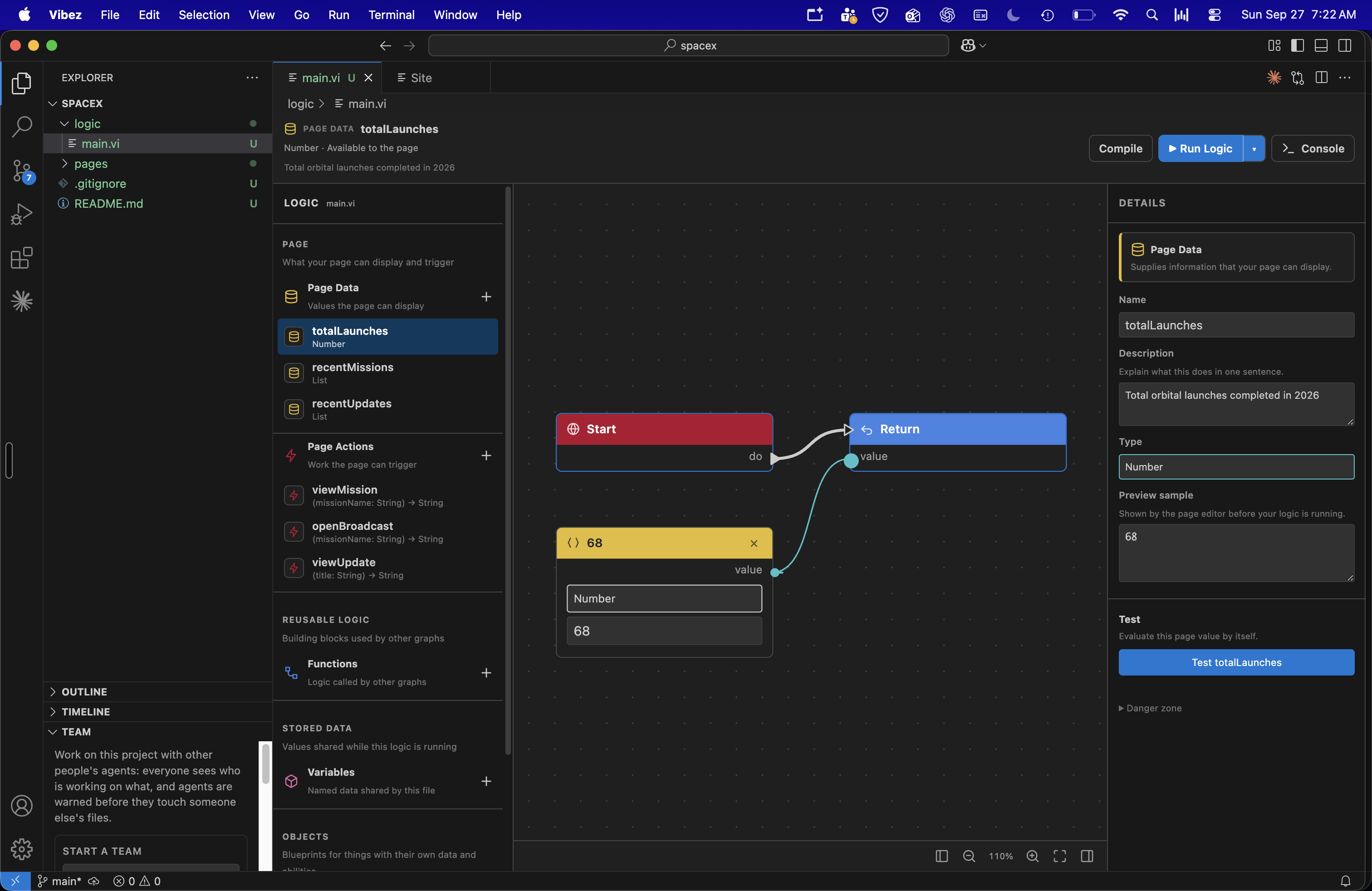
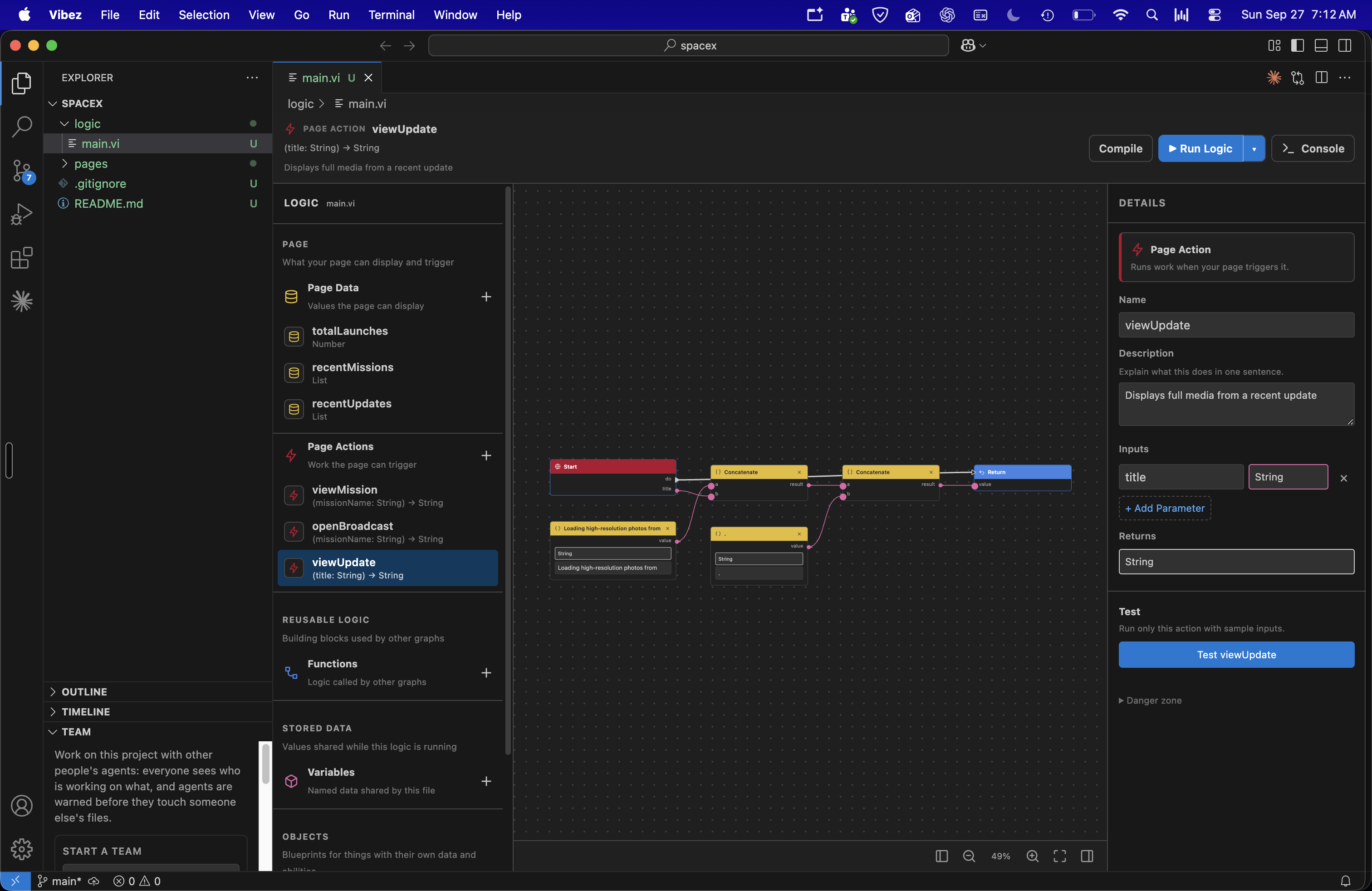
Vibez uses .vi files to represent logic as blocks and wires. White wires show the order things happen in, while colored wires carry data. Every graph compiles into real JavaScript, so the visual representation never hides what your program is actually doing.
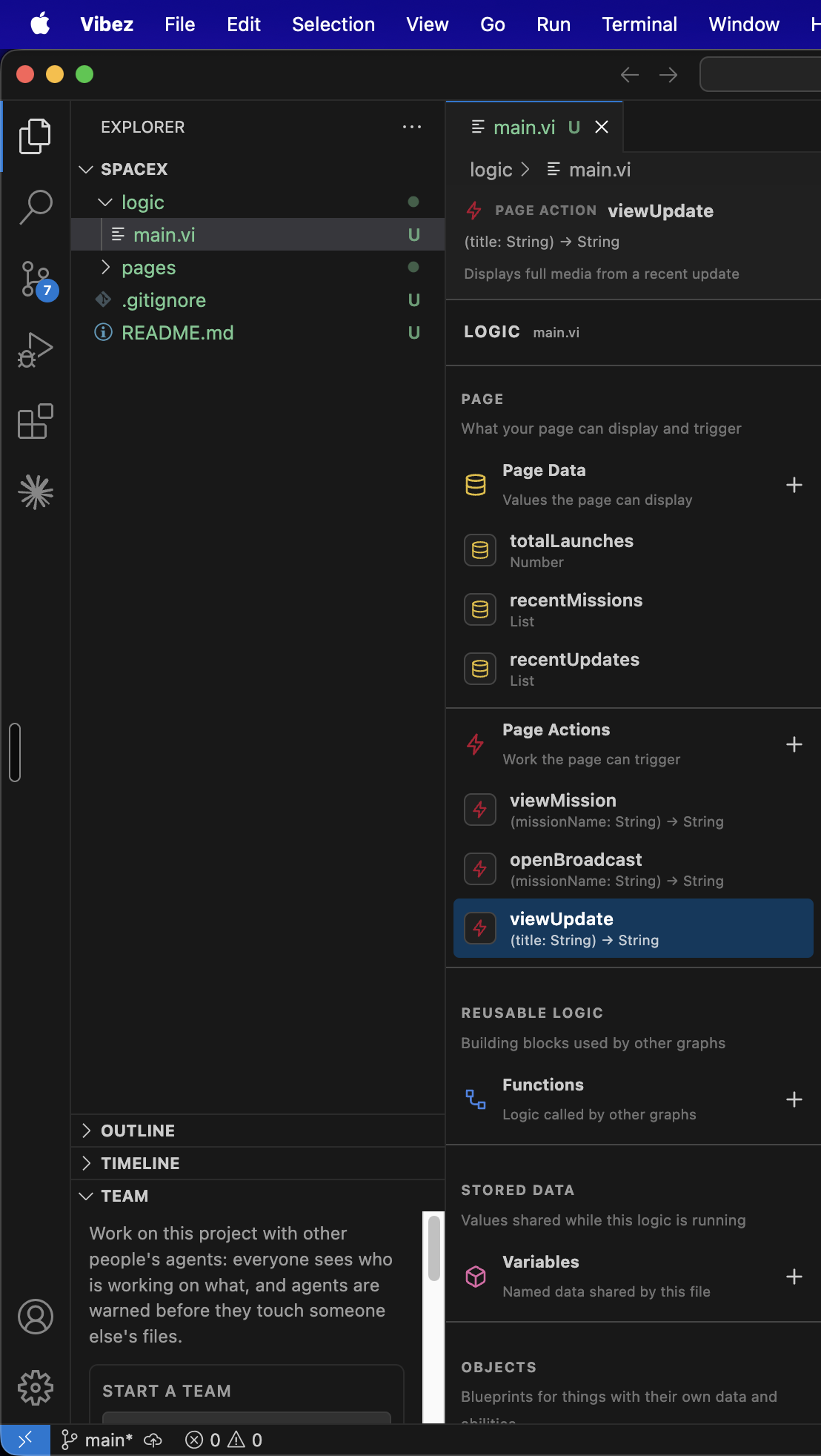
Logic is organized into four groups including page data, page actions, functions, and variables. Code generated by AI follows the same structure as code created manually.
Pages connect to logic by name. A field can display a value, a button can trigger an action, and a list can repeat over data. If an action is renamed or removed, Vibez shows the broken connection instead of letting it fail silently.
Double-click anything and Vibez gives you a plain-English explanation of what it does, where it leads, and which file and line created it. Instead of staring at unfamiliar code, a beginner can see an explanation like "adds this item to the cart and updates the total."
Errors are designed to teach too. If a wire is missing or a loop goes nowhere, the compiler identifies the problem and explains what needs to change.
Vibez can also show what actually happened when your app ran. Recorded flows trace each step from the user's click through the underlying logic, making it possible to visually follow the behavior of the app.
Everyone works on the same project from their own machine. The Team view shows who is active, what they're working on, and which files they're touching.
Before an edit is written, Vibez checks whether someone else is working on the same file, page, or element. Instead of locking anyone out, it gives both developers live overlap warnings.
You can attach notes to files, leave context for other developers or agents, and hand a task directly to a teammate with Take over.
Multiple AI agents can work simultaneously as well. Each agent gets its own copy of the project and is limited to the files assigned to it, reducing the chance of unrelated changes colliding.
How we built it
Vibez is built as a fork of Code - OSS. We intentionally kept modifications to the original codebase small. Most of Vibez consists of new files added to the workbench, with only a few small registrations in existing files. This makes pulling future updates much easier.
For direct editing on the Site canvas, each page runs inside its own frame with an injected bridge script. The bridge handles hovering, selecting, dragging, and explaining elements, then converts each interaction into a precise modification to the corresponding HTML element.
The .vi compiler converts each visual graph into a JavaScript function. Action graphs are compiled by following execution wires, while value graphs are compiled by tracing data dependencies backward from the final output. Before compilation, a validator checks for missing wires, circular connections, and unknown calls.
The connection between the interface and .vi logic is intentionally small. A .vi file exports values, which pages display, and actions, which pages execute. Pages store references to them rather than duplicating their data.
We also built an MCP server that allows AI agents to modify pages, logic graphs, and regular HTML through Vibez itself. Agent edits go through the same checks as human edits, appear immediately on the canvas, and remain one undo away. This keeps AI-generated changes visible and reviewable.
Team collaboration runs through Supabase, with security rules that make each team's project data visible only to its members.
Recorded flows come from OpenTelemetry traces of the running application. This means the visual graph represents what actually executed rather than what Vibez assumes executed.
We also wanted performance measurements to represent what really happened. Vibez separates the time a step spends doing its own work from the time spent running its children. If multiple children run at the same time, that overlapping time is counted only once.
When an agent claims a change made something faster, Vibez does not trust a single run. It replays the same recorded flow multiple times before and after the change, then statistically compares the results. This helps determine whether a performance improvement is consistent rather than just the result of one unusually fast run.
Challenges we ran into
Making small edits actually stay small was one of our biggest challenges. Changing one element needed to modify exactly that element in the HTML without reformatting the rest of the file or affecting other pages. Getting moves, deletions, and undo to preserve that behavior took several iterations.
Parallel developers and AI agents also frequently collided in the same files. We solved this with Git worktrees, per-file boundaries, and live overlap warnings. One of our biggest design decisions was choosing to warn about conflicts rather than blocking edits entirely.
Rebuilding all of Code - OSS after every change was far too slow. We created scripts that sync our source files into the fork and recompile only what changed, dramatically speeding up development.
Dragging across frames created another challenge. Every page on the canvas runs inside its own frame. During early versions, the pointer effectively disappeared whenever a drag left the frame, and standard drag-and-drop did not behave consistently. We rebuilt dragging using pointer events and pointer capture.
The canvas bridge also caused some unexpected problems. The bridge script is injected into each page, and at one point a stray comment silently broke everything after it. We now validate the generated script during every build.
Accomplishments that we're proud of
We built a real visual language. .vi is not a mockup. Its graphs compile into JavaScript that actually runs. Individual functions can be tested with custom inputs and their outputs inspected directly.
We also made small edits actually stay small. Changing one button on the canvas changes that button in the HTML file and nothing else. Every modification is also undoable.
An entire site can fit on one canvas. Every page runs live side by side, with links drawn between them and plain-English explanations available by double-clicking an element.
Developers on different machines can see each other's activity, receive warnings before their work collides, leave context behind, and hand tasks back and forth. AI agents follow those same rules. Their changes are checked, visible, and undoable instead of happening invisibly somewhere in the codebase.
We're also proud that Vibez works inside a real IDE. Instead of creating a standalone prototype, we shipped Vibez as a working fork of a major code editor with native editors for pages, visual logic, collaboration, and the Site canvas.
What we learned
Small changes deserve small tools. Asking an AI to "make this button bigger" should not require rewriting code. Clicking the button and changing it directly is faster, more predictable, and helps you understand where that change actually lives.
Seeing code is not the same as understanding it. For beginners, a plain-English explanation of what something does can be far more useful than showing another screen full of source code.
Structure makes AI-generated code easier to learn from. When generated logic follows the same organization every time, developers start recognizing patterns instead of treating AI output like a black box.
Collaboration should warn, not block. Knowing that someone else is touching the same part of a project is useful. Being locked out of your own work is not.
We learned the same lesson while building Vibez. Dividing the project into page, logic, and collaboration systems connected through small, clear boundaries allowed us to work in parallel without constantly stepping on each other.
That's exactly the kind of development experience we want Vibez to give its users.
What's next for Vibez - Know your code
We want to expand .vi with more runnable blocks, including data sources and validation, so larger parts of real applications can be built visually.
We're also working toward a guided Explain my app experience that walks beginners through a project page by page and block by block.
Team sharing will become simpler, with the goal of joining a project through a single link instead of going through a setup process.
We also want to make AI-assisted small edits more predictable. A request like "make this bigger" could identify the exact element and preview the exact change before anything is saved.
The goal is simple. AI should help you build faster without making your own project harder to understand.
Built With
- claude
- code-oss
- css
- electron
- git
- github
- grok
- html
- javascript
- mcp
- node.js
- opentelemtry
- postgresql
- sqlite
- supabase
- typescript
- vercel
- xai


Log in or sign up for Devpost to join the conversation.