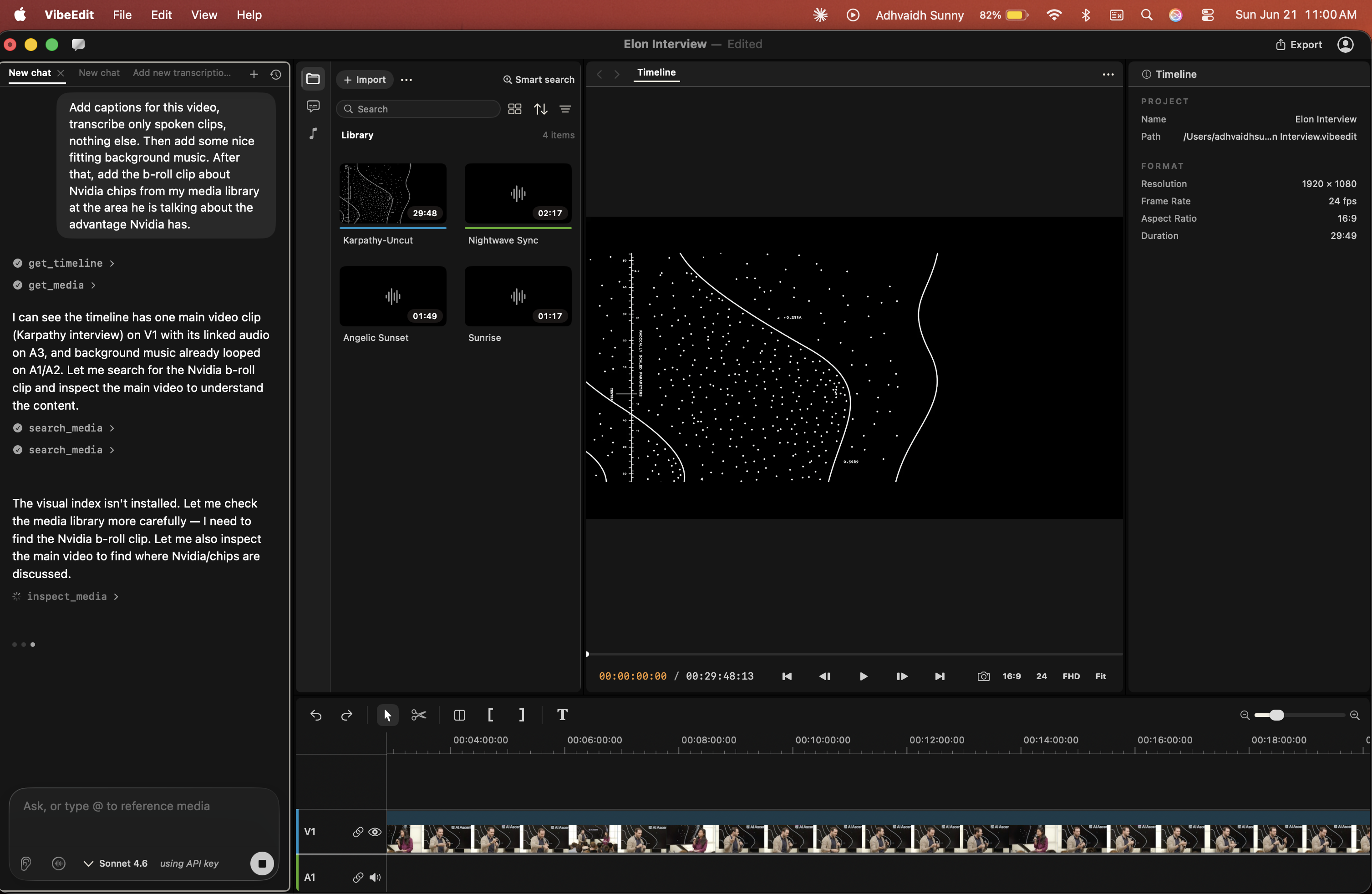
VibeEdit: a voice-first Cursor for video editing
Inspiration
Adhvaidh runs a YouTube channel where companies like Google, OnePlus, and TCL send him phones to review. His cousin wanted to help edit and help with the creative process but has a disability that does not allow him to use today's editing tools and software to edit. So to solve this and to make video editing more accessible for everyone, we built VibeEdit.
What it does
VibeEdit is an ai-native video editing workspace for creatives. we want to make video editing more accessible by adding seamless voice-driven editing which supersedes basic text-to-speech, allowing you to search for videos and audios using natural language queries, and allowing you to edit videos professionally without any previous experience; removing the previous high barrier of entry.
How it works
VibeEditing
- Text Agent Integration:
Any inputs (voice or text) to the vibe editor is accepted by the Claude Agent Orchestrator which then assigns a specific task to be completed. It also uses our many designated and specific tools using tool use to make edits in the video editor very accurately.
Voice Base Workflow:
Agent Mode (Smart AI): The system hands the microphone over to ElevenLabs conversational AI. This lets you ask for complex edits using normal, everyday language. It will then use VibeEditing pipeline. The AI will speak back to you, and it automatically closes the conversation bracket when you are finished.
Default Mode (Fast & Free): This uses Apple Speech directly on your computer. Because it happens on-device, it requires no internet, costs nothing, and is incredibly fast (low latency). It listens for a specific list of basic commands. It uses fuzzy matching to figure out what you meant if you mispronounce a word, and regex to understand commands with variables (like "move forward 10 seconds").
Sleep mode: "sleep" command pauses listening so you can freely talk to your friends in the room, until you tell your program to “wake up” and listen to your commands again!
Smart Media Search (Semantic Media Memory): This feature lets you search your videos using your voice, and it processes everything 100% on-device for privacy.
Step 1: It scans the specific folders on your computer that you have given it permission to look at for images and videos.
Step 2: It extracts frames from those videos using Apple's AVFoundation. Then, it converts those images and words into mathematical data (embeddings) using a CLIP-style CoreML model running on your hardware, and a HuggingFace swift-transformers tokenizer for the text.
Step 3: It saves this data (vectors), the file locations, and the exact timestamps into a local on-disk cache so it can remember them for later.
Step 4: When you speak a search query, it converts your voice into data as well. It then compares your search to the saved files using a math function called Accelerate (vDSP) cosine similarity. It instantly finds the most relevant clip and gives you the exact timestamp, ready to be dropped into the editing timeline.
Built with
Swift 6, SwiftUI + AppKit, AVFoundation, Apple Speech (on-device), CoreML CLIP embeddings, Accelerate/vDSP, HuggingFace swift-transformers, ElevenLabs, MCP, Claude API, Redis, GCP, Whisperflow
Redis is deployed to make our project work vividly. Firstly, using vector search, every clip is embedded (1408-d multimodal: text and visuals share one space) and indexed in Redis with HNSW cosine ANN. A text query retrieves visual content. Second, leveraging hybrid retrieval, one Redis query fuses vector similarity with tag (has-speech), date range, and geo-radius filters. "The sunset drone shot near the coast where someone's talking" resolves in a single query, and we rank to pick the best hit. Finally, focusing on agent memory, the agent recalls across every shoot you've ever ingested via an MCP tool backed by Redis. Items like persistent, searchable, cross-session are agent memory, and it's what turns "search my files" into "the agent already knows my files."
Cognition (Devin) CLI tools were used to help develop on computers that aren't up to date with the software required to compile our build. Devin helped us organize a workflow to compartmentalize our features and test them independently to make sure we could parallelize tasks, as well as seamlessly integrate them into the main build.
Claude CLI tools were used to orchestrate a multi agent workflow to organ
Challenges
- Just finding a video file was not enough. The system had to find the exact second an event happened (timestamp), remember exactly where the file is saved on your computer (local path), and make it ready to drop right into your video project (timeline).
- Videos show personal faces and private talks. To protect you, your videos never leave your computer. All the background data that helps the AI understand your videos (embeddings and metadata) stays safely on your own hard drive. Basic voice commands are also processed directly on your computer using Apple Speech.
- Sending basic voice commands like play or pause to the internet (the cloud) would be slow and cost too much money. So, your computer handles everyday commands instantly. We only use the internet AI when you ask for something complicated.
Accomplishments we're proud of
- We built a tool that finds the exact second you are looking for and places it right into your video project automatically.
- We built this system so your that specific video data and personal data never leave your computer. Everything is processed safely on your own machine and then only the parsed data is sent for features that need it.
- If we used the internet for every simple command like play or pause, it would be slow and expensive. We fixed this by making your computer handle the easy commands instantly and only using the internet for the really complicated requests.
What we learned
We learned that using the computer's own power for easy tasks and the internet (cloud AI) for hard tasks gives the user the best of both worlds.
What's next
We want to train the AI to understand bigger and more complicated editing instructions when you speak to it.


Log in or sign up for Devpost to join the conversation.