🧱 Minecraft AI Builder Mod (Fabric 1.21.1)
A Fabric client-side mod that lets you construct Minecraft structures using natural language, powered by Claude AI.
Describe it. Preview it. Approve it. Build it.
✨ Features
- 🤖 AI-Driven Building – Simply describe your structure and Claude generates the build plan
- ⚡ High-Speed Placement – 50ms delay per block (~20 blocks/sec)
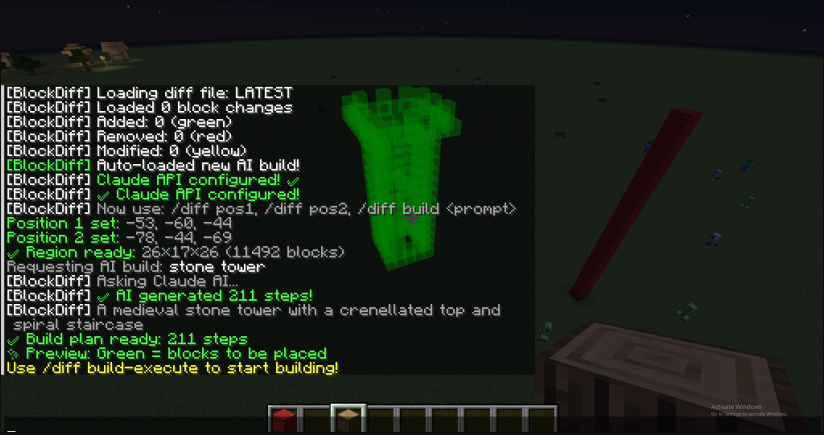
- 🎨 Live Visual Preview – Green highlights show exactly what will change
- ✅ Approve or Reject – Review before committing permanently
- 🚫 No Server Rate Limits – Executes as your player client
📦 Requirements
- Minecraft 1.21.1
- Fabric Loader
- Fabric API
- Java 21+
- Claude API key (from anthropic.com)
🚀 Installation
1️⃣ Build the Mod
cd fabric-mod
.\gradlew.bat build
2️⃣ Install the JAR
copy build\libs\blockdiff-1.0.0.jar $env:APPDATA\.minecraft\mods\
3️⃣ Launch Minecraft
Start Minecraft 1.21.1 with Fabric Loader enabled.
🛠 Usage Guide
1️⃣ Configure Claude (One-Time Setup)
/diff claude-setup sk-ant-api03-YOUR-KEY-HERE
2️⃣ Define Your Build Region
Stand at the first corner:
/diff pos1
Move to the opposite corner:
/diff pos2
3️⃣ Generate & Execute a Build
Request a structure:
/diff build a medieval stone tower with battlements
✨ A green preview will appear showing planned changes.
Execute the temporary build:
/diff build-execute
⚡ Blocks place instantly and highlights update.
Finalize or undo:
/diff build-keep     # Make permanent
/diff build-reject   # Undo all changes
4️⃣ Iterate Within the Same Region
/diff build add a flag on top
/diff build-execute
/diff build-keep
📖 Command Reference
Setup
/diff claude-setup <api-key>– Configure Claude API (one time)
Region Selection
/diff pos1– Set first corner/diff pos2– Set second corner
AI Building
/diff build <description>– Generate preview/diff build-execute– Place blocks (temporary)/diff build-keep– Commit permanently/diff build-reject– Undo changes/diff build-cancel– Cancel pending build
Diff & Highlight Tools (Optional)
/diff load <file>– Load diff file manually/diff opacity <0-100>– Adjust highlight transparency/diff toggle– Show/hide highlights/diff clear– Clear all highlights/diff info– Show current status
🏗 Example Workflows
Quick Cube
/diff pos1
/diff pos2
/diff build a 5x5 stone cube
/diff build-execute
/diff build-keep
Tower Build
/diff pos1
/diff pos2
/diff build a tall tower with stone base and wooden top
/diff build-execute
/diff build-keep
Iterative House Construction
/diff pos1
/diff pos2
/diff build a house foundation
/diff build-execute
/diff build-keep

/diff build add walls to the house
/diff build-execute
/diff build-keep

/diff build add a roof
/diff build-execute
/diff build-keep
⚙️ How It Works
- You describe your structure in natural language
- The mod sends your prompt + region bounds to Claude API
- Claude generates a structured block placement plan
- The mod renders a green preview client-side
- You execute the build (using
/setblockcommands) - You keep or reject the result
🧪 Troubleshooting
❗ “Claude API not configured”
Run:
/diff claude-setup <your-key>
❗ “No region defined”
Set both corners:
/diff pos1
/diff pos2
❗ Out of memory
Reduce the selected region or build in smaller sections.
❗ Too many requests
Wait briefly and retry (API rate limiting).
❗ Mod fails to load
- Ensure Java 21+ is installed
- Confirm Fabric API is in your mods folder
- Verify Minecraft version is 1.21.1
🏎 Performance
Placement Speed
- 50ms per block
- 100 blocks ≈ 5 seconds
- 1000 blocks ≈ 50 seconds
Highlights
- Green = Added blocks
- Rendered client-side using GL11
- Adjustable transparency
🏗 Building From Source
cd fabric-mod

# Set Java 21
$env:JAVA_HOME="C:\Program Files\Eclipse Adoptium\jdk-21.0.10.7-hotspot"

# Clean & build
.\gradlew.bat clean build
Output:
build\libs\blockdiff-1.0.0.jar
📜 License
MIT
🙌 Credits
- Fabric API
- Claude AI by Anthropic
- Gson (JSON parsing)
Built With
- claude
- java
- minecraft

Log in or sign up for Devpost to join the conversation.