-
-
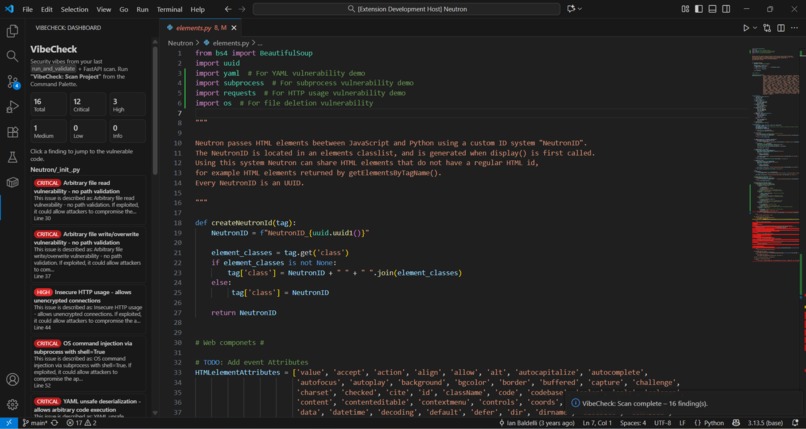
The is our extension Output.
Inspiration
Most security tools feel like homework: separate UIs, giant JSON files, and zero context inside your editor.
We wanted something that feels like a teammate sitting in your VS Code sidebar saying:
“Here are the 5 scariest things in this repo, here’s why they’re bad, and here’s how to fix them.”
That’s how VibeCheck was born – an in-editor security copilot that checks the “vibes” of your codebase from both static analysis and dependencies, then turns that into clean, human-readable guidance.
What VibeCheck does
VibeCheck is a VS Code extension that:
- Scans your entire project with one command:
VibeCheck: Scan Project - Runs a local analyzer that:
- Feeds your code to static analysis (e.g., Semgrep)
- Walks the repo for dependency manifests (like
package-lock.jsonandrequirements.txt) - Queries OSV for known CVEs
- Normalizes everything into a single
vibecheck_summary.json
- Sends that summary to a FastAPI backend that:
- Enriches vulnerabilities with human-readable titles, explanations, and fixes
- Shows results directly in VS Code:
- Squiggly highlights on vulnerable lines
- Hover popovers with explanation + suggested fix
- A Dashboard view that groups all findings by file and severity
From a judge’s perspective: one click → full security picture of the repo.
How we built it
We split the system into three layers:
VS Code extension (TypeScript)
- Uses the VS Code Extension API for:
- Commands (
VibeCheck: Scan Project,VibeCheck: Configure) - Diagnostics & hovers (squiggles + tooltips)
- A webview-based Dashboard with a custom UI (HTML/CSS/JS)
- Commands (
- Spawns a Node script (
run_and_validate.js) withchild_process - Reads the generated
vibecheck_summary.json - POSTs that JSON to a FastAPI
/summarizeendpoint - Merges local + backend results into strongly typed
Findingobjects
- Uses the VS Code Extension API for:
Analyzer / runner (Node + CLIs)
- A single script (
run_and_validate.js) orchestrates:- Running Semgrep (if installed) and parsing JSON output
- Recursively discovering
package-lock.jsonandrequirements.txt - Querying the OSV API with retries and backoff
- Converting everything into our canonical summary format
- Validates the final summary against a JSON schema to guarantee the shape of data the extension and backend see.
- A single script (
FastAPI backend (Python)
- Receives the raw summary as JSON
- Applies enrichment:
- Upgrades severity where appropriate
- Generates human-readable vulnerability descriptions
- Returns suggested fixes tailored to each finding
- Responds with an array of enriched vulnerabilities, which the extension then renders.
Challenges we ran into
Path & line number chaos
Different tools report paths and positions in different ways (Windows-style vs POSIX-style, 0-based vs 1-based). We had to:- Normalize paths to a consistent format
- Convert line/column numbers into 0-based indexes
- Safely clamp ranges so VS Code diagnostics never crash with “line must be non-negative”.
Making the UI feel native to VS Code
Balancing a custom dashboard with the editor’s look & feel was tricky:- We built a webview UI that’s minimal but clear: severity tiles + file groups + clickable cards.
- We also wired hover providers so devs can stay in the editor and still get all the context.
Orchestrating multiple tools in one pipeline
Semgrep, OSV, JSON schema validation, and a backend all had to agree on:- File locations
- Severity levels
- Object shape
Designing a clean summary schema and enforcing it with validation was key.
Keeping it hackathon-friendly
We needed something that:- Works well on a judge’s machine with minimal setup
- Still demonstrates a serious, realistic security pipeline (static analysis + dependency scanning + backend enrichment).
What we learned
- How to build a non-trivial VS Code extension:
- Using diagnostics, hovers, commands, and webview views together
- How to orchestrate multi-tool security pipelines:
- Semgrep + OSV + custom detectors with a unified JSON schema
- How to design a developer-first UX for security:
- Show the “why” and the “how to fix”, not just a rule ID and a red underline
- How to keep code paths robust:
- Defensive handling of ranges, file paths, and partial data from various tools
What’s next for VibeCheck
- A dedicated Dependencies section in the dashboard (grouped by package + CVEs)
- More language ecosystems (Poetry, Pipenv, Java / Maven / Gradle, etc.)
- Inline quick actions like “Open docs for this vulnerability” or “Copy fix snippet”
- Workspace-wide progress indicators while scans are running
Our long-term vision: VibeCheck becomes the quickest way for a developer to answer
“How bad are the vibes in this repo right now?”
Built With
- child-process
- css
- extension
- fastapi
- git
- github
- html
- javascript
- json
- node.js
- osv
- python
- semgrep
- typescript


Log in or sign up for Devpost to join the conversation.