-
-
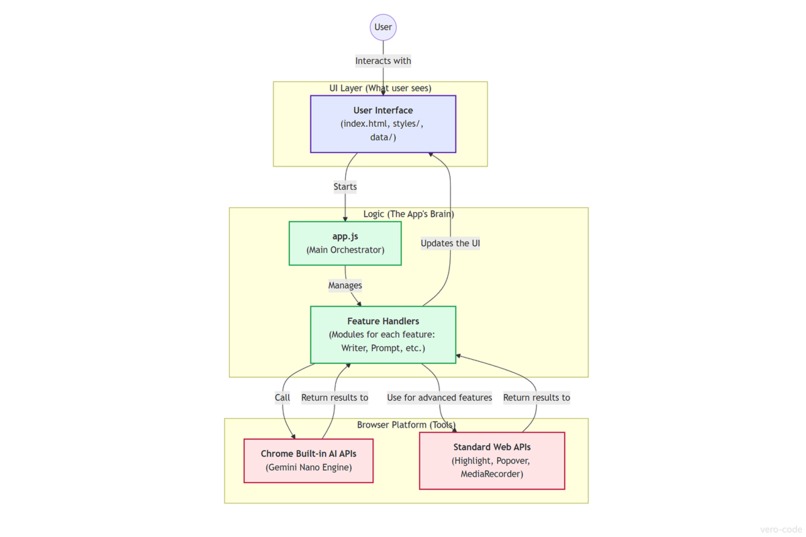
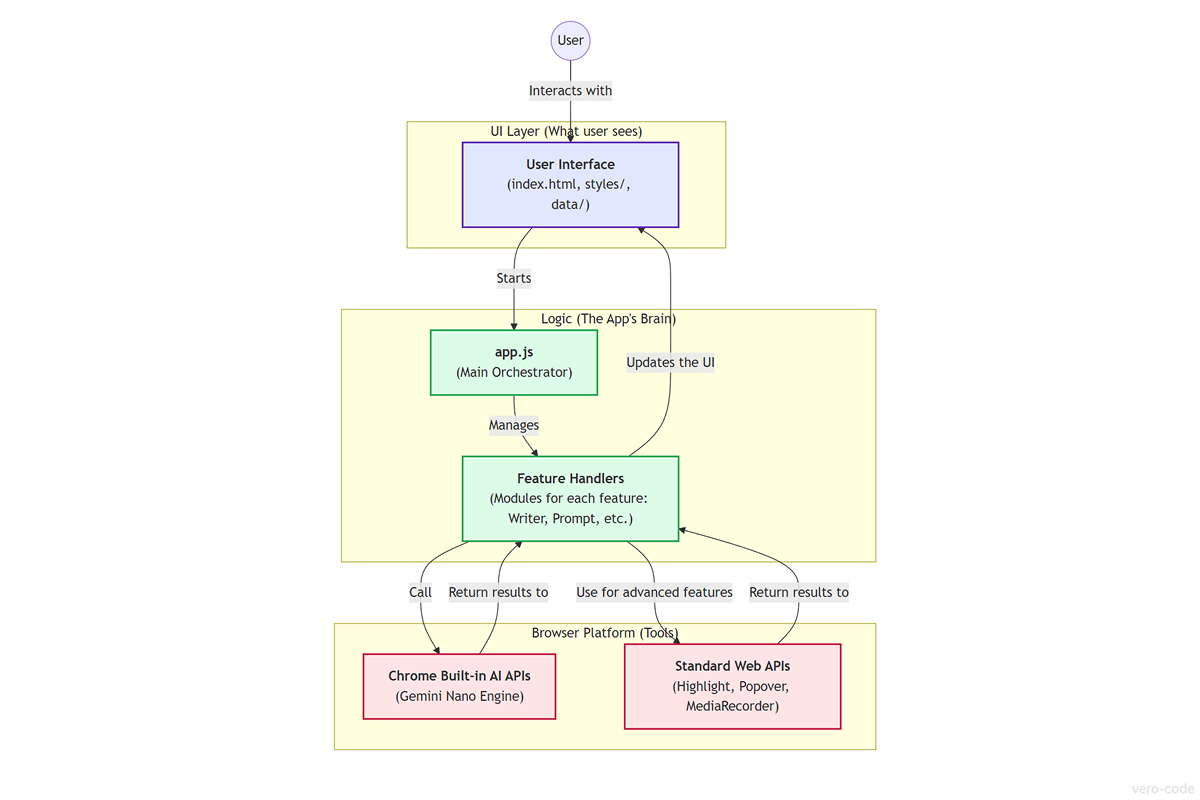
The architecture of Verve AI Assistant, visualizing its modular design and the flow between the UI, app logic, and Chrome's AI APIs.
-
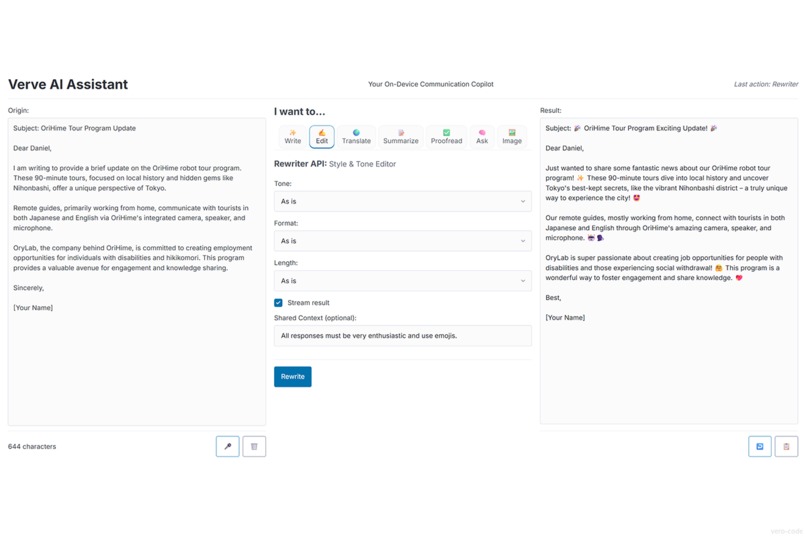
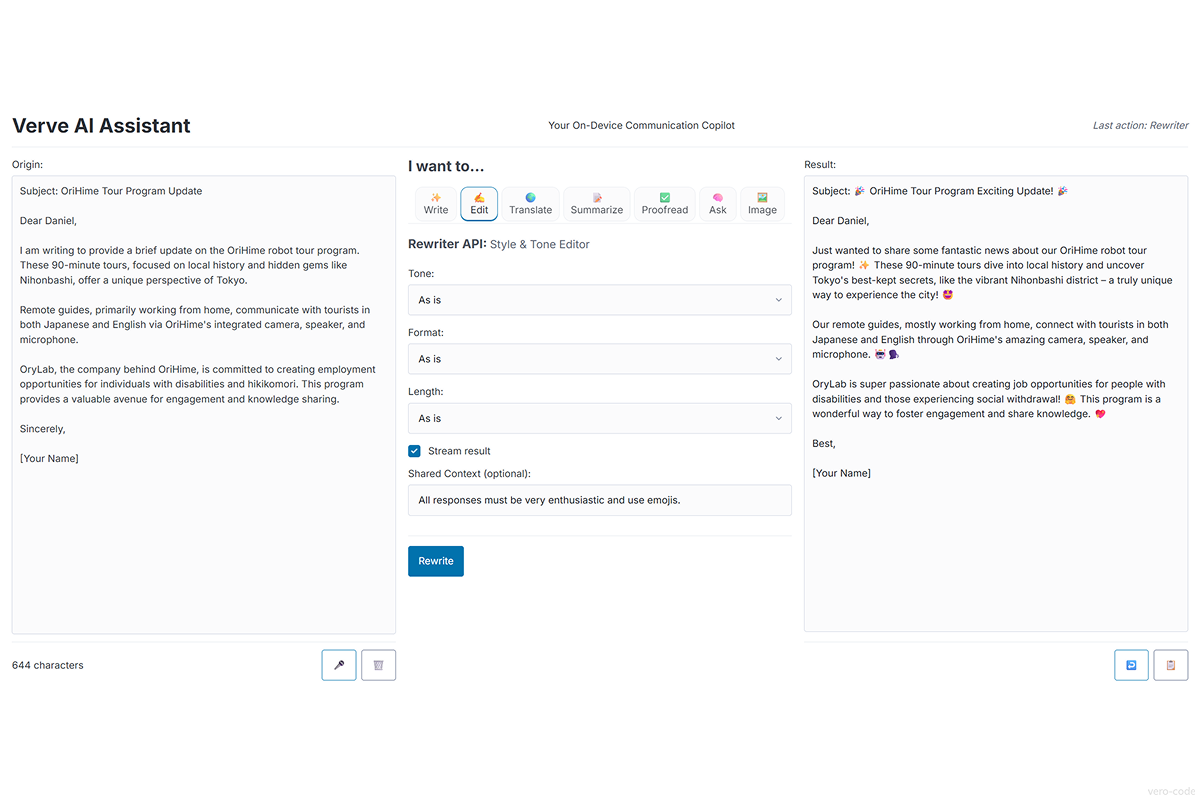
The final UI of Verve AI Assistant, featuring a clean 3-column layout and a tabbed interface providing access to all AI tools.
Inspiration
In a world of cloud-based AI, the promise of on-device processing felt revolutionary: true privacy, zero latency, and no server costs. The inspiration for Verve AI Assistant was to harness this promise by exploring the absolute limits of the new technology. The mission was not just to use one or two APIs, but to implement the entire suite of Chrome's Built-in AI APIs, creating a powerful, single-page communication copilot that respects user data by design.
What it does
Verve AI is a complete, intelligent, and multimodal workspace that integrates every available Chrome Built-in AI API:
🧠 The Brain (
Prompt API): The creative core of the app. It supports text analysis, conversation memory for follow-up questions, and fine-grained control over AI creativity with Temperature and Top-K sliders.🎤🖼️ Multimodal Input (
Prompt API): Verve AI goes beyond text. It can transcribe voice from the microphone and analyze uploaded images, making it a truly versatile assistant.✍️ Interactive Proofreader (
Proofreader API): Provides a professional editing experience by using the CSS Highlight & Popover APIs to interactively highlight errors with a color-coded legend and offer one-click correction suggestions.🛠️ Full Writing Suite (
Writer&RewriterAPIs): A complete set of tools to generate and refine text with advanced controls like tone, length, format, streaming, and cancellation.🌐 Smart Translator (
Translator&Language DetectorAPIs): Automatically detects the language as you type and seamlessly translates text between multiple languages.📄 Intelligent Summarizer (
Summarizer API): Distills long texts into clear summaries, offering different formats like key-points, TL;DR, or headlines.
How I built it
Verve AI is a modern web application built from the ground up with Vanilla JavaScript (ES6 Modules), HTML5, and CSS3, demonstrating that powerful applications don't always need heavy frameworks.
UI: The clean, tab-based interface is styled with Pico.css for a responsive, modern look.
Architecture: The project features a fully modularized architecture, with each API's logic encapsulated in its own handler (
writer-handler.js,prompt-handler.js, etc.) for clean separation of concerns and maintainability.Advanced Web APIs: Beyond the AI suite, the project leverages cutting-edge browser technologies like the CSS Highlight API, the Popover API,
MediaRecorderfor audio capture, andAbortControllerfor cancellable operations.
Accomplishments that I'm proud of
- 🚀 Implementing the entire suite of Chrome's Built-in AI APIs in a single, cohesive application.
- ✨ Building a professional-grade interactive Proofreader that rivals desktop applications, using the most modern web APIs available.
- 🎨 Designing a clean, modular, and maintainable codebase entirely in Vanilla JavaScript.
What I learned
This project was a masterclass in persistence, debugging, and the nuances of experimental APIs. I learned that documentation for cutting-edge tech is often a starting point, not the final word, and that deep-dive testing is crucial. Most importantly, I learned firsthand how incredibly powerful and fast on-device AI has become. Building Verve AI solidified my belief that the future of many AI applications is local, private, and seamlessly integrated into the browser.
What's next for Verve AI Assistant
The foundation is incredibly strong. The next logical steps are:
- Continue to polish the UI/UX.
- Expand language support as the APIs mature.
- Package the application as a full-fledged Chrome Extension to make it accessible on any webpage.
Built With
- chrome
- chrome-built-in-ai
- css-highlight-api
- css3
- es6-modules
- gemini-nano
- html5
- javascript
- language-detector-api
- mediarecorder-api
- pico-css
- popover-api
- prompt-api
- proofreader-api
- rewriter-api
- summarizer-api
- translator-api
- writer-api



Log in or sign up for Devpost to join the conversation.