-
-
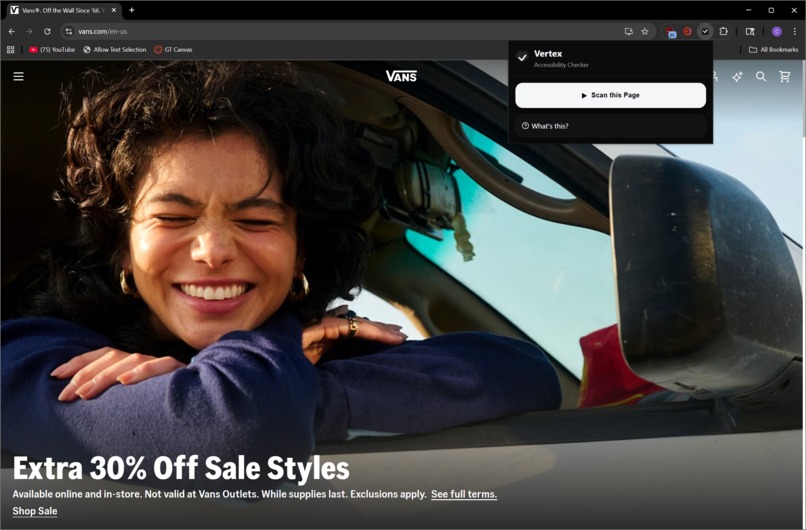
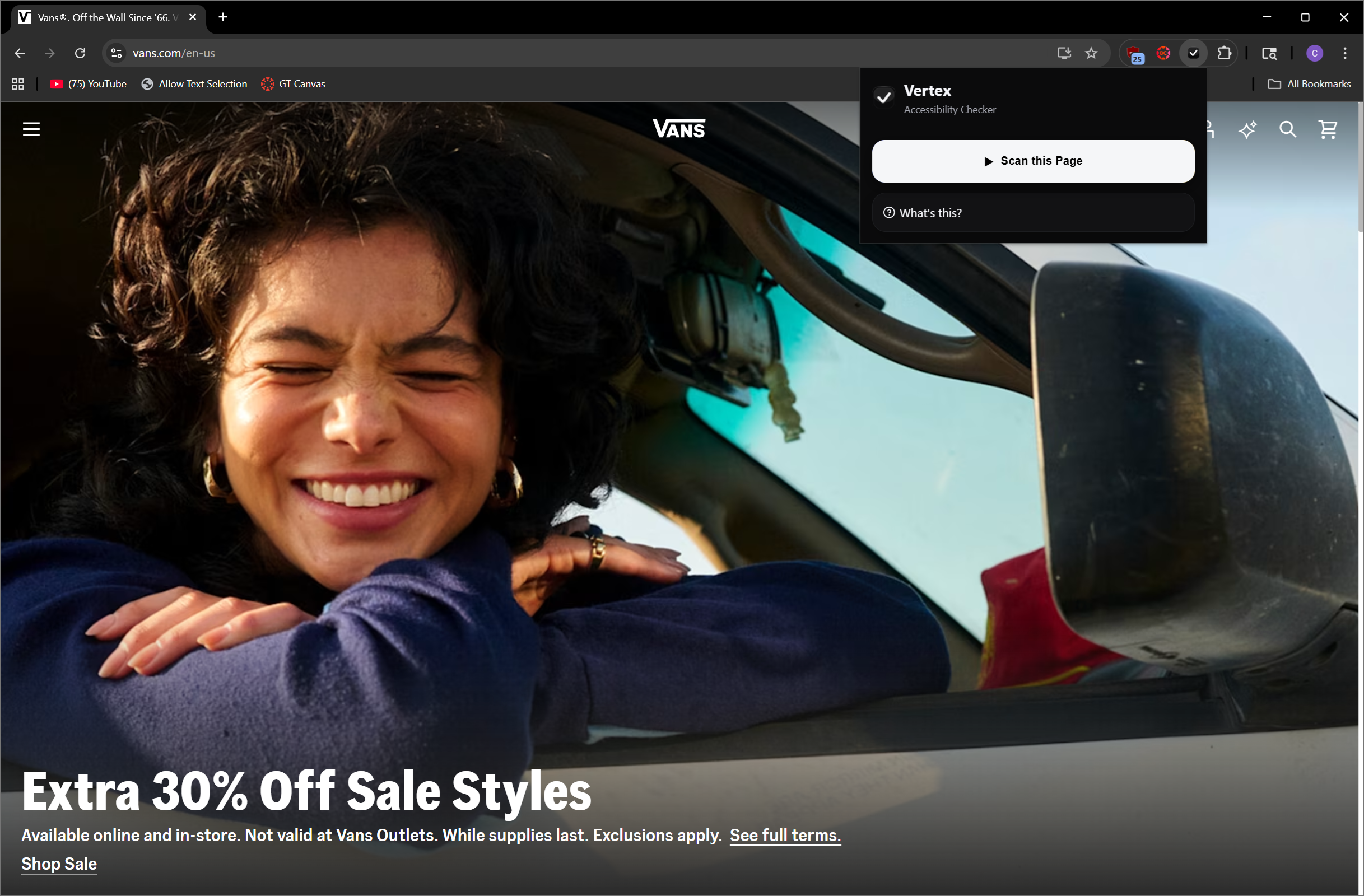
Home Page
-
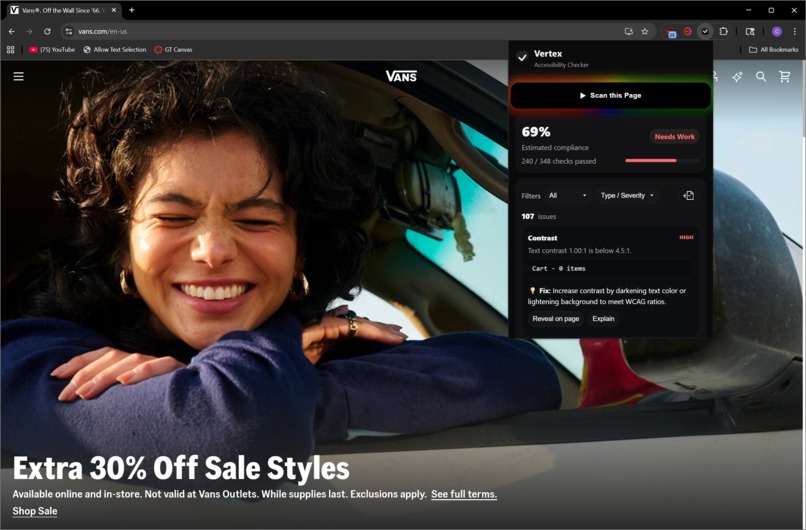
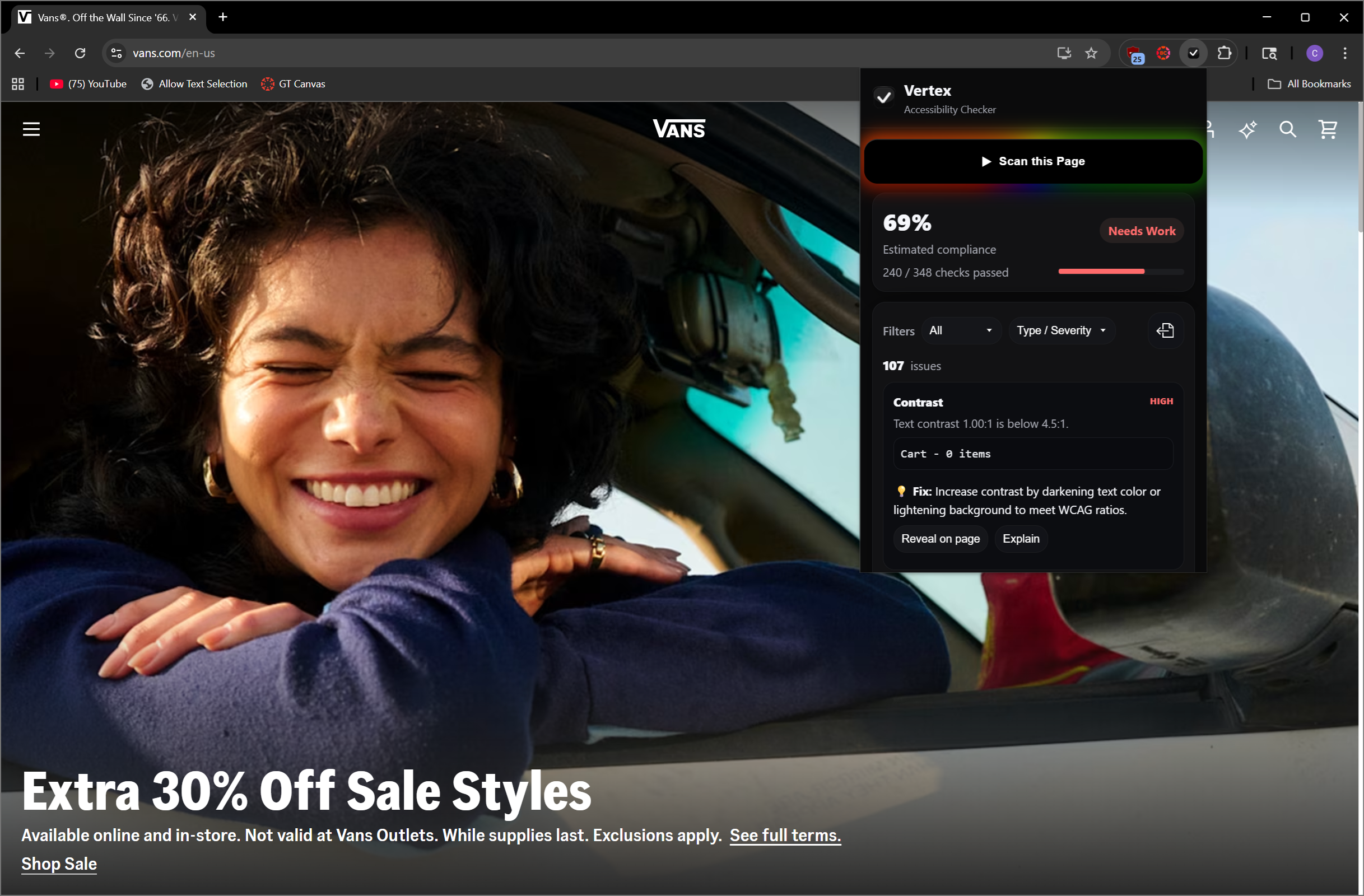
Scanned results
-
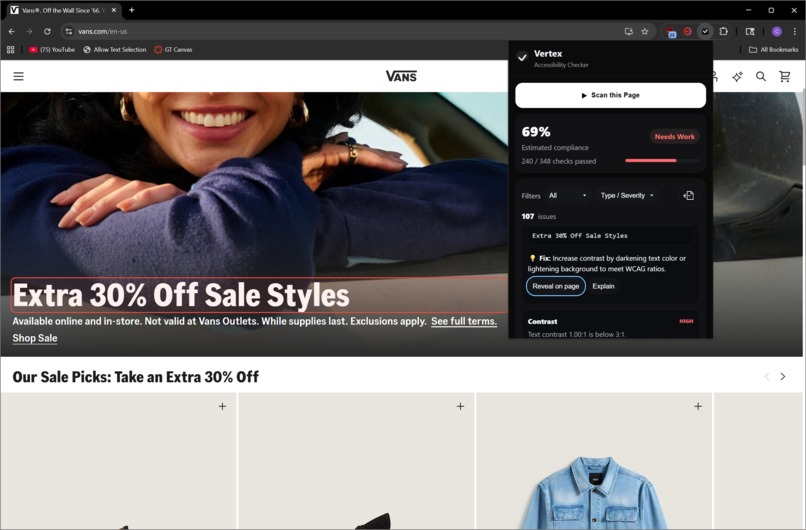
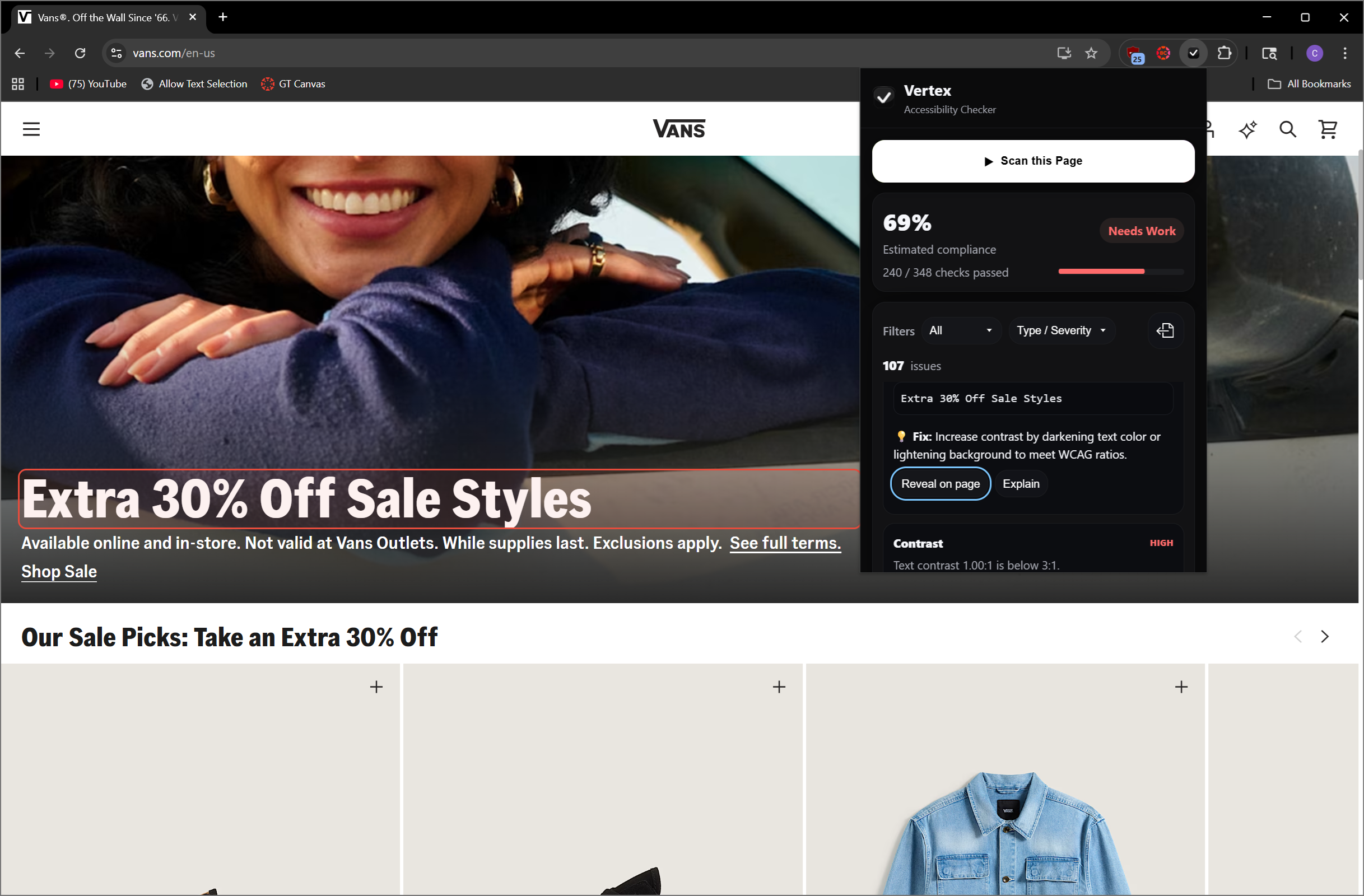
Element Highlight feature
-
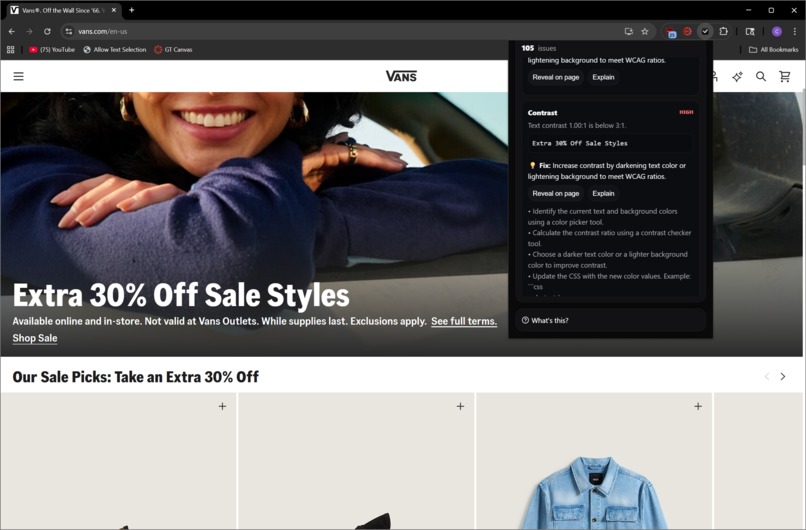
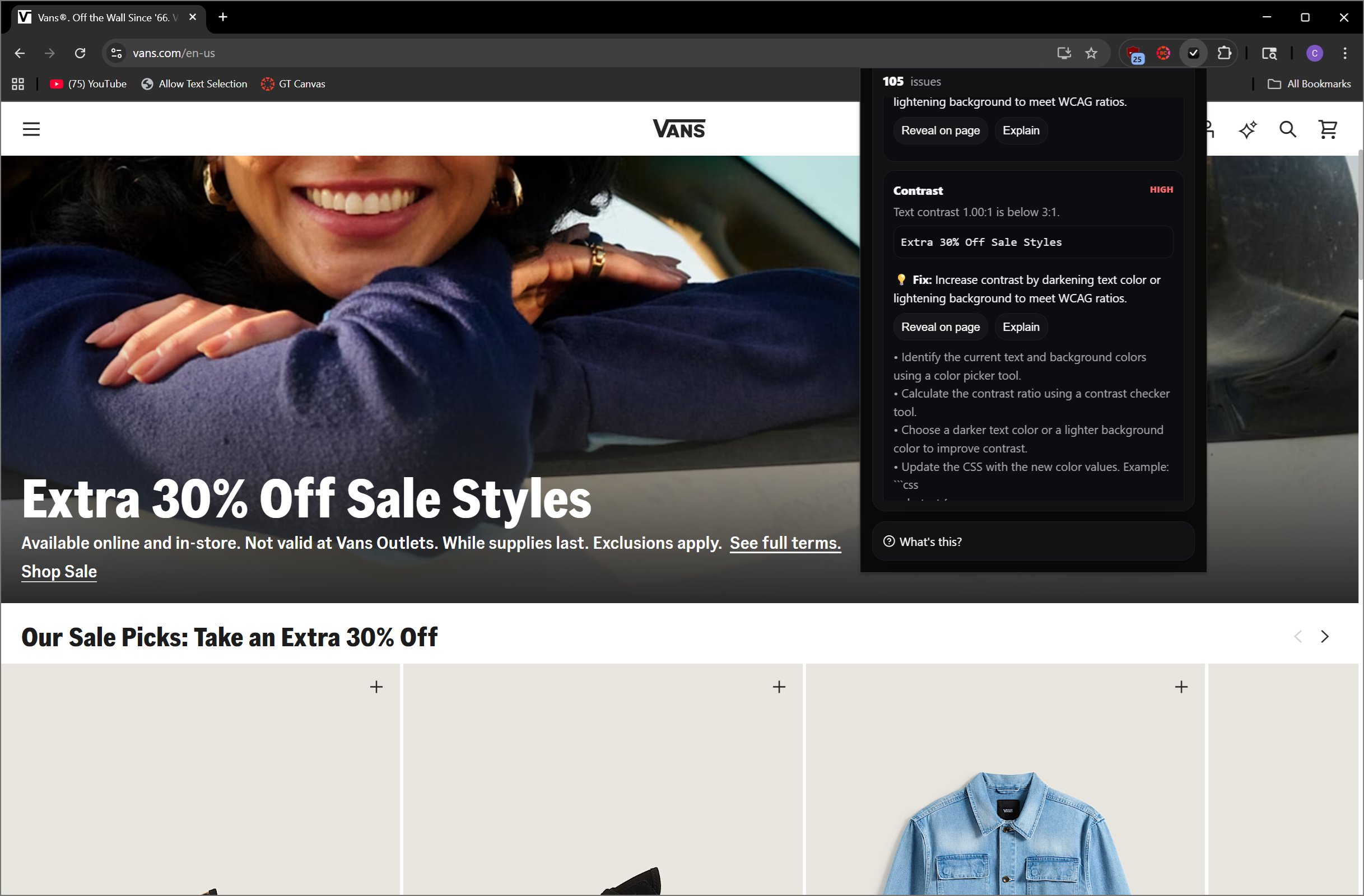
AI Recommendation feature
Inspiration
Around 16% of the world's population, nearly 1.3 billion people, live with some form of visual impairment. While assistive technologies continue to evolve each year, web development hasn’t kept pace when it comes to accessibility. In fact, a study by WebAIM found that over 96% of the top million websites fail to meet accessibility standards such as the Americans with Disabilities Act (ADA) and the Web Content Accessibility Guidelines (WCAG), which are designed to make websites more usable for individuals with visual and auditory impairments. As a developer, I recognize that accessibility often takes a backseat to the bigger, more immediate challenges of building a site. That’s why I created Vertex A11y: to make building accessible websites easier and more approachable for developers.
Accessibility compliance isn't just the right thing to do — it's also smart business. Huge corporations like Amazon and CVS have faced huge lawsuits in the past due to inaccessible design. Reducing the barrier to creating accessible design could help them avoid costly legal battles. Small businesses on the other hand can reach millions more customers and even claim federal tax credit for accessibility expenses. Everyone deserves to experience the web equally, and I want to help make that a reality.
What it does
Vertex A11y scans web pages for accessibility compliance and highlights inaccessible elements in real time. Additionally, it uses Gemini to provide contextual explanations and actionable code suggestions to fix issues immediately.
Key Features
- Automated accessibility checks for images, color contrast, keyboard navigation, forms, semantic HTML, media captions, and heading structure
- Visual highlighting of violations on the page
- Actionable code suggestions to fix issues immediately
- Compliance scoring with tiered ratings (A, AA, AAA)
- Developer-friendly workflow: instant feedback, filtering, sorting, and contextual learning for each violation
- Modern interface: smooth animations, responsive design, and dark theme optimized for developer use
How I built it
Vertex A11y was developed using Vanilla JavaScript to create lightweight, fast content scripts without framework dependencies, and Motion.js to provide smooth animations and interactive feedback in the user interface. The extension performs accessibility checks across seven core categories: images, color contrast, keyboard navigation, forms, semantic HTML, media, viewport, and heading structure.
For development and deployment, I used ESBuild to bundle scripts to bypass the restrictions due to Manifest v3. By combining real-time scanning, visual feedback, and educational guidance, Vertex A11y helps developers integrate accessibility into their workflow from the very start of the development process.
Challenges I ran into
- Gemini API Integration: Requests were misrouted to the web app instead of the API, requiring debugging and restructuring of calls.
- Manifest V3 Limitations: Inline scripts were disallowed, so I reworked Motion.js animations to run entirely through content scripts and the popup.
- Backend–Frontend Integration: Merging the scanner, AI explanations, and UI demanded careful message passing and modular design to keep the extension fast and reliable.
Accomplishments that I am proud of
- Successful Gemini API Integration: I'm proud of getting the Gemini API working seamlessly within the extension to provide contextual explanations and code-level fix recommendations.
- Smooth Frontend Animations: Using Motion.js, I built an intuitive and modern interface with responsive animations that make the developer experience more engaging.
- Real-Time Issue Highlighting: One of my favorite features is the ability to visually highlight accessibility issues directly on a live webpage, giving developers instant clarity on what needs attention.
What I learned
- TailwindCSS: Early in the project, I experimented with TailwindCSS while building the foundations and saw how powerful utility-first styling can be for quickly prototyping UI.
- Motion Framework: I gained hands-on experience with Motion.js, learning how to build smooth, responsive animations that enhance usability while working within Manifest V3 limitations.
- Gemini API: I learned how to properly integrate the Gemini API into a Chrome extension, managing requests, debugging errors, and using it to generate contextual, developer-friendly explanations.
- CSS Mastery: I deepened my understanding of modern CSS, from custom properties to gradients and responsive layouts, refining the UI’s polish and accessibility.
- Better GenAI Prompting: I learned how to craft detailed prompts that produce better outputs, which helped both the extension’s guidance system and our my development workflow.
What's next for Vertex A11y
I see Vertex A11y as just the beginning of a more comprehensive accessibility toolkit. Some of the future directions I am excited about include:
- Support for Auditory Accessibility: Expanding beyond visual impairments to include checks and recommendations for users with hearing disabilities.
- Fixed Website Preview: Offering a preview mode that shows what a page would look like once accessibility issues are resolved.
- Pre-Deployment Assistant: Building an AI-powered coding assistant that helps developers write accessible code before their websites go live.
- Performance Dashboard: Creating a dashboard where developers and organizations can track their progress and performance in building accessible websites over time.
- Beyond Websites: Extending Vertex A11y to evaluate accessibility in other applications and digital products, not just web pages.

Log in or sign up for Devpost to join the conversation.