-
-
Logo
-
Architecture Flow
Inspiration
Leading digital literacy workshops in senior centers, I worked alongside many older adults who had firsthand experience with cybersecurity scams, sometimes losing tens of thousands of dollars after a single email or malicious website. More than money, many felt embarrassed, confused, and afraid to use the Internet.
Yet, existing anti-virus and security tools fail the most-targeted group: seniors. Interfaces use tiny fonts, technical jargon, and confusing dashboards, so seniors either ignore warnings or get frightened away from useful online services.
Veris was born to replace fear with confidence: a one-click, readable, trustworthy assistant that explains why something is risky in plain language and teaches safer habits over time.
What it does
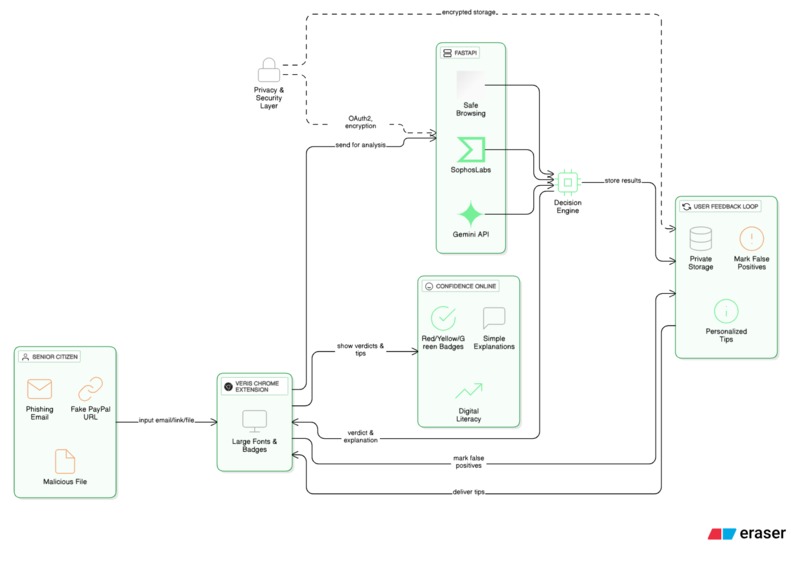
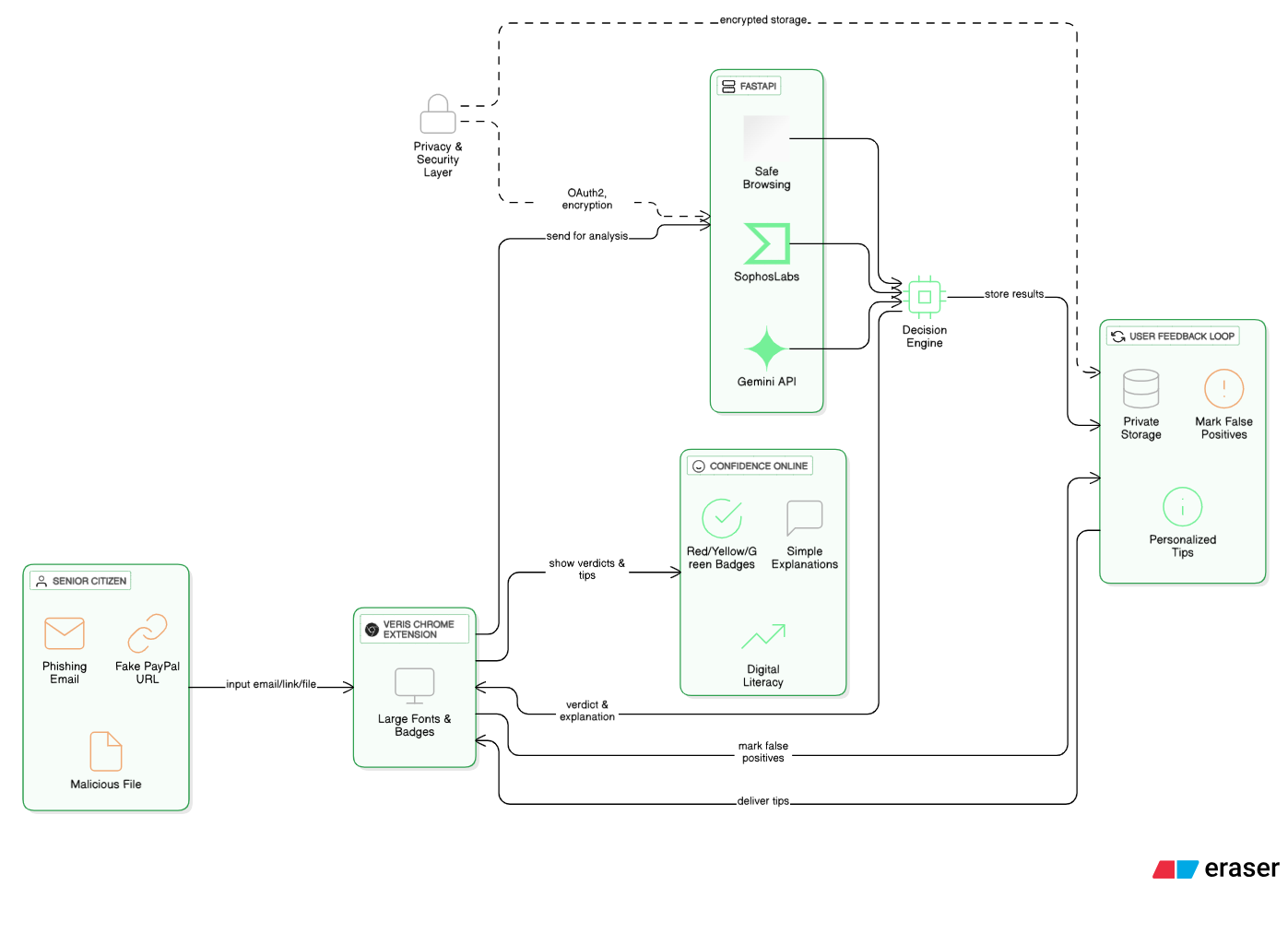
One-click scan of selected email text, links, or attachments in Chrome.
Returns a Red / Yellow / Green verdict plus a single plain-language sentence explaining the risk (e.g., “Sender domain is paypalsecure-24.com — not paypal.com”).
Fuses signals from: Gemini Prompting (Prompt API) for contextual checks and human-friendly explanations,
Google Safe Browsing (fast, client-friendly URL reputation),
Local-first & privacy-minded: Gemini Nano runs client-side for low latency and privacy; optional hybrid fallback to Gemini Developer API via Firebase AI Logic only with user consent.
Personalized micro-lessons: local history of verdicts converts repeated patterns into tips (e.g., “Don’t trust sites that don’t start with https”).
Accessibility-first UI: large fonts, single primary action, screen-reader support, and spoken explanations.
How we built it
Chrome Extension (MV3): TypeScript + React + TailwindCSS for a high-contrast, readable UI.
Client-side AI: Gemini Prompt API for Web & Chrome Extensions — primary explainability and verdict generation.
Reputation: Google Safe Browsing for immediate URL/domain flags.
Hybrid backend: FastAPI (Python) to orchestrate heavier multimodal checks (Gemini Developer API) and optional attachment scanning.
Privacy techniques: local-first preprocessing that masks PII before remote calls; encrypted local storage for verdict history; guest mode to avoid mandatory login.
Challenges we ran into
Prompt design — tuning Gemini prompts to produce short, consistent, non-technical explanations took many iterations.
Accessible UX — designing a single-action UI that communicates risk without overwhelming or patronizing older adults required repeated user testing and copy editing.
Accomplishments that we're proud of
Working Chrome extension prototype with one-click scanning that returns clear verdicts and explanations.
Integrated Google Safe Browsing + Gemini Prompting into a single flow that prioritizes client-side checks.
Designed an accessible interface tailored for seniors (large fonts, clear colors, spoken explanation).
What we learned
Empathy drives better security design: wording, contrast, and simplicity matter more than feature density for adoption among seniors.
Explainability builds trust: users are more likely to follow a recommendation when they understand why it’s given.
Local-first models like Gemini Nano enable meaningful privacy gains and faster responses for client-side safety tools.
What's next for Veris
SMS/phone-call detection: use Twilio + Whisper to detect robocall and SMS scams in real time.
Partnerships: pre-configure Veris for public computers at senior centers, libraries, and AARP chapters.
Localization: Spanish, Mandarin, Hindi for broader reach (Translator API).
Cross-browser: Firefox & Edge versions.
Threat analytics pipeline: anonymized signals + foundation models to help link attacks and assist law enforcement (long-term).
Built With
- chrome-mv3
- fastapi
- gemini-api
- github
- google-safe-browsing
- python
- react
- tailwindcss
- typescript

Log in or sign up for Devpost to join the conversation.