-
Logo
-
Architecture Flow
Inspiration
Leading digital literacy workshops in senior centers, I worked alongside many older adults who had firsthand experience with cybersecurity scams, sometimes losing tens of thousands of dollars after a single email or malicious website. More than money, many felt embarrassed, confused, and afraid to use the Internet.
Yet, existing anti-virus and security tools fail the most-targeted group: seniors. Interfaces use tiny fonts, technical jargon, and confusing dashboards that leave them vulnerable.
We built Veris to replace fear with confidence.
One clear badge. Plain reasons. Practical lessons. Over time, Veris helps seniors to feel independent and confident online.
What it does
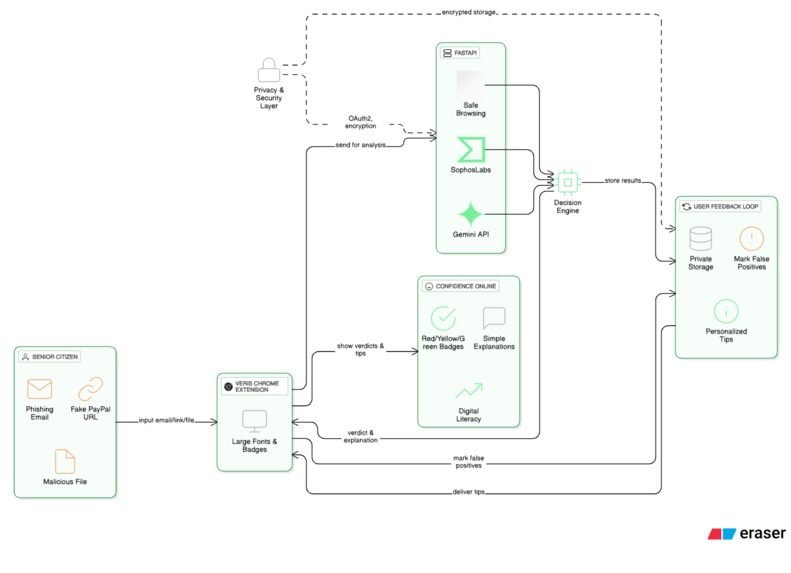
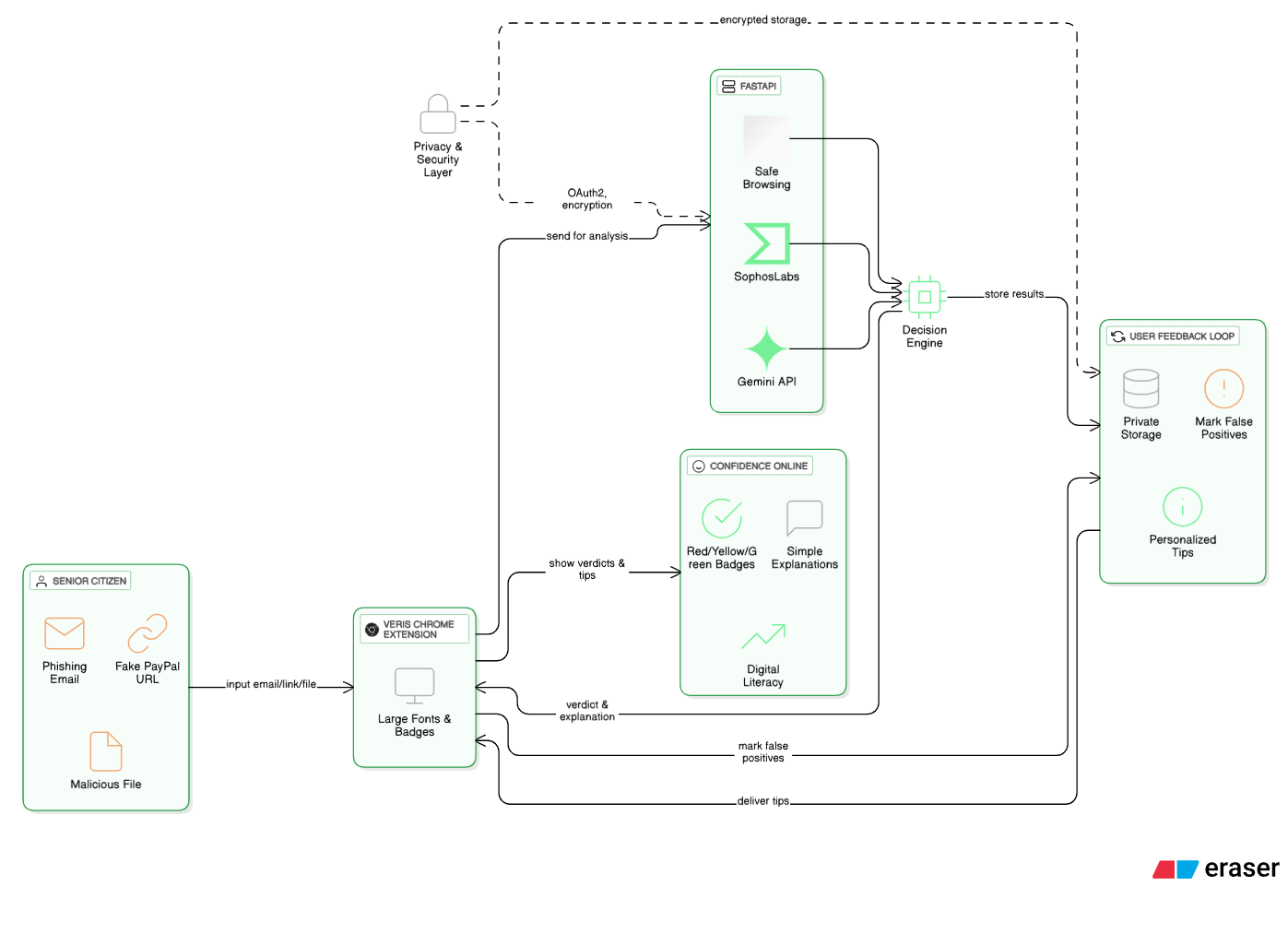
Veris is a Chrome extension + web demo that helps seniors evaluate digital threats:
- Scans email text, URLs, and file attachments.
- Scores each item Red / Yellow / Green using three engines:
- Google Safe Browsing for known malicious domains
- Gemini API for explainability and context-aware checks
- SophosLabs for file/hash reputation checks
- Google Safe Browsing for known malicious domains
- Explains why in a single, plain sentence (example: Sender domain isn’t paypal.com — it’s paypalsecure-24.com.”).
- Stores verdicts privately and converts repeated patterns into personalized learning tips (example: “Don’t trust sites that don’t start with https.”).
All interactions use large, readable fonts and a single-action UI so seniors aren’t overwhelmed.
How we built it
Front-end & Extension
- Manifest V3 Chrome Extension (TypeScript + React)
- TailwindCSS for accessible, high-contrast UI
Back-end
- FastAPI endpoints
Engines / Integrations
- Google Safe Browsing
- Gemini API
- SophosLabs
Security & Privacy
- OAuth2 local account or email-less guest mode
- All personal data encrypted
- Local-first preprocessing (sensitive tokens masked before remote calls)
Challenges we ran into
- Getting three different APIs (Gemini, Google Safe Browsing, SophosLabs) to align into a unified scoring system.
- Balancing cost and efficacy: Google Safe Browsing is much cheaper but significantly less effective than other malware/phishing detection APIs
- Tweaking Gemini prompts to keep explanations short, plain, and consistent for seniors
- Designing a UI that seniors could read at a glance, balancing clarity, color contrast, and simplicity. ## Accomplishments that we're proud of
- Working Chrome extension prototype with one-click scanning.
- Integrated Safe Browsing, SophosLabs, and Gemini into one flow.
- UI is accessible by seniors.
What we learned
- Empathy drives design — wording and contrast matter.
- Explainability increases trust — seniors need the why.
- Local-first checks reduce privacy risk and speed responses.
What's next for Veris
- Add phone-call and SMS scam detection using Twilio + Whisper so we can analyze robocalls in real time.
- Partner with senior centers, libraries, and AARP chapters to deploy Veris pre-configured on public computers.
- Transition from Safe Browsing to Google's Evaluate API once it is released to the public.
- Launch Firefox and Edge versions.
- Localize into Spanish, Mandarin, and Hindi to protect seniors worldwide.
- Long-term: anonymized threat data pipeline paired with foundation models that link attacks to attackers to assist law enforcement.
Built With
- chrome
- gemini-api
- google-safe-browsing
- python
- react
- sophoslabs
- tailwindcss
- typescript


Log in or sign up for Devpost to join the conversation.