-
-
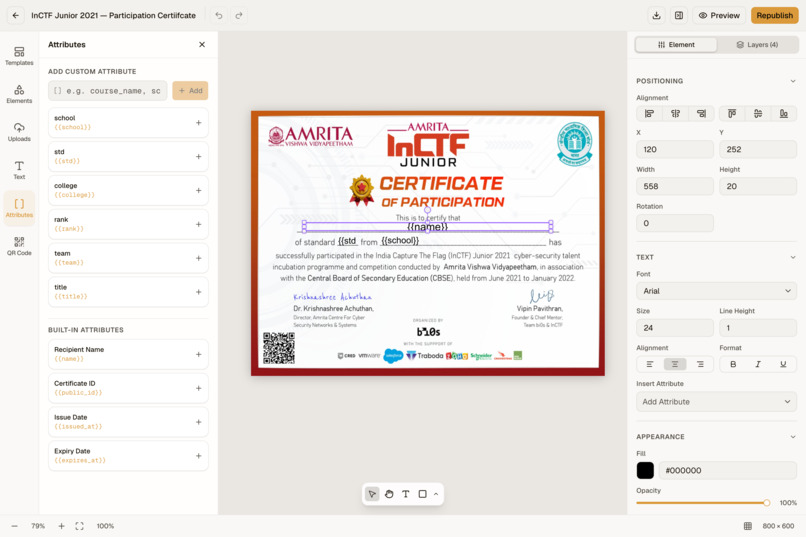
Certificate Editor UI
Two days after the fest ends, the WhatsApp group is still going.
Someone can't find their certificate. Someone else's name is spelled wrong. A volunteer is copying names into a design tool at 1am, and a sponsor wants to know why their logo is missing from half the certificates.
That is the part nobody plans for. The event is over, the photos are up, the winners have been announced — and the last thing between the team and a clean closeout is a folder of PDFs that nobody can check.
Verifycate is what we built after watching that happen at event after event, including a campus fest with 60+ sub-events and over 5,000 students.
What Verifycate is
Verifycate is a certificate operations tool for event and cohort organisers. You design a certificate once, import a spreadsheet of recipients, and send each person a link to a certificate with a QR code and a public page that anyone can open to verify it.
It is a bulk certificate generator with verification built in, but the verification is not the whole product. The product is the closeout: collecting the names you are missing, holding a certificate until someone gives feedback, fixing a misspelt name without reissuing everything, and leaving behind a page that still works years later.
The four things that actually go wrong
1. The list is never finished
There is always a registration that never made it into the sheet, a walk-in, or a team lead who signed up six people under one email address.
Two ways out, depending on how much of the list you have:
- Import what you have. Drop in a CSV or Excel file, or paste rows straight from a spreadsheet. Map columns to name, email, and Attributes once. Duplicate rows are identified and skipped, and you can preview the output with real recipient data before anything is sent.
- Collect what you are missing with the Issue Request Form. Share one link. Applicants confirm their email with a one-time code and submit their own details, including extra fields for university, team name, or track. Choose Issue Automatically or Review Before Issuing, then work through submissions in Issue Requests.
Importing recipients does not spend credits. Only issuing does.
2. You want feedback before the certificate goes out
Course feedback and post-event surveys usually arrive late, incomplete, or not at all, because the certificate — the one thing the recipient actually wants — has already been handed over.
The Certificate Unlock Form inverts that. Enable the form, add recipients, and each person receives a private link. Their certificate is held until they complete your form: a rating, a few questions, a testimonial, a project link. No login and no OTP for the recipient.
You choose whether the certificate releases automatically on submission or waits for your review in Unlock Responses. It is the one workflow that is genuinely awkward to reproduce with a design tool and a mail merge, and it is the reason some organisers switch.
3. Someone's name is wrong
A typo should not become a support thread, and it should not cost you another credit.
Recipients request a fix from their own certificate page through the Correction Form. They confirm their email, select which Attributes are wrong, and submit the correct values. You can apply corrections automatically or review each one in Correction Requests.
An applied correction creates a new version at the same certificate page. The old link keeps working, the public record stays consistent, and no credit is spent.
We learned where to point this by watching a real fest. At Vidyut 2025, corrections clustered on exactly two things: the recipient's name and the college name. Not the award, not the date. So the form is built around Attributes, not a generic "contact us" box.
4. "Is this real?"
Every issued certificate has a public page: who issued it, what it was for, when, the award details, and the issuer's own information. The QR code on the certificate leads there. Recipients can download a PNG or PDF, copy a shareable link, and add the certificate to LinkedIn in one click.
The point is that verification is not a screenshot of a PDF. The page is the record, and a downloaded file still points back to it.
On Pro, the page also reports whether a blockchain anchor is confirmed, checked independently on Ethereum and Bitcoin through OpenTimestamps. The underlying data is signed as Open Badge 3.0 and W3C Verifiable Credentials. We describe what is checkable rather than claiming a file is tamper-proof — an image can always be edited; the public page and the signature are what establish authenticity.
Designing dozens of certificates is the real bottleneck
This was the surprise in our own event data, and it is why the editor looks the way it does.
At Vidyut 2025, over 5,000 students across 60+ events received certificates, and once the designs and signatures were done, the send took under a day. The days before that went on designing dozens of unique certificates, placing the right sponsor logos on each one, and collecting stakeholder signatures one certificate at a time. Sending was never the slow part.
So the design side is built for repetition:
- A template editor with text, images, shapes, and reusable Attributes, on a blank canvas or over artwork you already have.
- Create with AI generates four editable directions from a description, so you start from something instead of a blank page.
- Use Your Canva Design imports a Canva file as a background, then you add Attributes and the QR code on top.
- Preview with Data catches long names, missing values, and layout breakage before 2,000 emails go out.
- Template versions show which recipients are still on an older design, so a late sponsor logo means reissuing only the people affected.
- Templates can be reused from another certificate, which matters when a fest has sixty sub-events and one visual identity.
How it works
- Design. Open the editor, upload artwork, or bring in a Canva design. Place
{{name}},{{university}}, and the QR code. Publish the template. - Import. Drop a CSV or Excel file, or paste your list. Map columns to name, email, and Attributes once.
- Send. Issue the pending list in one click. One credit per certificate issue. Rows move from Pending to Active.
- Share and verify. Each recipient gets a QR code and a public page. Anyone can open it and check the details, the issuer, and the signature.
What it costs
300 free credits on signup, no card required. That is 300 certificates, and it is enough to run a small workshop end to end before you decide anything.
- Importing, designing, verifying, downloading, and corrections do not spend credits.
- One issue or reissue spends one credit.
- Credits never expire, including top-ups. Only the Pro seat is time-limited.
- Extra credits are ₹1 each, in packs of 500 to 5,000.
Pro is ₹499 a month with 100 credits, ₹999 a quarter with 300, or ₹2,999 a year with 1,200. For reference, 1,000 certificates fit inside one annual Pro seat. Pro unlocks the three forms, the API, the MCP server, custom domains and email senders, sponsor slots, logo removal, SSO and SCIM, audit logs, and the blockchain anchor.
Pricing is published in rupees and checkout is in INR. USD figures on the site are displayed equivalents.
Who it is for, and who it is not for
It is for the people who hand out certificates at a moment in time: campus fests and cultural events, hackathons and CTFs, conferences and webinars, university departments, bootcamps and training providers, volunteer programmes, and nonprofits. Typically hundreds to a few thousand recipients per event, with a date they have to deliver by.
It is not for enterprise credential programmes that need employer-recognised badge networks, degree or transcript records with institution-level governance, or procurement that requires SOC 2 or ISO 27001. We do not hold those attestations, and our security page says so plainly. If that is a hard gate, we are the wrong tool and we would rather say it here.
How we built it
The backend is Go, using Huma for the API layer, PostgreSQL through pgx and sqlc, Redis with Asynq for background jobs, and S3 for assets. Certificates are rendered to PNG and PDF with chromedp in a queued pipeline, so a 5,000-recipient batch does not block the request path.
The app is Next.js and React with TypeScript, sharing a separate template engine package with the renderer so what you see in the editor is what gets rendered.
Verification data is signed as JSON-LD credentials with multibase and JOSE. Anchoring uses go-ethereum and OpenTimestamps, so a proof can be checked without trusting our database or our continued existence. There is a versioned REST API with OpenAPI docs, webhooks, a Zapier connector, and an MCP server for agents.
Challenges we ran into
Corrections versus immutability. A certificate that can be silently rewritten is not proof of anything, but a certificate that can never be fixed punishes people for a typo. We settled on new versions at a stable URL, issuer-controlled auto-apply or review, and no credit charged for a correction.
Rendering at scale without surprises. One broken template multiplied by thousands of recipients is a very bad afternoon. Preview with Data and template versioning exist because we broke this ourselves.
Gating a certificate without forcing a recipient to make an account. Every recipient gets a unique private link. Email confirmation is enough to stop someone else unlocking a certificate; a login is not.
Knowing when to stop claiming. It would be easy to write "tamper-proof" and "bank-grade" on a landing page. We do not, because it is not true, and organisers who get burned by that language do not come back.
What we learned
- The send is not the hard part. Design and sign-off are.
- Organisers do not want a credential platform. They want the event closed out and the complaints to stop.
- The most requested change after an event is a spelling correction, not a feature.
- Trust in a certificate is a working URL, not a badge graphic on a homepage.
What is next
- Better template reuse across the sub-events of one fest, so sixty certificates share one identity without sixty designs.
- Cohort workflows: expiry, reissue, and term-over-term history for training providers.
- A deeper agent and API surface, so registration tools and internal systems can issue directly.
- Published case studies with real numbers, including the ones that did not go to plan.
Try it
Start with 300 free credits and no card. Design one certificate, import a short list, and check what the recipient sees.
- Website: https://verifycate.com
- Sample certificate page: https://verifycate.com/c/17e9695e-9352-4cd6-874d-7315f09b9ea1
- Developer docs: https://developers.verifycate.com
Built With
- go
- nextjs
- postgresql
- react
- tailwind
- typescript

Log in or sign up for Devpost to join the conversation.