-
-

API save Page
-
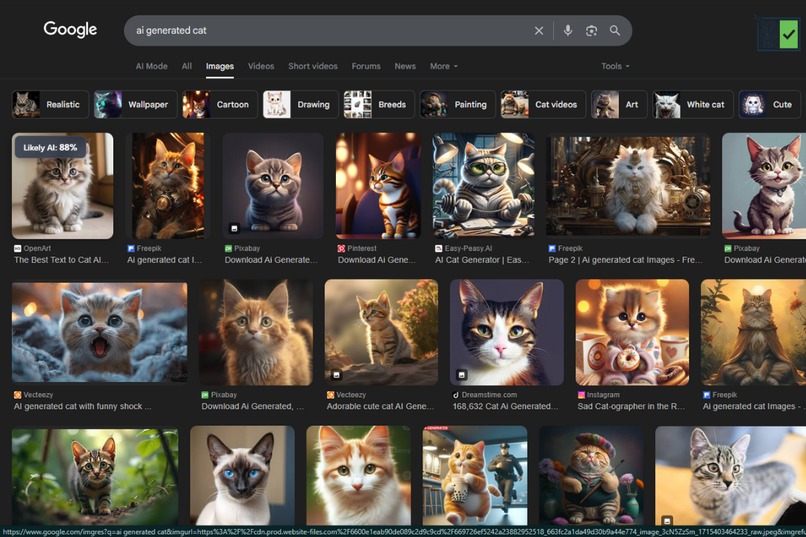
Chack on Google image
-

Chack on Social Media

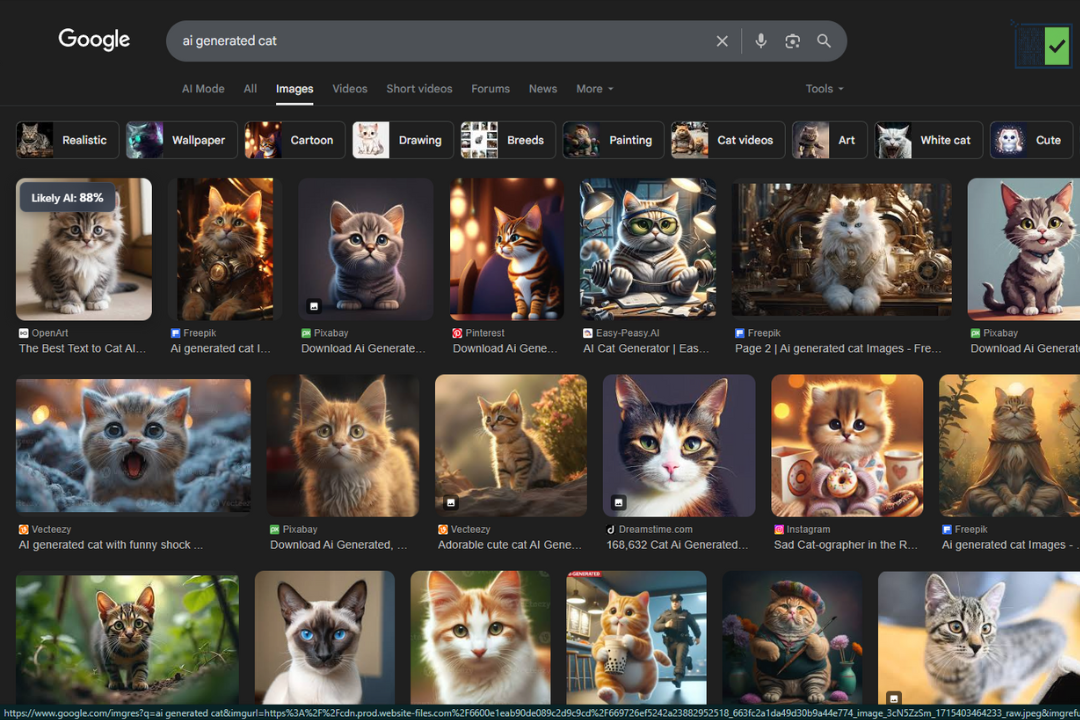

VerifEye
Inspiration
In an era where digital reality is increasingly fluid, the line between authentic and artificially generated content has become dangerously blurred. I was inspired by the growing challenge of visual misinformation—how a single, convincing AI-generated image can spread across social media and erode public trust.
While powerful generative models have democratized creativity, they have also created an urgent need for accessible verification tools. I realized that for the average internet user, existing solutions were often too slow or cumbersome, requiring manual uploads or clicks.
The core inspiration behind VerifEye was to create a frictionless, real-time “first line of defense” against this problem. I envisioned a tool that was as intuitive as browsing itself—a seamless assistant that empowers users to question what they see without interrupting their workflow. The goal was not to be a definitive arbiter of truth, but to foster a healthy skepticism and provide an instant data point to help users think more critically about the content they consume.
What It Does
VerifEye is a sophisticated yet simple-to-use Chrome extension that acts as a real-time AI image detector. Once enabled with a single click on the toolbar icon, it works silently in the background.
As a user browses any website—from news articles to dynamic social media feeds like Facebook or Instagram—they can simply hover their mouse over an image. VerifEye instantly initiates an analysis, sending the image data to Google's Gemini API.
Within moments, a clean, non-intrusive tooltip appears over the image, displaying a clear, color-coded probability score (e.g., "Likely AI: 95%") that indicates the likelihood of the image being artificially generated. This empowers users with immediate, actionable insight into the authenticity of the visual content they encounter.
How I Built It
VerifEye was architected using a modern, robust, and event-driven approach, adhering to Chrome’s Manifest V3 standards for security and performance.
The extension is built on three core components:
1. Content Script (content.js)
- Acts as the frontline of the extension.
- Injected into every webpage and uses a MutationObserver to track all images, including those loaded dynamically.
- Handles mouseover events, manages the UI tooltip, and establishes a long-lived connection with the background script.
2. Background Script (background.js)
- Serves as the central brain.
- Manages the on/off state, toolbar icon, and badge.
- Handles communication with the Google Gemini API, processing analysis requests from the content script.
- Securely fetches image data, calls the API, and returns the result to the correct tab.
- Includes caching and debouncing mechanisms for performance optimization.
3. Google Gemini API (gemini-flash-latest)
- Powers the core intelligence of VerifEye.
- Processes visual information via a multimodal model.
- Uses a carefully crafted prompt to determine the probability of AI generation.
- Returns results efficiently, ensuring real-time feedback.
Challenges I Ran Into
🔐 API Security and Architecture
- Handling the Gemini API key securely was a major challenge.
- The MVP used a local key, but the architecture was later designed with a backend proxy for secure key management.
🧠 Dynamic Content on SPAs
- Initially failed on modern sites like Facebook due to dynamically loaded content.
- Implemented MutationObserver to track new DOM elements in real time.
🔄 Asynchronous Communication Errors
- Faced persistent
Extension context invalidatedandReceiving end does not existerrors. - Refactored messaging to use long-lived ports (
chrome.runtime.connect) for stable communication.
⚙️ API Reliability and Prompt Engineering
- Encountered failures from model updates and safety filters.
- Added detailed error handling and a diagnostic function to list available models.
- Iteratively refined prompts to produce consistent probability scores.
Accomplishments That I'm Proud Of
- Built a fully functional Manifest V3 extension using modern Chrome APIs.
- Successfully implemented MutationObserver for dynamic content handling.
- Designed a stable communication architecture using long-lived connections.
- Created a clean, intuitive UI with an on/off toggle and non-intrusive tooltip.
- Delivered a tool that is both technically robust and user-friendly.
What I Learned
This project was a profound learning experience, offering deep, practical knowledge of:
- The Chrome Extension Manifest V3 ecosystem.
- The lifecycle of service workers and inter-script communication.
- Secure interaction with third-party AI APIs.
- Debugging complex asynchronous systems in the browser environment.
It solidified my understanding of how to build robust, real-world applications that solve tangible problems.
What's Next for VerifEye
The next major step is to implement the “Source Finder” feature.
This would integrate a reverse image search API (e.g., SerpApi) through a secure backend.
When an image is deemed “Likely Real,” users could view a list of websites where that image appears—enabling fact-checking and source tracing.
This would elevate VerifEye from a simple detector to a comprehensive verification and research assistant.
Built With
- chrome.action
- chrome.storage
- css3
- gemini-flash-latest
- googlegeminiapi
- html5
- javascript
- long-livedportconnections
- manifestv3

Log in or sign up for Devpost to join the conversation.