-
-
Verifai
-
Verifai - Finish Test Run
-
Verifai - History Test Run
-
Verifai - Test Dashboard
Inspiration
Every development team ships bugs — not because they don't care, but because manual QA can't keep up with the pace of modern development. We watched QA engineers spend hours clicking through the same flows after every sprint, writing the same Jira tickets, attaching the same screenshots. Meanwhile, Gemini's Computer Use capability had just launched with the ability to see and interact with screens like a human would.
The question that started Verifai was simple: what if the QA engineer could hand a Jira ticket to an AI agent, point it at a staging URL, and come back to a finished bug report with Jira tickets already filed?
We wanted to build something that doesn't just automate tests someone already wrote — it reads specs the way a real QA engineer would, looks at the live application, decides what to test, and tells you what's broken.
What It Does
Verifai is an autonomous QA testing agent. You give it a spec source (Jira ticket, Confluence page, or plain text) and a target URL. It does the rest:
Reads the spec — Gemini parses Jira tickets, Confluence documentation, or free-form descriptions into a sequential test plan of 5-8 browser actions.
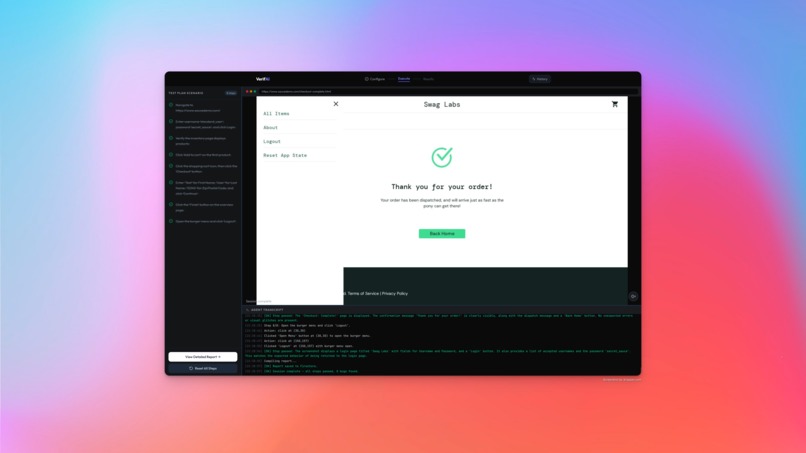
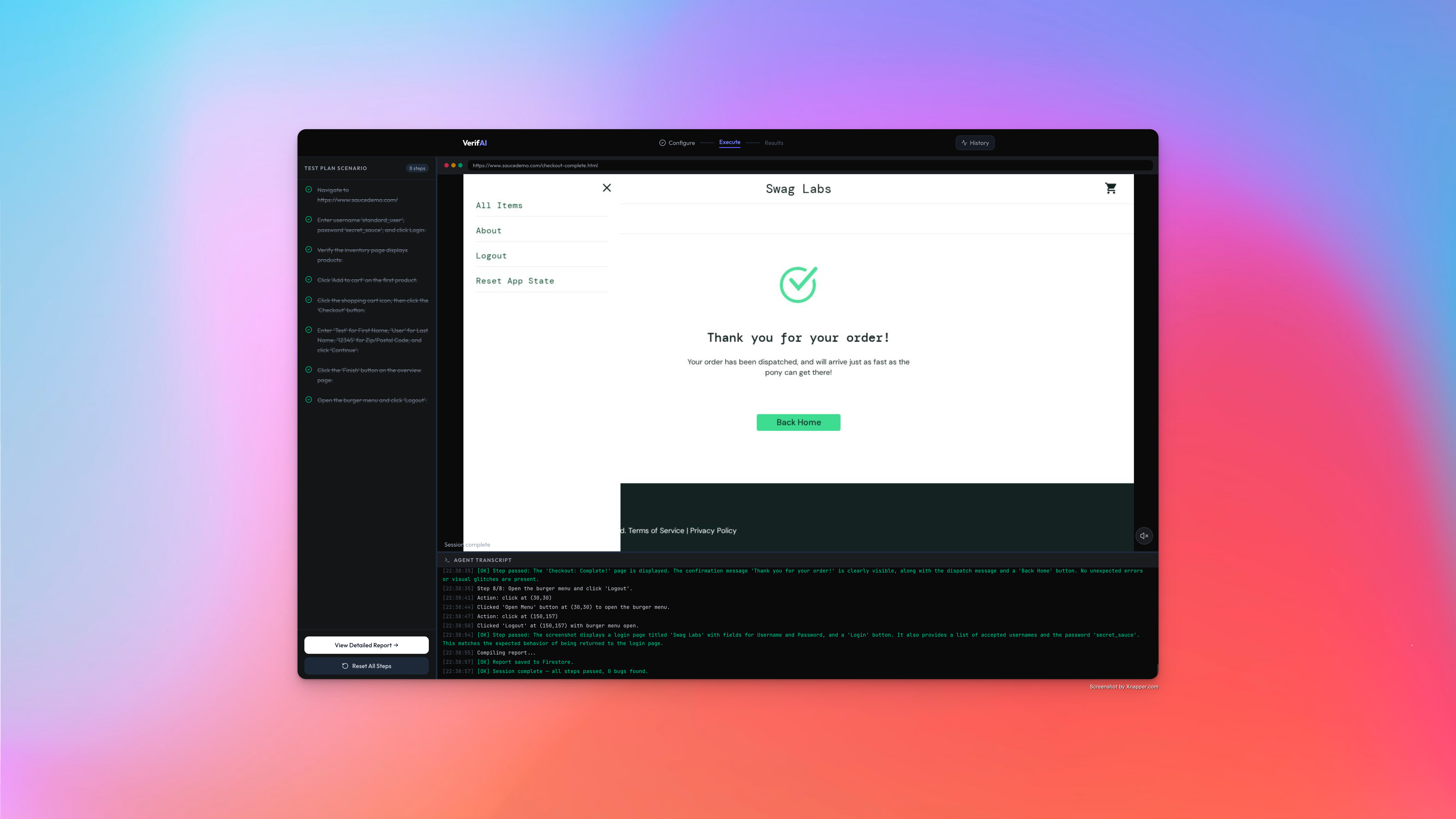
Tests autonomously — For each step, the agent takes a screenshot of the live browser, sends it to Gemini 3 Flash with the Computer Use tool, receives a coordinate-based action decision, executes it via Playwright, then verifies the result with a separate Gemini model. The AI sees before it acts — every single time.
Finds real bugs — When verification fails, Verifai captures the evidence: screenshot, expected vs. actual behavior, severity assessment. It generates a detailed bug description and auto-creates a Jira ticket with the screenshot uploaded to Google Cloud Storage.
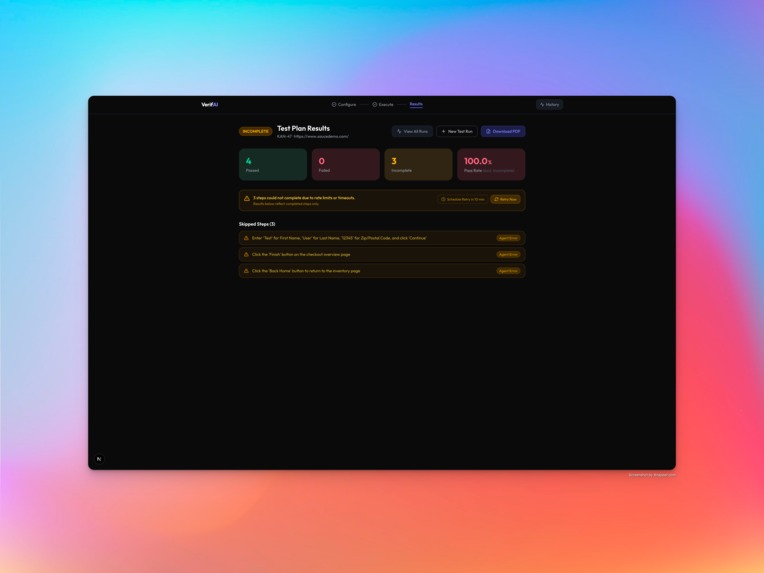
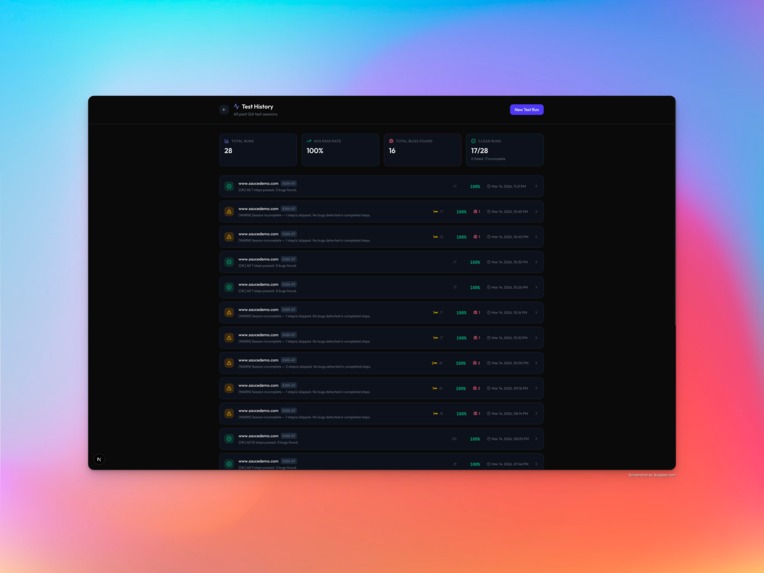
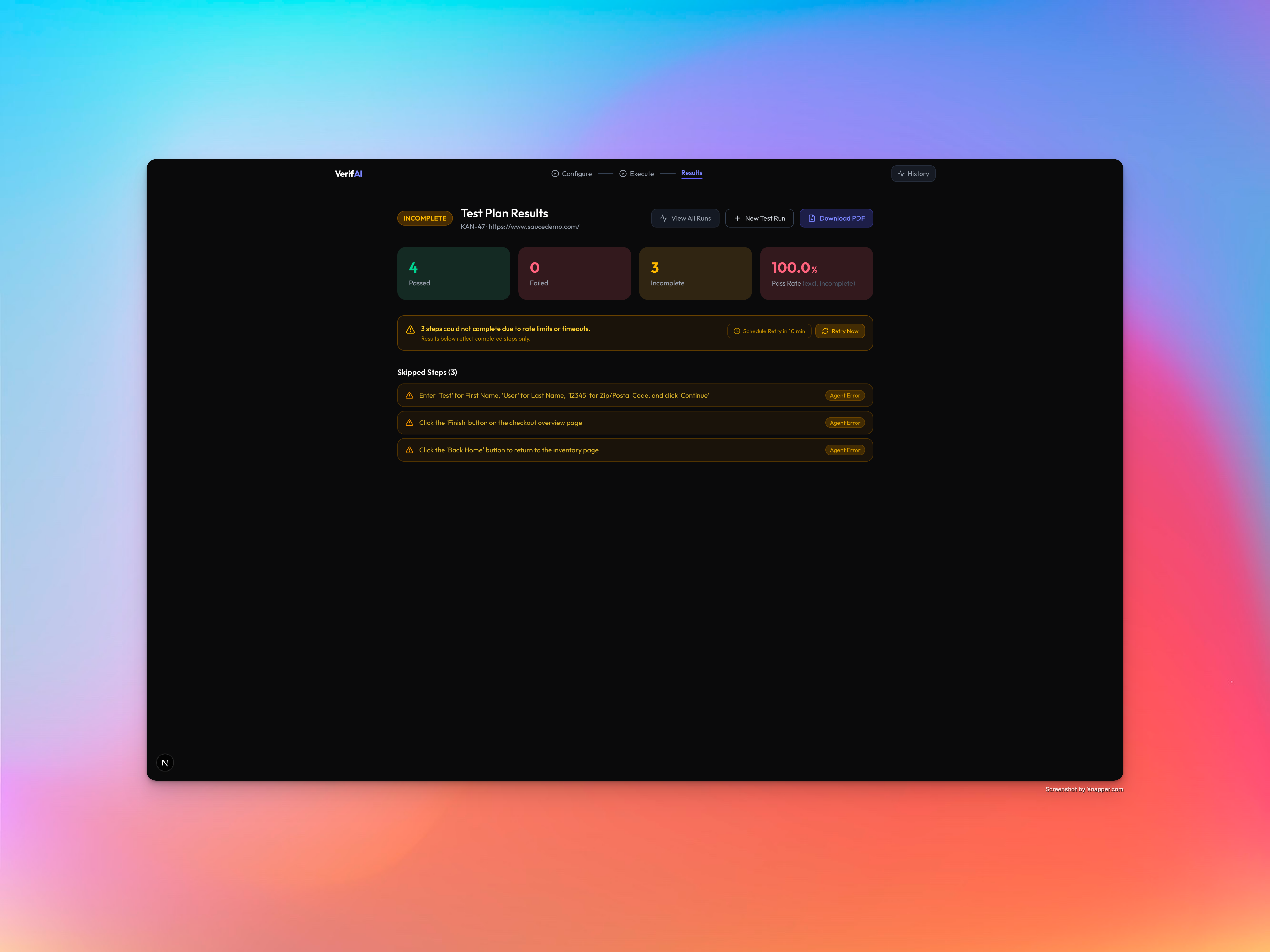
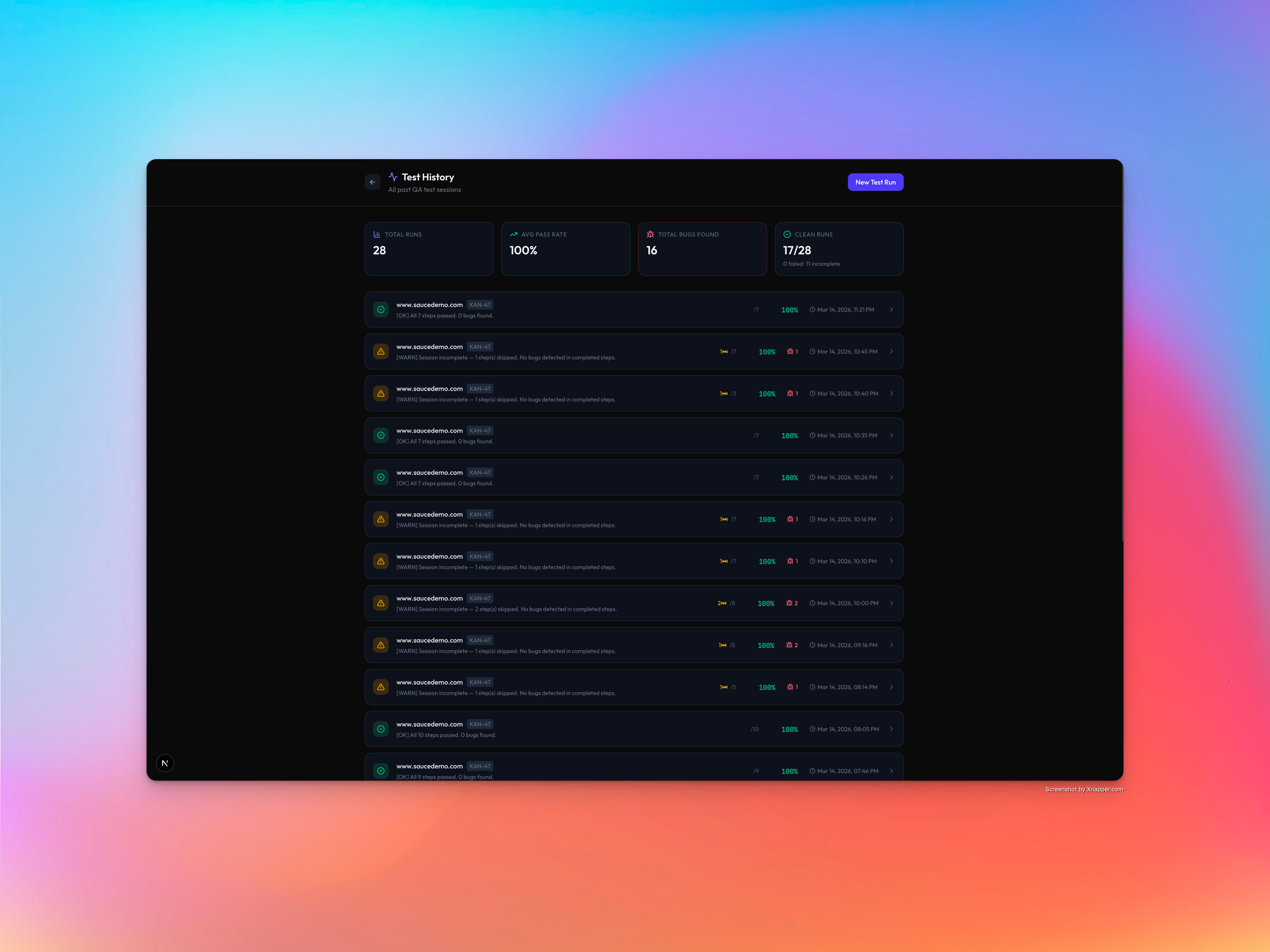
Reports everything — A tri-state reporting system classifies each step as Passed, Failed, or Incomplete (timeout, error, or skipped). Reports are persisted to Firestore with full audit trails. You can download a PDF or browse past runs in the test history page.
Keeps humans in control — When the AI encounters ambiguity (low confidence actions, unexpected page states, destructive operations), it pauses and asks the operator for guidance via a HITL modal — showing the screenshot, its reasoning, and decision options. Every human intervention is logged.
Narrates live — Gemini TTS provides real-time voice narration during execution. The agent literally explains what it's doing as it tests.
How We Built It
Architecture: Turborepo monorepo with a Next.js frontend (Vercel) and a Node.js/Express agent server (Cloud Run). The agent manages a headless Chromium browser via Playwright and communicates with the frontend through Socket.io WebSockets for real-time streaming.
Multi-Model Architecture: We use three specialized Gemini models, each chosen for what it does best:
| Model | What It Does |
|---|---|
| Gemini 3 Flash | The agent's eyes and hands — uses the native Computer Use tool to analyze live screenshots and return pixel-coordinate actions (click at x,y, type text, scroll, navigate). Makes every browser action decision. |
| Gemini 2.5 Flash Lite | The agent's brain for everything else — parses Jira/Confluence specs into test plans, verifies each step by comparing screenshots to expected behavior, generates bug descriptions for Jira tickets, and writes real-time text narration for the transcript. |
| Gemini 2.5 Flash TTS | The agent's voice — converts narration text into spoken audio streamed live to the frontend. The AI literally talks through what it's doing during the demo. |
Each model handles a distinct responsibility. Computer Use (Gemini 3 Flash) is the only model with the native tool-calling protocol needed for coordinate-based browser interaction. Lite handles all text and vision-verification tasks. TTS adds the live voice layer that makes the demo unforgettable.
The Vision Loop (core architecture):
For each step:
  Screenshot → AOM tree → Gemini 3 Flash (Computer Use) → coordinate action
  → Playwright executes → wait → Screenshot → Gemini 2.5 Flash Lite (verify)
  → passed / failed / incomplete
Gemini sees the live browser state before every decision. Playwright is just the hands; Gemini is the brain. This is a Computer Use agent that happens to do QA, not a QA script with AI bolted on.
Resilience layers: Every Gemini call is wrapped in callGeminiWithBackoff with exponential retry. abortableSleep uses 50ms polling so session cleanup is near-instant when a user skips a step or ends a session. Per-step abortToken and per-session sessionAbort prevent ghost Gemini calls from lingering after the session moves on. raceSkip polls at 150ms in Promise.race for responsive user-initiated skips.
Google Cloud integration: Firestore for report persistence, GCS for bug screenshots (linked in Jira tickets), Cloud Run for the agent with session affinity for WebSocket support.
Challenges We Ran Into
Computer Use response parsing is unpredictable. Gemini 3 Flash sometimes returns a functionCall via the native tool-calling protocol, sometimes returns JSON text, sometimes returns free-form text with "STEP_COMPLETE." We wrote a multi-fallback parser that handles all three response formats and gracefully degrades when the model produces something unexpected.
The "blind execution" trap. Our first architecture had Gemini generate a full test plan upfront, then Playwright executed steps without consulting Gemini again. This looked impressive in demos but failed on any real-world page where the UI didn't match expectations. The fix was architectural: every single action must be preceded by Gemini seeing a fresh screenshot. This was the most important design decision of the project.
Background Gemini calls after session ends. When a user skips a step via Promise.race, the original executeStepWithVisionLoop promise continues running in the background. Its retry sleeps would wake up seconds later and make stale API calls. We solved this with abortableSleep — a 50ms polling loop that checks an abort flag and resolves immediately instead of sleeping the full duration.
Tri-state reporting was harder than expected. Binary pass/fail seems simple until you realize that timeouts, network errors, and user-initiated skips are not bugs — they're infrastructure noise. We built a tri-state model (Passed / Failed / Incomplete) with typed reasons (rate_limit, timeout, crash) so the report clearly separates "real bugs the AI found" from "steps that couldn't run." Getting this right required rewriting the type system, session runner, and both frontend screens.
Input field interaction is inconsistently reliable. In our demo recording, Verifai failed to reliably focus and type into certain input fields — the Computer Use tool returned valid coordinates, but the click didn't always register focus before the type action fired. This is a sequencing issue between Playwright's click() and fill() calls, not a Gemini issue. We know the fix (explicit focus assertion between click and type, with a retry on empty field state) and it's the first thing on the roadmap.
Accomplishments That We're Proud Of
It actually finds bugs.: Running Verifai against SauceDemo's problem_user account, it discovered UI bugs that weren't in the test spec — items not adding to cart, images displaying incorrectly, checkout totals showing wrong values. The agent reads a normal feature ticket and organically discovers bugs the team didn't know to look for. Check out this Google sheet for the tickets we used and Verifai's bug: https://docs.google.com/spreadsheets/d/1j0AUvxSyCdNytiWE141tgbuf2KhZlE0N/edit?usp=sharing&ouid=108633293263262860350&rtpof=true&sd=true
Tri-state reporting is the right abstraction. Instead of binary pass/fail (where infrastructure timeouts look like bugs), we classify every step as Passed, Failed, or Incomplete with a specific reason. This means the report tells you "we found 2 real bugs and couldn't check 1 step due to a timeout" instead of "3 things failed."
Human-in-the-Loop with confidence scoring. The agent self-assesses its confidence on every action (0.0–1.0). Below the threshold, it pauses and asks the human. The options are context-dependent — "Mark as Passed / Mark as Failed" for ambiguous verifications, "Allow Action / Skip / Abort" for destructive operations. Every intervention is timestamped in the audit trail.
Demo safety net. The demo recording system captures every socket event with timestamps during a real session. During the live presentation, we can replay the recording at 0.7x speed — the UI replays identically (screenshots stream, steps animate, transcript fills, voice narrates). Hidden behind ?demo=true URL parameter.
What We Learned
Multi-model specialization pays off. Most hackathon projects use one model for everything. We split across three: Computer Use for browser decisions, Lite for verification and text tasks, TTS for voice. Each model is chosen for its specific strength — you wouldn't use a Computer Use model just to compare two strings, and you wouldn't use a text model to decide where to click on a screenshot.
Judges care about visible reasoning. Research on past hackathon winners showed that transparent AI decision-making scores higher than polished UI alone. That's why every Gemini decision is logged in the transcript with reasoning, every confidence score is visible, and HITL pauses show exactly what the AI is thinking.
The vision loop is non-negotiable. We lost two days on the "generate plan, execute blindly" approach before accepting that the agent must see the browser before every action. This is fundamentally what makes it a Computer Use agent versus a Playwright test runner with an AI prompt at the beginning.
Graceful degradation beats feature completeness. Every external integration (GCS, Firestore, Jira, Gemini TTS) is individually try-caught. If Jira is down, screenshots still upload. If GCS fails, the report still generates locally. If TTS has an issue, text narration continues. The app never crashes because an optional feature failed.
What's Next for Verifai
Parallel test sessions. Currently one browser per session. With Cloud Run scaling and a Redis session store, Verifai could run multiple test scenarios simultaneously against different user accounts or feature branches.
Visual regression baseline. Store "golden" screenshots from passing runs and diff against future runs pixel-by-pixel to catch visual regressions that functional tests miss.
CI/CD integration. A GitHub Action that runs Verifai against a staging deployment on every PR, posts the report as a PR comment, and blocks merge if high-severity bugs are found.
Smarter test generation. Instead of generating plans from a single Jira ticket, read the entire Confluence space to understand the application's full user flow graph, then generate test plans that cover critical paths and edge cases discovered from documentation analysis.
Multi-browser testing. Extend beyond Chromium to Firefox and Safari via Playwright's multi-browser support, running the same test plan across browsers and reporting browser-specific bugs.
Reliable input field interaction. Our demo exposed a sequencing issue where click-then-type actions occasionally fail to register focus before typing. The fix — explicit focus assertion and retry on empty field state — is the immediate next commit.

Log in or sign up for Devpost to join the conversation.