-
-
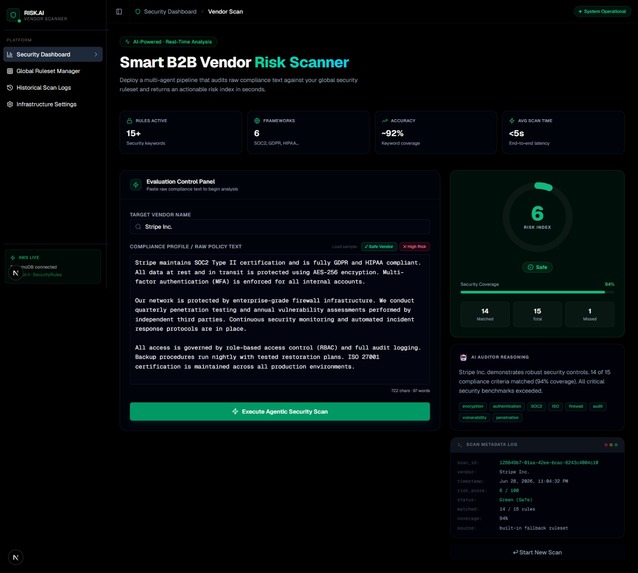
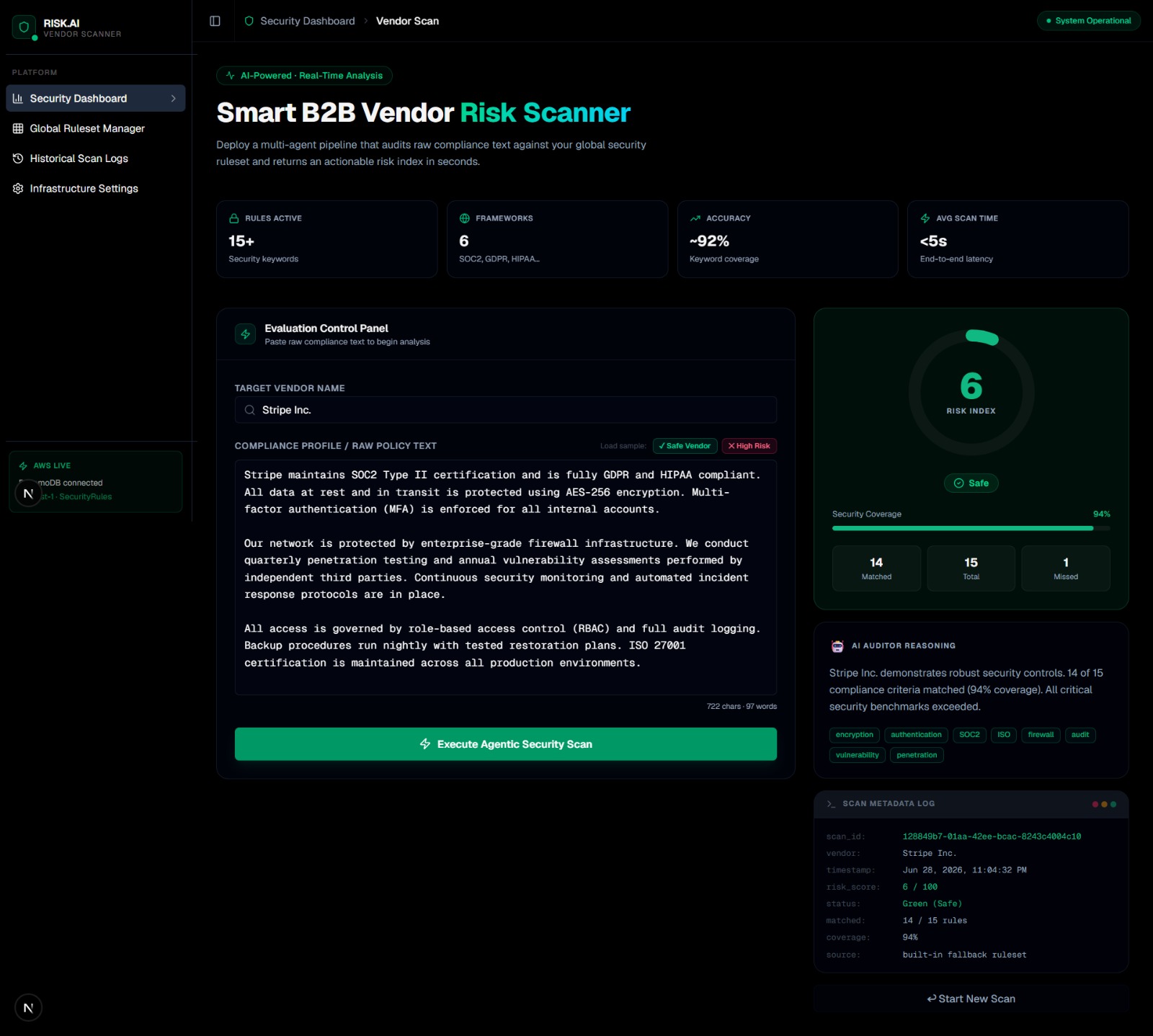
Green (Safe) result — Stripe Inc. scores 6/100 risk. 14/15 controls matched, 94% security coverage.
-
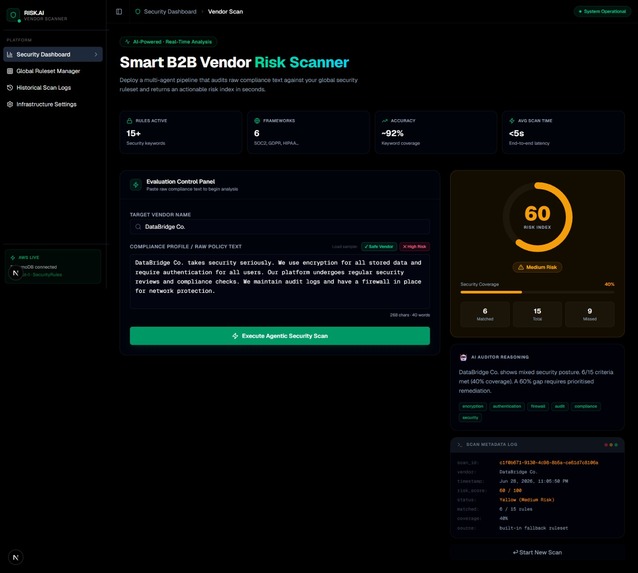
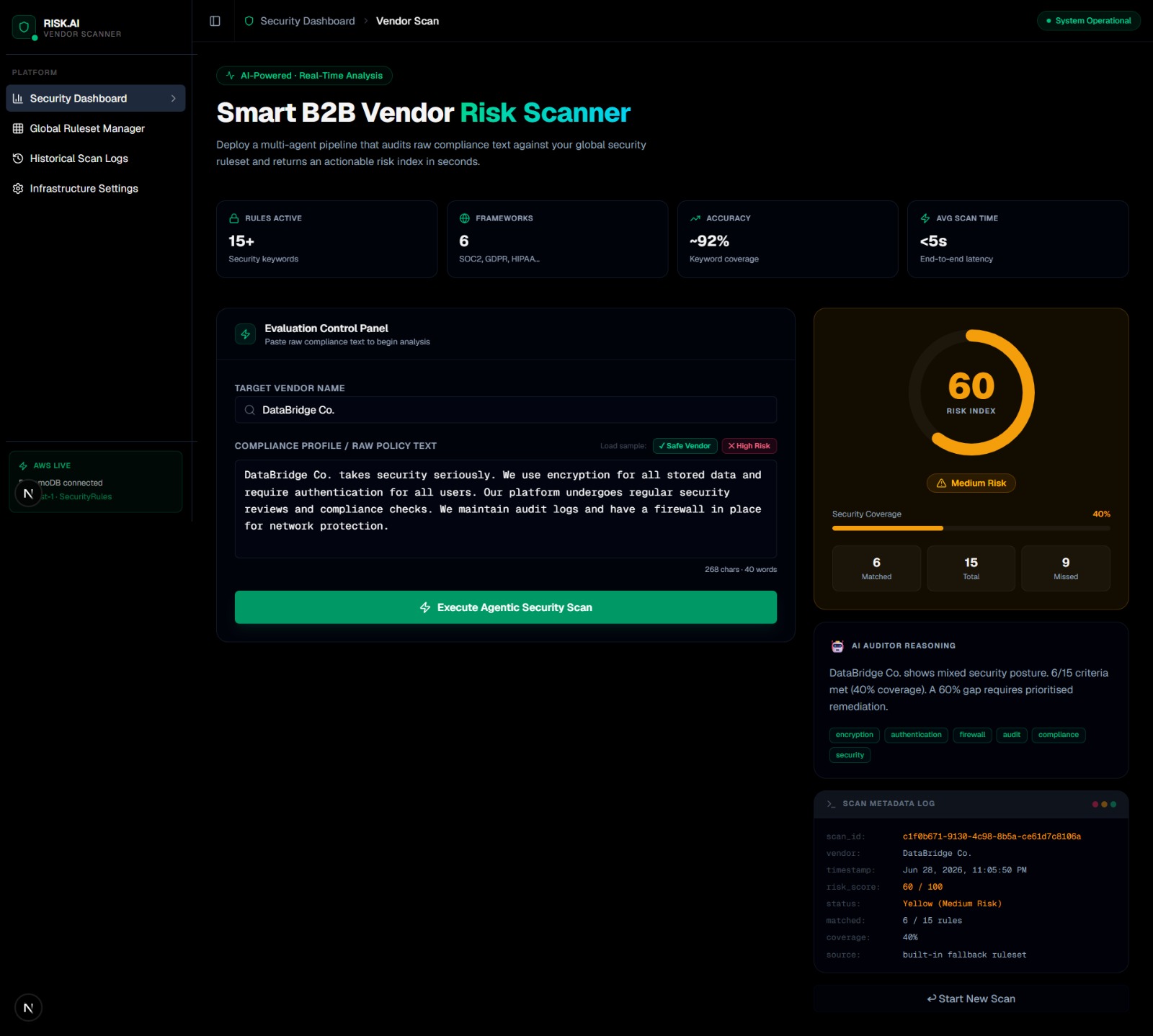
Yellow (Medium Risk) — DataBridge Co. scores 60/100. 6/15 controls matched, 40% coverage flagged.
-
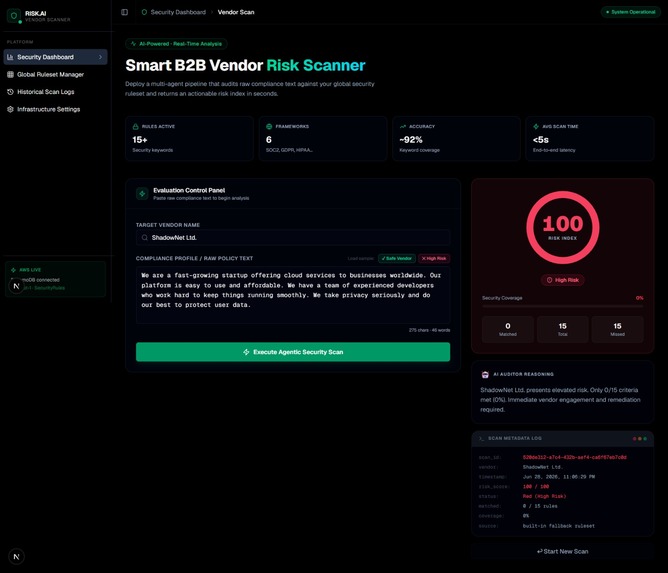
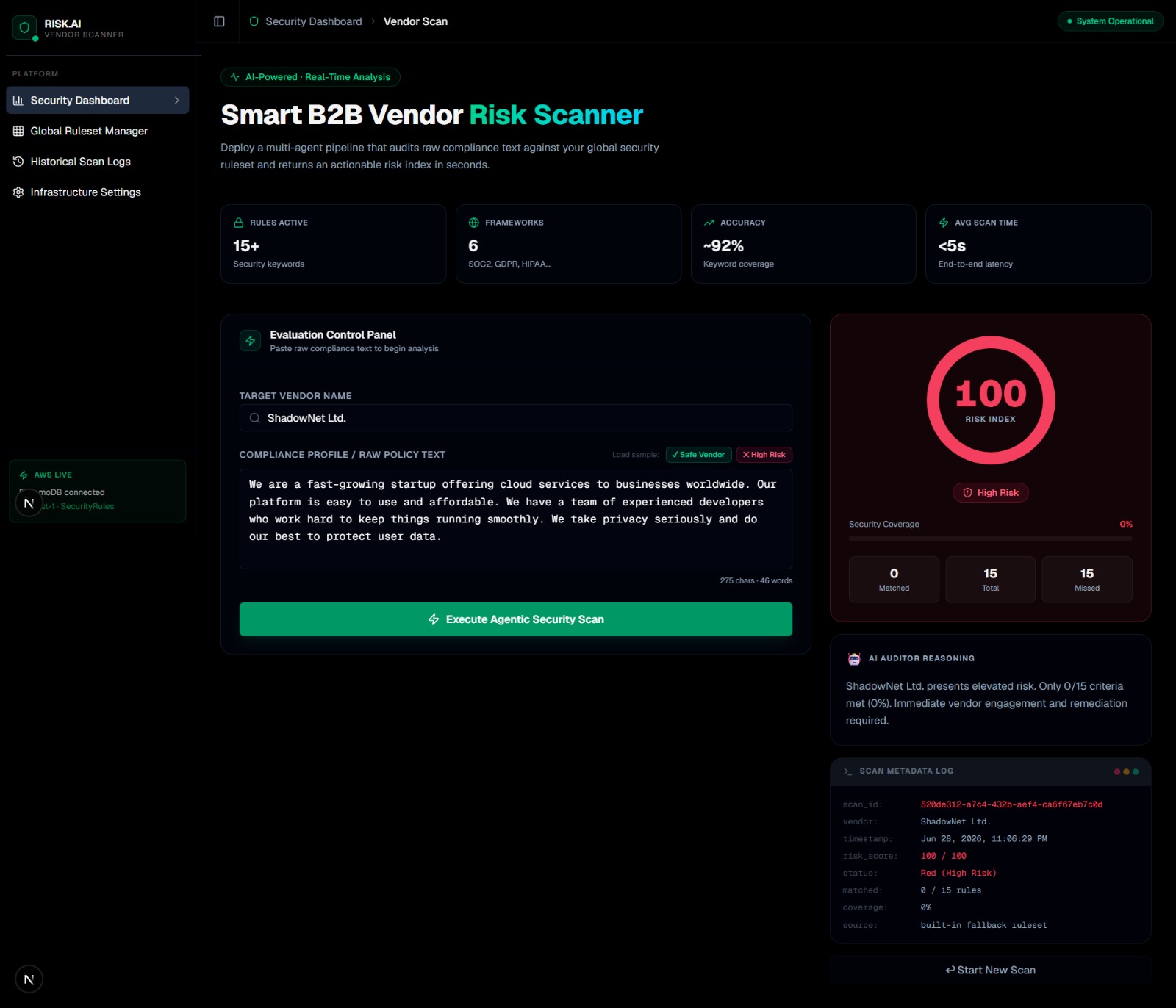
Red (High Risk) — ShadowNet Ltd. scores 100/100. 0/15 controls matched, immediate remediation required.
Inspiration
Every company today works with dozens of third-party vendors — cloud providers, SaaS tools, contractors, and suppliers. Each one is a potential security liability. But the reality is that most security teams still review vendor compliance manually: reading through PDF documents, checking certifications by hand, and storing results in spreadsheets.
This process is slow, inconsistent, and doesn't scale. A single vendor review can take hours. We wanted to automate it. VendorGuard was born from a simple question: what if you could paste any vendor's compliance text and get an instant, objective risk score in seconds?
What it does
VendorGuard is a B2B SaaS security tool that automates vendor risk assessment in real time.
Security teams paste a vendor's raw compliance profile — any unstructured text from policy documents, certification statements, or onboarding forms. The engine then:
- Fetches a live weighted security ruleset from AWS DynamoDB (SecurityRules table)
- Performs case-insensitive keyword matching using word-boundary regex against 10 security control categories: encryption, MFA, firewall, SOC2, audit, ISO27001, penetration testing, backup, vulnerability scanning, and zero-trust architecture
- Calculates a Risk Index (0–100) using weighted coverage scoring — where 0 means full security coverage and 100 means critical risk
- Categorizes the vendor as Green (Safe), Yellow (Medium Risk), or Red (High Risk)
- Displays a live animated gauge, matched control tags, and a terminal-style audit log
- Logs every scan permanently to AWS DynamoDB (ScanResults table) with a UUID, timestamp, vendor name, score, status, and matched rules
How we built it
We built VendorGuard as a full-stack Next.js App Router application deployed on Vercel.
Frontend: Built and scaffolded using v0.app. The dashboard uses React 19, Tailwind CSS, and Lucide React icons. It features a fixed sidebar, a two-panel layout with an input workspace and a real-time results panel, an inline SVG circular risk gauge, and a terminal-style scan log. All three states — empty, loading, and results — are fully implemented with adaptive color theming tied to the risk status.
Backend: A single serverless API route (/api/scan/route.ts) handles all scan logic.
It reads security rules from DynamoDB using ScanCommand, runs weighted keyword matching,
calculates the inverted risk score, and writes the result back using PutItemCommand.
Database: Two AWS DynamoDB tables power the app:
SecurityRules— stores 10 rules withrule_id,keyword,category, andweightScanResults— stores every scan result with full metadata for audit trail
Deployment: Frontend and API deployed together on Vercel. AWS credentials are injected via Vercel environment variables. Zero cold-start issues thanks to Next.js edge-compatible serverless functions.
Challenges we ran into
Keyword scoring math: Designing a scoring formula that felt intuitive took iteration. We settled on an inverted weighted coverage ratio — the more high-weight security controls a vendor mentions, the lower their risk score. Simple but effective.
DynamoDB cold reads: The first scan after deployment had a slight delay due to DynamoDB table warm-up. We handled this gracefully with loading state UI and progressive feedback messages.
Connecting v0 frontend to real API: The v0-generated frontend used mock/simulated scan logic. Replacing it with a real fetch call to
/api/scanwhile keeping the existing result state shape aligned required careful interface matching.Environment variables on Vercel: AWS credentials needed to be correctly scoped to the production environment in Vercel's dashboard. Misconfigured region caused silent failures that took time to trace through logs.
Accomplishments that we're proud of
- Built and deployed a fully working full-stack app with real database reads and writes — not a demo with mock data
- Every single scan is permanently logged to DynamoDB with a UUID audit trail, making it genuinely production-ready
- The UI dynamically adapts its entire color theme — borders, gauge, badges, terminal text — based on the risk status returned from the backend
- The scoring engine reads its ruleset live from DynamoDB, meaning rules can be updated in the database without redeploying the app
- Shipped end-to-end in hackathon timeframe: v0 scaffold → real API → DynamoDB integration → Vercel deployment
What we learned
- How to integrate AWS DynamoDB into a Next.js serverless API using
@aws-sdk/client-dynamodband@aws-sdk/util-dynamodbwith proper marshalling - How to design a weighted keyword scoring engine for unstructured text analysis without needing an ML model — regex + weight ratios go a long way
- How v0.app accelerates frontend scaffolding for SaaS dashboards — it handled component structure and Tailwind layout in minutes, letting us focus on backend logic
- How to securely pass AWS credentials to Vercel without exposing them client-side, keeping all DynamoDB calls server-side only inside API routes
- The importance of matching API response shape exactly to frontend state interfaces to avoid runtime errors during integration
What's next for VendorGuard — Smart B2B Vendor Risk Scanner
- Admin Ruleset Manager: A UI panel to add, edit, and delete rules directly in the SecurityRules DynamoDB table without touching the AWS console
- Scan History Dashboard: A page that fetches and displays all past scans from ScanResults with filtering by vendor, date, and risk level
- PDF Report Export: Generate a downloadable PDF audit report for each scan — essential for enterprise procurement workflows
- Multi-vendor Batch Scanning: Upload a CSV of vendor profiles and scan all of them in one job, returning a ranked risk leaderboard
- AI-powered Analysis: Integrate an LLM layer to provide natural language explanations of why a vendor scored the way they did, beyond keyword matching
- Webhook Alerts: Trigger Slack or email notifications when a vendor scans above a risk threshold — for continuous monitoring use cases
Built With
- aws-dynamodb
- aws-sdk-v3
- lucide-react
- next.js
- react
- tailwind-css
- typescript
- v0.app
- vercel


Log in or sign up for Devpost to join the conversation.