
Vendio
WATCH THIS: WATCH THIS: https://drive.google.com/file/d/1SKkyN3Wyj3g5zOWXZXFeXclKxuJvGw6Z/view?usp=sharing
Sell your stuff faster than you can snap a photo!
AI marketplace autopilot. It turns item photos into complete marketplace listings and post them to Kijiji and Facebook Marketplace.
Inspiration
Selling used items online is repetitive and TOO lenghty: take photos, write a title, guess a price, pick categories, copy the same details into Kijiji and Facebook Marketplace, then answer the same buyer messages again and again. Most people give up after one platform or never list at all.
We built Vendio because listing should feel as fast as taking a photo. We wanted a tool that respects how Canadians actually sell (Kijiji + Facebook Marketplace), keeps the seller in control, and runs on their own machine without handing passwords to a third-party server.
What it does
Vendio is an AI marketplace autopilot. You upload photos of an item, and Vendio:
- Connects your marketplaces via a local browser session (Facebook Marketplace and Kijiji).
- Generates a full listing: title, description, price, category, condition, and location, using vision AI when configured.
- Lets you review and edit the draft before anything goes live.
- Posts to each selected marketplace using Playwright automation that fills the real listing forms in a headed browser on your device.
- Tracks posted listings on a live dashboard with per-marketplace status, links, and activity.
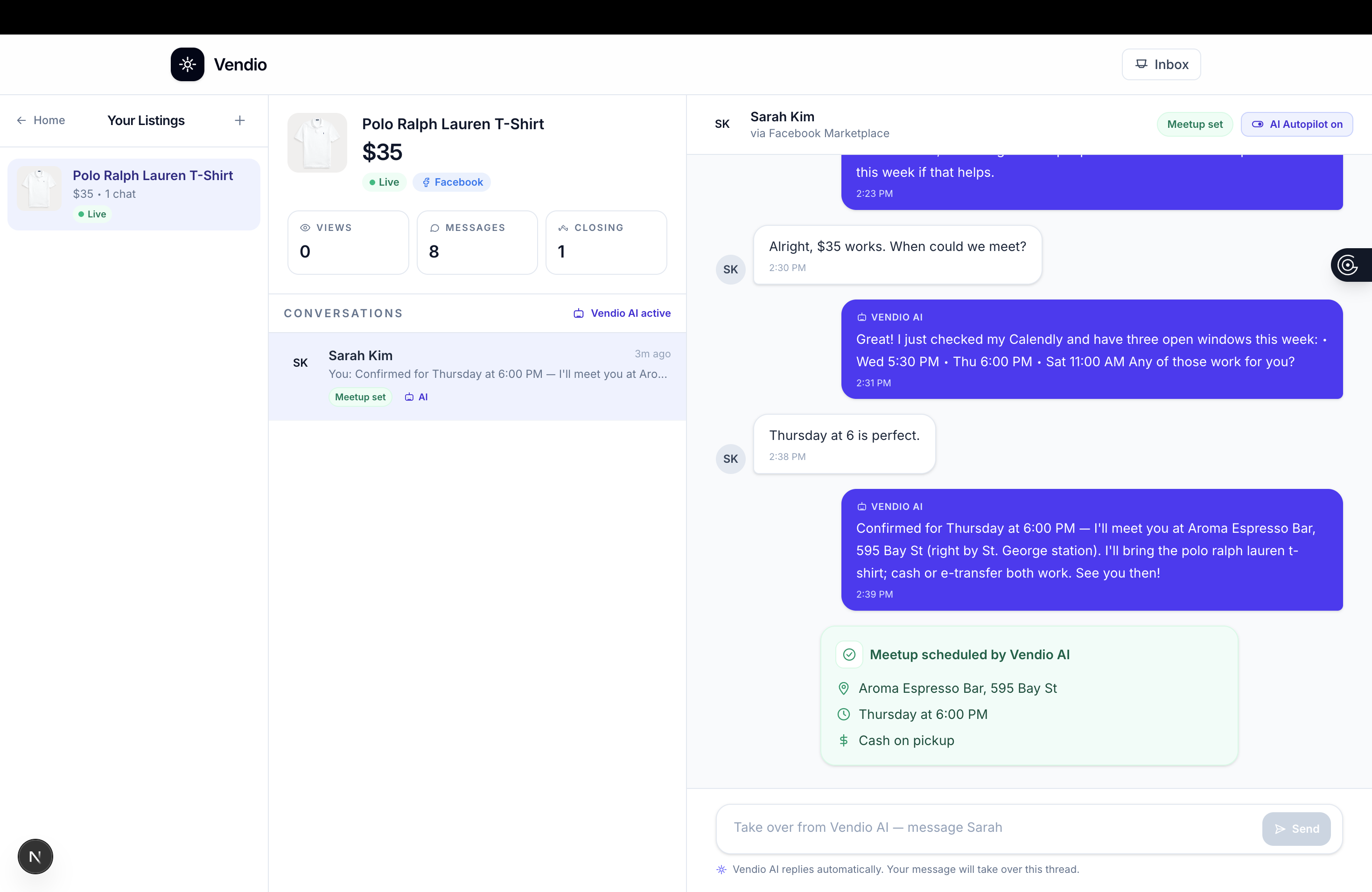
- Manages buyer conversations in a unified inbox with AI-assisted replies, autopilot mode, and negotiation/meetup flows.
Nothing is posted without your approval. Credentials stay in your local Chromium profile. As well, Vendio never stores marketplace passwords.
How we built it
Frontend: Next.js (App Router), React, TypeScript, and Tailwind CSS v4. A guided step flow (Connect → Upload → Review → Post → Dashboard) with a shared stepper, polished step components, and client-side state for the full listing lifecycle.
Backend: Next.js API routes for listing generation, marketplace connect/disconnect, posting, and AI buyer replies. Images are stored locally under public/uploads with metadata in .vendio/.
AI: OpenAI Vision (optional) analyzes uploaded photos and drafts listing copy grounded in what’s actually visible. A separate reply pipeline powers inbox responses with intent detection (questions, negotiation, meetup, close sale).
Automation: Playwright with persistent browser profiles per marketplace. Facebook login is verified via the c_user cookie; Kijiji uses homepage sign-in (legacy login URLs were retired). Adapters map Vendio categories to each platform’s UI, fill forms with resilient selectors, and return partial-success states when a field needs manual completion.
Architecture highlights: Typed domain models (ListingWithActivity, marketplace post status, conversations), client helpers for API orchestration, and session markers that sync with live browser cookies before posting.
Stack: Next.js · React · TypeScript · Tailwind CSS v4 · Playwright · OpenAI Vision (optional)
Challenges we ran into
Fragile marketplace UIs: Facebook and Kijiji change labels, flows, and categories often. We built fallback selectors, category/condition mapping tables, and “finish in browser” paths instead of failing the whole post on one missed field.
Kijiji’s retired login URL:
t-login.htmlreturns 404. We fixed connect by opening the live homepage and clicking Register or Sign In, with post-ad as a fallback redirect.Session truth vs. UI state: “Connected” in the app wasn’t enough; we had to verify cookies and DOM signals before posting, and clear stale session markers on logout.
Blob URL lifecycle: Dashboard images broke after “Create another listing” because summaries used revoked
previewUrls. We persisted server/uploads/...URLs from the generate API instead.Type drift across features: As inbox, activity, and post-status types grew,
page.tsxand API responses fell out of sync. We centralized summary building and alignedGenerateListingResponsewith a requiredlistingId.Long-running automation: Connect and post routes can take up to two minutes (manual login). We tuned API
maxDuration, connect UX copy, and PostingStep refs to avoid React effect re-run bugs during multi-marketplace posts.
Accomplishments that we're proud of
- A complete end-to-end flow from photos to multi-marketplace posts: not just a mock UI, but real Playwright integration with local sessions.
- Dual-marketplace support for Canada’s two biggest classifieds channels in one calm, guided experience.
- Seller-first design: review gate before posting, clear errors, per-marketplace status messages, and open-in-browser fallbacks when automation can’t finish alone.
- A unified inbox with AI replies so listing doesn’t end at “Post": buyers get fast, consistent responses.
What we learned
- Browser automation for consumer marketplaces is less about “clicking buttons” and more about graceful degradation when the DOM changes.
- The best trust model for local selling tools is headed browsers on the user’s machine, not credential vaults in the cloud.
- Vision models are strong at drafting copy, but human review still matters for price, condition honesty, and platform-specific categories.
- Hackathon velocity benefits from strict shared types early; inbox and dashboard features are much easier when
PostedListingSummaryis the single source of truth. - Small UX details (sign-in hints during a 110s connect, upload-step error display, persistent photo URLs) matter as much as the automation itself.
What's next for Vendio
- Stronger post confirmation: detect live listing URLs after publish instead of relying on the automation tab URL.
- Smarter category mapping: learn from manual corrections per user/region to improve Kijiji and Facebook category picks.
- eBay, Craigslist, and OfferUp: extend the adapter pattern to more marketplaces.
- Pricing intelligence: optional comps from recent sold listings in the same city/category.
- Inbox sync: pull real buyer messages from marketplace inboxes instead of demo/simulated threads.
- Mobile capture: phone camera upload with on-device photo cleanup (crop, background blur).
- Optional cloud sync: encrypted listing history across devices while keeping marketplace auth local.
Quick start (for judges)
npm install
npx playwright install chromium
npm run dev
Optional: set OPENAI_API_KEY in .env.local for real AI-generated descriptions and inbox replies.
Open http://localhost:3000 → Connect marketplaces (sign in in the opened browser) → Upload photos → Generate → Review → Post.
Built With
- next
- node.js
- openai
- playwright
- react
- tailwind
- typescript
- vision

Log in or sign up for Devpost to join the conversation.